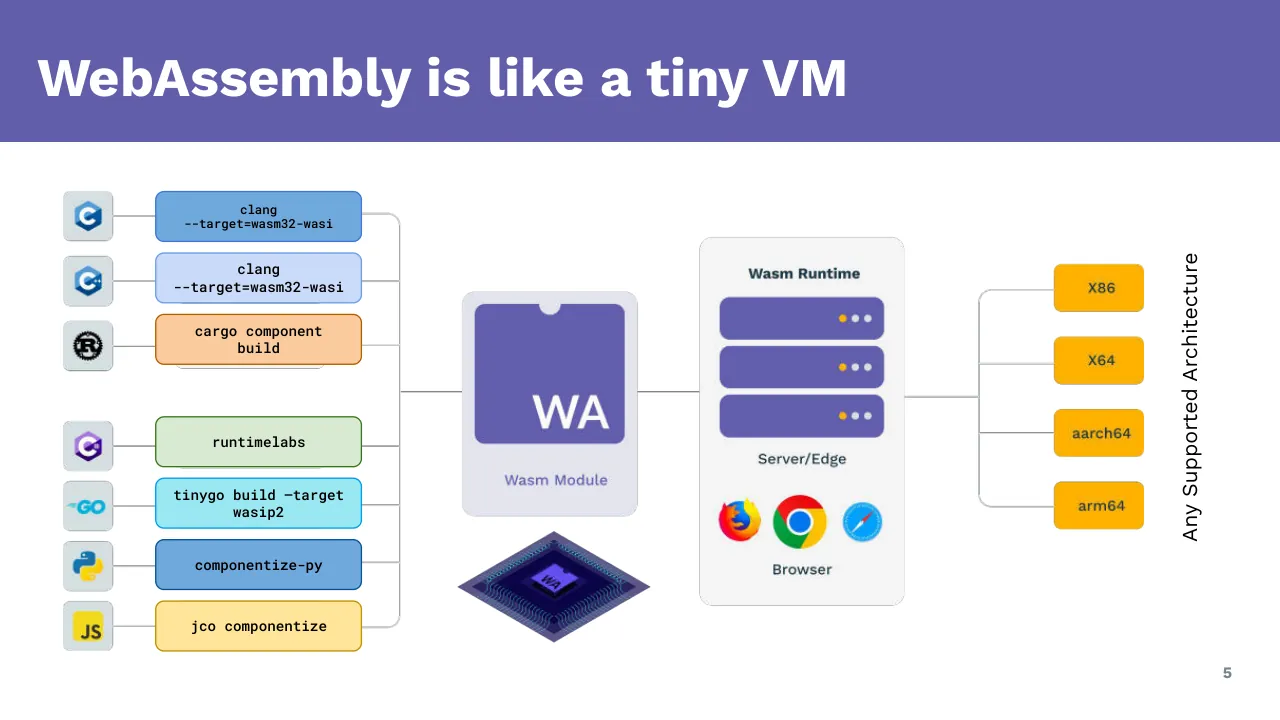
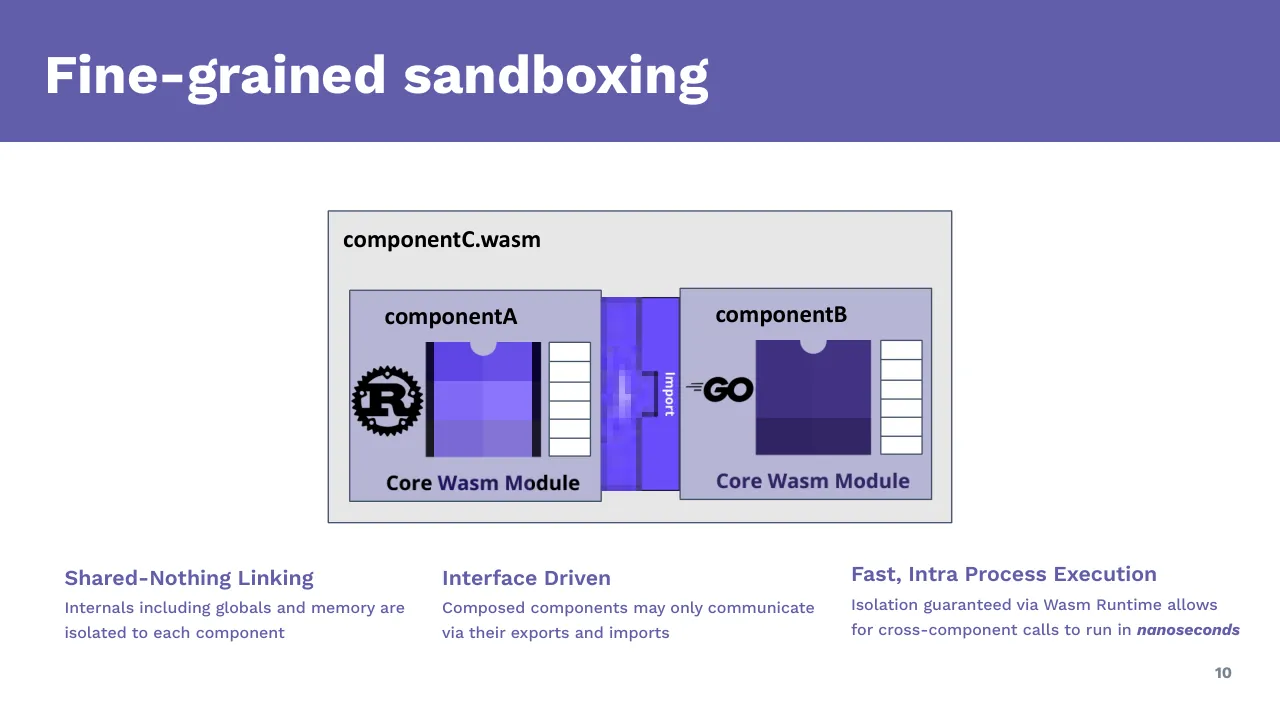
The deck opens with a title slide naming wasmCloud and WasmEdgeRuntime as presenters, followed by an agenda. It then introduces WebAssembly as a portable, sandboxed compilation target, explains the WASI 0.2 system interface and the component model, and covers WIT interface definitions, versioning and language support. Next it describes what WebAssembly looks like in cloud native settings, with separate sections on the CNCF WasmEdge runtime and the CNCF wasmCloud platform. A hands-on section walks through building a first WebAssembly component based on WASI P2, running it with wasmtime and the CNCF runtimes, and then covers beyond-hello-world topics: running LLM apps with WasmEdge and distributed components with wasmCloud. The deck closes with a call-to-action slide listing wash installation, the quickstart, adding persistent storage and logging, and scaling. Slides worth studying include the layered diagram of a WebAssembly module and component, the fine-grained sandboxing diagram, and the versioning and backwards compatibility timeline. Most slides use a single heading with one diagram or a short bullet list, and code samples are shown as screenshots of tooling output.
Slides worth studying
Questions about this deck
How many slides does the wasmCloud and WasmEdgeRuntime deck have?
The deck has 30 slides. Slide 2 lists the agenda, which covers introductions, WebAssembly, WASI P2, cloud native uses, the CNCF runtimes, a hands-on section, and closing topics.
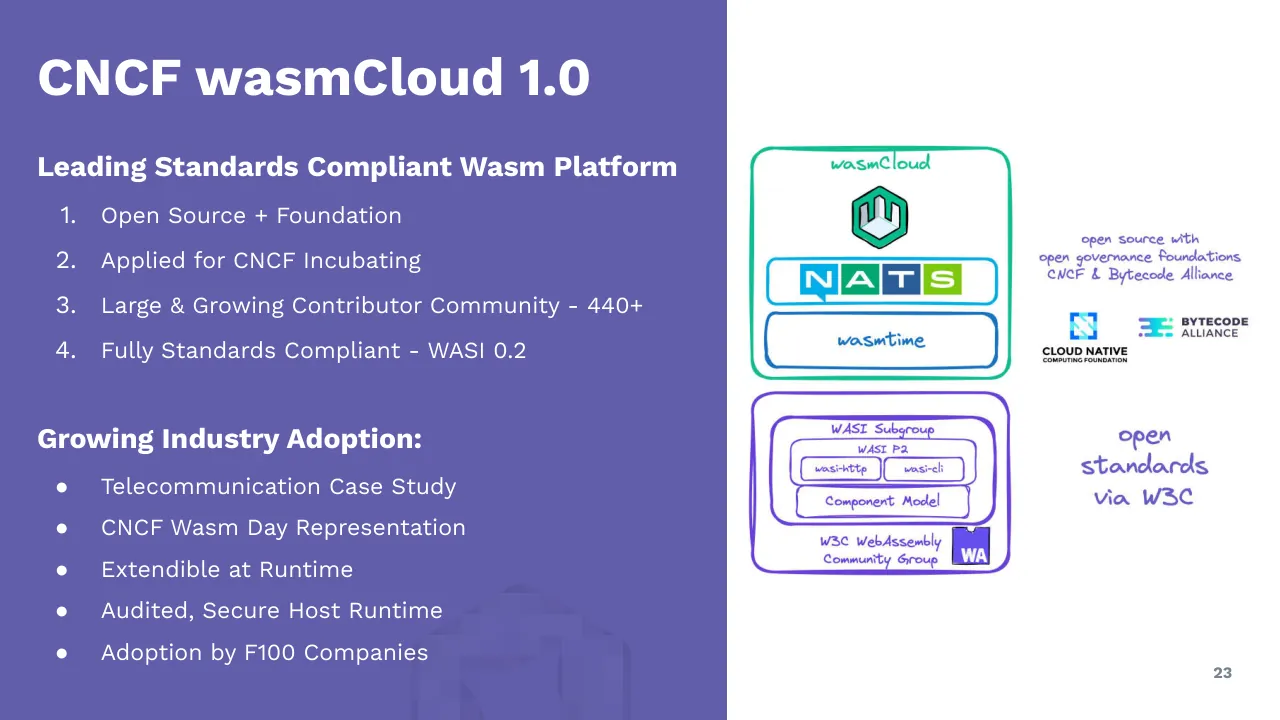
What does the wasmCloud and WasmEdgeRuntime deck say about the wasmCloud contributor community?
Slide 23, titled CNCF wasmCloud 1.0, describes a large and growing contributor community of 440+. The same slide says wasmCloud applied for CNCF Incubating.
What does the wasmCloud and WasmEdgeRuntime deck say about WasmEdgeRuntime performance?
Slide 19 says WasmEdgeRuntime has very fast AOT and JIT compilers. It also states that the runtime is sometimes faster than native.
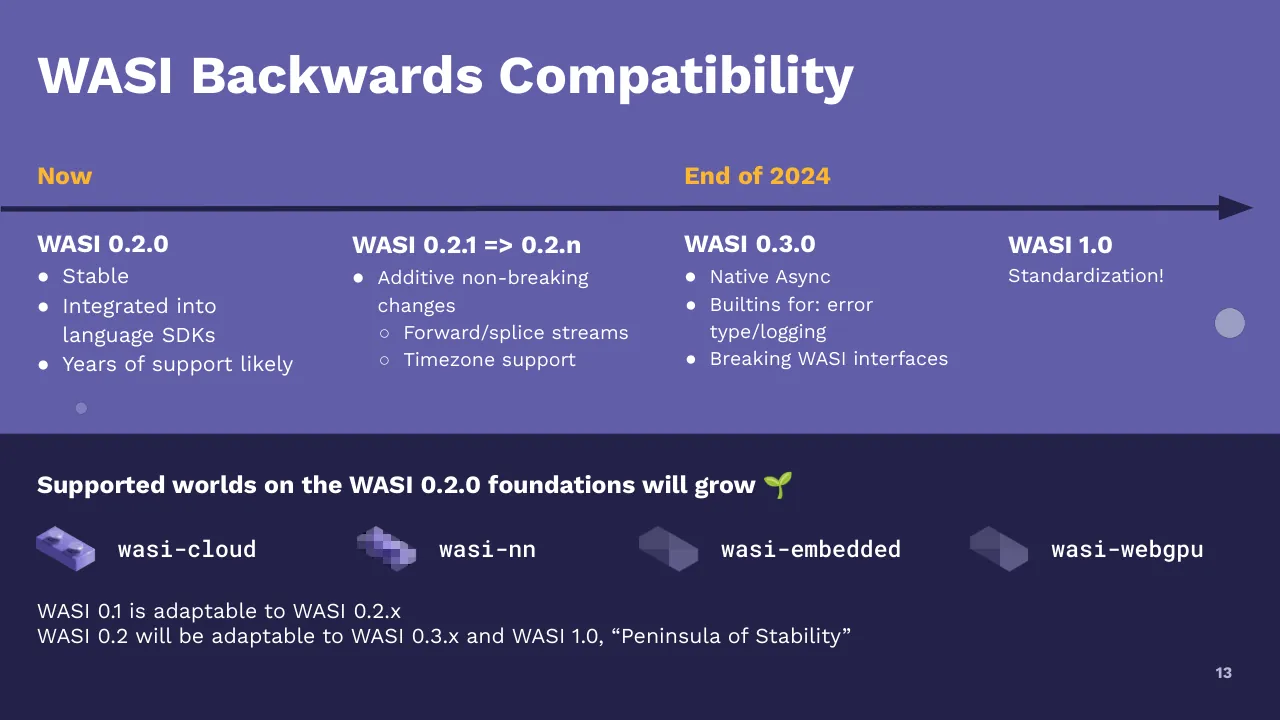
How does the wasmCloud and WasmEdgeRuntime deck describe the WASI backwards compatibility timeline?
Slide 13 lists WASI 0.2.0 as stable and integrated into language SDKs, with WASI 0.2.1 through 0.2.n as additive non-breaking changes. It places WASI 0.3.0, with native async and breaking WASI interfaces, after that, followed by WASI 1.0 for standardization.
Details
- Company: wasmCloud and WasmEdgeRuntime
- Year: 2024
- Type: Course deck
- Industry: Cloud Native Computing
- Pages: 30
Review score: 6 out of 10, Needs substantial work
Presentation quality, judged with the SlideDeck Co review heuristic. Ask, evidence and idea merit are not rated here.
The core explanatory run (slides 5 to 13) is readable and well built, with a consistent purple identity, large titles and clear diagrams such as the tiny VM on 5, sandboxing on 10 and the timeline on 13. The deck falls apart in the second half: slides 17 and 28 are placeholder-like diagrams with empty boxes, slides 16 and 17 are screenshots too small to read, and slides 26 to 28 are tiny code pasted as screenshots. Several slides (3, 6, 15, 21) are large section dividers with a decorative question mark, and slide 7 repeats slide 6 almost word for word, so the route spends pages without adding content. Substantial revision of the hands-on and runtime sections is needed before the deck works as a talk or as a reader.
Worth keeping: Keep the consistent purple and navy identity with large white titles, and the diagram-led explanatory slides 5, 10 and 13.
Most useful repair: Replace the unreadable screenshots (slides 16, 17, 26, 27, 28) with cropped or highlighted excerpts, and fill or remove the empty-box diagrams on slides 17 and 28.
What would change the score: Merge the duplicate slides 4 and 7, drop or shrink the empty divider slides, and make the closing slide 30 a clear single action instead of a list of bare links.
Confidence high. 30 of 30 pages inspected on contact sheets, 4 at readable size. Reviewed 2026-11-08. Model-assisted review (claude-sonnet-5-5).
Full text of the slides (30 slides)
Every slide's words and a description of its charts and images, so the deck can be searched and rebuilt. Also available as Markdown.
Slide 1
Cloud Native WebAssembly
and How to Use It
Presented by
wasmcloud
WasmEdgeRuntime
Visuals: Two logos in the lower band. On the left, the wasmcloud logo: a green (#10B981-like) hexagon outline with an inner stylised 'm' glyph, followed by the lowercase wordmark 'wasmcloud' in grey (#6B7780-like) geometric sans-serif. On the right, the WasmEdgeRuntime logo: a square purple (#6A4FEE-like) tile with a rounded notch cut at its top centre, containing a white line icon of a pentagon network of five nodes joined by lines around a white cloud symbol; to its right, the wordmark 'WasmEdgeRuntime' in condensed bold purple (#6A4FEE-like) sans-serif. No photographs or other illustrations.
Slide 2
Agenda
- Introductions
- What is WebAssembly (Wasm)
- What is WASI P2 (WASI 0.2.0)
- What does WebAssembly look like in Cloud Native
- Intro: CNCF WasmEdge
- Intro: CNCF wasmCloud
- Your first WebAssembly Component
- Based on WASI 0.2, wasi:http
- Run and inspect using standard tools from the Bytecode Alliance
- Run using the CNCF runtimes
- Beyond Hello World
- LLM with WasmEdge
- Distributed Components with wasmCloud
Wasm module
(module
(type (;0;) (func (param i32)))
(type (;1;) (func (param i32 i32) (result i32)))...
Wasm component
(component
(import "logging" (id "wasi:logging")
(instance $logging
(export "log" (func (param string)))
))...
2
Visuals: Illustration: a composition in the right half (x 52.8%, y 19.5%, w 44.3%, h 68.2%; the same image is placed twice at almost identical offsets, so it appears as one composition). It contains two rounded light-grey code cards, a dashed orange connector, two circular code badges and decorative pale circles (the pale circles sit in a separate image at top right). Card 1, 'Wasm module': rounded rectangle about x 52.8% to 86.1%, y 23.6% to 49.1%, fill about #F2F5F6, thin light grey border, subtle drop shadow; three small window-style dots at top left (first orange #F5A623, then two pale grey) above the title 'Wasm module' in bold purple #625EA9; below it the monospace-like code lines '(module', '(type (;0;) (func (param i32)))' and '(type (;1;) (func (param i32 i32) (result i32)))...' in dark grey #333F48. Card 2, 'Wasm component': rounded rectangle about x 60.6% to 94.0%, y 55.4% to 87.7%, same styling; three window dots at top left above the bold purple title 'Wasm component', then code lines '(component', '(import "logging" (id "wasi:logging")', '(instance $logging', '(export "log" (func (param string)))' and '))...' in dark grey. Badges: two circles filled about #B3AEDB, each containing a purple #625EA9 bold '</>' code icon; the first sits centred on the top edge of card 1 (x 76.9% to 81.0%, y 20.1% to 27.5%), the second overlaps the right edge of card 2 (x 91.9% to 96.1%, y 74.8% to 82.2%). Connectors: a dashed orange #F5A623 curve leaves the right edge of card 1 near y 36.6%, bulges right to about x 96.5% and returns down-left to the right edge of card 2 near y 63%; a second dashed orange curve leaves the bottom-left of card 1 near (53.1%, 49.8%), bows left and descends to a solid orange diamond at about (60.6%, 71.6%) on the left edge of card 2. Decorative circles: a solid peach-orange circle #FBD27A at top (x 83.3% to 86.4%, y 3.4% to 8.7%), a tiny pale peach dot #FDEBC8 at (x 71.7%, y 10.2%), and a pale cream circle #FDEBC8 at right (x 92.8% to 95.6%, y 23.7% to 28.6%). Lighting is flat, no photographs. Dominant colours: white, light grey, purple #625EA9, orange #F5A623. Not cropped.
Slide 3
What is / WebAssembly / (Wasm)? / 3
Visuals: Illustration of question marks, set in the lower-right part of the purple left panel. A large solid yellow-orange question mark (about #FDB932) sits at about 40.4% x, 61.4% y, measuring about 7.9% by 18.8%. Two smaller purple question marks (about #7470B8, semi-transparent) sit below and to its right and left, at about 46.0%, 75.1% (5.7% by 13.3%) and 36.8%, 81.0% (3.6% by 10.2%). Behind them is a faint, low-contrast outline of a head and shoulders silhouette, at about 28.0% x, 76.5% y, measuring 25.4% by 23.5%, in a slightly darker purple than the panel, cropped by the bottom edge of the slide. No photographs. Flat style, no lighting or shading.
Slide 4
What is / WebAssembly / (Wasm)?
● Came from browserland / (Assembly code, in the Web) / ● Open, standards driven / ● Architecture/OS agnostic / compilation target / ● Run in secure sandbox / ● Small binary / ● Polyglot / 4
Visuals: Decorative illustration in the lower part of the left panel: a group of three question marks, one large bright yellow-orange (about #FBBA2B) question mark at upper right of the group, and two smaller pale periwinkle (about #8F8FD0) question marks, one left and one right of the large one with small dot terminals, sitting above a faint outlined rounded shape (about #7A78C0 at low contrast, resembling a pale rounded panel or figure outline) that is cropped at the bottom edge of the slide. The illustration is not boxed; it sits directly on the purple background with no overlay. Its bounding area is roughly x 28% to 53.4%, y 61% to 100%. Lighting is flat, with no shading.
Slide 5
WebAssembly is like a tiny VM
clang --target=wasm32-wasi
clang --target=wasm32-wasi
cargo component build
runtimelabs
tinygo build –target wasip2
componentize-py
jco componentize
WA
Wasm Module
Wasm Runtime
Server/Edge
Browser
X86
X64
aarch64
arm64
Any Supported Architecture
5
Visuals: Diagram of a WebAssembly toolchain flow. Left column: six language logos (C, C++, Rust, C# purple, Go, Python, JavaScript; seven logos in total with C, C++, Rust, C#, Go, Python, JS as icons) each on a light grey-blue rounded square, joined by a horizontal grey line to a coloured rounded rectangle labelled clang --target=wasm32-wasi (medium blue #6FA8DC), clang --target=wasm32-wasi (light blue #C9DAF8), cargo component build (peach #F9CB9C), runtimelabs (pale green #D9EAD3), tinygo build –target wasip2 (cyan #9AE8F2), componentize-py (blue #6FA8DC), jco componentize (pale yellow #FFE599). Grey connector lines run from each box right to a vertical bracket line at about x 31% which merges into a single horizontal line to the Wasm Module card. Centre: a light lavender-grey card (#E4E4EE) labelled Wasm Module with a purple #6A5FB5 square containing white WA letters, a notch at top. Beneath it an isometric dark navy microchip (#1A1A4D with purple WA on top, outline grid in blue-violet) about 15% wide. A horizontal grey line connects the module to a light grey (#F3F3F3) rounded panel titled Wasm Runtime containing three purple #6A5FB5 rounded bars each with orange and grey-white dots, labelled Server/Edge, then Firefox, Chrome and Safari browser icons labelled Browser. A grey line leaves the panel and branches via a bracket into four orange #FFB300 rounded rectangles labelled X86, X64, aarch64, arm64. A vertical dark grey rotated caption reads Any Supported Architecture.
Slide 6
What is / WebAssembly / Systems Interface / P2 (WASI 0.2.0)? / 6
Visuals: Illustration of question marks: one large yellow-orange (about #F6B73C) question mark at upper right of the cluster, approximately 28% to 53% horizontally and 62% to 88% vertically region, plus two smaller muted lavender-blue (about #7B78C4) question marks, one left of centre near x 36.8% to 40.4% and y 81% to 91%, and one at right x 46% to 51.7% y 75% to 88%. Behind them is a faint, low-contrast pale lilac silhouette of a head and shoulders (about #6E6BB5 on #6259A6), cropped by the slide bottom edge. The illustration is unboxed, sits directly on the purple panel with no frame, and the question marks are flat-coloured without shadows. Lighting is flat; no photograph.
Slide 7
What is / WebAssembly / Systems Interface / P2 (WASI 0.2.0)?
● Wasm on the server-side
● Set of standard interfaces (IO, / CLI, Filesystem, Sockets, HTTP)
● Open, standards driven
● Architecture/OS agnostic / compilation target
● Run in secure sandbox
● Small binary
● Polyglot
7
Visuals: Decorative illustration in the lower part of the left purple panel: a yellow pixelated question mark about 40.4% x, 61.4% y, 7.9% wide and 18.8% high (19 by 26 px raster), overlapping two smaller lavender-purple pixelated question marks (one at about 46.0% x, 75.1% y, 5.7% by 13.3%; a small dot-like fragment at about 36.8% x, 81.0% y, 3.6% by 10.2%) and a faint, low-contrast pixelated rounded silhouette (about 28.0% x, 76.5% y, 25.4% by 23.5%) behind them, suggesting a head with question marks. Pixelated, low-resolution raster; the illustration is not cropped by the slide edge and is boxed on the left panel with no visible frame. Dominant colours: golden yellow #F5B731 for the main question mark, lavender-purple #7C78C0 for the secondary marks, and a muted purple tint #6E6AB0 for the silhouette. No overlay. No logos or icons.
Slide 8
Wasm Components
(component
(import "logging" (instance $logging
(export "log" (func (param string)))
))
(import "libc" (core module $Libc
(export "mem" (memory 1))
(export "realloc" (func (param i32 i32) (result i32)))
))
(core instance $libc (instantiate $Libc))
(core func $log (canon lower
(func $logging "log")
(memory (core memory $libc "mem")) (realloc (func $libc "realloc"))
))
(core module $Main
(import "libc" "memory" (memory 1))
(import "libc" "realloc" (func (param i32 i32) (result i32)))
(import "logging" "log" (func $log (param i32 i32)))
(func (export "run") (param i32 i32) (result i32)
... (call $log) ...
)
)
(core instance $main (instantiate $Main
(with "libc" (instance $libc))
(with "logging" (instance (export "log" (func $log))))
))
(func $run (param string) (result string) (canon lift
(core func $main "run")
(memory (core memory $libc "mem")) (realloc (func $libc "realloc"))
))
(export "run" (func $run))
)
logging
libc
Imports
memories
tables
globals
...
WA
Core Wasm Module
Exports
run
8
Visuals: Left: a dark navy screenshot of a code listing with 31 numbered lines in a monospace font. Keywords and strings are coloured pink/red, strings yellow, numbers purple, and code plain white. Three thick yellow rounded-rectangle outlines highlight lines 2-4 (import logging instance), lines 14-21 (core module $Main), and line 30 (export run). Three yellow arrows run from these highlights to the diagram: the top arrow from the lines 2-4 box to the logging tab, the middle horizontal arrow from the lines 14-21 box to the WA block, and the lower arrow from the line 30 box to the run block. Right: a diagram made of purple (#6B4EF5) puzzle-style shapes. A purple tab bar on top carries the labels logging and libc. Below it is a light grey (#E4E4E4) rectangle outlined in purple with a yellow horizontal rule under the word Imports and another yellow rule above Exports. Inside, a purple square with the white letters WA sits above the label Core Wasm Module, and a black curly brace points to a stack of four purple-outlined boxes labelled memories, tables, globals and ... . A purple block labelled run hangs below the grey rectangle, with a small purple tab beneath it. Three question-mark icons sit in the title band at the top right: one large yellow-orange question mark and two smaller semi-transparent lavender ones.
Slide 9
WASI .2 - Composable Components (Dec ‘23)
componentA.wasm
componentB.wasm
+
Language Interoperable
Compose components with any
other language
Strictly-defined Interfaces
API Driven design defines boundaries
across ecosystem
9
Visuals: Diagram of two light lavender rectangles, each labelled above with a Calibri Bold filename and below with 'Core Wasm Module'. Left rectangle (componentA.wasm): a Rust gear logo (black, on lavender) at the left edge, followed by a purple square with white 'WA' letters and a semicircular notch at its top centre, then a purple vertical 'Export' plug shape with a rightward tab, running along the right edge of the rectangle. A black bold plus sign sits between the two rectangles. Right rectangle (componentB.wasm): a purple vertical 'Import' plug shape with a white notch on its left side along the left edge, a black 'GO' logo with a small leading hatch mark overlapping the import plug, and on the right a pixelated low-resolution purple image with white 'WA' letters and a semicircular notch at top. Yellow rounded outlines (about #FFC000, about 2.5 px stroke, corner radius about 15 px) surround: the Rust logo, the Export plug, the Import plug, the GO logo, the 'Language Interoperable' callout and the 'Strictly-defined Interfaces' callout. Bottom right: a purple square (#6751F5 approx) with a semicircular notch at top and white bold 'WIT' letters, a WIT logo. No charts or tables.
Slide 10
Fine-grained sandboxing
componentC.wasm
componentA
componentB
Import
GO
Core Wasm Module
Core Wasm Module
Shared-Nothing Linking
Internals including globals and memory are
isolated to each component
Interface Driven
Composed components may only communicate
via their exports and imports
Fast, Intra Process Execution
Isolation guaranteed via Wasm Runtime allows
for cross-component calls to run in nanoseconds
10
Visuals: Diagram. A large light-grey rounded-less rectangle labelled componentC.wasm (top-left, Calibri Bold black) contains two lavender module boxes side by side. Left box labelled componentA contains a Rust gear logo at its left edge, a purple striped Core Wasm Module block (three horizontal bands in violet and lavender with dark vertical bars on both sides and a semicircular notch at the top), and a stack of six white empty cells on its right; caption Core Wasm Module at its bottom. Right box labelled componentB contains a Go logo with speed lines at its left, a dark indigo Core Wasm Module block (upper area indigo, lower band darker) with a semicircular notch at the top, and a stack of six white empty cells on its right; caption Core Wasm Module at its bottom. Between the two boxes a vertical pixelated blue-violet connector strip, with a darker vertical bar labelled Import rotated 90 degrees reading downward, shows the import link from componentB to componentA. No photographs; the logos are the Rust gear and the Go wordmark with speed lines, both black. The Core Wasm Module captions and the grey and lavender fills are estimated from the image, not measured.
Slide 11
WIT
WebAssembly Interface Types
Define WebAssembly Component
Model interfaces & worlds.
Language agnostic contracts
between Components to facilitate
efficient binary communication.
Source: https://cosmonic.com/blog/engineering/wit-cheat-sheet
11
The WIT cheatsheet image text (not slide text, part of the picture): THE WIT CHEATSHEET. File Structure. Package: A single package can and often is represented by multiple files. A common pattern is types.wit, world.wit, and my-interface-name.wit. The package must include a namespace and an identifier, and can optionally include a version number which should follow semantic versioning. Interface: A collection of types and functions scoped to a package which can be used within a world. Interfaces are the only place that a type can be defined. Packages can contain multiple interfaces. World: Akin to a complete description of a component. A world is a collection of imports and exports that allow the component to interact with the host as well as other components. Language Keywords: These keywords are used to describe some sort of action or property within a component. include | used to include worlds into another; use | will include types from an interface in a world; import | used to import an entire interface into a world; export | used to export an interface/func from a world. Named Types: Types listed here all require an identifier. They provide more structure and flexibility than primitive types. record | a collection of types accessible via named keys; enum | a type that can equal one of a set of values; variant | a type that be one of many predefined types; flags | a collection of flags that can be toggled independently from each other; func | a function type; resource | a new abstract resource type. See below. Resource Keywords: Keywords here relate to resources. Resources are used to describe variables that should not be copied by value. constructor | method that returns a handle of the containing resource type; static | mark a resource func as scoped to resource; self | the borrowed handle to the resource; borrow | mark a handle as a temporary loan from caller to callee; owned | a handle representing unique ownership of a resource. WASI Component Types. Command: A component defined as a Command has a main function (or in wasi:cli, a run function) and terminates when the function returns. Reactor: This component is more like a library. It exposes an API once it is instantiated and remains live, allowing functions on the component to be called from the host or other components. Primitive Types: These are the core types for a wasm module. Most languages will implement all of these types. bool | boolean value; true or false; s8, s16, s32, s64 | signed integers with 8, 16, 32 or 64 bit length; u8, u16, u32, u64 | unsigned integers with 8, 16, 32 or 64 bit length; float32, float64 | floating-point numbers with 32 or 64 bit length; char | single Unicode scalar character; string | Unicode string with a finite length. Container Types: These types are used to create collections of other types. They can contain any of the primitive or named types. tuple<...> | a finite sequence of values of different types; list<T> | a sequence of values of the type T; option<T> | mark a type as optional, value will be type T or no value; result<T,E> | represents value or error, where the output will be one or the other but not both. Comments: Sometimes you just need to leave a note. /// single line comment; /* comment block */. WASI Worlds to know: These are some useful worlds defined by the WASI proposals that you might find useful in writing your own components. wasi:cli/command; wasi:keyvalue/keyvalue; wasi:blob-store/blob-store; wasi:messaging/messaging; wasi:nn/ml; wasi:http/proxy; wasi:cloud-core/cloud-core. Cosmonic footer: cosmonic logo, THE FUTURE OF DISTRIBUTED APPLICATIONS, TODAY. From napkin sketch to running apps anywhere, at scale, in minutes, Cosmonic is the lightweight, low-boilerplate platform that radically simplifies application development. Build your apps with composable Wasm components that run in any datacenter, cloud or edge. QR code labels: Cosmonic, wasmCloud.
Visuals: One large portrait image of the WIT Cheatsheet, a white one-page reference sheet with a small navy-and-purple rocket-style mascot illustration at the top right, a title THE WIT CHEATSHEET in dark navy handwritten capitals with WIT underlined, and two columns of navy headings with small tables of keyword and value rows (File Structure, Language Keywords, Named Types, Resource Keywords, WASI Component Types, Primitive Types, Container Types, Comments, WASI Worlds to know) in alternating light grey and white rows, plus a navy footer band with the Cosmonic logo, a tagline, a paragraph and two QR codes labelled Cosmonic and wasmCloud. The sheet is shown fully, not cropped, boxed with a soft amber glow halo behind it (a larger blurred copy of the image at 59.8 percent x, 1.3 percent y, 39.0 percent width, 87.5 percent height). The image is sharp and evenly lit, with a dark navy surround. A faint low-contrast decorative image sits across the whole left purple panel, barely visible near the lower centre. The Cosmonic footer image is placed at x 28.0, y 76.5, w 25.4, h 23.5 percent, matching the Cosmonic logo and QR block of the sheet.
Slide 12
Interfaces are
Versioned
● Versions may be mixed
and matched
● wasmCloud and
WasmEdge supports 0.2.0
● Runtime supports linking
multiple versions for WASI
1 package wasmcloud:actor;
3 use wasi:http/[email protected] as http-incoming2;
4 use wasi:http/[email protected] as http-incoming3;
6 /// ...
8 world interfaces {
9 import wasi:blobstore/[email protected];
10 import wasi:logging/[email protected];
11 import wasi:messaging/[email protected];
13 export http-incoming2;
14 }
1 (func $wasi:http/[email protected]#handle (;27;)
(type 1) (param i32 i32)
(local i32 i32 i32 i32 i32 i32 i32)
global.get $__stack_pointer
2 local.set 2
3 i32.const 16
4 local.set 3
8 ...
10 (export "wasi:http/[email protected]#handle" (func $wasi:http/[email protected]#handle))
This is how the adapters work to adapt
compiled wasm components to newer
versions of WASI without requiring developers
to change their code or recompile!
wasm-tools component new old.wasm -o
new.wasm --adapt ./wasi_preview1.wasm
12
Visuals: Two dark code-editor screenshots with line numbers and syntax highlighting: an upper block (Roboto Mono-style monospace) showing a WIT/WebAssembly interface file, and a lower block showing WebAssembly text format (WAT) code. Keywords are in magenta/pink, version numbers in violet, plain text in white, and the lower block's export string in yellow-green. A curved orange arrow (about #F5A623, roughly 3 px stroke) starts after 'export http-incoming2;' in the upper block at about x 58.9%, y 40.6% and curves right and down to a arrowhead pointing at the first line of the lower block at about x 71.6%, y 53.2%, indicating that the export maps to that function. A lightbulb icon: a yellow filled circle (#FFC000) with a white outline light bulb and small rays, sitting at the top-left corner of the callout. The callout text highlights 'adapters' and the command '--adapt ./wasi_preview1.wasm' with yellow (#FFC000) highlight bars. A faint, low-contrast hexagon outline (slightly lighter than the purple panel) sits at the bottom centre of the left panel, partly cropped by the slide bottom edge.
Slide 13
WASI Backwards Compatibility / Now / End of 2024 / WASI 0.2.0 / ● Stable / ● Integrated into / language SDKs / ● Years of support likely / WASI 0.2.1 => 0.2.n / ● Additive non-breaking / changes / ○ Forward/splice streams / ○ Timezone support / WASI 0.3.0 / ● Native Async / ● Builtins for: error / type/logging / ● Breaking WASI interfaces / WASI 1.0 / Standardization! / Supported worlds on the WASI 0.2.0 foundations will grow 🌱 / wasi-cloud / wasi-nn / wasi-embedded / wasi-webgpu / WASI 0.1 is adaptable to WASI 0.2.x / WASI 0.2 will be adaptable to WASI 0.3.x and WASI 1.0, “Peninsula of Stability” / 13
Visuals: Timeline arrow: a single dark navy (#242248) horizontal line with a filled triangular arrowhead at the right end, running from the left edge (x 0%) to about x 97.9% at y about 29%; the line is about 0.5% of slide height thick and the arrowhead about 3.6% tall. Two labelled points on the arrow: Now (left, x 2.9%) and End of 2024 (x 53.4%). Two small pale circles: a large one at about x 94.9%, y 42.3%, about 2.3% wide and 4.1% tall, pale grey-lavender #9B9CC6; a small one at about x 5.9%, y 55.9%, about 0.9% wide and 1.6% tall, muted #7A7BB0. Four world icons in the lower band, left to right: wasi-cloud, an isometric lavender-violet block with two studs in #7F7BC9 and #5F5AA8; wasi-nn, a pixelated cluster of violet squares in #6C5FC0 and #3F3A7A; wasi-embedded, a flat hexagonal gem in #4A4878 with lighter facets #5A5898; wasi-webgpu, a flat hexagonal gem in the same muted purples. A green seedling emoji 🌱 (sprout with two leaves, #7AC142 and #5A9A2E) follows the lower heading. Five raster image objects are also present in the file: two large images (498 by 351 px at x 0.5%, y 54.0%; 350 by 457 px at x 79.0%, y 42.8%) with no discernible content in the rendered slide, and tiny 7 by 6, 2 by 2 and 2 by 2 px icon images that correspond to the wasi-nn, wasi-embedded and wasi-webgpu icons; none are cropped, boxed or overlaid.
Slide 14
Language Support for Components
Robust
Full support in language SDK
and compiler
Beta
Nearly complete support with
some rough edges
Work in Progress
Emerging support within
language communities
Lua POCs have been built but there is no active work to upstream.
This is doable however and techniques used will be similar to Ruby and Python
14
Visuals: Three large filled circles (illustration badges): left circle yellow #FDB731 centred near x 23.5%, y 56% with diameter about 22.5% of slide width, containing the Rust gear logo at top centre, the C++ hexagon logo at lower left and the C hexagon logo at lower right; middle circle magenta-pink #DB4A9A centred near x 50%, y 56%, containing the JS yellow square logo at upper left, the TS blue square logo at upper right, the Python logo at lower left, the PHP logo in a grey-blue oval at lower right and the Ruby gem logo at bottom centre; right circle purple #6A5FB0 centred near x 77%, y 56%, containing the Go wordmark in cyan #00A7D0 with motion lines at left and the green C# circle logo with white C# letters at right. Each circle carries a dark navy #263747 circular icon badge at its upper-left edge: a flexed arm (strength) icon for Robust at about x 16.6%, y 37.8%, a flask icon for Beta at about x 43%, y 37.1%, and a crossed hammer and wrench icon for Work in Progress at about x 70%, y 38%; each badge is about 3 percent of slide width in diameter with white glyphs. A wavy connecting line (a single meandering stroke about 5 percent of slide height thick, graded from yellow-orange at left through coral to magenta-purple to violet, with a small square-ended terminal at the far right near x 93%, y 45%) runs behind the circles from the left edge at about y 50% to the right edge, passing behind each circle. The Lua logo is a dark navy #0A1E6E circle with white Lua lettering and a small navy dot at upper right, enclosed in a thin dashed grey outline, at about x 19.5%, y 89.5%, size about 4.6 by 8.1 percent. No photographs.
Slide 15
What does WASM
look like in
Cloud Native?
15
Visuals: Pixelated illustration cluster of three question marks above a faint figure. (1) Large gold question mark with dot below, at x 40.4 to 48.3 and y 61.4 to 80.2 percent. It has a yellow-to-orange gradient, roughly #F5C518 at the top right fading to #E08A1E at the lower left, and is rendered as a 10 by 13 pixel mosaic. (2) Medium lavender-grey question mark with dot below, at x 46.0 to 51.7 and y 75.1 to 88.4 percent, in about #7B78B8 with darker navy shading on its left edges. (3) Small dark navy-grey question mark with dot, at x 36.8 to 40.4 and y 81.0 to 91.2 percent, in about #2A2750 with lavender highlights. (4) Faint figure silhouette of a head and shoulders, at x 28.0 to 53.4 and y 76.5 to 100 percent, in a slightly darker violet #5A56A0 than the panel. It is cropped by the bottom edge of the slide, is drawn as a 16 by 8 pixel mosaic, and sits behind the question marks. Lighting is flat, with no shadows. The illustration overlaps the boundary of the violet panel near x 56.8 percent and is not boxed or framed.
Slide 16
Filters / GROUP: / Projects and products / Members / Certified partners and providers / Serverless / Wasm / VIEW MODE: / Grid / Card / ZOOM: / - / + / Wasm / Embedded Functions / Hosted Platforms / Languages / Decentralized Platforms / Application Frameworks / AI/Machine Learning / Orchestration & Management / Packaging, Registries & Application Delivery / Runtimes / Edge/Bare metal / Tooling / Debugging & Observability / Logo labels: dapr / WEBASSEMBLY / envoy / Fluvio / Istio / Knative / kubernetes / KUBEWARDEN / libSQL / NGINX / Open Policy Agent / OPEN FUNCTION / openGauss / Redpanda / shopify / SingleStore / WEBASSEMBLY / Azure Kubernetes Service / Workers / cosmonic / cosmonic / fastly / FERMYON / flows.network / taikun / .NET / C++ / C++ / BYTECODE ALLIANCE / Dart / GO / BYTECODE ALLIANCE / Kotlin / Moonbit / vmware / ZIG / casper / ripple / Polkadot / gear / AMBIENT® / Dapr for WasmEdge / EXTISM / Scale / SPIN / wasmcloud / WEBASSEMBLY / FFmpeg / OpenCV / PyTorch / docker / cri-o / KUASAR / KubeEdge / kubernetes / MESHERY / OpenYurt / podman / SuperEdge / youki / HARBOR / docker / BYTECODE ALLIANCE / wasmcloud / W3 / WAVM / WAZERO / FLATCAR / sel4 / Unikraft / Witc / observe / WEBASSEMBLY / What does WASM / look like in / Cloud Native? / 16
Visuals: Screenshot of a web landscape page (a grid of logo tiles) on a white panel. Top toolbar: a magenta Filters button, a segmented group selector (Projects and products, Members, Certified partners and providers, Serverless, Wasm with Wasm highlighted in solid blue), a view mode toggle (Grid highlighted solid blue, Card outlined) and zoom buttons (- and +). Below, a vertical blue sidebar labelled Wasm and twelve blue section header bars, each with a magnifier icon, with white-bordered logo tiles in rows: Embedded Functions (dapr, WebAssembly, envoy, Fluvio, Istio, Knative, kubernetes, KUBEWARDEN, libSQL, NGINX, Open Policy Agent, OPEN FUNCTION, openGauss, Redpanda, shopify, SingleStore, WebAssembly); Hosted Platforms (Azure Kubernetes Service, Workers, cosmonic, cosmonic, fastly, FERMYON, flows.network, a black circular logo, a black T-shaped logo, taikun, a blue logo); Languages (.NET, C++, C++, Bytecode Alliance, Dart, GO, an orange logo, Bytecode Alliance, Kotlin, Moonbit, a dash logo, a dark R logo, a teal logo, a WebAssembly-style purple logo, vmware, ZIG); Decentralized Platforms (casper, a purple dot logo, an infinity logo, an Ethereum-like logo, Filecoin-style f, gear, N logo, Polkadot, Q logo, ripple); Application Frameworks (AMBIENT, Dapr for WasmEdge, a blue ring logo, EXTISM, WebAssembly, Scale, a spider logo, SPIN, VS Code logo, WASI logo, vmware, wasmcloud, a blue figure logo, WebAssembly, a blue logo); AI/Machine Learning (WebAssembly, FFmpeg, WebAssembly, OpenCV, WebAssembly, PyTorch, WebAssembly); Orchestration & Management (WebAssembly, a black container logo, cri-o, WebAssembly, docker, KUASAR, KubeEdge, kubernetes, KWA, MESHERY, OpenYurt, podman, a graph logo, SuperEdge, youki); Packaging, Registries & Application Delivery (a box logo, docker, HARBOR, Bytecode Alliance, a blue logo); Runtimes (wasmcloud, a Krustlet-style logo, a circular logo, an M logo, timecraft, an 8 logo, Bytecode Alliance, W3, a figure logo, a blue logo, Bytecode Alliance, WAVM, WAZERO); Edge/Bare metal (FLATCAR, WebAssembly, sel4, Unikraft); Tooling (WebAssembly, WebAssembly, a box logo, WebAssembly, a bird logo, a blue logo, WebAssembly, a blue logo, a circular WA logo, a circular WA logo, W-C logo, Bytecode Alliance, Witc); Debugging & Observability (a red logo, observe, WebAssembly). Small logo tiles are about 6% wide and 9% tall each; each tile has a thin light-grey border and a white fill. No photographs.
Slide 17
What does WASM / look like in / Cloud Native?
Filters
GROUP:
Projects and products
Members
Certified partners and providers
Serverless
Wasm
VIEW MODE:
Grid
Card
FILTERS APPLIED (reset all) :
PROJECT: SANDBOX
Wasm
> Embedded Functions
Runtimes
Wasm Embedded Functions
Kubewarden (Wasm)
Cloud Native Computing Founda...
CNCF
SANDBOX
Manage admission policies in your Kubernetes cluster with ease
GitHub stars: 172
OpenFunction (Wasm)
Cloud Native Computing Founda...
CNCF
SANDBOX
Cloud Native Function-as-a-Service Platform (CNCF Sandbox Project)
GitHub stars: 1.4k
KUBEWARDEN
OPEN FUNCTION
Wasm Runtimes
Krustlet (Wasm)
Cloud Native Computing Founda...
CNCF
SANDBOX
Kubernetes Rust Kubelet
GitHub stars: 3.5k
TAG RUNTIME
wasmCloud
Cloud Native Computing Founda...
CNCF
SANDBOX
wasmCloud allows for simple, secure, distributed application development using WebAssembly acto...
GitHub stars: 1.2k
TAG RUNTIME
WasmEdge (Wasm)
Cloud Native Computing Founda...
CNCF
SANDBOX
WasmEdge is a lightweight, high-performance, and extensible WebAssembly runtime for cloud native,...
GitHub stars: 7.8k
TAG RUNTIME
17
Visuals: Screenshot of a web catalogue interface (UI, not a photograph) showing a Wasm project directory. Top bar: a magenta Filters button with a funnel icon; GROUP segmented control with blue outlined tabs (Projects and products, Members, Certified partners and providers, Serverless, and a filled blue Wasm tab); VIEW MODE segmented control (Grid outlined, Card filled blue). Below, a filter chip PROJECT: SANDBOX with a circled x. Left sidebar: a blue #5B9BD5 header bar reading Wasm, then a tree item with chevron Embedded Functions (grey highlight) and Runtimes. Six cards in a 3-and-2 layout: Kubewarden (Wasm) with red-and-white Kubewarden shield logo and KUBEWARDEN wordmark; OpenFunction (Wasm) with green hexagon OPEN FUNCTION logo; Krustlet (Wasm) with purple-blue Krustlet ball logo and KRUSTLET wordmark; wasmCloud with green hexagon wasmcloud logo; WasmEdge (Wasm) with purple square WasmEdge logo and WasmEdgeRuntime wordmark. Each card has blue CNCF tags, grey SANDBOX tags, and globe, GitHub and X icons. Tag RUNTIME outlined boxes appear on the three runtime cards. Dominant colours: white, light grey, blue, magenta.
Slide 18
CNCF WasmEdgeRuntime
WasmEdgeRuntime
Visuals: One logo lockup, placed as a single image of 959 by 310 pixels, centred in the lower navy band. On the left is a square purple tile (about x 23.7%, y 55.6%, w 15.5%, h 27.6% of the slide) with a small semicircular notch cut from the centre of its top edge. Inside the tile is a white outline icon: a pentagon whose five corners are open circles, with a short arrow pointing up from the top corner into a white outline cloud at the centre, and short connector lines between the corners. To the right is the wordmark WasmEdgeRuntime in a condensed bold sans-serif in purple, on a single line, with the cap height about 9.8% of the slide height. The tile and wordmark share the same purple, and no photograph, chart or other graphic is present.
Slide 19
WasmEdgeRuntime
Wasm runtime optimized for the server-side
Written in C++ but first-class support for Rust
Very fast AOT and JIT compilers
It is sometimes faster than native!
A powerful plugin architecture
Rich set of features as plugins
Async sockets for (HTTP) servers
TLS for HTTPS clients
GC support for dynamic languages
Cross-platform GPU & AI runtime support
Common Rust, Go and Node libraries supported
out of the box
First-class sandbox in Docker, Podman & K8s
Committed to support Component Model
https://www.cncf.io/blog/2024/03/12/we
bassembly-on-kubernetes-from-contain
ers-to-wasm-part-01/
19
Visuals: One diagram at top right, a flowchart-style architecture drawing on a very pale grey-blue background (#F7F9FC) with no border. Top box: a dashed-outline rounded rectangle labelled 'Container management platforms' containing a Kubernetes wheel logo (blue) and a Docker whale logo (blue). A thin dotted line runs down to a second dashed rounded box labelled 'High-level container runtimes' containing the containerd logo in black text. Two dotted lines fan out from it to the large light-blue dashed band labelled 'Containerd-shim' which holds two rounded boxes: left 'runwasi (containerd-wasm-shim)' with small WA and SI icons, and right 'Containerd-shim-runc-v2'. A dotted line runs down from runwasi to a light-green band labelled 'Wasm runtimes' with four dashed boxes labelled Wasmedge, Wasmtime, Spin and Slight, each with a small logo (Wasmedge blue-purple chip icon, Wasmtime teal stripes, Spin letter F, Slight coloured triangles and squares). A dotted line runs from containerd-shim-runc-v2 down to a second light-green band labelled 'Low-level container runtimes' containing boxes 'crun' and 'youki' with small logos and purple WA module icons. Below both bands is a light grey band labelled 'Wasm module' containing six purple WA module icons, each connected by a thin dotted vertical line up to its runtime box: four under Wasm runtimes and one each under crun and youki. The diagram uses blue (#1A73C8) labels and purple (#5B4BC4) WA icons.
Slide 20
WasmEdgeRuntime / Write once, run anywhere, for GPUs / Devs only compile to WASI-NN spec / WasmEdge translates to most efficient / native func available on the device / Many GPU, NPU, TPU devices / Frameworks and libraries (e.g., CUDA / 11/12, Metal, MLX, RomC, TensorRT) / An app dev platform / Rust / JS API to do model-specific pre- and / post-processing / Rust / JS API for RAG and prompt mgmt / Multiple models working together / Supports LLM, VLM, Yolo etc / https:/LlamaEdge.com/ / 20
Visuals: Logo cluster diagram on the right: a central purple gradient rounded diamond (square rotated 45 degrees) with a white stylised llama glyph, surrounded by 11 white rounded-diamond tiles, each with a logo: Intel Extension for Transformers (black text, top-left), Apple (black apple glyph, top), LLaMA (black wordmark with orange llama mark, top-right of centre), Tensor RT (black text, far top-right), arm (teal wordmark, left of centre), Linux Tux penguin (full colour, right of centre), mlX (grey and black wordmark, bottom-left), NVIDIA (green logo with black wordmark, bottom of centre), AMD (black wordmark, bottom-right of centre), intel (blue wordmark, far bottom-right). The tiles have thin light-grey outlines and soft shadows and sit on white. Faint llama silhouette watermark near the bottom of the purple panel, low opacity, lighter than the purple, partly hidden behind the bullet text; it is not cropped. No photographs.
Slide 21
CNCF wasmCloud
Visuals: One logo: the wasmCloud logo lockup, a green hexagon icon followed by the grey lowercase wordmark 'wasmcloud', placed horizontally centred in the lower band. The hexagon is bright green (about #13BE8B) with a stylised interior cut-out resembling a stacked building or 'm' shape; the wordmark is a muted slate grey (about #75808F) in a rounded geometric sans-serif. The logo is not cropped, boxed, or overlaid, and it sits directly on the dark navy band.
Slide 22
wasmCloud
Application Platform
●
Wasm orchestrator with declarative
deployments
●
Cloud, edge, platform agnostic
●
Extensible at runtime
●
Seamless compute mesh with automatic
load balancing, failover, RPC
●
CNCF project with active F/OSS
community
22
Open
Application
Model
OPEN CONTAINER INITIATIVE
OpenTelemetry
cloudevents
Builtin Capabilities
http
logging
...
wasmCloud Host
Remote Capabilities
keyvalue
blobstore
...
wasmtime
WA
NATS Client
N A T S
Visuals: Right-hand white area contains: (1) Open Container Initiative logo at top-left of the right area: a dark navy square (#2B2A5C) with a white stylised 'Ci' glyph, followed by grey wordmark 'OPEN' in bold letters and smaller 'CONTAINER INITIATIVE' stacked in navy-grey (#4A4A6A). (2) Text logo 'Open Application Model' at top-right of the right area, set in blue (#2A7BD0) sans-serif, three lines: 'Open' / 'Application' / 'Model'. (3) Central diagram, an isometric illustration with hand-drawn style outlines: a dark grey ground plate (#7A8288) with rounded corners beneath three stacked pale grey (#E8EBEE) cards outlined in green (#2EBE8A); the front card is labelled 'wasmCloud Host' at its top-right in small dark navy text and shows a green hexagonal wasmCloud icon at its top-left; inside the card a diamond labelled 'Builtin Capabilities' connects by small arrows to diamonds labelled 'http', 'logging' and '...'; below, a rounded rectangle labelled 'wasmtime' contains a purple stacked 'WA' WebAssembly module icon (#6A4FD0 with white 'WA'); a second rounded rectangle labelled 'NATS Client' sits beside it. To the right of the stack, a diamond labelled 'Remote Capabilities' sits above a vertical chain of three small diamonds labelled 'keyvalue', 'blobstore' and '...'. Beneath the card stack, four square tiles spelling 'N', 'A', 'T', 'S' in NATS colours (blue #27AAE1, green #27B53B, dark blue #0F5EA8, lime #6CC24A) with white letters. (4) OpenTelemetry logo at lower-left of the right area: a stylised telescope icon in orange (#F5A623) and slate blue (#5B6DB5) above the wordmark 'OpenTelemetry' where 'Open' is orange and 'Telemetry' is slate blue (#5B6DB5). (5) cloudevents logo at lower-right of the right area: a dark slate-blue (#3F6A8A) outlined cloud containing a stylised 'e' above the black lowercase wordmark 'cloudevents'. (6) Left panel: a faint pixelated, semi-transparent lighter-purple watermark image lies behind the lower part of the bullets near the bottom centre of the purple panel. No photographs; all graphics are flat or line illustrations.
Slide 23
CNCF wasmCloud 1.0
Leading Standards Compliant Wasm Platform
1. Open Source + Foundation
2. Applied for CNCF Incubating
3. Large & Growing Contributor Community - 440+
4. Fully Standards Compliant - WASI 0.2
Growing Industry Adoption:
● Telecommunication Case Study
● CNCF Wasm Day Representation
● Extendible at Runtime
● Audited, Secure Host Runtime
● Adoption by F100 Companies
23
wasmCloud
open source with
open governance foundations
CNCF & Bytecode Alliance
WASI Subgroup
WASI P2
wasi-http wasi-cli
Component Model
W3C WebAssembly
Community Group
open
standards
via W3C
NATS
wasmtime
Visuals: 1) Hand-drawn architecture sketch (illustration, boxed, not cropped, placed at x 58.3%, y 19.7%, w 41.4%, h 60.7%; source 752 by 620 px). Drawn in green, dark blue and purple marker-style outlines on white. Top group: a large rounded rectangle with a green (#2EBD85) outline containing the handwritten label 'wasmCloud' in green at its top centre, a dark green and grey 3D hexagonal cube logo (wasmCloud logo) centred below it, then a horizontal rounded rectangle with a light blue (#1DA1D9) outline containing the NATS logo (four coloured tiles reading N, A, T, S: N in light blue #27A8E0, A in green #3BB54A, T in dark blue #2C4E9A, S in lime green #7AC143, with a small speech-bubble tail under the N), and below it a rounded rectangle with a blue (#2F6FB5) outline containing the handwritten label 'wasmtime' in blue. Bottom group: a large rounded rectangle with a purple (#6A5ACD) outline containing a nested rounded box labelled 'WASI Subgroup' at top, inside it a box labelled 'WASI P2' containing two small rounded boxes labelled 'wasi-http' and 'wasi-cli' side by side, below that a box labelled 'Component Model', and at the bottom of the purple group the handwritten text 'W3C WebAssembly Community Group' with a purple WA logo square (white 'WA' lettering on purple #6A5ACD) at its right. Arrows: none. Right of the sketch: handwritten purple text 'open source with open governance foundations CNCF & Bytecode Alliance' at about x 77-93%, y 18-22%; the Cloud Native Computing Foundation logo (blue-and-white square mark with black bold 'CLOUD NATIVE' and small 'COMPUTING FOUNDATION' beneath) at about x 81-91%, y 40-46%; the Bytecode Alliance logo (three stylised teal and blue horizontal dash strokes with black bold 'BYTECODE' over 'ALLIANCE') at about x 88-97%, y 42-46%; handwritten purple text 'open standards via W3C' in three lines at about x 81-91%, y 59-71%. Dominant colours of the sketch: white, green, blue, purple. Lighting: flat. 2) Faint watermark of the wasmCloud cube logo (image, about 16 by 8 px source, placed x 28.0%, y 76.5%, w 25.4%, h 23.5%) at the bottom of the purple panel, rendered as a slightly lighter and darker purple tint at low opacity, cropped by the slide bottom edge and overlapping the bullet text.
Slide 24
Your first WebAssembly Component
1
Based on
WASI P2
2
Run using
wasmtime
3
Using CNCF
runtimes
Visuals: Decorative scatter of small filled circles (dots) across the background and over the cards, in two colours: lavender #8A88DB and pale yellow #FAD58A, with a few semi-transparent tints. Larger lavender dots sit near (25%, 26%), (84%, 26%) and at the left edge near (0%, 47%); small dots are scattered around the cards. No photographs, charts, logos or icons. The three rounded rectangles are the card shapes described in elements.
Slide 25
Let’s Code!
We will:
1. Install Rust + Wasm tools
2. Build an HTTP Component
3. Run the Component with wasmtime, the ByteCode Alliance’s Wasm runtime
https://github.com/cosmonic-labs /kubecon2024-eu-wasm-workshop
Wasmtime
A fast and secure runtime for WebAssembly
A Bytecode Alliance project
Visuals: Two images. (1) A QR code, about 23.5% wide and 42.1% tall, positioned at x 11.3%, y 21.8%, placed on a purple #6159A8 square backing; the QR code has black modules on white with a rounded black border and a black GitHub Octocat logo in the centre; three corner finder patterns have mint green #6FCF97 centres. It links to https://github.com/cosmonic-labs/kubecon2024-eu-wasm-workshop. (2) A screenshot-style image, about 52% wide, at x 39.8% and y 70.1% in the lower right, that is not a photograph but an illustration from the Adventure Time cartoon: Finn the human in a blue shirt and blue shorts with a green backpack raises one arm and rides on the back of a grey dolphin over blue ocean waves, with Jake the yellow dog sitting on the dolphin's back beside him; a blue sky with white clouds fills the upper part. The lower part is a white panel showing the heading Wasmtime in dark charcoal sans-serif bold, the line A fast and secure runtime for WebAssembly in dark charcoal sans-serif regular, and the small line A Bytecode Alliance project with Bytecode Alliance in teal. The image is boxed with hard rectangular edges, no border, no shadow, not cropped.
Slide 26
Let’s Code!
WasmEdge (CNCF runtime) supports each
Component Model proposal as a plugin. It allows
to add Component Model support gradually.
https://github.com/second-state/component-model-tests
Visuals: One screenshot of source code in a dark code panel (boxed, not cropped, not full-bleed, no rounded corners, no shadow). Code type: WebAssembly component text format (WAT). Panel background near-black #0D1117. Syntax colours: keywords and s-expression heads in salmon red about #E06C75 (component, import, export, func, param, result, core, module, instance, instantiate, with, canon, lift, lower, call), strings in light blue about #9CDCFE, identifiers in pale grey about #D4D4D4, numeric literals and local.get in blue-violet about #A5A9FF, parentheses in light grey. Monospace font, about 0.9% of slide height per line, line spacing about 1.5 percent of slide height. Transcription with lines separated by ' / ': (component / (import "wasi:http/test" (instance $http / (export "http-get" (func (param "index" u64) (result string))) / (export "print" (func (param "text" string))) / )) / (core func $http-get (canon lower / (func $http "http-get") / )) / (core func $print (canon lower / (func $http "print") / )) / (core module $M / (func $g (import "http" "http-get") (param i64) (result i64 i64)) / (func $p (import "http" "print") (param i64 i64)) / (func (export "run") (param i64) / local.get 0 / call $g / call $p / ) / ) / (core instance $main / (instantiate $M / (with "http" / (instance / (export "http-get" (func $http-get)) / (export "print" (func $print)) / ) / ) / ) / ) / (func $run (param "a" u64) / (canon lift / (core func $main "run")) / ) / (export "run" (func $run)) / ). No photographs, logos or icons.
Slide 27
Beyond Hello
World:
Cross-platform
LLM apps with
WasmEdge
Wasm bytecode app
Native GPU calls for the device
One-liner to run any OSS LLM on any device
https:/LlamaEdge.com/
Visuals: Illustration of two stacked browser-style cards joined by a dashed orange connector. Upper card: light grey-white rounded rectangle (#F2F5F6) with a thin light grey border, three small window dots at top left (one orange #F5A623, two pale grey), label 'Wasm bytecode app' centred, and a lavender circle (#B3AAD8) with a purple code icon '</>' (#635BA9) overlapping its top edge at upper right. Lower card: same style, label 'Native GPU calls for the device' centred, same three window dots at top left, and a lavender code-icon circle overlapping its lower right corner. A dashed orange (#F5B233) curved connector leaves the right edge of the upper card, arcs down the right side and ends near the left edge of the lower card; a second dashed curve leaves the bottom left of the upper card, bulges left and ends at a solid orange diamond on the left edge of the lower card. Decorative circles: a solid orange circle at top (about 83-86% x, 3-9% y), a tiny pale peach dot (about 72% x, 10% y), and a pale cream circle at right (about 93-96% x, 24-29% y). A faint darker-purple llama silhouette watermark sits at the bottom of the purple panel, partly behind the subtitle, rendered at low opacity. Flat vector style, no shadows, no photographs.
Slide 28
Let’s Code! / // Create graph and initialize context. / let graph = GraphBuilder::new(GraphEncoding::Ggml, ExecutionTarget::AUTO) / .config(serde_json::to_string(&options).expect("Failed to serialize options")) / .build_from_cache(model_name) / .expect("Failed to build graph"); / let mut context = graph / .init_execution_context() / .expect("Failed to init context"); / loop { / println!("USER:"); / let input = read_input(); / // Set prompt to the input tensor. / set_data_to_context(&mut context, input.as_bytes().to_vec()).expect("Failed to set input"); / // Execute the inference. / println!("ASSISTANT:"); / match context.compute() { / Ok(_) => (), / Err(Error::BackendError(BackendError::ContextFull)) => { / println!("\n[INFO] Context full, we'll reset the context and continue."); / } / Err(Error::BackendError(BackendError::PromptTooLong)) => { / println!("\n[INFO] Prompt too long, we'll reset the context and continue."); / } / Err(err) => { / println!("\n[ERROR] {}", err); / } / } / // Retrieve the output. / let output = get_output_from_context(&context); / if let Some(true) = options["stream-stdout"].as_bool() { / println!(); / } else { / println!("{}", output.trim()); / } / } / https://github.com/second-state/WasmEdge-WASINN-examples/tree/master/wasmedge-ggml/basic
Visuals: Two screenshots of Rust source code on near-black panels, with no photographs, charts or icons. Left panel: a short block of code beginning with the comment '// Create graph and initialize context.' and ending with '.expect("Failed to init context");', shown at x 1.2% to 50%, y 37.6% to 62.5%, unrounded corners, with a slight drop-shadow-free flat edge; it is partly covered on its right side by the right panel. Right panel: a longer block of code beginning 'loop {' and ending with a closing brace, shown at x 49.3% to 98.8%, y 12.1% to 87.9%, with flat unrounded corners. Syntax colours: keywords such as let, match, if, else and loop in salmon red #E06C75 or pink #C678DD, function names in light blue #61AFEF, strings in light green #98C379, type names and the 'Ok', 'Err', 'Some' and 'true' tokens in orange #E5C07B or amber, comments in grey #5C6370, plain identifiers in off-white #ABB2BF. The URL is set in white, underlined, and is the only other visual element.
Slide 29
Beyond Hello World:
Cloud-Native
Capabilities
Distributed
Components
Visuals: Right side: two stacked, light-grey browser-window cards (#F2F5F7, thin grey border, small corner radius) joined by a dashed orange curve (#F5A623). The upper card spans about x 52.9% to 86.5%, y 23.6% to 49.1%; the lower card spans about x 60.7% to 94.0%, y 55.6% to 88.4%. Each card has three small window-control dots at its top-left: one orange (#F5A623) and two pale grey (#D5DBE0). The dashed curve leaves the right edge of the upper card, arcs clockwise to the right and down, and ends at the right edge of the lower card; a second dashed curve leaves the bottom-left of the upper card, bows left and down, and ends at a small orange diamond (#F5A623) on the left edge of the lower card. Two lavender circular badges (#B3B0DC) with a purple '</>' code symbol (#635FA9) sit on the cards: one centred on the top edge of the upper card at about x 77%, y 20%, diameter about 4.2% of width; one on the lower right corner at about x 92%, y 75%, same size. Scattered decorative circles: a large pale orange circle (#FDD9A0) at about x 83.5%, y 3.4%, diameter about 3.6%; a tiny pale peach dot (#FDEBD0) at about x 72.3%, y 11%; a pale cream circle (#FDEFD8) at about x 93.5%, y 24%, diameter about 2.8%. Behind the lower-left of the purple panel, a faint darker-purple cube or package outline (about 10% opacity, #534F9A) sits at x 32% to 49%, y 76.5% to 100%, partly cropped by the bottom edge. No photographs.
Slide 30
Let’s Code!
- 🚿 Install `wash` / https://wasmcloud.com/docs/installation
- 🏃 Run through the quickstart / https://wasmcloud.com/docs/tour/hello-world
- 📚 Add persistent storage and logging / https://wasmcloud.com/docs/tour/adding-capabilities
- 🚀 Scale and distribute
Visuals: Four logos in a row at the top right, left to right: (1) the Rust gear-with-R logo, black, at about x 50.1% y 2.5% w 8.9% h 15.8%, drawn as an 8 by 8 pixel image (pixelated); (2) the Python two-snake logo in blue and yellow at about x 59.9% y 3.3% w 7.9% h 15.4%, drawn as a 40 by 44 pixel image (pixelated); (3) a blue pixelated square icon at about x 68.6% y 3.3% w 7.9% h 14.1%, an 8 by 8 pixel image; (4) the Go logo with its speed lines in cyan/teal, at about x 77.4% y 3.3% w 21.1% h 14.1%, an 80 by 31 pixel image (pixelated). Four emoji icons are placed beside the bullets: shower head 🚿 at about x 7.9% y 30.8% w 4.0% h 6.7%, running person 🏃 at about x 7.9% y 46.5% w 4.0% h 6.7%, books 📚 at about x 7.9% y 62.2% w 4.0% h 6.7%, rocket 🚀 at about x 7.9% y 77.8% w 4.0% h 6.7%; each is a 68 by 64 pixel colour emoji rendered at full colour. The header band images sit flat on the lavender fill with no overlay, cropping or shadow.
Download this deck
The hosted PDF of every library deck is free for readers of the SlideDeck Co newsletter. Join with your email and the viewer and download appear here.
Building a deck of your own? The SlideDeck Co Standard Deck is a slide library for business presentations: reviews, updates and plans.