The deck opens with a title slide, "A Financial Plan For Life," and a definition of a financial plan as a way to set goals, follow a path and adjust as events occur. It then makes a case for financial literacy through three trends: micro investing, financial literacy classes in schools and financial wellness in the workplace. Next it covers long-term investing with a compounding return chart and three investment lessons for educators. A problem section cites statistics on teen employment, paycheck-to-paycheck living and low financial literacy, followed by a solution section presenting the Troutwood app and its three-step plan builder (profile, career, goal). The app section includes a green-shield likelihood and adequacy indicator and download instructions. The deck closes with educator support tools, a financial plan message, and a stock market simulation game called Buy, Sell, Hold! plus an interactive stock market map. Slides 4, 13 and 12 are the most worth studying for their visual design.
Slides worth studying
Questions about this deck
How many slides does the Troutwood financial plan deck have?
The Troutwood deck has 20 slides, and slide 1 is the title slide, "A Financial Plan For Life."
What does the Troutwood deck say about families living paycheck to paycheck?
Slide 6 states that 69% of families live paycheck to paycheck. The same slide also says 84% of Gen-Z rely on family to learn personal finance.
What does the Troutwood deck say about the return from long-term investing in the S&P 500?
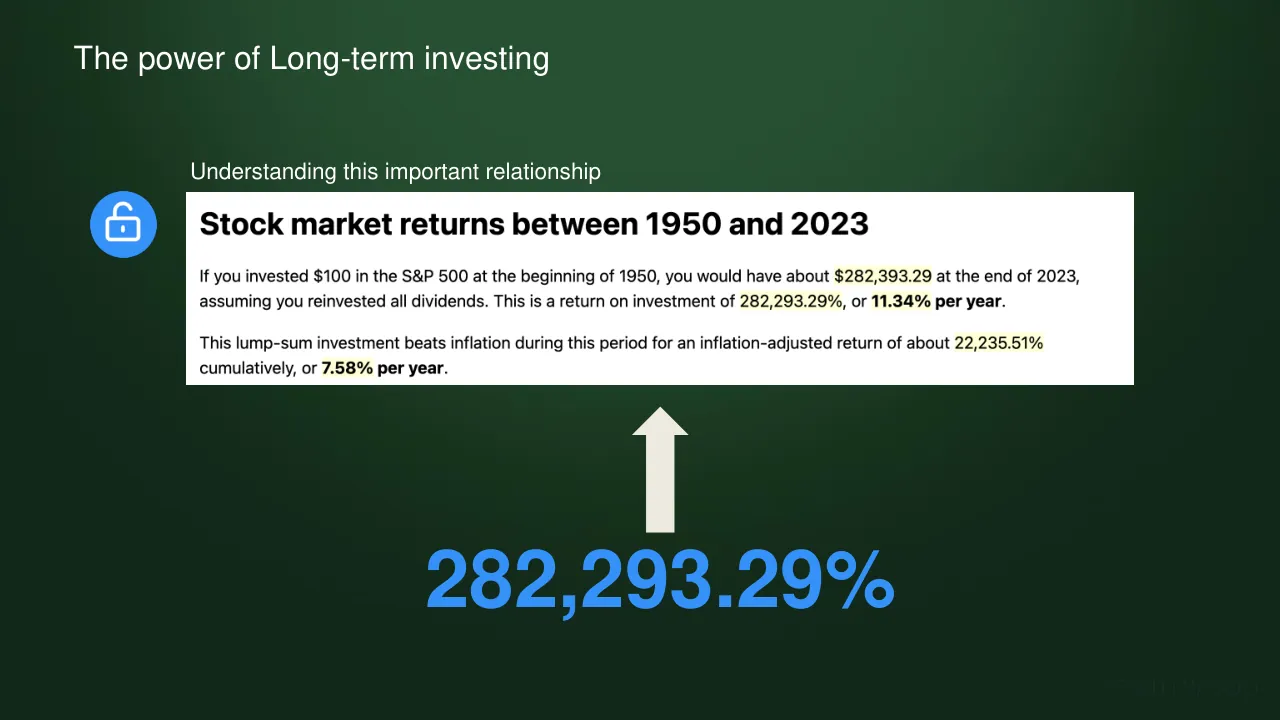
Slide 4 says that a $100 investment in the S&P 500 at the beginning of 1950 would have been about $282,393.29 at the end of 2023, assuming all dividends were reinvested. It reports this as 11.34% per year.
What are the three steps to build a plan in the Troutwood app?
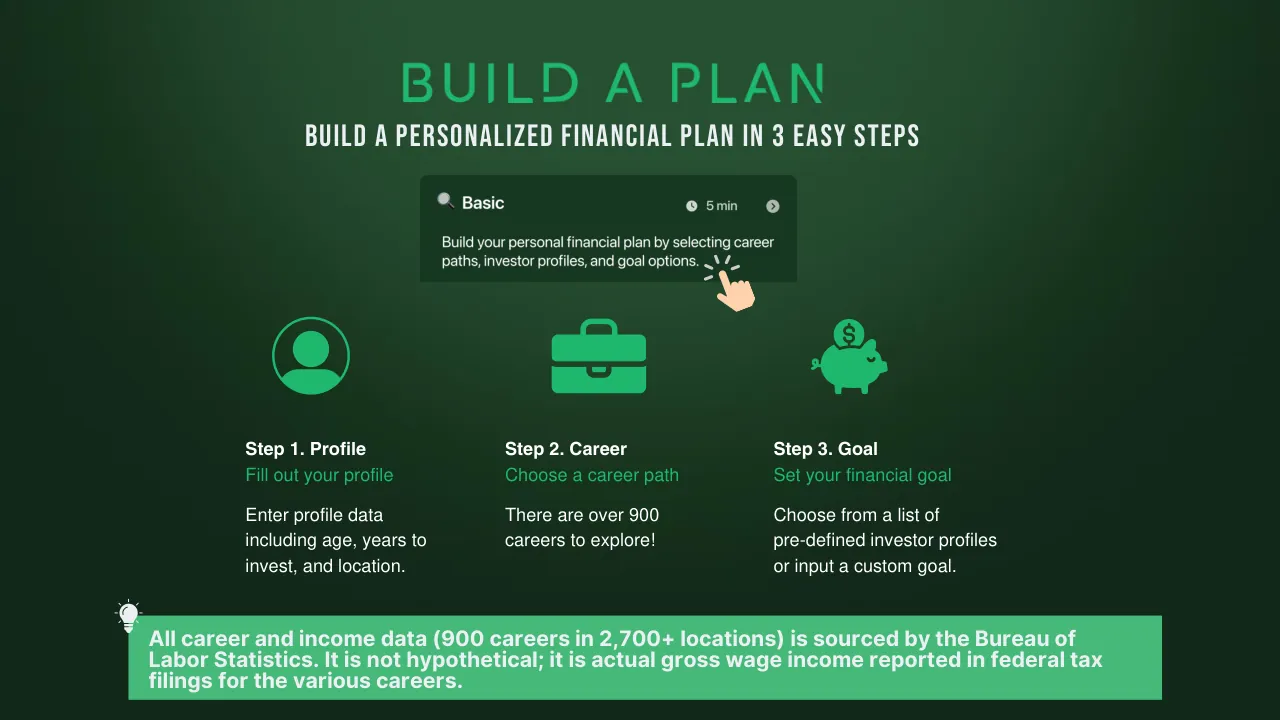
Slide 12 lists three steps: Profile, where you enter age, years to invest and location; Career, where you choose from over 900 careers; and Goal, where you set your financial goal.
Details
- Company: Troutwood
- Year: 2024
- Type: Product launch
- Industry: Financial Education
- Pages: 20
Review score: 6 out of 10, Needs substantial work
Presentation quality, judged with the SlideDeck Co review heuristic. Ask, evidence and idea merit are not rated here.
The deck has a coherent route from definition to trends, the problem, the app, the plan builder, educator tools and games, and the dark green palette with tree identity is consistent. Several slides fail to deliver their message at readable size: slide 3 has tiny dense text, slide 5 has a tiny three-column layout with a broken third lesson ('If you do nothing...'), and slide 4 is a screenshot of web text with a huge raw 282,293.29% figure and no chart. Slides 12 and 13 show real craft, but the later slides (11, 14, 16 to 20) are mostly screenshots with little explanation, and the deck mixes styles (blue slide 15, differing fonts), so substantial revision is needed.
Worth keeping: Keep the problem statistics on slide 6, the 3-step builder on slide 12 and the shield explainer on slide 13, with the consistent green identity.
Most useful repair: Rebuild slides 3, 4 and 5 with larger type, fewer words and a real compounding chart, and fix the dangling third lesson on slide 5 and the typo 'WELLLNESS' on slide 13.
What would change the score: Add short takeaway headlines to the screenshot slides (8, 9, 14, 17 to 20), and restyle slide 15 and the empty slide 16 to match the rest of the deck.
Confidence medium. 20 of 20 pages inspected on contact sheets, 4 at readable size. Reviewed 2026-11-08. Model-assisted review (claude-sonnet-5-5).
Full text of the slides (20 slides)
Every slide's words and a description of its charts and images, so the deck can be searched and rebuilt. Also available as Markdown.
Slide 1
TROUTWOOD
A Financial Plan For Life
Build • Implement • Evaluate • Achieve
1
Visuals: Logo: a circular emblem with a white inner disc (about 14.8% wide) set inside a slightly lighter green ring. Inside the disc is a stylised tree illustration: a brown trunk and branching twigs with brown roots at the base, with leaves in two greens, a lighter mint green (#4CB27A approx.) and a dark forest green/near-black (#1E3A2B approx.), arranged symmetrically around the top of the trunk. Wordmark: the word TROUTWOOD in widely letter-spaced white geometric capitals with stroke-like letterforms (a custom logotype, about 43.9% wide, 7.7% high). Tiny bullets between tagline words are dark green dots. No photographs.
Slide 2
A financial plan shows where you to want to go, the path to get there and how to respond as events occur along the way, both expected and unexpected.
2
Visuals: Full-bleed photograph of a forest road receding to a vanishing point at centre. Tall, moss-covered redwood-type trunks line both sides, dense dark green foliage in the upper corners, and a pale misty opening at the far end of the road. A grey-white road runs up the centre with a dashed-looking white centre line near the bottom and white edge lines curving to the sides. Lighting is soft and diffused, with haze brightening the vanishing point. Dominant colours are deep forest green and olive-brown, with a dark green tint overlay across the whole image that darkens the scene. The image is uncropped and covers the full slide. Above the text sits a white speech-bubble quote icon with a rounded rectangle and a downward tail at its lower-left; inside it is a grey-green double quotation mark glyph. A faint wordmark reading TROUTWOOD sits bottom right in dark grey, low contrast against the photograph.
Slide 3
It’s as simple as having a plan
Your time is now! The combination of increasing financial literacy awareness, changing market dynamics and advancements in technology have created a once in a generation opportunity.
Financial Literacy
In the Classroom
25 states now require a financial literacy class for high school graduation. Over 2 million students will take a personal finance class in 2024-25.
Financial Wellness
In the Workplace
Financial education and access went unaddressed for so long, money is the #1 source of stress in the workplace, the consequences of which are sharply negative and well documented.
Retirement
Responsibility
The traditional “employer directed” pension fund, has been in large part replaced by “employee directed” retirement planning (401k, 403b, 457b, Roth IRA).
Micro Investing
Technology
Creates unprecedented opportunity and access to the financial markets. For 110 million non-investors in the US, this door is no longer closed!
TROUTWOOD
Visuals: Four solid blue circular icons (#3B8EF0 approx) with white line pictograms, left to right: a classroom building with a clock above the door (Financial Literacy); an office or workplace building with windows (Financial Wellness); a palm tree (Retirement); an open padlock (Micro Investing). Between the icons are three small dark green plus signs (about #0E2A18, semi-transparent). The phrase “once in a generation” sits on a solid blue #0070C0 highlight block. Bottom edge has a pale blue wave band on white with the grey TROUTWOOD wordmark at right.
Slide 4
The power of Long-term investing
Understanding this important relationship
Stock market returns between 1950 and 2023
If you invested $100 in the S&P 500 at the beginning of 1950, you would have about $282,393.29 at the end of 2023, assuming you reinvested all dividends. This is a return on investment of 282,293.29%, or 11.34% per year.
This lump-sum investment beats inflation during this period for an inflation-adjusted return of about 22,235.51% cumulatively, or 7.58% per year.
282,293.29%
TROUTWOOD
Visuals: One blue circular icon: a solid #3491F7 circle about 5% of slide width with a white open padlock outline (shackle open on the right) centred inside it, stroke white, rounded corners. One cream up-pointing block arrow: fill #EEECE1, shaft about 2.5% of slide width by about 14% of height, arrowhead about 4.4% wide by about 4% tall with a flat base, no outline, no shadow. It sits centred horizontally at about x 49.4% to 53.8%, from y 56.5% to 74%, directly beneath the white card and pointing up at it. The white card is a plain rectangle, no shadow, square corners, containing bold heading and two paragraphs; the figures inside the paragraphs carry a pale yellow highlight (about #FFFBD0) behind them: $282,393.29, 282,293.29%, 11.34% per year (bold), 22,235.51%, 7.58% (bold). No chart or photograph. The background is a smooth dark green radial gradient, lighter at top centre (about #2A4F33) and darker toward the corners and bottom (about #0F2418). The wordmark TROUTWOOD is a logo in widely letter-spaced capitals, very low contrast against the background, colour about #1B3024.
Slide 5
Three important investment lessons for you to remember
Don’t let your past trip / you
Tune out the noise
If you do nothing . . .
Not everyone grew up / with a ”Wall Street / Journal” on the dining / room table. Three / reasons your students / aren’t investing, / include:
(1)Fear / (2)Lack of Trust / (3)Lack of Knowledge
The next +/- 10% move / in the stock market / should be of ZERO / concern to our / students!
Teach them to play and / plan for the 200,000+% / return they can, and / with your help, will get / over their lifetime.
Graduate long-term / investors
. . . you’ll have nothing!
TROUTWOOD
Visuals: Three blue circular icon badges (diameter about 12% of slide height) with white line icons. Badge 1 (left) shows a white line icon of a building or courthouse with a clock face over an arched doorway and window grid. Badges 2 and 3 (centre and right) show the same white line icon of two adjoining tower buildings with window dots and a doorway. Two dark green plus signs (about 3.8% by 6.8%) sit between the badges, one between columns 1 and 2 at about x 36.6 and one between columns 2 and 3 at about x 60.4, vertically centred on the badges. One highlight: the word students! in the centre column sits on a solid blue rectangle. No photographs or charts.
Slide 6
THE PROBLEM / WHY FINANCIAL LITERACY IMPORTANT? / 84% / GEN-Z RELY ON FAMILY TO / LEARN PERSONAL FINANCE / 69% / FAMILIES LIVE PAYCHECK / TO PAYCHECK / 60% / AMERICANS CANNOT PASS A / BASIC FINANCIAL LITERACY TEST / 54% / TEENS HAVE ANXIETY / OVER MONEY / 39% / TEENS HAVE / A JOB / 28% / EMPLOYEES RUN OUT / OF MONEY BETWEEN / PAYCHECKS
Slide 7
The Solution
It is simple: have a plan. A plan that shows where you want to go, how to get there and
what to do as life happens along the way.
1%
Americans have a
personal financial
plan
TROUTWOOD
Mission Possible
Last modified July 11, 2024
My Financial Health
Plan
Likelihood
Adequacy
100%
92%
160%
Plan Details
Tap on a row to customize or edit an item.
Goal
$12,029,866
Visuals: One photographic-style phone screen mockup (a UI screenshot of the Troutwood app) shown inside a black rounded phone frame with dark green header. It is cropped at the bottom edge of the slide, so the Goal row is the last visible item. Subject: the 'Mission Possible' plan screen. Top header bar shows the TROUTWOOD wordmark in thin white capitals at left and a small grey-white icon with sparkles and three dots at right. Below, 'Mission Possible' in bold dark text on the dark green band, with 'Last modified July 11, 2024' beneath. A white rounded card titled 'My Financial Health' contains three hexagonal badge icons joined by a thin horizontal line: Plan (green hexagon with a light blue pencil icon, underlined label 'Plan', value 100%), Likelihood (green hexagon with a red target icon, underlined label 'Likelihood', value 92%), Adequacy (green hexagon with a yellow star icon, underlined label 'Adequacy', value 160%). Values are in bold green. Below on a light grey-blue panel is a white card titled 'Plan Details' with the line 'Tap on a row to customize or edit an item.' and a small grey circular chevron at right; a blue ribbon badge with a white star overlaps the top-right corner of this card. A divider line separates a final row 'Goal' with value '$12,029,866' in green and a right chevron. Lighting is flat UI lighting; dominant colours are dark green, white, light grey-blue and blue. The screenshot is not boxed by a shadow and has no overlay. A second copy of the same screenshot is placed at a slightly larger scale in the file, overlapping the first.
Slide 8
TROUTWOOD BASIC
• NO LOGIN REQUIRED
• NO ADS
• NO SPONSORED PRODUCT PLACEMENT
Start Investing
Compare investment companies and get started with investing
Finance to English
Making finance easier to understand, for everyone
Screen 1: 9:41 / TROUTWOOD / $112 per month / My Save First Goal / This is your estimated amount you should save to stay on track towards achieving your goal / Go to Plan / What are you looking to do? / Explore some of our tools to help you make the best financial decision! / Start Investing / Compare investment companies and get started with investing / Go to Start Investing / Transpo (clipped: 'You could save ... month on parking ... public transp') / Go (clipped) / My Financial Plan / View My Plan
Screen 2: Featured Tools / The Missing Semester (cover: THE MISSING SEMESTER; author line GENE NATALI et MATT KAY, partly cut) / An award-winning book in your library / Library / Calculate / A powerful suite of financial calculators / Start Investing / Compare investment companies / How To / Learn how to use TROUTWOOD
Screen 3: 9:41 / My Financial Plan / Likelihood / 95% / Estimated Value / $3.9M / Adequacy / 72% / Plan Details / Age 27 / Goal $1,250,000 / Investor Type Optimist / Career IT Security Specialist / Salary $138,000 / Years Invested 42 / Location Pittsburgh, PA / Essentials $40,000 / Surplus $1,250 / Life Hacks $500 / Add Ons - $250
Screen 4: Add Ons (clipped) / $50 (clipped) / Weekly / Monthly / Annually / My Budget / The median cost of living expense for your selected location / Monthly / Annually / $76,000 / TOTAL / My Save First Goal / Taxes / Student Loans / Medical/Health / Housing / Utilities / Transportation / Food / Surplus / After factoring in your living essentials, you have a surplus of (clipped)
Visuals: Four smartphone screenshots side by side, all in black rounded-rectangle phone frames with thin grey #555555 edges and a notch at top. Phone 1 (x32.7 y22.5 w14.9 h77.5, screenshot 338x1418 px) shows the TROUTWOOD app home screen: dark green header bar, a white card with a green circle showing $112 per month and a blue Go to Plan button, a 'What are you looking to do?' heading, and two white tool cards (Start Investing with a green sprout icon, and a clipped Transport card with an orange truck icon); the bottom is cropped. Phone 2 (x48.4 y20.8 w14.2 h79.2, 375x1605 px) shows the Featured Tools carousel on a dark green header and light grey body: a white card with a book cover for The Missing Semester (white and dark green cover, a green tree logo, and a gold EIFLE award seal), a green Library button with a pagination dot row, and three list rows (Calculate with a purple icon, Start Investing with a green icon, How To with an orange hammer icon). Phone 3 (x63.6 y22.2 w14.5 h77.8, 375x2279 px) shows My Financial Plan with three stat tiles (Likelihood 95%, Estimated Value $3.9M, Adequacy 72%, green values) above a Plan Details table with blue pencil edit icons. Phone 4 (x79.0 y0 w14.2 h100, 375x2641 px) is cropped at the top and bottom and shows My Budget: a Weekly/Monthly/Annually toggle with Annually highlighted in green, a donut chart with segments coloured green, dark grey, light blue, yellow, dark olive, purple, red-orange and green-blue (the donut centre reads $76,000 TOTAL), and an eight-item legend in two columns (My Save First Goal green, Student Loans yellow, Housing dark olive, Transportation purple; Taxes light blue, Medical/Health red, Utilities coral red, Food grey); below is a Surplus section. Two product cards on the left: Card A (x5.9 y55.9 w11.0 h24.8) is white with rounded corners, a pale green circle holding a green sprout icon, the title Start Investing and grey body text Compare investment companies and get started with investing, and a small grey circled X at top right. Card B (x17.6 y55.9 w11.0 h24.8) is white, with a pale mint circle holding a green book-stack icon, the title Finance to English and body text Making finance easier to understand, for everyone, and a small grey circled X at top right. A faint image (430x449 px) is placed at x5.9 y48.1 w17.6 h32.7 behind the cards and is not visibly distinct. No logos besides the TROUTWOOD wordmark on the phone screen.
Slide 9
TROUTWOOD BASIC
AVAILABLE ON DESKTOP, TABLET AND MOBILE
My Dashboard / Plan Builder Intro / Edit Profile / Custom Career / Edit Career
Profile / Career / Goal / Review
Find Career
Occupational Groups
Architecture and Engineering Occupations
Business and Financial Operations Occupations
My Dashboard / College Explore Intro / College Explore Search / College Explore Page
College Explore
Explore demographics, tuition costs and more!
A T Still University of Health Sciences Kirksville, MO
ABC Adult School Cerritos, CA
ABC Adult School - Cabrillo Lane Cerritos, CA
ABC Beauty Academy Richardson, TX
ABCO Technology Inglewood, CA
AI Miami International University of Art and Design Miami, FL
AMG School of Licensed Practical Nursing Brooklyn, NY
AI Miami International University of Art and Design
Miami, FL
https://www.artinstitutes.edu
Admissions / Demographics / Student Debt Profile / Tuition & Cost / Net Price by Family Income / Endowment
Student Debt Profile
$29,836 Median Debt Upon Graduation
$285 Median Monthly Loan Payment
Total Debt Range $3,475 - $45,498
Receiving Federal Loans 63.9%
Receiving Pell Grants 57.04%
Median Debt $14,701
Default Rate 12%
9:41
My Financial Plan
Last modified May 25, 2022
My Financial Health
Plan / Likelihood / Adequacy
1/4
Swipe to see your financial health, likelihood, adequacy score and estimated value. You can increase these scores by modifying things like your goal amount or yearly salary!
Next
Age 27
Goal $1,250,000
Investor Type Optimist
Career IT Security Specialist
Salary $138,000
app.troutwood.com
Visuals: Three device mockups showing the TroutwoodBasic web and mobile app. (1) Back-left laptop: black bezel with light grey #E9E9E9 lid and base; its screen shows a dark green top bar with breadcrumb links and a four-step progress line with circular icons labelled Profile, Career, Goal and Review, a Find Career search field, and an Occupational Groups heading over two photo cards: Architecture and Engineering Occupations (pencil and drafting compass over blueprint, grey and white tones) and Business and Financial Operations Occupations (hands writing over documents with a laptop, warm brown tones); the lower card is cut off by the screen edge. (2) Front-centre laptop: light grey-blue #E9EEF3 screen with College Explore page; left column is a searchable list of schools with small logos; right panel shows the Al Miami International University of Art and Design logo (red stylised Ai mark with The Art Institutes wordmark), its location and link, tabs with Student Debt Profile selected and underlined in blue, and a debt summary table with dollar and percent values as listed in text. (3) Phone at far right: black bezel with rounded corners and notch, dark green screen showing My Financial Plan with three circular score badges (green Plan, yellow Likelihood, green Adequacy) and a dark green tooltip card with a green Next button, then a list of goal, investor type, career and salary rows. Screens are shown with soft drop shadows. A pill-shaped link badge has a white fill, a 3px-ish bright blue #0695FE outline, a green chain-link icon at left and the blue underlined link text app.troutwood.com. Background is a full-bleed photographic-style dark green gradient, lighter at top centre.
Slide 10
Download the app
Download on the
App Store
GET IT ON
Google Play
TROUTWOOD
A financial plan for life.
9:41
Build My Financial Plan
Sign Up
Pro Tip: Make sure your phone’s font
size is set to normal, no zoom
Visuals: Illustration: a smartphone mockup, black bezel with rounded corners and a central notch, shown front-on and slightly overlapping the App Store and Google Play badges. The screen is dark green and shows the time 9:41 with signal, Wi-Fi and battery icons at top, a white circular badge (about 12% of screen width) containing a green stylised tree with roots on a dark green ring, the wordmark TROUTWOOD in widely spaced white capitals, the tagline A financial plan for life. in small white sans-serif, a blue button labelled Build My Financial Plan and a green button labelled Sign Up, with a partly hidden line of text at the bottom edge. Lighting is flat and even, with no visible shadows on the screen. Composition is a straight-on, uncropped view with the phone's top edge fully visible and the bottom edge cut by the badges. QR code: a black-and-white QR code on a white square, centred in a neon frame. The frame is a double-line rectangle with a green inner stroke that shifts to cyan-blue on the right and bottom, with a soft outer glow in green and blue. The code is a standard square matrix with three finder squares in the corners and no logo at its centre. Store badges: Apple App Store badge (black rounded rectangle with thin grey border, Apple logo and the text Download on the / App Store in white) and Google Play badge (black rounded rectangle with thin grey border, multicoloured Play triangle and the text GET IT ON / Google Play in white). Dominant colours: dark green, black, white, blue #5B8DEF, green #6CC07A, neon green #2EE38A and cyan #22B8F0.
Slide 11
1 / Tap “Sign-up” / 2 / Enter your information / 9:41 / TROUTWOOD / A financial plan for life. / Build My Financial Plan / Sign Up / Already have an account? Log In / 7:32 / Sign-up / First Name / Last Name / Email Address / Date Of Birth / Don't worry, your security is our top priority. We use your birthdate to build a more accurate plan with detailed financial forecasting and modeling. / Password / Password Confirmation / Sign Up / Password Criteria: / Must not include any part of your name, email, or birthdate. / Avoid common words like “safe” and “password.” / Must be at least 9 characters long. / Must include a mixture of letters and numbers.
Visuals: Two phone mockups drawn as black smartphone outlines with rounded corners and a notch, showing app screens. Phone 1 (left): dark green screen with the white circular tree logo (green leaves, brown roots) centred near the top; the wordmark TROUTWOOD in thin white capitals; a blue button 'Build My Financial Plan' (#5B8DEF) above a light green 'Sign Up' button (#6BBE7A); 'Already have an account? Log In' with 'Log In' in green. Phone 2 (right): dark green screen with a back arrow at top left, the tree logo in a white circle at top centre, the heading 'Sign-up' in white, then stacked light grey-blue input fields (#EEF2F4) labelled First Name, Last Name, Email Address, Date Of Birth, a dark teal info box with a blue info icon and small blue text, then Password and a partly hidden Password Confirmation field; a bright green (#1DB36A) full-width 'Sign Up' button overlaps the bottom of the Password Confirmation field; a white home indicator bar at the bottom. Two green numbered circles (outline white strokes) are the only other graphic marks: outline circles with a white 1.5px stroke and green numerals. Lighting is flat, screen-capture style with no reflections; the phones are shown fully framed, not cropped.
Slide 12
BUILD A PLAN / BUILD A PERSONALIZED FINANCIAL PLAN IN 3 EASY STEPS / Basic / 5 min / Build your personal financial plan by selecting career paths, investor profiles, and goal options. / Step 1. Profile / Fill out your profile / Enter profile data including age, years to invest, and location. / Step 2. Career / Choose a career path / There are over 900 careers to explore! / Step 3. Goal / Set your financial goal / Choose from a list of pre-defined investor profiles or input a custom goal. / All career and income data (900 careers in 2,700+ locations) is sourced by the Bureau of Labor Statistics. It is not hypothetical; it is actual gross wage income reported in federal tax filings for the various careers.
Visuals: Three line-style green icons in a row: a circled person silhouette at left (about x21-27, y44-55), a briefcase in the centre (about x43-50, y44-56), and a piggy bank with a dollar coin at right (x63-69, y44-55), all solid #1EB86E. A dark rounded card (Basic) overlaps the upper area with a magnifier icon, clock icon, circled chevron and a peach pointing-hand cursor with grey motion dashes at its lower right edge. A small white lightbulb icon sits at the left of the bottom banner. No charts, photos or tables.
Slide 13
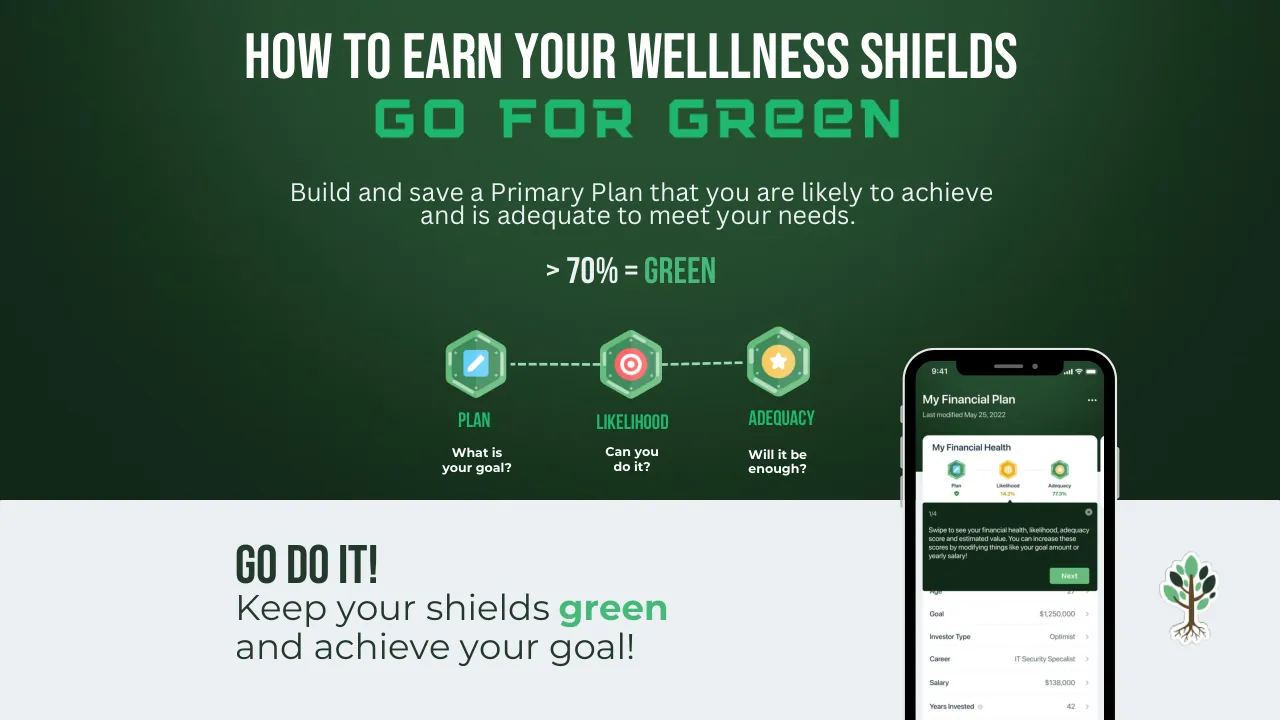
HOW TO EARN YOUR WELLLNESS SHIELDS / GO FOR GREEN / Build and save a Primary Plan that you are likely to achieve / and is adequate to meet your needs. / > 70% = GREEN / PLAN / LIKELIHOOD / ADEQUACY / What is / your goal? / Can you / do it? / Will it be / enough? / 9:41 / My Financial Plan / Last modified May 25, 2022 / ... / My Financial Health / Plan / Likelihood / Adequacy / 14.2% / 77.3% / 1/4 / Swipe to see your financial health, likelihood, adequacy score and estimated value. You can increase these scores by modifying things like your goal amount or yearly salary! / Next / Age / 27 / Goal / $1,250,000 / Investor Type / Optimist / Career / IT Security Specialist / Salary / $138,000 / Years Invested / 42 / GO DO IT! / Keep your shields / green / and achieve your goal!
Visuals: Full-bleed dark-green gradient background image covering the top about 70% of the slide, fading to dark green edges. Three hexagonal icons in a row: left hexagon (120 px, about x 34.5%, y 45.7%, w 5.4%, h 9.6%) is mint-green with a light-blue pencil/edit square; centre hexagon (80 by 90 px, about x 46.9%, y 45.9%, w 4.8%, h 9.5%) is mint-green with a red-and-white target; right hexagon (139 px, about x 58.0%, y 45.3%, w 5.6%, h 10.0%) is mint-green with a yellow-orange circle holding a white star. Dashed mint-green connector lines run from the left hexagon to the centre hexagon and from the centre to the right hexagon at about y 50.4%. A smartphone mockup at about x 70.5% to 87.3%, y 48.3% to bottom: black body (#000000) with light grey (#E9E9E9) outer rim, rounded corners, notch at top; the screen shows a dark-green header with 'My Financial Plan' and a white card 'My Financial Health' with three small hex icons and scores, a dark-green tooltip box with a Next button in green, and a white list of rows with chevrons. A green-and-brown stylised tree with roots, outlined in a white sticker border, at about x 89.9%, y 75.7%, w 6.3%, h 14.9%.
Slide 14
EDUCATOR SUPPORT TOOLS
• TEACHER GUIDES
• USER GUIDES
• CLASSROOM ACTIVITIES
• HOW-TO-VIDEOS
• Other resources (shown in capitals)
TROUTWOOD
Products / Customers / Calculators / Classroom / Videos / About
Stock Market Map
'HOW TO' VIDEO SERIES
A collection of video tutorials on how to use Troutwood's various products.
HOW TO CREATE A FINANCIAL PLAN ON THE
TROUTWOOD APP
How to Create Your FIRST Financial Plan!
Watch later
YOUR FIRST
FINANCIAL PLAN
TROUTWOOD APP
for teachers
Own your financial future.
Visuals: Photograph-style background: a dark green gradient, lighter at top-centre (around #2A4A35) and darker toward the lower left (around #12231A), spanning the full slide. Laptop mockup: black bezel (#000000) with a thin mid-grey outer rim (#969696) and rounded top corners, cropped by the bottom edge. Screen: a screenshot of the Troutwood website on a white header with grey nav links, a large green (#1DB86B) hero band with a darker green (#00943F) wave, the headline 'HOW TO' VIDEO SERIES in white, and a video thumbnail below it showing a smiling young woman with glasses and braids looking down at a laptop, with the text YOUR FIRST FINANCIAL PLAN overlaid and a red YouTube play button at its centre-bottom. Three blue hand-drawn style arrows (#1E90FF) point down at the nav items Classroom and Videos from above. Two translucent white pills (opacity 0.74) sit at the right of the nav bar, one reading Stock Market Map. Promotional card: a portrait rectangle (about 566 by 800 px) with a dark slate fill (#293949), a green paint-splash notch at its top-left, the wordmark TROUTWOOD APP in white, 'for' in white serif and 'teachers' in green (#1DB86B) handwritten script, four smartphone mockups in a row showing app screens, a small green circular badge with a clock icon on the first phone, the caption Own your financial future. in white bold sans, and a circular chevron button in its lower-left. The card's lower-right corner shows a light grey page-curl, and the card sits unboxed over the laptop screen with no shadow visible. Icon: a small circular chevron-right button in white outline at the lower-left of the card.
Slide 15
TROUTWOOD / A Financial Plan for Life / We're taking a stance. / 100% of high school students should graduate with a working financial plan. / TOGETHER, we can make that happen. / TROUTWOOD / A financial plan for life.
Visuals: Illustration: a flat vector scene of a graduation ceremony in a boxed cream-white blob shape at about x 66.6%, y 34.2%, 15.2% by 27.3%. A young man in a black gown and mortarboard, with a red-brown face, shakes hands with a woman in a grey-blue gown with a gold stole and medal. A wooden podium with a round emblem stands between them on a cream platform. A cluster of grey-green and beige balloons on a stand and a string of beige bunting sit at the upper left. Lighting is flat with no shadows. Dominant colours are cream #F9F5F2, grey-blue #8693A5, black, brown-orange podium and beige. The blob is cropped to its own silhouette and is not full-bleed. Sign illustration: a cream wooden sign with a dark red edge, reading TROUTWOOD and A financial plan for life., on a pole, with a green bush and purple reeds at its base, at about x 10.7%, y 61.8%, 16.4% by 29.1%. Landscape: layered green hills and hedges at the bottom and right, with a light green band at the base; the bushes are about x 81.6%, y 70.6% to 84.3%.
Slide 16
MORE RESOURCES
Visuals: One tree logo, a stylised tree with a white outline, a brown trunk and branches, light green and dark green leaves, and white-and-brown roots, placed centred above the title. The background is a full-bleed dark green radial gradient, lighter at the top centre and darker toward the corners and bottom, with no photograph, pattern or overlay.
Slide 17
BUY, SELL, HOLD
Portfolio Value / $5,320 / 47.67% / vs. / 47.67%
Cash Available to Invest / $365 / $5,320 / $5,320 / BUY / SELL / HOLD
Portfolio Value / $15,102 / -8.07% / vs. / -8.07%
Cash Available to Invest / $365 / $15,102 / $18,071 / BUY / SELL / HOLD
Portfolio Value / $248,385 / 0.00% / vs. / 12.45%
Cash Available to Invest / $4,380 / $252,400 / $300,204 / BUY / SELL / HOLD
An Investment Simulation Game
Buy, Sell, Hold! is an investment simulation that teaches students the power of / long-term investing using real historical data. Test your investment skills while / experiencing the ups and downs of the S&P 500, a stock market index.
Scan to / Download
Challenge yourself to grow your personal finance and investing knowledge with the / NextGen Personal Finance question bank as you play.
ngpf
For the two-thirds of kids who get an allowance, what's the average weekly amount they receive?
$1 Per Day
B $30 Per Week
C $10 Per Week
+250
Visuals: Full-bleed background photograph/pattern of a dark green field with a repeated faint tone-on-tone pattern of dollar signs and curved arrows. Centre top: three smartphone mockups side by side, each about 10 percent of slide width, black bezels with notches, light grey-white screens. Left phone (green screen): 'Portfolio Value $5,320' with green up-arrow badges 47.67%, a bright green background panel with a rising white line chart and a purple line, a cartoon green leaf-shaped mascot wearing a party hat, orange progress bar about 20 percent filled, and blue BUY, green SELL and orange HOLD buttons. Middle phone (red screen): 'Portfolio Value $15,102', red down-arrow badges -8.07%, red background panel with a flat-then-rising white and purple line, a sad green mascot, orange progress bar about 40 percent filled, same buttons. Right phone (blue screen): 'Portfolio Value $248,385', red 0.00% and green 12.45% badges, blue background panel with a steadily rising white and purple line ending near the top right, a happy party-hat mascot, orange progress bar about 90 percent filled, same buttons. Lower left: a single phone mockup, black with rounded corners, showing a white quiz card with an ngpf graduation-cap logo, a question, three answer options with a green check ("$1 Per Day"), a blue B and a blue C, the orange '+250' score, and a green mascot with a graduation cap; the screen background has orange dollar signs. Lower right: a green blob shape #1EB86E overlapping a bright blue blob #0695FE, a white QR code on a white square, and a white curved arrow pointing down-left toward the QR code. Lighting is flat and even; no shadows on the backdrop.
Slide 18
TROUTWOOD MAP OF THE MARKET
Market summary
of global indices
Financial News
General
S&P 500
Healthcare
Real Estate
Technology
Search for News
It's an Awful Time to Play Games
With Debt Ceiling: Bernstein
Jared Bernstein, a member of the White
House Council of Economic Advisers...
Bloomberg Markets and Finance | Thu, 26 Jan 2023
13:34:20
Negative
New home sales rise for third
straight month as mortgage rates fall
December purchases of new homes
rose 2.3% as mortgage rates began t...
Fox Business | Thu, 26 Jan 2023 13:10:49
Positive
There are reasons to be optimistic
on the economy, says iCapital's
Anastasia Amoroso
CNBC's 'Halftime Report Investment
Committee' discuss recent market...
CNBC Television | Thu, 26 Jan 2023 13:00:00
Positive
MOH.DE $745.49
MA $355.11
MSFT $248.60
NVDA $165.48
TCEHY $38.97
TSLA $181.76
PG $149.24
S&P 500 -2.05%
Treasury Yield 10 Years 2.82%
Bitcoin USD 0.35%
Dow Jones Industrial Average -1.63%
NASDAQ 100 -2.08%
Russell 1000
Market Summary
Bubble Metric
Technical
Fundamental
1 Quarter Performance
Sectors
TROUTWOOD MAP
United States
Mexico
Cuba
MAP JR.
Privacy
Policy
Logos provided by Clearbit
Stock prices are delayed, the delay can range from a few minutes to several hours.
An Interactive Stock Market Map
Visuals: Tablet mockup: dark charcoal rounded-rectangle device frame with a thin bezel, shown front-on and slightly rounded. The screen shows a dashboard. A left icon rail sits along the screen edge. A top ticker strip lists stock prices. Below it, index cards are filled red or green, with the S&P 500, Treasury yield, Bitcoin, Dow Jones, NASDAQ 100 and Russell 1000 shown. The main area is a light grey map of the United States, Mexico and Cuba with coloured bubbles, green for gains and red for losses, sized by value. Bubbles are semi-transparent with soft halos. Dense clusters appear over the eastern US. Overlay controls sit at the lower right: Bubble Metric, 1 Quarter Performance and Sectors. Phone mockup: white rounded phone with a financial news list, each item with a thumbnail photo of a TV news studio or a construction-site image, a headline, a source line and a green or pale green Positive or red-pink Negative tag. Callout: white rounded speech bubble with a small tail pointing left toward the tablet, with a soft shadow. Blobs: a green (#1EB86E) organic blob cropped by the top-left corner and a green plus blue (#0695FE) organic blob in the bottom-right corner, both flat with no gradient.
Slide 19
FINULATOR
What's this game about?
Save for retirement and stay afloat in this choose your own adventure game! Customize an avatar, then select one of 800+ careers in 16 different locations across the country. Simulate 40 years in 30 minutes.
FINULATOR
Practice adulting before you become one!
Enter the forest of finance . . . and
practice adulting, before you
become one
Visuals: Two device mockups and a wordmark. (1) Phone-style card, about 16.7 by 40% of the slide, boxed on a slate teal #2F5A66 panel. Its top has a white rounded card with the heading 'What's this game about?' and a body paragraph. Below it is a green leaf-shaped mascot with two large white eyes with black pupils, an open smile and a small stem, in #4CC184 green. Under the mascot is the FINULATOR wordmark and the tagline. (2) iMac-style monitor, silver-grey #D9D9D9 bezel with a white Apple logo, grey chin and silver stand with a soft drop shadow. The screen shows a flat cartoon scene: sky blue #5CC8FF top, bright green #4EE06E grass bottom, a row of blue houses #1E9BE8 along the horizon, a green-shirted cartoon man with brown skin and a dark-brown hooded head in the centre, a red-and-black wheelbarrow with brown soil at his left, and a red-and-navy mailbox with an orange post at the lower right. (3) A 2 by 2 pixel image sits behind the wordmark at the top; it is effectively invisible. The FINULATOR wordmark is a thin white geometric sans logotype. Lighting is flat and even; the monitor is shown front-on, uncropped, with no overlay.
Slide 20
TROUTWOOD STOCK MARKET TIME PORTAL
Invest with Understanding
TROUTWOOD
Time Portal
Ever Wonder what might have been?
Or what could be?
Simulate how an investment in the S&P 500 would have performed, based on actual stock market history.
1926 - 2021
Continue
Terms of Service
Let's Time Travel!
Find out what the investment you didn't make in 1926 is worth in 2021.
Start Year 1926
End Year 2021
Historical Milestone
The Great Depression 1929 — 1933
The Recession of 1937 1937 — 1938
The Vietnam War 1965 — 1973
Activate Time Portal
Your investment would be
$1,073,06
($190,305 in 2005)
1970
Contribution
Initial investment $ 0
Yearly investment $ 365
$1.00/day $2.00/day $3.00/day
$5.00/day $10.00/day
Results
$18,980 Total Contribution
11.78% Dollar Weighted Annualized Roll
-37% Minimum Return (2008)
37.58% Maximum Return (1995)
19% Down Years (10)
81% Up Years (42)
0% Initial Contribution Return
5554% Annual Contribution Return
Period Facts
What If...
Powered by Troutwood
Activate Time Portal
Follow the green "Activate Time Portal" button to
see what your investment would be worth.
Visuals: Four smartphone mockups in a row, all with black bezels (#000000) and dark grey (#555555) outer edges, each showing a Troutwood app screen. Phone 1 (leftmost, partly hidden by phone 2): light mint screen with the green-and-brown Troutwood tree logo inside a pale green circle, the TROUTWOOD wordmark, Time Portal subtitle, Continue green button, and Terms of Service link. Phone 2: white screen titled Let's Time Travel! with a green slider line, Start Year and End Year boxes, a Historical Milestone list of three cards (The Great Depression, The Recession of 1937, The Vietnam War) with grey circle bullets, and a green Activate Time Portal button at the bottom. Phone 3: green gradient screen with a dashed green line chart labelled 1970 and a vertical marker, a large $1,073,06 figure, Contribution inputs, pill-shaped day selectors, and a white Results card with values $18,980, 11.78%, -37%, 37.58%, 19%, 81%. Phone 4 (rightmost, fully on top): light grey-green screen with a green gradient header, $ 0 and $ 365 labels, pill day selectors, a white Results card with grid values, a pagination dot row, white Period Facts and What If... cards with small icons, and a Powered by Troutwood footer with a tree icon. Green button with a blue click burst and a peach-coloured pointing hand icon (about #F5C9A8 with blue #0695FE rays) at the right edge of the button. QR code: black square modules on white (#FFFFFF), boxed. Decorative shapes: solid green (#1EB86E) blob top-left and bottom-right, and a thin blue (#0695FE) freeform outline wave wrapping the bottom-right blob. The image lighting is even with soft glow on the phone screens; nothing is cropped except phone screens partly overlapped by the next phone.
Download this deck
The hosted PDF of every library deck is free for readers of the SlideDeck Co newsletter. Join with your email and the viewer and download appear here.
Preparing a strategy presentation of your own? The SlideDeck Co Consulting Deck is a slide library with a statement of work and a worked client case.