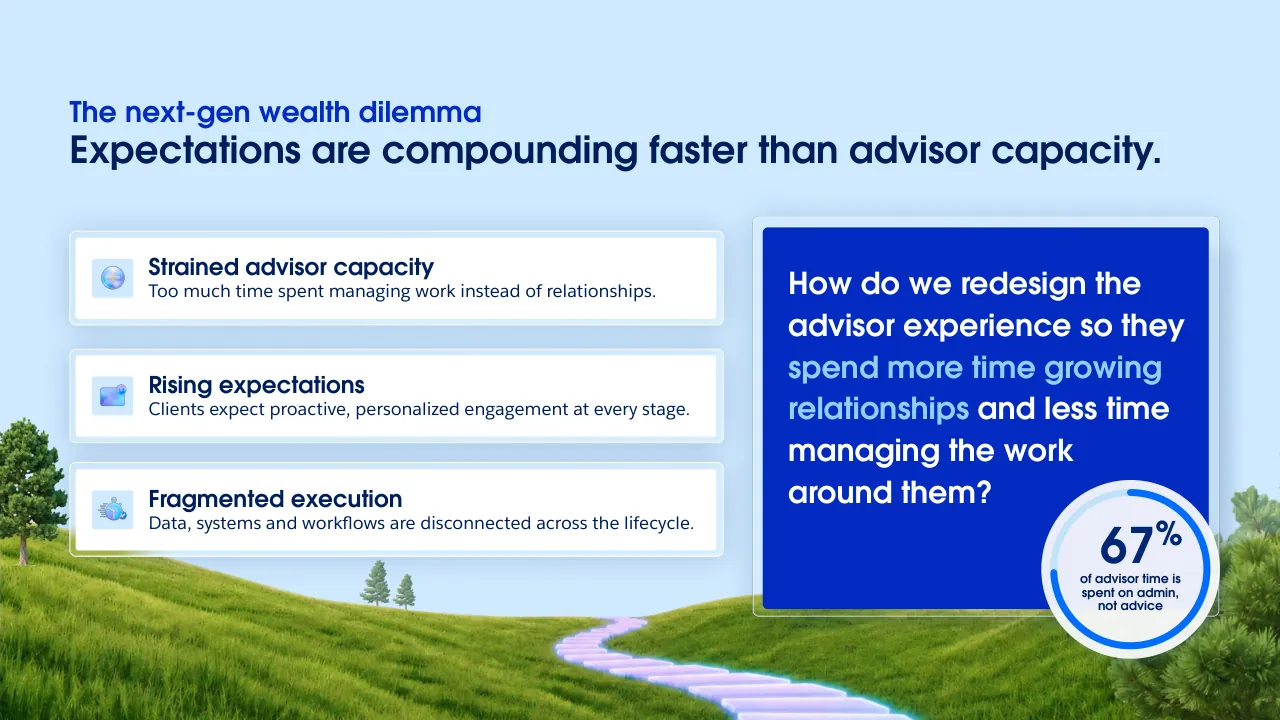
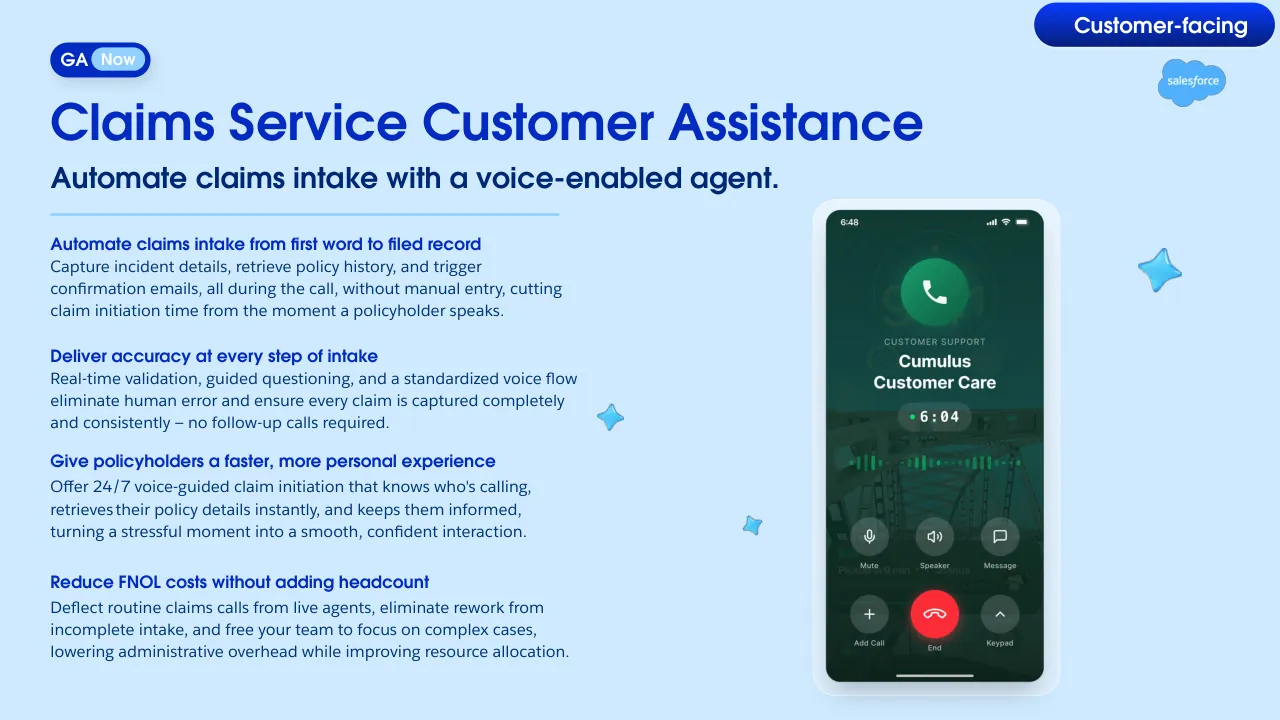
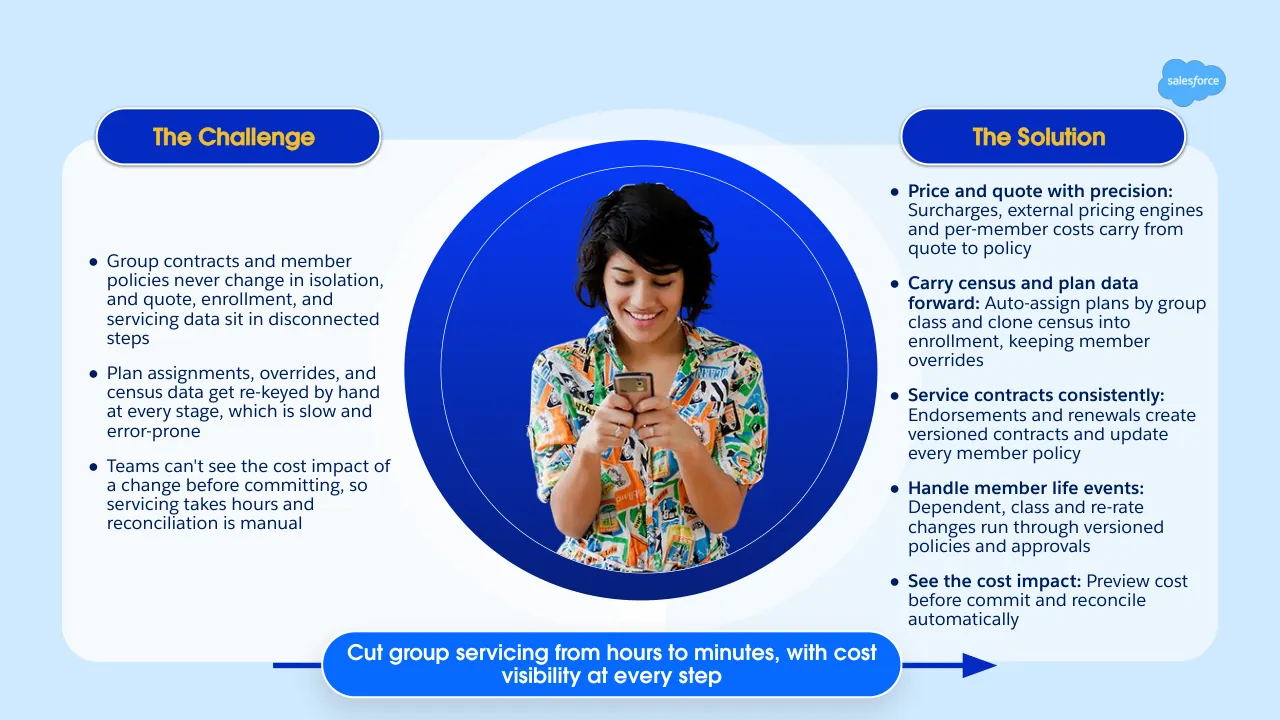
The deck opens with a title slide for the New Financial Services Cloud Editions and Winter '27 (264) release, followed by a thank-you slide listing customer groups, a forward-looking statements disclaimer, and an agenda. It moves through a pricing and editions section that compares Core, Advanced and Max tiers and bundles, then covers banking service and origination updates, wealth management features for advisors including the Agentic Advisor, Run My Day and Enhanced Client Details, insurance claims intake and financial authority controls, group benefits capabilities, and a sneak peek at agentic underwriting. The closing sections are a set of upcoming features and a final thank-you slide. Several slides use side-by-side comparisons of value and price, and the wealth section frames its problem with a short sequence of pain points before showing the product. Slides worth studying include the editions value comparison on slide 11, the advisor problem framing on slide 20, the claims intake flow on slide 35, and the group benefits challenge and solution split on slide 40.
Slides worth studying
Questions about this deck
How many slides does the Salesforce Financial Services Cloud deck have?
The Salesforce deck has 49 slides. The agenda on slide 4 lists six sections that structure the deck, from welcome and introduction through the sneak peek of coming features.
What does the Salesforce deck say about Financial Services Cloud edition pricing?
Slide 8 lists Core starting at $325 per user/per month, Advanced starting at $500 per user/per month, and Max starting at $700 per user/per month. Slide 10 gives the Sales & Service editions at $350, $525 and $725 per user/per month.
What does the Salesforce deck say about the Agentic Advisor for wealth management?
Slide 22 marks the Agentic Advisor as GA Now and describes it as a way to reimagine high-touch relationship management. The same slide lists related enhancements such as Meeting Concierge, Run My Day and Enhanced Client Details.
What value-to-price ratios does the Salesforce deck show for its bundled editions?
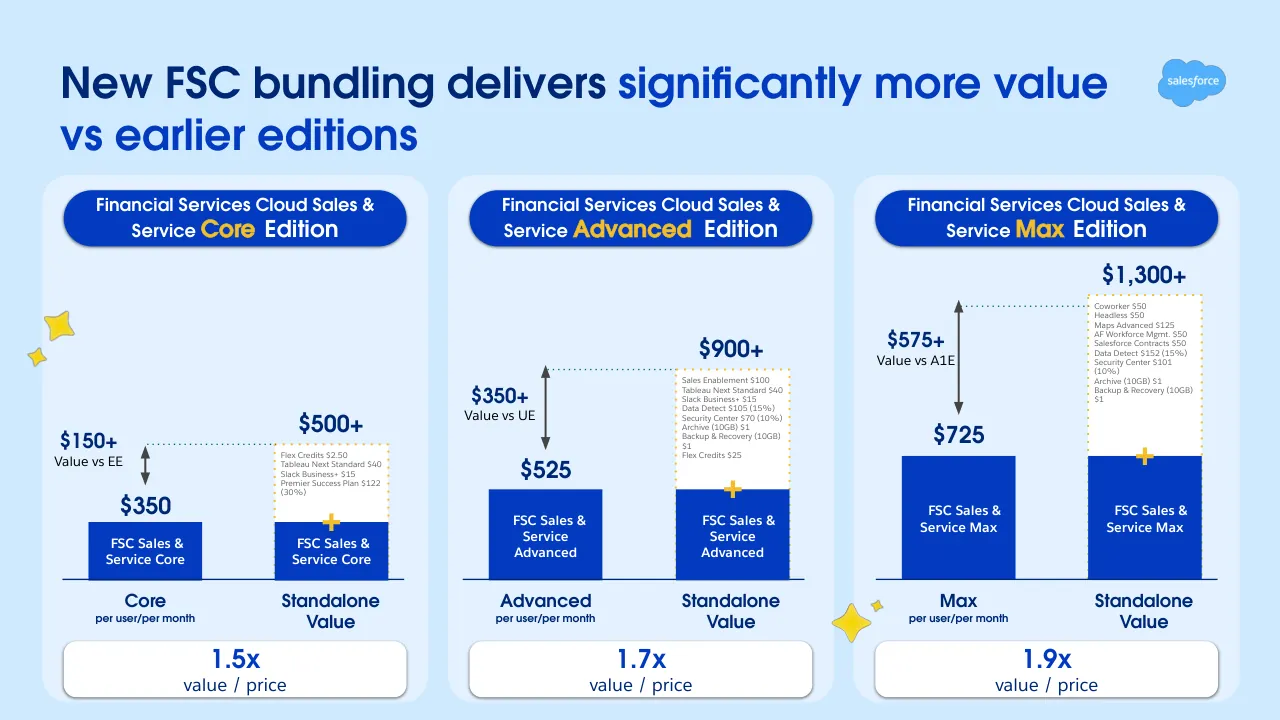
Slide 11 says the new FSC bundling delivers significantly more value vs earlier editions. It shows value-to-price ratios of 1.5x for Sales & Service Core, 1.7x for Sales & Service Advanced, and 1.9x for Sales & Service Max.
Details
- Company: Salesforce
- Type: Product launch
- Industry: Financial Services
- Pages: 49
Review score: 7 out of 10, Effective
Presentation quality, judged with the SlideDeck Co review heuristic. Ask, evidence and idea merit are not rated here.
The deck has a consistent branded system, a clear agenda, and section dividers that make a 49-page release briefing easy to navigate, and the strongest slides (11, 20, 35) use clear titles, hierarchy and purposeful visuals. The consequential weaknesses are legibility and density: slide 11 has a tiny itemised price list inside the bars, slides 38 and 41 to 44 rely on unreadable screenshots with thin labels, and slides 25, 27 and 37 carry very small text and callouts. The Group Benefits run (slides 41 to 44) repeats one template with little explanation, so the feature story fades into screenshot tours, and a few slides, such as the pricing tiles on 10 and 12 and the agenda-style dividers, are packed or filler-like.
Worth keeping: Keep the editions slide 11 structure of paired bars with a value/price multiple, the problem framing on slide 20 with its single stat, and the clear title-plus-subtitle-plus-benefit-list pattern of slide 35.
Most useful repair: Enlarge or crop the screenshots on slides 38 and 41 to 44 to the one relevant region and add a one-line takeaway per slide, and raise the minimum text size on slides 11, 12, 25 and 27.
What would change the score: I would cut or merge the repeated Group Benefits slides and the empty-looking section dividers (14, 15, 17) to tighten the route and give each remaining feature one readable proof visual.
Confidence medium. 49 of 49 pages inspected on contact sheets, 4 at readable size. Reviewed 2026-11-08. Model-assisted review (claude-sonnet-5-5).
Full text of the slides (49 slides)
Every slide's words and a description of its charts and images, so the deck can be searched and rebuilt. Also available as Markdown.
Slide 1
Power Your
Agentic
Transformation
New Financial Services Cloud Editions and
Winter '27 (264) Release Innovations
Visuals: Salesforce cloud logo: a light-blue (#00A1E0) cloud shape with white lowercase 'salesforce' wordmark, at about x 65.7% y 33.6% w 26.3% h 32.8%. A small blue 3D mascot character (round blue ball with black sunglasses) at about x 60.2% y 57.0% w 8.8% h 15.6%. Four-pointed gold sparkle stars of varying sizes (about #FFC917 to #F5B800) scattered around the cloud at upper right, lower left of the mascot and below the cloud, at approximately x 89.6% y 25.2%, x 88.6% y 33.1%, x 65.6% y 71.2% and x 62.1% y 71.0%. The cloud and mascot are not cropped and are placed directly on the background with no box or overlay. Background is a full-bleed photographic-style gradient rendering.
Slide 2
Thank / you / Customers / Trailblazers / Veterans / Employees / Partners / Community
Visuals: Six circular photographs, each with a dark-blue pill label beneath it. (1) Customers: four people in front of a wall of colourful Crocs-style shoes, one holding a blue clog. (2) Trailblazers: a crowd at a conference, with a group selfie of smiling attendees wearing lanyards, cropped at top. (3) Veterans: a smiling woman in a cream jacket shaking hands with a woman in camouflage uniform, with a blurred background. (4) Employees: four young people around a wooden table in front of an orange and teal tiled wall, one holding a laptop. (5) Community: volunteers in navy 'volunteer' T-shirts packing boxes of food and supplies in an office with an exit sign. (6) Partners: five people in front of an 'Agentforce Partner Summit' backdrop with yellow confetti and a cartoon cat with sunglasses. Photos are circular crops, unboxed, with no overlay. Decorative 3D illustrations: a party-horn emoji face at upper left, a blue striped bear-like robot face with visor at top centre-right, two blue sparkle stars (one small near centre-top, one large blue wisp at top right) and the brown Astro mascot waving at lower right. Logo: the Salesforce cloud wordmark 'salesforce' in white on a #00A1E0 cloud at the centre top.
Slide 3
Forward-looking statements
This presentation contains forward-looking statements about, among other things, trend analyses and statements
regarding future events, anticipated growth and industry prospects, and our strategies, expectation or plans regarding product releases and enhancements. The achievement or success of the matters covered by such forward-looking statements involves risks, uncertainties and assumptions. If any such risks or uncertainties materialize or if any of the assumptions prove incorrect, results or outcomes could differ materially from those expressed or implied by these forward-looking statements. The risks and uncertainties referred to above include those factors discussed in Salesforce’s reports filed from time to time with the Securities and Exchange Commission, including, but not limited to our ability to meet the expectations of our customers; uncertainties regarding AI technologies and their integration into our product offerings; the effect of evolving domestic and foreign government regulations; regulatory developments and regulatory investigations involving us or affecting our industry; our ability to successfully introduce new services and product features, including related to AI and Agentforce; our ability to execute our business plans; the pace of change and innovation and our ability to compete in the markets in which we participate; and our ability to maintain and enhance our brands.
Visuals: One non-text visual apart from the panel: the Salesforce cloud logo at top right, a light blue cloud shape with the white lowercase wordmark 'salesforce' inside it. The background is a smooth blue gradient with a bright glow at the bottom centre and a darker navy band along the left and right edges; no photograph or illustration is present. The white panel is a flat rounded rectangle with a small corner radius and no shadow or border.
Slide 4
Agenda / 01 / Welcome and / Introduction / 02 / All New / FSC Editions / 03 / Winter '27 / Innovations: / Banking / 04 / Winter '27 / Innovations: / Wealth / 05 / Winter '27 / Innovations: / Insurance / 06 / Sneak peek to into / what is coming soon!
Visuals: Decorative and brand elements only. A Salesforce cloud logo in light blue with white lowercase 'salesforce' wordmark sits at the top-left of the blue panel. Three-dimensional glossy yellow four-point sparkle stars: one large at the top edge of the panel (x 33.5 percent, y 2.8 percent), one small at the right of it, and one large cropped at the bottom-left corner of the slide, partly off-canvas, overlapping the panel edge. A 3D green icon of a spreadsheet grid with a gear, glossy with highlights and a dark-green base, sits on the panel at about 4.7 percent x, 57.9 percent y. Lighting is soft and frontal from above-left; dominant colours are green, yellow and white. Nothing is cropped except the bottom-left star.
Slide 5
Financial Services Cloud
New Editions
One Platform.
More Value.
Less Complexity.
salesforce
Visuals: Illustration cluster on the white panel, all 3D rendered in glossy blue and yellow: a fuzzy blue round mascot head with a black glossy visor/sunglasses and a light-blue highlight, at about x 7.6 to 20.9%, y 28 to 62%, overlapping the top-left corner of a solid blue (#0250D9) rounded card at x 9.4 to 24.2%, y 41.7 to 68%; a blue upward-right arrow icon (darker blue #0A5AE6) on that card near x 19 to 24%, y 44 to 51%; a light-blue (#00B3FF) square tile at x 25.6 to 32.4%, y 55.9 to 68% partly behind a translucent white search pill (white at 40% opacity) at x 16.8 to 30.2%, y 59.2 to 65%, which holds a small purple four-point sparkle icon in a white circle at its left end and a white rectangular field to the right; a brown-skinned clapping-hands emoji (3D) at x 26.5 to 32.2%, y 50.8 to 61.8%, overlapping the tile; small 3D sparkles (a yellow four-point sparkle at about x 16.7 to 19%, y 28.9 to 32%, a light-blue four-point sparkle at about x 18.9 to 22.1%, y 28.6 to 36%, a small light-blue sparkle at about x 11.3 to 13%, y 64 to 67%, and a clustered yellow sparkle pair beside the hands); a light-blue horizontal progress bar at x 9.4 to 24.2%, y 70.5 to 74.7% with a darker blue (#0250D9) filled segment covering about the left 55% of it; a large glossy yellow four-point star at the lower-left edge of the panel at x 0 to 11.3%, y 57.4 to 84.6%, partly bleeding off the slide edge. Lighting is soft and frontal with glossy highlights; no photograph. The Salesforce cloud logo at top right is light blue (#4DB8FF) with white lowercase wordmark 'salesforce'.
Slide 6
Your teams are spending / more time managing / software than serving / customers. / 14+ / Internal Systems / per institution are managed / through CRM middleware / Source: Market Reports World / salesforce
Visuals: A white filled circle (#FFFFFF) at x 81.3-93.8, y 56.4-78.7 (about 12.5% of width) containing the text 14+ in dark blue #022AC0, set in a bold geometric sans. Light blue highlight rectangles (#90D0FE) sit behind the words 'spending', 'more time managing' and 'software', each a flat filled box with square corners. A Salesforce cloud logo in light blue (#4FB3F6 approx.) with white lettering 'salesforce' at top right, x 90.5, y 8.2, w 5.2, h 6.5. The slide background is a photographic-style blue gradient, not a photograph: brightest blue near the top centre and a glowing lighter cyan band along the bottom edge around x 50, darkening to deep blue at the left and right edges.
Slide 7
From 12 vendors to one platform / Fragmented Buying Hazards / Multiple vendors, paperwork, integration & renewal risks / Domain extensions / Telephony & Messaging / Contracting, Maps Advanced / Origination / Forecasting / Conv. Intel / Outcome Based Agents / Analytics / Collaboration / GenAI / Data Platform / CRM (w/ support) / The New Way: All-Inclusive Single SKU / Maximum value, single contract, zero integration or maintenance overhead / Max / Digital Insurance & Digital Origination / Contact Center Dig., Workforce Mgmt. / Contracts, Maps Advanced / Advanced / Collections & Financial Recovery, / Insurance Brokerages / Sales Programs / Service & Sales Intelligence / Help Agent & Agentforce / Tableau Next / Slack / Agentforce / Data 360 / Industry Cloud (w/ Premier Success Plan) / Core / salesforce
Visuals: Left: a stacked list of 12 white rows with thin grey dashed separators under a dark grey header block, titled Fragmented Buying Hazards with a subtitle; the rows are labelled Domain extensions, Telephony & Messaging, Contracting, Maps Advanced, Origination, Forecasting, Conv. Intel, Outcome Based Agents, Analytics, Collaboration, GenAI, Data Platform, CRM (w/ support). Centre: three grey-outlined curly brace connectors (dark grey #444444, about 0.15 percent stroke) join left row groups to tiers: the first brace spans Domain extensions through Origination and points to Max; the second spans Forecasting through Outcome Based Agents and points to Advanced; the third spans Analytics through CRM (w/ support) and points to Core. Right: three vertical tier blocks labelled Max (dark navy), Advanced (bright sky blue) and Core (pale blue), each with a small green spreadsheet-style grid icon beside the label; to the right, 12 white rows with dashed separators list the included products. Decorative: a white-and-blue astronaut robot mascot with sunglasses and a glowing jet trail, cropped at the panel's top-right edge and overlapping the header area; a blue Salesforce cloud logo with white lowercase wordmark salesforce at top right; a blue four-point sparkle star at lower left.
Slide 8
Core. Advanced. Max. / Core / Edition / starting at / $325 / per user/per month / Your foundation / AI, analytics, and collaboration built in / from day one. / everything in Core plus… / Slack Business+ with Slackbot / Tableau Next with Tableau Agent / Sales Emails / Premier Success Plan / Security Essentials / Data & AI / 500K Flex Credits/org / 20MB data storage/user / Advanced / Edition / starting at / $500 / per user/per month / From reactive to proactive / Intelligence, security, and industry tools / that replace separate contracts. / everything in advanced plus… / Casey, Help Agent with / outcome-Based Pricing / Sales Insights, Account Research / Sales Programs / Customer Signals Intelligence / Backup & Recovery, Archive / Data Detect, Security Center / *Insurance Brokerages, / Collections & Financial Recovery / Data & AI / 1M Flex Credits/org / 1GB data storage/user / Max / Edition / starting at / $700 / per user/per month / The complete picture / Unmetered AI, contact center, Digital / Insurance and Origination, everything in / one stack. / Coworker unmetered; All Sales, / Service, Industry Agent Templates / Momentum, Salesforce Contracts / Contact Center Digital / Workforce Management, Quality / Mgmt. / *Industry add-ons : Digital / Insurance & Digital Origination / Data & AI / 2.75M Flex Credits/org / 1GB data storage/user / *Base capability only. Seed credits to be included. Customers who wish to use at scale will need to purchase additional credits. Digital Origination is only available with FSC Sales Max and FSC Sales & Service Max
Visuals: Three pricing cards with navy outlines and soft drop shadows. Each card has a gold coin badge with a four-point star at its lower right corner, overlapping the Data & AI button edge. Small colour icons precede the bullet items: Core card has a Slack hash logo, a Tableau logo, a blue face icon for Sales Emails, a blue person-with-check icon for Premier Success Plan, and a purple lightning bolt for Security Essentials. Advanced card has a blue face icon for Casey, a green square arrow icon for Sales Programs, a pink heart icon for Customer Signals Intelligence, a purple lightning bolt for Backup & Recovery, and a blue office building icon for Insurance Brokerages. Max card has a blue face icon for Coworker unmetered, a green square arrow icon for Momentum, a pink heart icon for Contact Center Digital, and a blue office building icon for Industry add-ons. A green rounded-square icon with a gear and grid sits left of the title. No photographs or charts are present.
Slide 9
Built-In value to power your Agentic Transformation
Native / Financial / Services / expertise, so / you get started / faster
AI in every / edition, / delivering value / from day one
Slack built in, / so teams work / where they / already are
Tableau, / delivering / insights where / work happens
Enterprise / platform and / security, built to / scale
Success included so you accelerate adoption and value
salesforce
Visuals: Five app or product icons sit on pale translucent circular discs above the cards, left to right: a green spreadsheet-style grid icon with a gear (171 by 171 px image, about 3.7% by 6.6% of the slide); a glossy blue round creature wearing dark sunglasses (600 by 600 px); the four-colour Slack hash logo on a soft white disc (600 by 600 px); the Tableau logo of multicoloured bars in a white oval (983 by 983 px); and a violet-blue lightning-bolt glyph with a lighter inner facet (220 by 220 px). A blue user silhouette with a dark checkmark in its lower right sits at the left of the bottom bar, overlapping the bar edge (600 by 600 px). Four yellow glossy four-point sparkle stars are placed at the left edge near the top of the cards, the left edge below them, the lower right corner overlapping the card row, and at the far right edge; each is a single gold star with soft highlights. The Salesforce cloud logo is a light blue cloud with white lowercase wordmark salesforce, top right (1960 by 1372 px). No photographs, charts or tables.
Slide 10
Financial Services Cloud Editions for Sales, Service
and Sales & Service
salesforce
Financial Services Cloud
Sales
FSC Sales
Core
$325
per user/per month
FSC Sales
Advanced
$500
per user/per month
FSC Sales
Max
$700
per user/per month
Financial Services Cloud
Service
FSC Service
Core
$325
per user/per month
FSC Service
Advanced
$500
per user/per month
FSC Service
Max
$700
per user/per month
Financial Services Cloud
Sales & Service
FSC Sales &
Service Core
$350
per user/per month
FSC Sales &
Service
Advanced
$525
per user/per month
FSC Sales &
Service
Max
$725
per user/per month
Visuals: Three pricing cards, each a rounded light-blue panel with a coloured top tab (teal, magenta, navy) and a small gold coin icon with a four-point star at its top right. Each card has three rows; each row is a dark blue tier label box joined to a white rounded price box. Card 1 (Financial Services Cloud Sales): FSC Sales Core $325 per user/per month; FSC Sales Advanced $500 per user/per month; FSC Sales Max $700 per user/per month. Card 2 (Financial Services Cloud Service): FSC Service Core $325 per user/per month; FSC Service Advanced $500 per user/per month; FSC Service Max $700 per user/per month. Card 3 (Financial Services Cloud Sales & Service): FSC Sales & Service Core $350 per user/per month; FSC Sales & Service Advanced $525 per user/per month; FSC Sales & Service Max $725 per user/per month. No chart axes or legend. Bottom white rounded bar holds seven small 3D-style app icons in this order from left: teal square with arrow, pink heart, multicoloured ring of dots, blue person with checkmark, multicoloured hash-style Slack-like mark, blue smiling face, purple lightning bolt. At bottom left a green spreadsheet/calculator-style 3D icon with yellow sparkle stars overlaps the left edge of the first card; a small yellow star sits beside it. Icons are flat-lit with soft shadows; no photographs. Logos: salesforce cloud logo, top right.
Slide 11
New FSC bundling delivers significantly more value / vs earlier editions / Financial Services Cloud Sales & / Service Core Edition / Financial Services Cloud Sales & / Service Advanced Edition / Financial Services Cloud Sales & / Service Max Edition / $1,300+ / $900+ / $575+ / Value vs A1E / $500+ / $725 / $350+ / Value vs UE / $525 / $150+ / Value vs EE / $350 / FSC Sales & / Service Core / FSC Sales & / Service Core / FSC Sales & / Service Advanced / FSC Sales & / Service Advanced / FSC Sales & / Service Max / FSC Sales & / Service Max / Core / per user/per month / Standalone / Value / Advanced / per user/per month / Standalone / Value / Max / per user/per month / Standalone / Value / 1.5x / value / price / 1.7x / value / price / 1.9x / value / price / Coworker $50 / Headless $50 / Maps Advanced $125 / AF Workforce Mgmt. $50 / Salesforce Contracts $50 / Data Detect $152 (15%) / Security Center $101 / (10%) / Archive (10GB) $1 / Backup & Recovery (10GB) / $1 / Sales Enablement $100 / Tableau Next Standard $40 / Slack Business+ $15 / Data Detect $105 (15%) / Security Center $70 (10%) / Archive (10GB) $1 / Backup & Recovery (10GB) / $1 / Flex Credits $25 / Flex Credits $2.50 / Tableau Next Standard $40 / Slack Business+ $15 / Premier Success Plan $122 / (30%)
Visuals: Three paired bar charts with no axis scales printed, drawn as solid navy bars on a navy baseline. Column 1 (Financial Services Cloud Sales & Service Core Edition): bar 'FSC Sales & Service Core' labelled $350 per user/per month with category label 'Core', and a second bar 'FSC Sales & Service Core' stacked with a white dotted-outline box labelled $500+ (standalone value) listing Flex Credits $2.50, Tableau Next Standard $40, Slack Business+ $15, Premier Success Plan $122 (30%); a dotted teal leader line runs from the $350 bar top to the standalone top with a double-headed grey arrow labelled $150+ Value vs EE. Column 2 (Advanced): bar 'FSC Sales & Service Advanced' labelled $525, and a second bar 'FSC Sales & Service Advanced' with a white dotted box labelled $900+ listing Sales Enablement $100 through Flex Credits $25; a double-headed grey arrow labelled $350+ Value vs UE joins the two bar tops by a dotted teal leader. Column 3 (Max): bar 'FSC Sales & Service Max' labelled $725, and a second bar 'FSC Sales & Service Max' with a white dotted box labelled $1,300+ listing Coworker $50 through Backup & Recovery (10GB) $1; a double-headed grey arrow labelled $575+ Value vs A1E joins the bar tops with a dotted teal leader. Each bar pair carries a small yellow plus sign on the standalone bar top. Bar heights are relative, not scaled: the Core standalone bar is about 2.3 times the Core bar height in the drawing, Advanced standalone about 1.5 times, Max standalone about 1.9 times. Value ratios printed in the white boxes: 1.5x, 1.7x and 1.9x, each with 'value / price' beneath. Decorative four-point yellow stars: one large near the left edge of column 1 at about x 2.3 y 41.1, one small at x 1.7 y 47.4, one at x 64.7 y 83.0 between columns 2 and 3, and a small one beside it. The Salesforce cloud logo sits top right in blue.
Slide 12
Evaluate your footprint & plan your upgrade To amplify ROI
Collaboration & Insights
Give teams a seamless collaboration interface & conversational analytics with Slackbot & Tableau
Slack w/ Slackbot | Tableau Next
CORE
ADVANCED
MAX
Personalized Guidance
Keep your business growing with faster support, expert guidance, and fewer disruptions
Premier Success Plan
AI for Reps & Customers
Give teams instant insights and your customers instant responses with Sales AI, Help Agent & CSI
Casey (Help Agent), CSI, Sales AI
Trusted Security
Protect customer data, pass security audits, and work complex regulatory workflows with native trust, security, and compliance.
Backup and Recover, Archive, Data Detect, Security Center
Unmetered AI for Reps
Scale AI across customers and reps with complete catalog of financial services Agent templates, plus unmetered employee AI incl. Coworker
Agentforce for Financial Services Cloud | Unmetered Agentforce Coworker
Full Financial Services CRM Stack
Eliminate point solutions, giving customers one unified platform, purpose-built for financial services.
Workforce & Quality Management | SPM Suite | Ind. Add-ons
*Unmetered AI for Reps refers to all sales/service/industry AI agents bundled within A4FSC SKUs
Visuals: Six flat illustrations, one per column, all boxed (not cropped, no overlay): (1) Collaboration & Insights: a small purple-framed dashboard screenshot showing a '2.4M' metric, a line chart and a blue popup button, lit evenly, dominant purple and white. (2) Personalized Guidance: a blue-bordered browser window titled 'My Premier Success Plan' with text lines and a small photo of people, dominant blue and white. (3) AI for Reps & Customers: a light UI screenshot of Sales AI and Account Research panels with a small circular gauge, dominant white and light blue. (4) Trusted Security: a 3D-style cyan shield with a padlock over a cloud and a document card on a blue square, dominant blue and cyan. (5) Unmetered AI for Reps: a glossy blue 3D robot-like head with dark visor, dominant cobalt blue. (6) Full Financial Services CRM Stack: a green 3D calculator/keypad icon with a gear, dominant green. Tier bars are flat solid shapes, not illustrations; there are no charts or tables.
Slide 13
Resources: Explore The Latest Pricing Editions / Financial Services Cloud Pricing Webpage / Financial Services Cloud Pricing Datasheet / Financial Services Cloud Add-on Pricing Webpage / Blog: Financial Institutions Need a Trusted Partner
Visuals: Four flat, blue-toned icons, each about 110 by 110 pixels, centred in the pale-blue panels of the cards. Icon 1: a globe in mid and dark blue with lighter blue meridian and latitude lines, three dark navy dots and one white dot. Icon 2: a document pair, a dark navy sheet behind and a bright sky-blue front sheet with three horizontal blue lines. Icon 3: a bright blue circle with a dark navy plus sign, a white curved highlight at top-right and four small white dots on the rim. Icon 4: a browser window with a dark navy title bar holding three white dots and a small white flag, and a bright blue body with three horizontal blue lines. Decoration: four small yellow four-point sparkle stars with thin gold outlines, two on the left edge near the first card and two at the bottom-right near the fourth card. Logo: the Salesforce cloud logo in light blue with a white lowercase salesforce wordmark, top-right.
Slide 14
Winter '27 / Innovations: / Banking / salesforce
Visuals: Illustration (left, inside white panel): a fuzzy bright-blue round character with a small ear-like bump at top left, wearing black glossy sunglasses with a white highlight, positioned at about x 7.7%, y 28% to 55%. Behind it is a rounded-square blue card (#0250D9) with a lighter blue diagonal up-right arrow icon near its top right corner. To its lower right is a light-blue rounded square (#00B3FF) with a brown-skinned 3D clapping-hands emoji overlapping its top-left edge. A translucent white pill (white at 40% opacity) with a white inner bar and a white circle holding a purple four-point sparkle sits across the two squares. Below the card is a horizontal progress bar: a rounded light-blue track (#00B3FF) with a darker blue fill (#0250D9) covering about the left 55%. Decorative 3D sparkles: a small yellow four-point star above the character, a larger light-blue four-point star above that, a small light-blue sparkle at the lower left of the card, and a small yellow sparkle beside the clapping hands. A large glossy yellow 3D star is cropped at the left edge of the slide, around y 63% to 79%, overlapping the white panel boundary. Lighting is soft and studio-like from above; the 3D renders have glossy highlights and soft drop shadows beneath them. Dominant colours: royal blue, light cyan blue, white, yellow and brown. No photograph; the illustration is boxed within the white panel and not cropped apart from the yellow star at the slide's left edge.
Slide 15
Banking Service Agent / Enhancements
Visuals: Decorative illustrations only: four glossy yellow four-point sparkle stars (one large at right edge, one medium at lower right of card, two small at upper left), and a light blue Salesforce cloud logo with white lowercase 'salesforce' wordmark at top right. A soft bright blue light glow sits along the bottom edge of the slide. No photographs or charts.
Slide 16
Service Rep Assistant Integration
Provide instant context when it matters most to clients
Proactive Discovery
Surface relevant data in real-time to a CSR
when a client mentions keywords like
“balance” or “fee” during an interaction
Contextual Catch-Up
Generate an automatic summary of the
client’s interaction history upon case
escalation to a CSR
Seamless Execution
Suggest relevant topics and actions to a CSR
based off the client’s interaction context for
faster resolution
Banking
Service Agent
Gathers and summarizes
client information and
context relevant to the
request
Customer
service rep
Receives a client’s full
interaction history and
recommended service
actions
Transfers client context at escalation
salesforce
Visuals: Photograph: a smiling young Black woman with natural curly hair, wearing a mustard-yellow button-up shirt, seated and typing on a keyboard at the lower left of the frame, looking to the left; she is cropped by a circular mask, lit softly from the front, against a saturated royal-blue to deep-navy gradient backdrop; the circle sits on top of a faint white halo ring at 50% opacity. Illustration: a white and dark-visor cartoon robot mascot with blue accents, one arm raised in a wave and legs bent as if floating, placed over the upper-left of the circle; two small yellow four-point sparkle stars sit at the lower left of the circle. Diagram: a horizontal navy line with an arrowhead on its right end runs from about 54% to 89% x at about 79% y, passing behind a solid bright-blue pill labelled 'Transfers client context at escalation'. Two translucent rounded panels (white at 85% opacity) form one wide card behind the circle, with two text labels on either side. Logo: Salesforce cloud logo, light blue cloud with white lowercase 'salesforce' wordmark, top right.
Slide 17
Digital Origination
Enhancements
Visuals: Full-bleed blue gradient background image with a soft light-blue glow along the bottom centre. Yellow four-point sparkle illustrations: one large sparkle cropped at the right edge at about 87.7%, 53.9%, one medium sparkle at about 75.1%, 78.4% below the panel's bottom-right corner, and two small sparkles at the top-left at about 13.2%, 9.5% and 10.3%, 9.6%. One Salesforce cloud logo with white lowercase 'salesforce' wordmark sits at the top right at about 90.5%, 8.2%.
Slide 18
Origination Checklist / Streamline loan decisioning with a unified, auditable Origination Checklist for / financial review / Unified Financial Review / See all applicant income, expenses, and / liabilities across documents and records / in one connected view, no spreadsheet / toggling / Instant Eligibility Insights / Automatically calculate key ratios and / determine loan eligibility the moment / applicant data changes / Configurable, Auditable / Decisioning / Admins configure calculation logic once, / every update and resulting decision stays / traceable for compliance
Visuals: Illustration and screenshot. (1) A large white rounded-corner card with a soft grey drop shadow sits behind the product screenshot, spanning about x 43.8% to the right edge and y 25.1% to 100%, cropped by the right slide edge. (2) A screenshot of the Salesforce Affordability and Serviceability Calculator UI, placed at about x 41.8%, y 22.8%, cropped at the right edge. The top shows a horizontal tab bar with tabs Eligibility Analysis, Affordability (selected, blue text with blue underline), Tradelines, Collateral, C360, Document Centre and CAM Report. Below is the page header 'Affordability and Serviceability Calculator' with a blue-and-white calculator icon at left and outlined pill buttons '+ Add Month', 'Export' and 'Save' at right (Save cut off). Next is an 'Agentforce Summary' panel with timestamp 'Today at 10:37 AM', a paragraph of summary text with bolded '$520,645.00' and '7.00%.', a solid blue pill button 'Simulate Scenarios', thumbs up and thumbs down icons at right, and a 'Sources (2)' list with 'Bank Statement 2025 • Document' (grey document icon) and 'Plaid Integration • External Link' (red globe icon). Table at bottom: columns Line Item | % Consideration | Actuals ($) with sub-columns Feb 25, Mar 25, Apr 25 | Projected ($) with sub-columns May 25, June 25, July 25 (cut off at right edge). Rows: Basic Pay | 100 | 5000 | 5000 | 5000 | 5200 | 5200 | 5200; Fixed Allowances | 100 | 500 | 500 | 500 | 500 | 500 | 500; Variable Allowances | 100 | 100 | 200 | 100 | 150 | 150 | 150; Expenses & Deduction | 100 | 800 | 800 | 800 | 850 | 850 | 850. The Projected columns have a light blue tint. (3) Four glossy light-blue 3D sparkle/star icons: one at about x 92.8%, y 22.8% (small), one at x 90.6%, y 19.3% (small), one at x 40.6%, y 75.8% overlapping the card's lower-left corner, all in sky blue. (4) A light-blue 3D Salesforce cloud logo with white lowercase 'salesforce' wordmark at top right, x 90.5%, y 8.2%.
Slide 19
Winter '27 / Innovations: / Wealth
Visuals: Illustration cluster on the white panel: a fuzzy blue 3D character head with black sunglasses at upper left, a blue rounded square with a white diagonal up-right arrow icon, a light-blue rounded square with a 3D brown clapping hands emoji overlapping it, a translucent white pill with a purple sparkle icon and a white bar, a light-blue horizontal progress bar with a darker blue filled segment about 45% of its length at lower left, small yellow and light-blue four-point sparkles above, and a glossy yellow 3D star cut off at the left edge of the panel. The Salesforce cloud logo in white lettering on light blue at top right. Composition is flat front-on with the illustration cluster in the panel's left half.
Slide 20
The next-gen wealth dilemma
Expectations are compounding faster than advisor capacity.
Strained advisor capacity
Too much time spent managing work instead of relationships.
Rising expectations
Clients expect proactive, personalized engagement at every stage.
Fragmented execution
Data, systems and workflows are disconnected across the lifecycle.
How do we redesign the advisor experience so they spend more time growing relationships and less time managing the work around them?
67%
of advisor time is spent on admin, not advice
Visuals: 1) Full-bleed illustration of a pale sky with rolling green grassy hills, pine trees at the left and right edges, a pair of small pines on the horizon at about x 28% to 32%, y 70% to 80%, and a glowing lavender-white stepping path winding from the bottom edge toward the horizon. Soft daylight, no overlay. 2) Three small icons on pale blue tiles, one per card: a glossy blue plus-in-circle (strained advisor capacity), a blue envelope-style image with a pin (rising expectations), and a blue 3D cube with motion lines and a check badge (fragmented execution). 3) Progress ring in the lower-right circular badge: a light blue track with a bright blue arc running clockwise from 12 o'clock through about two-thirds of the circle, with the figure 67% and the caption inside. No axes or legend.
Slide 21
Advisors don’t need another
system to manage, they need
one that does the work for them.
A proactive cockpit to prioritize what
matters most
AI to orchestrate time consuming,
multi-step relationship tasks
Real-time signals, personalized
insights and next best actions
+50%
improvement in productivity
when staff works with AI agents
Idle Cash Detected
Attention Needed
Draft Outreach
Reach out to at-risk clients
Upcoming Client Meeting
Prep Brief Ready
salesforce
Visuals: Photograph: a smiling woman with shoulder-length dark hair, in a light grey-blue blazer, looking down toward a dark teal laptop. She is lit softly from the front, and the image is cut out with no background, so she blends into the light blue field. Illustration: the Astro character, a 3D brown-haired mascot in a brown hooded top with 'AI+ CRM' printed on the chest, holding a glowing blue orb in one hand and reaching out with the other. Three floating UI cards with white pill shapes and soft shadows: (1) 'Idle Cash Detected' with a yellow 'Attention Needed' tag, a light-blue 'Draft Outreach' tag and a blue cursor arrow; (2) a bright cyan #00B3FF pill reading 'Reach out to at-risk clients' with a small circular woman headshot on its left; (3) a white card reading 'Upcoming Client Meeting' with a blue round avatar of a cartoon face in sunglasses and a teal 'Prep Brief Ready' tag. Three blue sparkle shapes with glossy gradients sit on the right edge. Icons: a navy-to-cyan paper-plane arrow beside bullet 1, a blue square sparkle icon beside bullet 2, and a blue stacked-lines icon beside bullet 3. Stat: '+50%' in navy and blue type on a white card.
Slide 22
GA Now
Agentic Advisor
Reimagine high-touch
relationship management
Elevate advisor capacity
Guide advisors with smarter insights
Personalize every client interaction
Unify data, apps, and workflows
NEW ENHANCEMENTS
GA
Meeting Concierge
Walk into every meeting fully briefed
Guide conversations & capture every interaction
Automate summaries, tasks & follow-ups
NEW FEATURE
GA
Run My Day
Surface proactive alerts & opportunities
Prioritize daily tasks & client engagements
Take action with AI-powered recommendations
NEW FEATURE
GA
Enhanced Client Details
Unify clients & households in one view
Monitor financial health & performance
Create & manage next-gen household profiles
NEW FEATURE
GA
Intelligent Referral Management
Identify & capture new referral opportunities
Streamline referrals across specialists & LOBs
Track progress & ensure conversions
NEW FEATURE
GA
Prebuilt Data Connectors
Activate prebuilt custodian connectors
Unify structured & unstructured client data
Integrate OOTB connectors in minutes
PREVIOUS RELEASE
GA
Financial Advisor Agent
Prebuilt agent template for client meetings
Automate pre meeting prep & follow up tasks
Instantly surface a full client picture
IN DEVELOPMENT
Coming Soon
Anywhere Advisor
Extend Agentic Advisor into Slack or Teams
Context & action where collaboration happens
Desktop/mobile exp. anywhere advisors go
IN DEVELOPMENT
Coming Soon
Book of Business Insights
Prebuilt dashboards & visibility across the book
AUM trends, exposures, growth and risk signals
Identify opportunities and act with confidence
Visuals: Left bottom: a framed product illustration. A white 25% opacity frame (x 4.2%, y 62.3%, 33.8% by 32.7%) holds a solid #022AC0 royal blue panel (x 5.1%, y 63.5%, 32.1% by 30.3%) with a soft drop shadow. Inside the panel is a screenshot of the Agentic Advisor app, a Salesforce-style web window (about x 10.5%, y 67.8%, 19.5% by 21.9%) showing a top bar with search field and icons, a left app menu, a greeting 'Good evening, Ryan' with a short paragraph, card tiles titled Portfolio Review, Refinement Planning, Estate Planning Review, Insights, Top Tier Contact Gap, Upcoming Client Birthdays and Groups, plus small blue and red status pills. Overlapping the screenshot are: an Agentforce Actions panel at the upper left (x 7.6%, y 70.2%, 6.4% by 8.3%) listing Generate Email Draft, Add Task To Update Portfolio, Create Referral and Create Life Event, each with a small button; a Meeting Prep Brief panel at the lower right (x 27.0%, y 77.2%, 6.0% by 12.2%) with white fill, a Relationship Snapshot and Portfolio Overview sections; a glossy blue 3D orb (x 28.3%, y 69.9%, 3.2% by 5.6%); and a green 3D cube (x 9.1%, y 79.9%, 3.4% by 6.1%). Small sparkle icons in blue (x 27.2%, y 24.7%, 1.9% by 3.4%) sit beside the subtitle. Right grid: eight cards, each with a coloured outline and a badge (GA, Coming Soon) described under elements. Lighting is flat UI lighting; no photograph.
Slide 23
GA / Now / Meeting Concierge / Help advisors do their best work / Turn hours of meeting work into seconds / Drive better conversations with smarter insights / Personalize every interaction at scale / Manage the meeting lifecycle in one place / New Enhancements / Review and refine AI-suggested tasks / Verify AI insights with citations / Summarize every household member / Switch playbooks as meeting needs change / Track and audit transcription consent / Tailor AI-generated action recommendations / +more / Pre Meeting / In Meeting / Post Meeting / Meeting Mgmt / Screenshot UI text: Search... / Cumulus / Home / Miyazaki Household / Miyazaki Household / Miyazaki Annual Review / Miyazaki Household > Miyazaki Annual Review / Miyazaki Annual Review / In Progress / 2026/02/18, 09:00 AM - 10:00 AM / Meeting Prep / Meeting Session / Meeting Follow-Up / Meeting Prep Readiness / Refresh / Client Summary / Eriko Miyazaki | 51 / AUM $4.8M | Moderate Growth / Meeting Prep Tasks / New / Subject / Owner / Due Date / Status / Confirm Schedu... / Update Latest T... / Reassess Risk / Update Profile / Confirm financia... / Complete / In Progress / Pending / View All / Meeting Prep Brief / Client: Eriko Miyazaki / Meeting: Annual Review / Date: March 18, 2026 / AUM: $4.8M | Risk: Moderate Growth / 1. Relationship Snapshot / 2. Portfolio Overview / Edit / Generate Discussion Guide / Slack / Better collaboration with Slack / Notes / Note 1 / Jennifer Chen / View All / Documents / Attendees / Sources (2) / Source 1 / Source 2
Visuals: One photographic-style UI screenshot (illustration of a Salesforce Lightning app, 'Cumulus') placed in a white rounded panel at about x 54.7%, y 19.3%, w 41.8%, h 65.2%, slightly transparent white panel behind it (opacity 0.74). The screenshot shows a Miyazaki Annual Review meeting page with left column Client Summary card, Documents and Attendees collapsed cards, centre column Meeting Prep Tasks table with five rows (Confirm Schedu... 02/25/2026 Complete; Update Latest T... 03/12/2026 Complete; Reassess Risk 03/12/2026 In Progress; Update Profile 03/12/2026 Complete; Confirm financia... 03/12/2026 Pending; all owned by Shelly Ta...) and Meeting Prep Brief card, and right column Slack panel and Notes panel. Status pills are green (Complete), blue (In Progress), grey (Pending). Lighting is flat, even UI light; dominant colours white, light grey #F3F3F3 and Salesforce blue #0176D3. The screenshot is boxed with rounded corners and a soft shadow, not cropped. A blue 3D cartoon mascot character wearing sunglasses (about x 61.1%, y 11.4%, w 8.0%, h 14.1%) overlaps the top edge of the panel. A light blue Salesforce cloud logo sits at top right. Four-point sparkle stars in light blue #4DB8F0 decorate the panel edges at about (97.2, 23.5), (95.0, 20.1) and (51.1, 79.9). A blue segmented pill bar with four labelled segments: Pre Meeting (#00B3FF), In Meeting (#036CFD), Post Meeting (#022AC0), Meeting Mgmt (#001E5B), darkening left to right, each segment with rounded ends and a soft shadow.
Slide 24
GA Now
Run My Day
Prioritize what matters most
Start every day in one command center
Surface the relationship signals, opportunities, and
recommendations that matter in an AI-curated daily
workspace.
Proactively spot opportunities and risks
Whether it's a client who's gone quiet or a big life event on
the horizon, Run My Day puts them in front of the advisor
before the moment passes.
Let agents take the next step
Acting on a priority triggers additional agents to handle the
downstream work, so a signal turns into a completed task,
not just a to-do.
salesforce
Good evening, Ryan
Here are your daily updates: 4 meetings and 434 alerts that impact your clients.
Have a great day!
Today's Meetings
Annual Review In Prep Organizer: Ryan Dobson Related Record: Ebony Auet
Portfolio Review In Prep Organizer: Ryan Dobson Related Record: Silas Palmer
Retirement Planning Past Due Organizer: Ryan Dobson Related Record: Olivia Bennett
Groups
Grow 7
Retain 15
Service 404
Comply 8
Insights
Clients at Attrition Risk (5)
Engage with clients who are an attrition risk.
Top Tier Contact Gap (5)
Stay in touch with your high-value clients.
Upcoming Client Birthdays (5)
Reminder to acknowledge your clients' birthdays to
Top Tier Contact Gap
Lily Parker Attention Needed
Lily Parker is a household member with no advisor to
Casey Nguyen Attention Needed
Casey Nguyen is a top-tier client with no meaningful
Emily Johnson Attention Needed
Emily Johnson is a top-tier client with no meaningful
Grow
Retain
Service
Comply
Visuals: Screenshot of a Salesforce-style 'Run My Day' dashboard, placed as a large rounded-corner frame cropped by the right and bottom slide edges, on a white panel with opacity 0.74. Top section: a centred greeting 'Good evening, Ryan' with a small line of grey subtext above a 'Today's Meetings' card row showing three meeting cards (Annual Review, Portfolio Review, Retirement Planning) with blue-link organiser and related-record names and status badges (In Prep in pale blue, Past Due in pale red). Middle section: a three-column panel with a 'Groups' list (Grow 7 with a yellow alert icon, Retain 15 in a selected solid blue #0A6CFF row with white text, Service 404 with a red alert icon, Comply 8 with a red alert icon), an 'Insights' list of three items, and a 'Top Tier Contact Gap' list with three contact cards each carrying a yellow 'Attention Needed' badge. Lighting is flat UI lighting with soft white and grey tones. Dominant colours are white, pale grey, bright blue and yellow badges. The screenshot is cropped on the right and bottom. A 3D cartoon blue mascot with dark sunglasses sits at the top edge of the frame (about x 56.5%, y 21.2%, w 8%, h 14.1%), overlapping the frame edge. Three 3D blue sparkle shapes appear: one at about x 48.0%, y 75.0% (w 4.1%, h 7.3%) overlapping the left edge of the frame, and two at top right near x 90.0%, y 24.5% and x 92.2%, y 27.9%. The four pill tabs are a horizontal row of rounded capsules, each with a left-to-right colour step: Grow in #00B3FF (x 55.1%, w 10.8%), Retain in #036CFD (x 63.4%, w 11.6%), Service in #022AC0 (x 72.6%, w 11.6%), Comply in #001E5B (x 81.9%, w 12.9%); each capsule has a white label and a small logo or icon on its left. The pills overlap one another and the bottom edge of the frame.
Slide 25
Run My Day / Start every day knowing exactly where to focus / salesforce / Daily Briefing / An automated summary of the day's / priorities, meetings and client-impacting / alerts, the moment you log in. / Good morning, Ryan / Here are your daily updates: 2 meetings and 55 alerts that impact your clients. / Have a great day! / Today's Meetings / Annual Review / In Prep / Organizer: Ryan Dobson / Related Record: Ebony Auer / Portfolio Review / In Prep / Organizer: Ryan Dobson / Related Record: Silas Palmer / Groups / Grow 18 / Retain 14 / Service 13 / Comply 10 / Insights / Top Tier Contact Gap (10) / Stay in touch with your high-value clients. / Upcoming Client Birthdays (4) / Reminder to acknowledge your clients' birthdays to strengthen relationships. / Top Tier Contact Gap / Maida Volkman Urgent / No logged tasks or events yet / Vergie Wolf Urgent / No logged tasks or events yet / Adriel Tillman Urgent / No logged tasks or events yet / Haroid Volkman Urgent / No logged tasks or events yet / Show More / Draft Email / Draft Call Talking Points / Snooze / Dismiss / One-Click Actions / Recommended next steps agents can take / right from the card, without leaving the / page. / Actionable Detail Cards / Client-by-client cards explaining the situation / behind each flag, with urgency called out. / Insights / Priority client signals surfaced and ranked / within each group — from top-tier contact / gaps to upcoming client milestones.
Visuals: A photographed screenshot of the Salesforce Run My Day interface, shown as a rounded-rectangle screen capture with a light grey and white UI. Top panel: greeting 'Good morning, Ryan' with a line of daily updates and a Today's Meetings card containing two boxed meeting cards (Annual Review, Portfolio Review), each with an 'In Prep' pill tag. Lower left: a Groups list with rows Grow (18, arrow icon), Retain (14, selected in solid blue #0B5FFF-style fill with white text, alert icon), Service (13), Comply (10, amber icon); next to it an Insights panel with a highlighted card 'Top Tier Contact Gap (10)' and 'Upcoming Client Birthdays (4)'. Lower right: a lavender-tinted panel 'Top Tier Contact Gap' with four urgent contact cards (Maida Volkman, Vergie Wolf, Adriel Tillman, Haroid Volkman), each with a red Urgent badge and a dropdown caret, and a 'Show More' link at the bottom. A small dropdown menu at right lists Draft Email, Draft Call Talking Points, Snooze, Dismiss. Four dark blue (#022AC0) rounded pill callouts overlap the screenshot, with light text. The screenshot is full-width within its box, not cropped, with no tint.
Slide 26
GA / Now / Enhanced Client Details / Understand full client context / Unify every client detail on one page / Bring financial accounts, portfolio performance, relationship / histories, and meeting activity into one single view / Read the signals hiding in the data / Client Pulse surfaces sentiment and engagement at a glance, / while Insights and Actions recommends the next best move. / Seamlessly manage clients & households / Easily create, manage, and visualize Household and Client / Profiles to better understand family relationships and networks. / See the full financial picture / Monitor portfolio health, performance, and risk in one place, / with AI insights that drive proactive action. / salesforce / Cumulus / Home / Eriko Miyazaki / Search... / Account / Eriko Miyazaki / Premier Client - 10/24/15 / Follow / New / Edit / Delete / Clone / Meetings / Quarterly Rebalancing / Oct 24, 2025 • 10:00 AM / Past Due / Review portfolio drill and rebalance to target allocation with tax loss harvesting opportunities / Miyazaki Annual Review / Nov 28, 2025 • 11:00 AM / Prep Complete / Review ESG portfolio performance and new tax implications for 2026 planning / Estate Planning Review / Nov 15, 2025 • 3:00 PM / In Progress / Finalize capital gains harvesting and charitable contribution strategies / Year-End Tax Strategy / Nov 18, 2025 • 4:00 PM / Prep 25% / Finalize capital gains harvesting and charitable contribution strategies / View Next Meeting / Client Pulse / Last update at 9:27 PM by Agentforce. / High-value household ($14.2M AUM) needs attention: 84 days since last contact, equity concentration at 18% after stock vest, and cash below target minimum. / Key Actions / Tax planning for $450K vested options (Apr 15 deadline) / Rebalance to reduce 18% concentration (threshold 15%) / Restore cash reserves to $550K minimum (currently $459K) / Plan $180K college distribution (Aug 2027) / Sources / Insights synthesized from Customer emails, internal chat logs, and Quarterly Market Updates. / Recommended Actions / Engagement Risk Detected / Eriko Miyazaki's engagement score is dropping due to recent sentiment drift in emails. A proactive touchpoint is recommended to address portfolio concerns. / Dismiss / Draft Outreach / Client Context Briefing / New liquidity detected in the Miyazaki Household. Review the updated relationship map to discuss education funding and trust optimization. / Dismiss / View Briefing
Visuals: One screenshot illustration of the Salesforce Cumulus Account page for Eriko Miyazaki, showing a left Meetings list with four meeting cards (Quarterly Rebalancing with Past Due tag, Miyazaki Annual Review with Prep Complete tag, Estate Planning Review with In Progress tag, Year-End Tax Strategy with Prep 25% tag) and a View Next Meeting link, a right Client Pulse panel with Key Actions and Sources sections, and a Recommended Actions row with Engagement Risk Detected card (Dismiss, Draft Outreach buttons) and Client Context Briefing card (Dismiss, View Briefing buttons). The screenshot is a light grey and white interface with blue links and buttons, is boxed inside a white panel, and is cropped at the right slide edge. A four-point blue sparkle icon with a light blue gradient sits over the left edge of the screenshot. A small blue mark sits at the bottom edge of the screenshot. The Salesforce cloud logo is light blue with white lowercase wordmark. The GA Now pill is dark blue with white GA and light blue Now.
Slide 27
Enhanced Client Details
One page, the full client picture
Client Pulse
AI-generated summary of financial health, goal
progress, key actions, recent developments and
what's changed since the last conversation.
Next-Gen Household Experience
Build in minutes, update automatically from meeting
notes, and visualize with a configurable relationship
graph.
Insights & Actions
Portfolio changes, life events, and
engagement signals surfaced right on the
record, with one-click actions.
Portfolio Management
Monitor portfolio health, performance, and
risk in one place, with AI insights that drive
proactive action.
Client Pulse screenshot text:
Client Pulse
Generated at 9:37 AM
Prompt: Generate Client Pulse for Person Account
1. Summary:
Jennifer Blake is an active client with a multi-account relationship totaling $5,127,500 across five accounts, anchored by The Blake Family Trust. Her planning focus is retirement and college savings for two children, managed under the Blake Family Financial Plan.
2. What changed:
Three cases have been opened, including a high-priority Trust Document Amendment Request and a 529 Plan Contribution Increase request, both created on 8/26/2026. The address change case remains in working status. No last interaction date is on record, so elapsed time cannot be determined.
3. Why it matters:
The open high-priority trust amendment case warrants prompt attention given the size of The Blake Family Trust at $2,780,000. The 529 contribution increase request aligns with Olivia's college goal, where the current balance of $124,500 remains $75,500 short of the $200,000 target due July 2027.
4. Key Data Points:
Account Value - $5,127,500 across five active accounts (most recent balances as of 7/30/2026 and 9/29/2025)
Top Goal - Jennifer & Stephen's Retirement, IN_PROGRESS, $1,455,226 of $3,455,555 (42%), target January 8, 2037
Financial Plan - Retirement, in Progress
Relationship Status - Client
Open Cases - 3 open; Trust Document Amendment (High, in Progress), Primary Address Change (Medium, Working), 529 Plan Contribution Increase (Medium, New)
Next-Gen screenshot text:
Marcel Household
Members (3)
Marcel Green
Head of Household
Related Households (2)
Related Accounts (5)
Portfolio screenshot text:
Recent AUM Trend
$128.15K
Most Recent AUM
$128.2K
$128K
$127.8K
$127.6K
$127.4K
$127.2K
$127K
May
Jun
Liquidity Monitor
$4.9K
Actual
$0
Required
Required: $0
Actual: $4.9K
Top tier card text:
Top Tier Contact Gap
Emily Johnson is a top-tier client with no meaningful interaction in 60 days, well past the expected 30-day contact cadence. Reach out this week to schedule a portfolio check-in.
Dismiss
Draft Email
Visuals: Four UI screenshots and one portrait photograph, plus a Salesforce logo and a small blue orb icon. (1) Client Pulse: a white card screenshot with small grey-black text sections, a blue info icon and expand icon top right, boxed by a light translucent white frame with soft shadow, partly covered at its lower edge by the Client Pulse pill. (2) Next-Gen Household Experience: a tree diagram in a light grey panel. A rounded rectangle labelled Marcel Household with a blue icon connects by a thin grey elbow line to a white card Members (3) with a plus icon, containing a Marcel Green row with small avatar, purple star and Head of Household label; further connectors run to rounded rows Related Households (2) and Related Accounts (5), each with chevron and blue plus-in-circle icon. The panel is cut off at its bottom edge. (3) Recent AUM Trend: a white card with a line chart titled Recent AUM Trend, headline value $128.15K, y-axis labelled $127K to $128.2K in steps of about $0.2K, x-axis May and Jun, a single blue smoothed line from about $127.1K in May dipping slightly to about $127.0K in June then rising steeply to $128.15K at the right end, with blue point markers at the start, trough and end. Next to it, a Liquidity Monitor card with values $4.9K Actual and $0 Required, a solid bright blue horizontal bar spanning most of the width with a dark vertical end marker at its right, and the label Actual: $4.9K below. (4) Top Tier Contact Gap: a white card with blue heading, grey body paragraph, outlined Dismiss link in blue at lower left and an outlined pill button Draft Email with navy border at lower right, with a small blue glowing orb icon overlapping its bottom edge. (5) Portrait: a smiling woman with long dark hair and a tan jacket over a grey top, cropped as a circle, set on a flat lavender-blue #7F8CED disc, lit evenly from the front, framed by a thin cyan ring. (6) Salesforce logo: a bright blue cloud with white lowercase wordmark salesforce, top right.
Slides 28 to 49 continue in the full text file.
Download this deck
The hosted PDF of every library deck is free for readers of the SlideDeck Co newsletter. Join with your email and the viewer and download appear here.
Preparing a strategy presentation of your own? The SlideDeck Co Consulting Deck is a slide library with a statement of work and a worked client case.