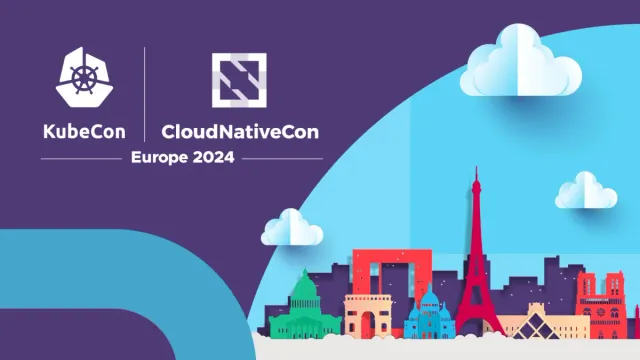
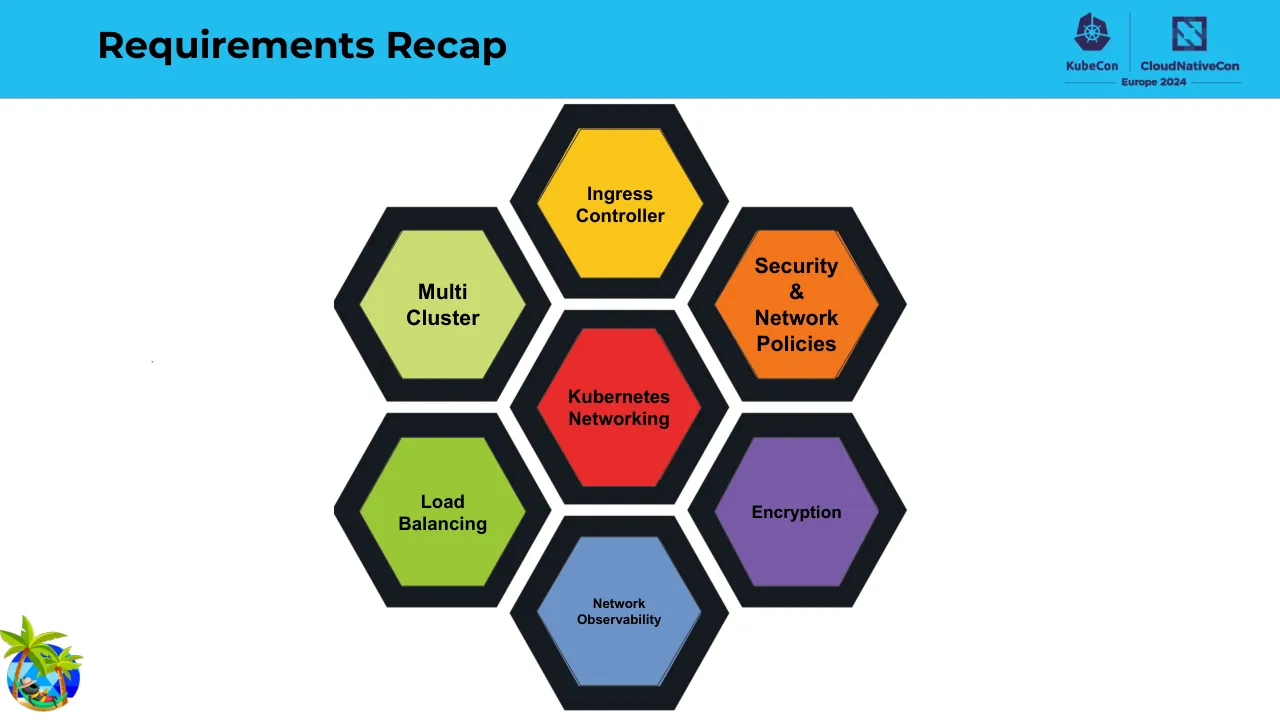
This KubeCon + CloudNativeCon Europe 2024 talk, presented by Nico Vibert and Dan Finneran of Isovalent, begins with a title slide and brief speaker introductions before asking the audience why they attended. It then covers Kubernetes networking for a general audience, explaining the pod network, the need for a CNI plugin, and the resulting challenges for ownership, troubleshooting, observability and control. A second section reviews Kubernetes networking requirements first from the architect's view and then from the application owner's view, using consistent simple diagrams with IP addresses to illustrate pod-to-pod traffic, service access, outbound access and security. A recap slide presents these requirements as connected topics. The talk then introduces Cilium and eBPF, the technology behind it, with examples of securing, observing and exposing a cluster, including Gateway API features. It closes with an overview of the Cilium Certified Associate exam, further learning links, a feedback request and a questions slide. Slides 9 to 25 are especially worth studying for reducing complex networking ideas to one diagram and one question per slide.
Slides worth studying
Questions about this deck
How many slides does the Isovalent Cilium introduction deck have?
The Isovalent deck has 43 pages. Slide 1 is the KubeCon and CloudNativeCon Europe 2024 title slide, and slide 43 is the Thank you slide.
What does the Isovalent deck say about what powers Cilium?
Slide 31 says eBPF makes the Linux kernel programmable in a secure and efficient way. It compares this to JavaScript and the browser with the line: What JavaScript is to the browser, eBPF is to the Linux Kernel.
How is the Isovalent deck structured?
Slide 8 presents the agenda: Why is Kubernetes networking so hard, Kubernetes networking without the jargon, What we need the network to do, Introducing Cilium, What powers Cilium, Cilium in action, Introducing the Cilium Certified Associate exam, Learn more, and Questions. Slides 9 to 25 cover the Kubernetes networking requirements from the architect and application owner views.
What does the Isovalent deck say about the Cilium Certified Associate exam topics?
Slide 39 lists the core areas of the Cilium Certified Associate exam with their weights: Architecture (20%), Network Policy (18%), Service Mesh (16%), Network Observability (10%), Installation and Configuration (10%), Cluster Mesh (10%), eBPF (10%), and BGP and External Networking (6%).
Details
More from Isovalent
All Isovalent decks in the library
Review score: 7 out of 10, Effective
Presentation quality, judged with the SlideDeck Co review heuristic. Ask, evidence and idea merit are not rated here.
The route is clear and well sequenced: agenda (8), problem (10-12), requirements for architects and then application owners (14-25), recap (27), then Cilium, eBPF and demos, so context arrives before it is needed. Slides 15-25 reduce each requirement to one quote and one repeated diagram with IP addresses, which a conference audience can follow. Weaknesses are consequential: slides 14, 16-19 and 22-25 use visibly pixelated and blurred icons, the code and gateway diagrams on slides 33-38 have tiny unreadable text, slide 28 shows an unlabeled hexagon graphic, and the first dozen slides lean on filler title and section pages with black text on busy blue-grey diagonals.
Worth keeping: Keep the one-diagram-one-question sequence on slides 15-25 with the stable cloud, node and IP layout, and the code-with-callout approach on slides 33-34.
Most useful repair: Replace the pixelated icons on slides 14-25 with crisp vector versions and enlarge or crop the code and gateway diagrams on slides 33-38 so the labels can be read from a room.
What would change the score: Cut the speaker and why-are-we-here filler on slides 3-6, break the dense text on slides 10-12 into diagram-led pages, and label the hexagons on slide 28 so the Cilium mapping is visible.
Confidence medium. 43 of 43 pages inspected on contact sheets, 4 at readable size. Reviewed 2026-11-08. Model-assisted review (claude-sonnet-5-5).
Full text of the slides (43 slides)
Every slide's words and a description of its charts and images, so the deck can be searched and rebuilt. Also available as Markdown.
Slide 1
KubeCon / CloudNativeCon / Europe 2024
Visuals: Logos and illustration. Logos: the Kubernetes helm wheel mark in white (KubeCon mark) at upper left, a white vertical divider line, and the CloudNativeCon mark, a white square outline with grey-and-white diagonal stripes. Illustration: a flat paper-cut style Paris skyline along the bottom right, in red, green, cyan, peach and dark purple, showing from left to right a green domed building (Panthéon-like), a red Arc de Triomphe-style arch in peach, a light-blue Sacré-Coeur style basilica, a red Eiffel Tower, a peach building with a glass pyramid (Louvre-style), a red Notre-Dame style cathedral and a red spire at the far right edge; a red arch-shaped Grande Arche block behind the Arc; dark purple city silhouette behind; the lower edge rests on a light grey cloud bank and a light grey ground strip. Three to four white-and-light-blue paper-cut clouds float in the sky: one large cloud top right, one medium cloud right middle, one small cloud centre-left above the skyline. The large light-blue circular sky arc fills the right half, with a darker mid-blue band sweeping in from the lower left.
Slide 2
A Cilium Introduction: Back to Bee-Sics
Nico Vibert & Dan Finneran, Isovalent
Visuals: Full-bleed flat geometric illustration behind all content: a diagonal split from upper-right to lower-left separates a steel-blue area (upper-left) from a dark indigo-purple area. A large lighter purple quarter-circle arc sweeps in from the lower-right, with a steel-blue rectangle block inside its upper part and a purple floor band at the bottom. Mascot illustration: a cartoon bumblebee character, black body with two yellow bands, dark grey antennae, round black head with teal-tinted eyes and black-framed round glasses, a red necktie, light-blue translucent wings with white veining, small black arms and legs, and an orange pointer stick held in its right hand. It stands on a faint darker-purple elliptical ground shadow. The mascot is unboxed, not cropped, with a transparent background. Lighting is flat with no shading beyond small highlights on the body.
Slide 3
Who are we?
Visuals: Abstract background illustration only, no photograph. Large blue diagonal split from upper right corner area down to lower left, with the upper-left triangle in bright blue and the lower-right area in light warm grey. In the lower right, a large blue quarter-circle arc sweeps from the bottom edge up to the right edge, with a lighter cyan rectangle overlapping its upper-left inner area; the rectangle's left edge is vertical at about 76% of slide width and its bottom edge is horizontal at about 87% of slide height, extending to the right edge. Flat vector shapes, no gradients, no shadows, no text in the graphic.
Slide 4
Nico Vibert / Senior Staff Technical / Marketing Engineer
Visuals: Full-slide background artwork: a flat blue (#4A77A0) upper-left plane and a dark purple (#342557) diagonal field with a lighter purple (#4F3A74) arc in the lower right and a thin blue arc behind the photo's top edge. Illustration in bottom-left: a cartoon palm tree pair (lime-green fronds, brown trunks with orange coconuts) over a blue hexagon-patterned circle, with a dark cartoon mascot lying in a green hammock wearing a tan sun hat, holding a cocktail with lime slices, and a red shorts/leg detail; the illustration is roughly square and fully visible, unboxed, with no shadow. Photograph in lower right: black-and-white portrait of a smiling man with short hair, wearing a grey crew-neck sweatshirt, against a near-black vignetted background; front-lit with soft light on the face; shown as a sharp-cornered rectangle bleeding off the right and bottom edges, with no overlay or tint.
Slide 5
Dan Finneran / Principal Community Advocate
Visuals: One circular photograph at the lower right: a smiling man in a black zip hoodie with white drawstrings and a dark cap, holding a white bicycle frame overhead with both wheels, with trees and shrubs behind him in daylight. The photo is cropped to a circle and runs off the bottom edge. Behind it is a larger dark purple circle. One cartoon mascot at the lower left: a black bee-like character with yellow stripes, light blue wings, a red scarf and a cyan eye, sitting on an orange sled and holding a white coffee mug with steam. It has no background and overlaps the left edge.
Slide 6
Why are we here?
Visuals: Full-bleed flat illustration covering the whole slide. A bright sky-blue (#20BDEF) field fills the upper-left area, separated by a diagonal edge running from the top centre-right down to the bottom-left. The lower-right area is light warm grey (#E9E8E6). A large sky-blue (#1FBCEF) circular arc rises from the bottom edge near x 56% and sweeps up to the right edge near y 39%. Inside it sits a lighter aqua (#5BD5F5) rectangular block that starts at about x 75% and y 54% and runs off the right edge and down to about y 87%. Bottom-left corner logo: a 577 by 577 pixel raster icon showing a blue and white striped globe with two green palm trees on top and a small cartoon figure lying in a red and yellow hammock across the lower centre. No photograph, no chart, no table.
Slide 7
Raise your hand if this is you
KubeCon
CloudNativeCon
Europe 2024
me who finally deployed an app on Kubernetes
pssst, you want to learn kubernetes networking?
OWLTURD.COM
Visuals: Three comic illustrations and two logos. (1) Left column, 563 by 852 px image, two stacked panels in a cartoon style with black line art on white and lavender-blue (#B8B8D8) filled figures. Top panel: a tall lavender figure with two large round white eyes and a wide grin leans over a small line-drawn figure seated on a bench with headphones, legs crossed, arms out, and small music notes; a caption with two arrows points at the headphone figure. Bottom panel: a line-drawn person with headphones and arms spread along a bench, grinning, beside a lavender figure with a small blue Kubernetes wheel on its forehead, large round eyes and a grin, with music notes. Lighting is flat, no shading; the panels are cropped at the bottom edge of the image. (2) Right panel, 563 by 410 px image, cropped by the slide, no border. A lavender figure with a large blue Kubernetes wheel logo on its head, one large white eye and one smaller eye, and a wide toothy grin, sits behind a line-drawn person wearing headphones with sweat drops and a smile; a speech bubble with a thick black outline sits at the bottom. The lavender shading is darker (#8F8FB5) on the right half. A faint grey shadow falls under the figures. The watermark OWLTURD.COM appears at lower right of the panel. (3) Palm-island icon, 577 by 577 px, showing a blue globe with palm trees, a small island, and a figure lying on the beach, in full colour (greens, yellows, blue). (4) Logos: the KubeCon logo (a dark purple hexagonal Kubernetes wheel above the word KubeCon) and the CloudNativeCon logo (a dark purple square with a white diagonal stripe pattern above the words CloudNativeCon and Europe 2024), both in dark purple #3B2A5C on the blue band, separated by a thin vertical line.
Slide 8
Agenda
Why is Kubernetes networking so hard?
Kubernetes networking without the jargon
What we need the network to do
Introducing Cilium
What powers Cilium 🐝
Cilium in action
Introducing the Cilium Certified Associate exam 🎓
Learn more
Questions
Visuals: Two small emoji glyphs inline in the bullet text: a honeybee emoji (colour, yellow and black, with blue-grey wings) after 'What powers Cilium' at about x 38.4%, y 53.6%, 3.6% by 6.1%; and a graduation cap emoji (black mortarboard with gold tassel) after 'Introducing the Cilium Certified Associate exam' at about x 78.5%, y 71.0%, 3.6% by 6.1%. Top-right logo lockup: KubeCon wordmark with Kubernetes helm icon (dark navy) and CloudNativeCon wordmark with a navy square icon, separated by a thin vertical divider, with 'Europe 2024' beneath between two thin horizontal rules; logo lockup approximately x 82.5%, y 2%, 14% by 12%, dark navy #1F2A5C on the blue band. No photographs or charts.
Slide 9
Kubernetes Networking / without the usual jargon and no acronyms
Visuals: Full-bleed abstract geometric illustration covering the whole slide. A diagonal edge runs from the top at about x 68% down to the bottom-left at about x 12.5%, splitting the slide into a cyan upper-left area and a light grey lower-right area. In the lower right, a large cyan quarter-circle arc fills from about x 56% at the bottom edge, curving up to the right edge at about y 38%. A lighter cyan rectangle sits inside the arc, from about x 75.6% to the right edge and from about y 53.8% down to y 86.7%, overlapping the arc. Mascot: a small cartoon bee-like insect with black body, yellow and black stripes, a red scarf, cyan wings and a small white face, riding an orange sled with black runners, facing right, placed in the bottom-left corner. Lighting is flat with no shading; no cropping; the mascot is fully visible.
Slide 10
Why are we here? / - “Generally” networking is a tough subject / - Out of the box Kubernetes doesn’t even provide any networking / capabilities, in order to facilitate the networking we require a CNI plugin. / - Kubernetes networking introduces a whole other network that exists / within the cluster itself. / KubeCon / CloudNativeCon / Europe 2024
Visuals: Diagram: a light grey cloud shape (#EAE9E8 fill, thin dark purple #4A3F72 outline) spans the upper-middle of the slide, roughly x 15% to 75%, y 55% to 80%. Three server rack stacks sit beneath the cloud, each a stack of three grey rack-mount servers with dark end caps and small green status LEDs. Each stack has a blue horizontal network bar with white circular end-caps and a grey centre clamp, and a blue vertical connector running down to a dashed purple horizontal line. The middle server stack is the one with the Kubernetes helm logo on top: a blue (#326CE5) heptagon with a white ship's wheel symbol, overlapping the bottom of the cloud. The dashed purple line (#4A3F72, about 0.6% of height stroke) runs across the bottom from about x 15% to x 81% at about y 94%, with solid purple square endpoints at each end. Logos: KubeCon logo (purple Kubernetes-style helm icon above the word KubeCon) and CloudNativeCon logo (purple square-stroke icon above the word CloudNativeCon), separated by a thin vertical divider, with Europe 2024 below in dark purple between two horizontal rules. Mascot: a cartoon bee wearing a red scarf riding an orange sled, in the bottom-left corner, about 7% wide, cropped at the bottom edge area, with a light blue wing.
Slide 11
Why are we here? / - One of the design principles of Kubernetes is to isolate workloads, this / allowing multiple workloads to happily share the same infrastructure. / - To provide this isolation applications within the Kubernetes cluster / doesn’t use the underlying network. / - Applications sit on an internal network referred to as the “pod network” / that is specified as a CIDR. / - The pod network isn’t directly accessible from outside the cluster, and / has the requirement that all pods can communicate within the cluster / (regardless of which node the pod is residing on) / KubeCon / CloudNativeCon / Europe 2024
Visuals: Two logos in the top-right of the header band: (1) KubeCon logo, a dark indigo hexagonal Kubernetes ship's-wheel mark above the word 'KubeCon' in bold indigo; (2) CloudNativeCon logo, a dark indigo square mark with a stylised white 'N'-like pattern above the bold words 'CloudNativeCon', with a thin horizontal rule and 'Europe 2024' in small bold text beneath both, separated from the first logo by a thin vertical divider. Bottom-left corner: a cartoon mascot illustration of a black-and-yellow bee with blue wings, a red scarf and black goggles-like eyes, riding an orange sled, facing right, unboxed on white, sitting at about 6.9% width and 13.3% height of the slide and not cropped. A tiny faint grey dot sits near x 11.8%, y 50% in the white space; no other visuals.
Slide 12
Why are we here? / - This has introduced a few problems: / - Who owns the Kubernetes network? / - Often the network infrastructure aren’t even aware of things like the / pod network / - What tools are available to troubleshoot the Kubernetes network? / - How do you observe the Kubernetes network for checking performance / or bottlenecks? / - How do you enforce controls on the Kubernetes network?
Visuals: Two non-text visuals. (1) The KubeCon | CloudNativeCon Europe 2024 logo lockup at top right: a dark navy Kubernetes-style helm wheel icon above the word KubeCon, a thin vertical divider, a dark navy square-spiral icon above the words CloudNativeCon, and the words Europe 2024 centred beneath with short horizontal rules on each side, all in dark navy #1F2A4D on the cyan band. (2) A cartoon bee mascot at bottom left, cropped to its bounding box, shown flying and riding an orange sled with a red headband-like band, black and yellow striped body, light blue wings, and small white eyes; the bee is on a white background with no overlay.
Slide 13
Kubernetes Networking
For Architects
Visuals: Full-bleed flat graphic background: a blue (#22BDEF) area fills the upper-left, divided by a diagonal edge running from the top at about 68% of the width down to the bottom edge at about 22% of the width, beyond which a light grey (#E9E8E6) area fills the rest. At lower right a large blue (#1EBCEF) arc or circle segment rises from the bottom edge near 56% of the width and curves up to the right edge at about 36% of the height. Inside it, a lighter blue (#5BD5F5) rectangle with a hard left edge at about 75% of the width and a bottom edge at about 87% of the height sits over the arc and runs off the right edge. Mascot logo at bottom-left, about 6.9% wide and 13.3% high: a cartoon bee-like character with a black body, yellow stripes, a red scarf, light blue wings and a white eye, riding an orange sled with black runners, facing right. No photographs, charts or tables.
Slide 14
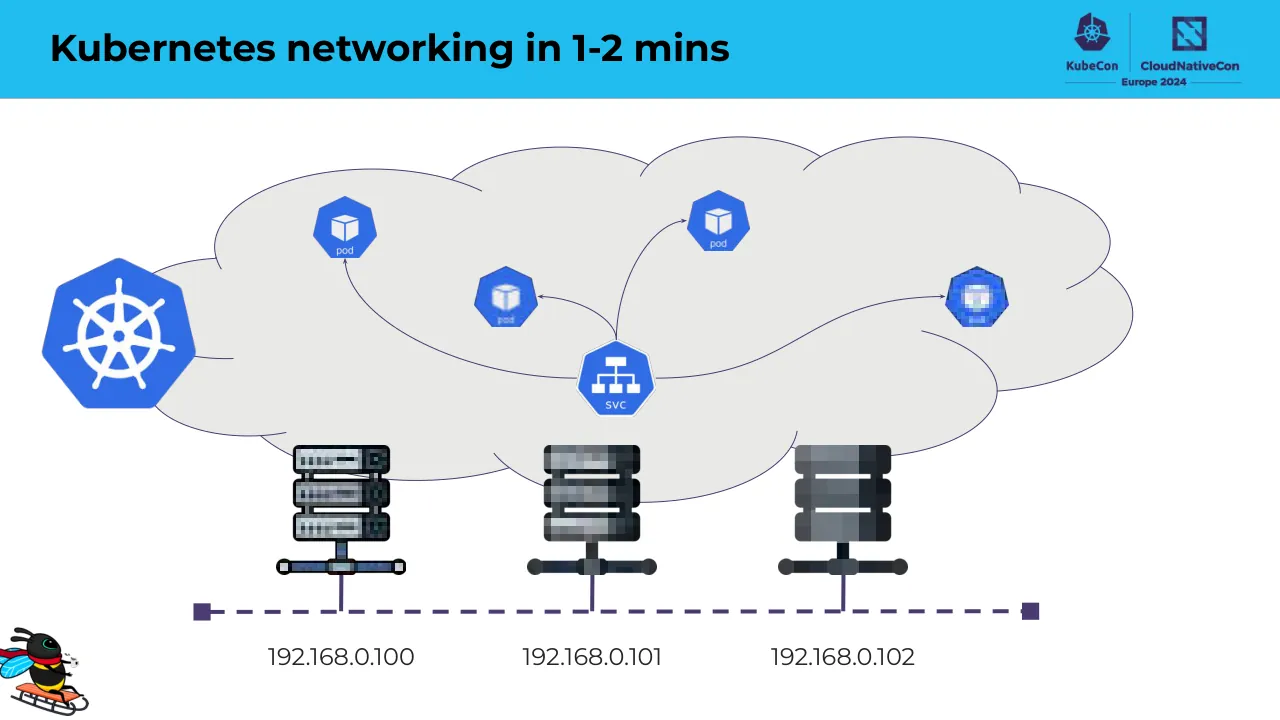
Kubernetes networking in 1-2 mins
192.168.0.100
192.168.0.101
192.168.0.102
Visuals: Diagram: a light grey cloud shape (#EAE9E8) with thin dark purple (#4B3F72-style) outline containing a Kubernetes helm logo at the far left (blue hexagon with white ship wheel, outside the cloud edge, overlapping it), four pod icons (blue hexagons with white cube and the word 'pod' beneath: one at upper left near x 30%, one at upper centre-right near x 54%, one at centre near x 38% with a blurred/pixelated appearance, one at right near x 76% also pixelated), and one service icon (blue hexagon with white hierarchical network icon and the label 'SVC' beneath) at centre bottom of the cloud around x 48%, y 53%. Curved thin purple arrows connect: from SVC to the upper-left pod (arrowhead pointing up at the pod), from SVC to the centre pod (arrowhead pointing left at the pod), from SVC up to the upper-right pod (arrowhead at the pod), and from SVC right-and-up to the right pod (arrowhead at the pod). A thin curved purple line runs from the Kubernetes helm logo to the cloud edge. Three server icons (grey stacked rack units with dark bases and pixelated/mosaic textures, the left one lighter, the centre and right ones darker) sit below the cloud, each connected by a short vertical purple line down to a horizontal dashed purple line (stroke about 0.4% of height, dash pattern) that runs from a small solid purple square at x 15.5% to another at x 80.5%, y about 85%. Bottom-left corner: a small cartoon bee-like mascot riding a orange sled with a red scarf and blue wings, about 0% to 7% horizontally and 87% to 100% vertically. Colours: header band #22BDEE-style cyan blue, cloud #EAE9E8, pod and SVC icons blue #326CE5-style, arrows and outlines dark purple #4B3F72.
Slide 15
The requirements for Kubernetes networking
“Pods need to be able to
communicate with one
another”
Visuals: Two raster images. (1) Top-right logo lockup in the header band: a KubeCon emblem (ship's wheel inside a dark navy hexagon-like shape) followed by a thin vertical divider and a CloudNativeCon emblem (dark navy square with a stylised diagonal-cut N-like mark), with the words 'KubeCon' and 'CloudNativeCon' in dark navy bold below their emblems, and a horizontal rule with 'Europe 2024' centred beneath, all in dark navy/purple (#2E2A5E approx.) on the cyan band. (2) Bottom-left mascot illustration at x 0.0, y 86.7, w 6.9, h 13.3: a cartoon bee/wasp-like insect with a black and yellow striped body, black head, cyan/light-blue wings, a red headband or scarf, riding a small orange sled with black runners, slightly rotated, whole figure visible, not cropped, no overlay, on white. A small faint dot is visible above the quote near x 11.8, y 50.0 with no clear meaning.
Slide 16
The requirements for Kubernetes networking
KubeCon / CloudNativeCon / Europe 2024
“Pods need to be able to
communicate with one
another”
192.168.0.101
192.168.0.102
Visuals: Diagram: a light grey (#EAE9E8) cloud shape with a thin dark purple (#4B3F72) outline, with a blue Kubernetes wheel logo at its upper-left edge. Two pods are drawn as small pixelated blue heptagon-like Kubernetes pod icons: one at the left-centre of the cloud and one at the upper-right. A double-headed thin purple arrow connects the two pods horizontally. Dotted purple curved arrows run upward from two server icons (dark grey stacked rack-style server units with a purple base, one at lower-left and one at lower-right) into each pod. A dotted curved arrow also runs between the two servers beneath the cloud. The two servers sit on a dashed purple horizontal line ending in purple square terminals, and each server is labelled with its IP address below. Logos: Kubernetes wheel (blue, white ship wheel), KubeCon logo and CloudNativeCon Europe 2024 logo at top right, and a small cartoon bee/wasp mascot riding a red-and-orange sled at bottom left. Composition: diagram occupies roughly the right half, cloud spans from about 50% to 99% of the width and from 15% to 71% of the height.
Slide 17
The requirements for Kubernetes networking
“We need our applications to
be accessible”
192.168.0.250:8080
:8080
192.168.0.102
Visuals: Diagram on the right half: a large light-grey cloud shape (#EAE9E8, thin dark purple outline) at about x 49.7% to 99.1%, y 15.5% to 71%. Inside the cloud, a blue Kubernetes wheel logo sits at top left (x 48.1%, y 20.9%), a dark-blue hexagonal pod/endpoint icon sits at upper right (x 85.4%, y 28.1%), and a blue hexagon icon labelled 'SVC' with a white network-hierarchy symbol sits lower centre (x 70.4%, y 44.6%). Below and overlapping the cloud is a dark charcoal (#2E3339) stacked server/router icon with three rack units and a horizontal bar with two round ends and a vertical stem (x 69.8%, y 63%, w 7.5%, h 18%). A dark purple dashed horizontal line (#4B3F72, about 3px dash) runs from x 56.4% to 88.7% at y 86.2%, with solid square end caps, and a short vertical stem connects it up to the server. Thin dark purple curved arrows connect: the label '192.168.0.250:8080' curves up to the SVC icon; the SVC icon points up-right to the pod icon; the ':8080' label curves up to the bottom of the SVC icon; and a further curved line runs from the cloud's lower edge down to the server. Labels '192.168.0.250:8080', ':8080' and '192.168.0.102' are dark grey text. Also present: the KubeCon and CloudNativeCon logos top right in the header, and a small cartoon bee mascot in the bottom-left corner. Two 2 by 2 pixel images are invisible specks, one near the centre of the cloud right and one at the cloud edge. No photographs; flat vector style.
Slide 18
The requirements for Kubernetes networking
“Pods need to communicate / with the outside world”
192.168.0.101
192.168.0.102
Visuals: Diagram: a light grey (#EAE9E8) cloud shape with thin dark purple (#3D3566) outline occupies the upper right, containing a pixelated blue Kubernetes wheel logo at upper left of the cloud and two smaller blue Kubernetes hexagon-style icons (one at about the centre-left, one at upper right of the cloud). Below the cloud are two dark grey (#2F3338) server-rack icons, each with three stacked rounded units and a stand with a horizontal bar and round ends; a dashed dark purple horizontal line connects their bases with purple square end caps. Two curved thin purple arrows run from each server's upper area up into the cloud icons. Lower left, a navy (#000080) outline globe icon with meridian and parallel lines, with two thin purple curved arrows pointing to it from the server area and labelled by the two IP addresses 192.168.0.101 and 192.168.0.102 printed below the servers. Lower left corner: a small cartoon bee-like mascot riding a orange sled with red scarf, in yellow, black, red and blue. No chart or table.
Slide 19
The requirements for Kubernetes networking
KubeCon | CloudNativeCon Europe 2024
“Pods need to communicate
with the outside world”
192.168.0.250
192.168.0.101
192.168.0.102
Visuals: Diagram on the right: a large light grey (#EAE9E8) cloud shape with a thin dark purple-navy (#3B3560) outline, containing a pixelated blue Kubernetes-style heptagon icon at top left of the cloud (about 48-57% x, 21-36% y), a solid blue (#4069B5) Kubernetes-style hexagon/heptagon icon at upper centre of the cloud, a curved thin purple arrow from the blue icon down-left to a dark navy (#262A5C) circular router icon with four white arrows (about 62% x, 48% y) labelled 192.168.0.250 below it. Below the cloud are two dark grey (#2F3439) rack-server icons, each with three stacked rounded units and a horizontal bus with two circular ends; a dashed dark purple (#4B3F72) line connects them with square end caps, the left server labelled 192.168.0.101 and the right labelled 192.168.0.102. A thin curved purple arrow runs from the cloud's lower left edge to a navy (#000080) outline globe icon at lower left (about 19-27% x, 75-90% y) with its arrowhead pointing at the globe. A small cartoon bee on a sled illustration sits in the bottom-left corner (about 0-7% x, 87-100% y), rendered in yellow, black, red and light blue. A tiny dot is visible at about 12% x, 50% y. The cloud and icons are not cropped.
Slide 20
Kubernetes Networking
For Application owners
Visuals: Full-bleed vector background illustration: a diagonal split from the top edge near x 68% down to the bottom-left corner near x 12.5%. The upper-left triangle is bright sky blue, the lower-right area is light warm grey, and a large blue circular arc with a lighter blue rectangular block sits in the bottom-right, cut off by the slide edges. One logo: a cartoon bee mascot, black body with yellow stripes, a red scarf, light blue translucent wings and a small white-tipped stinger, riding an orange sled, placed in the bottom-left corner.
Slide 21
The requirements for Kubernetes networking
“We need to secure our / Applications”
192.168.0.101
192.168.0.102
Visuals: Diagram: a light grey (#EAE9E8) cloud shape with dark purple (#4B3F72-ish) outline occupies the right half (about x 49.7–99.1%, y 15.5–71%). Inside the cloud, seven hexagonal Kubernetes-style pods (blue #3A5FA0 to #4A6FBF gradient fill, dark outline) are linked by thin dark purple arrowed lines: pod at top-left-centre linked by a left-pointing arrow to a blue netpol hexagon (bright blue #2F6FE0 with white up/down arrows and padlock and the word 'netpol'), which links by a right-pointing arrow to a pod at top-right; that top-right pod has a curved arrow looping down-left to a pixelated blue Kubernetes service icon (network hierarchy glyph) at centre-right; a pod at centre-left and a pod at lower-centre, the lower-centre pod linked by a horizontal line to a second netpol hexagon which curves up-right to the service icon. A pixelated blue-and-white hexagon (mosaic Kubernetes icon) sits at top-left above the cloud. A blue netpol hexagon sits below the cloud at lower-centre with a curved arrow rising up to the centre-left pod and a curved arrow pointing left to the globe. The globe is a dark navy (#000080-ish) outline wire-frame globe icon, about 13% wide, at lower-left. Two dark charcoal (#2E3238) server/rack icons with dark grey horizontal disks and a purple (#4B3F72) dashed horizontal line connecting them; their labels are '192.168.0.101' (left) and '192.168.0.102' (right). Bee mascot: colourful cartoon bee riding a sled, yellow and black body, red scarf, blue wings, orange sled, at bottom-left corner.
Slide 22
The requirements for Kubernetes networking
KubeCon / CloudNativeCon / Europe 2024
“We need to secure our
Applications”
192.168.0.101
192.168.0.102
Visuals: Diagram: a grey cloud shape (fill #EAE9E8, outline dark purple #3D3566, about 1.5 pt) occupies the right half and contains two blue heptagons, one at about 57.9% x and 39.9% y and one at about 83.4% x and 34.0% y, joined by a thin purple double-headed arrow running from the left heptagon to the right one. A third, lighter blue heptagon (about #6485C8) sits on the cloud's upper-left edge, outside the inner group. Below the cloud are two dark grey (#2B2F36) server icons, each a stack of three rounded rack units on a vertical post with a horizontal base bar with round ends, labelled 192.168.0.101 (left) and 192.168.0.102 (right). Each server has a dotted purple arrow pointing up into its heptagon in the cloud. A dashed purple line (#4A3F73, about 0.4% of slide height stroke) with square end caps runs horizontally between the two servers beneath them. A dotted purple line runs from each server down to a Kubernetes wheel logo (blue #326CE5 wheel on a white rounded square) centred under the dashed line. The bee mascot (a cartoon bee in red, black and yellow riding an orange sled, with blue wings) sits in the bottom-left corner, cropped by the slide edge. A tiny grey speck is visible near the quote at about x 11.8%, y 50%.
Slide 23
The requirements for Kubernetes networking
“We need our applications to / be accessible”
h t t p : / / 1 9 2 . 1 6 8 . 0 . 2 5 0 / y e l l o w
192.168.0.250:80
192.168.0.102
Visuals: Diagram: a light grey (#EAE9E8) cloud outlined in dark purple (#4B3F72, about 1.5 px stroke) spanning about x 50 to 98.6 and y 16 to 70. Inside it are four Kubernetes-style heptagon icons: a large pale blue heptagon at top left (about x 48.1 y 20.9, 8.6 by 14.9, fill about #6A8FD0), a dark blue heptagon above-centre (about x 59.8 y 25.1, 4.9 by 8.4, fill about #3A62A8), a pixelated bright blue heptagon at centre (about x 67.3 y 34.1, 6.2 by 10.6), a dark blue heptagon at top right (about x 85.4 y 28.1, 4.9 by 8.4, fill about #3E68B0), and a second pixelated bright blue heptagon lower right (about x 78.5 y 42.1, 6.2 by 10.6). Curved purple arrows (about #4B3F72, 1.5 px) connect them: one from the service icon up to the centre pixelated heptagon, one from the centre heptagon curving up-left to the upper dark heptagon, and one from the lower-right pixelated heptagon curving up to the top-right dark heptagon, each with an arrowhead at the target. A blue service icon (about #2B7BE0, hexagonal with white crossed-arrow glyph, about x 49.2 y 56.4, 7.5 by 10.3) sits at the lower left of the cloud and connects to the centre heptagon with the first arrow. A dark charcoal (#3A3F47) server stack of three rounded rectangles with white gaps (about x 69.7 y 62.9, 7.5 by 13.3) sits at the bottom of the cloud, with a dark grey horizontal bar and two round end caps (about x 68.4 y 88.5, 10.1 by 2) below it and a purple vertical stem down to a dashed purple line (#4B3F72, about 2.5 px dashes) from x 56.3 to 88.6 at y 86.2 with solid square end caps. A small cartoon bee on a orange sled (about x 0 y 86.7, 6.9 by 13.3) sits at bottom left. Lighting is flat; no photograph is present, and nothing is cropped or tinted.
Slide 24
The requirements for Kubernetes networking / “We need our applications to / be accessible” / http://192.168.0.250/red / 192.168.0.250:80 / 192.168.0.102
Visuals: Illustration (diagram) on the right half: a light grey (#EAE9E8) cloud shape with a thin dark purple outline (#3B3366, about 1 px) contains five Kubernetes-style heptagon pods. The large pod at top left is a flat light blue (#6A8FD0) heptagon. A dark blue (#3A62A8) pod sits at upper centre-left, a medium blue (#4A6FB8) pod at centre, and a dark blue (#3E68B0) pod at upper right. A pixelated blue pod (#5E8FE8 with dark navy #1E2A4A edges) sits at lower right of the cloud. Three thin dark purple curved arrows (#3B3366) connect the pods: one from the centre pod curving up-left to the upper-left small pod, one from the lower-left of the cloud curving right to the pixelated pod, and one from the pixelated pod curving up-right to the upper-right pod, with arrowheads at the destination pods. A blue checkered heptagon icon (#2E6FD8) sits at lower left of the cloud, representing an ingress or service, labelled 192.168.0.250:80 beneath it. Below the cloud's lower right edge is a dark charcoal (#343A42) stacked server rack of three units with a dark bar and dots beneath (a network switch). A vertical dark purple line (#4B3F72) runs from the rack down to a horizontal dashed purple line (#4B3F72, dashes about 1 px thick) with solid square end caps (#4B3F72) at each end, labelled 192.168.0.102. Left column: the quote is a centred, bold sans-serif text block. The URL is set in a bold Courier-style monospace. Logos: the KubeCon and CloudNativeCon Europe 2024 logo lockup at top right, with a Kubernetes wheel icon in dark purple (#3B2F6B) and a square stylised icon in dark purple, separated by a thin vertical divider. Bottom left: a cartoon bee with a red headband and cyan wings riding an orange sled, in black, yellow, red, cyan and orange, not cropped. A tiny grey speck sits in the left column above the quote.
Slide 25
The requirements for Kubernetes networking / Defines common gateways / Attach ingress routes / Services, TCP and UDP / Routes / More being added / 192.168.0.250:80 / 192.168.0.102
Visuals: Diagram: a light grey (#EAE9E8) cloud outline with purple-navy (#3F3A6E) stroke containing five blue heptagon-style Kubernetes node icons (one large pale blue at top-left, four smaller mid-blue nodes at upper-middle, centre, right and lower-right); curved purple-navy arrows connect the small node at upper-middle back to the centre node, the centre node to the lower-right node, the lower-right node up to the upper-right node, and a long arrow from the lower-left gateway to the lower-right node. A blue gateway icon (dark blue hexagon with white arrows, labelled 192.168.0.250:80) sits at lower-left of the cloud. Below the cloud a dark grey server stack (three stacked rounded rectangles #3A3F45 with a vertical post and a horizontal bar) connects by a purple line to a dashed purple horizontal line with square end caps, labelled 192.168.0.102. Logo: Kubernetes wheel logo in royal blue #326CE5 with white helm, beside the words 'gateway api' in black lowercase rounded sans-serif. KubeCon and CloudNativeCon Europe 2024 logos at top-right in navy. Bee-on-sled mascot bottom-left in yellow, black, red and blue.
Slide 26
What we need the network to do
We need our applications to have accessible IP addresses
We need our applications to be able to communicate with other applications
We need our applications to be able to access the outside world (outbound access)
We need our applications to be accessible from the outside world (inbound access)
We need our applications to be secured and our data protected
We need our applications to be globally resilient and highly available
We may need to meet regulatory goals and requirements
We need to be able to operate and troubleshoot when applications misbehave
Visuals: Two non-text elements. (1) Top-right logo lockup in the blue band: a dark navy (#2B2A4C approx.) Kubernetes helm wheel icon with the text KubeCon, a vertical divider, a dark navy square-and-diagonal CloudNativeCon icon with the text CloudNativeCon, and below them a thin rule either side of the text Europe 2024. (2) Bottom-left cartoon illustration: a stylised globe-shaped badge (blue sphere with white and light-blue facets) with two green palm trees on top and a small dark character lying in a red hammock in the lower centre; it is not cropped, sits on white, and is roughly square at 7% of slide width. No photographs, charts or tables.
Slide 27
Requirements Recap
Ingress / Controller
Security / & / Network / Policies
Multi / Cluster
Kubernetes / Networking
Load / Balancing
Encryption
Network / Observability
Visuals: Seven hexagons arranged as a honeycomb cluster with flat-topped... pointy-sided hexagon cells: a centre red hexagon labelled Kubernetes Networking, surrounded by six hexagons: Ingress Controller at the top (yellow #F9C51A), Security & Network Policies at the upper right (orange #F1751C), Encryption at the lower right (purple #795AA6), Network Observability at the bottom (blue #6C93C8), Load Balancing at the lower left (green #98C736), and Multi Cluster at the upper left (light green #CADC71). Each hexagon has a thick near-black (#14181F) outer border ring with a thin lighter edge around the coloured fill, and the cells are separated by white gaps. Top-right of the slide: KubeCon logo (dark navy hexagon with a ship's wheel icon, wordmark KubeCon) divided by a vertical rule from CloudNativeCon logo (dark navy square with a stylised N-like mark, wordmark CloudNativeCon) above a horizontal rule with Europe 2024. Bottom left: a round emoji-style icon of two palm trees over a blue globe with a small figure in a hammock. A tiny grey dot sits at about x 11.8%, y 50% with no meaning.
Slide 28
Addressing these requirements with Cilium / KubeCon / CloudNativeCon / Europe 2024
Visuals: Diagram: a honeycomb cluster of seven flat-topped hexagons with thick near-black outlines, arranged as a centre hexagon with six neighbours. Top: yellow hexagon. Upper-left: light yellow-green hexagon. Upper-right: orange hexagon. Centre: red hexagon. Lower-left: green hexagon. Lower-right: purple hexagon. Bottom: light blue hexagon. Each hexagon has a black outer border about one fifth of its width, a coloured inner fill, and a small white gap separating it from its neighbours. No arrows, labels or connecting lines. Logos: KubeCon logo (ship's wheel in a hexagon, navy) with the word KubeCon, and CloudNativeCon logo (square with diagonal stripes, navy) with the words CloudNativeCon and Europe 2024 beneath, separated by a thin vertical divider line. Bottom-left: a colourful cartoon illustration of a globe with palm trees and a small figure lying in a hammock. A tiny grey speck appears at about x 11.8%, y 50%, probably a stray mark.
Slide 29
Enter Cilium / The De-Facto Kubernetes Networking Platform
Visuals: Background artwork: a full-bleed flat graphic. A sky-blue (#20BDEF) field fills the upper-left and lower-left. A light-grey (#E9E8E6) band enters from the top at about 69% of width and runs diagonally down-left to the bottom edge at about 12.5% of width, covering the right side. In the lower right, a large sky-blue arc (about #20BDEF) rises from the bottom edge near 56% of width to the right edge near 72% of height. Inside that arc, a lighter blue rectangle (about #5BD4F5) spans from about 76% of width to the right edge and from about 54% to about 87% of height. Logo: a small full-colour clip-art illustration in the bottom-left corner showing a blue-and-white striped globe with two green-leafed palm trees, and a small figure in a hammock with a dark hat at its base, in red, green and yellow. No photographs.
Slide 30
Do we need all these tools? / WHERE / IS MY / APP? / NETWORK POLICY / MULTI- CLUSTER / LOAD BALANCER / INGRESS / KUBE-PROXY / SERVICE MESH / SIDECAR / APPLICATION / CILIUM / APPLICATION / cilium / KubeCon / CloudNativeCon / Europe 2024
Visuals: Illustration (full-slide-width composition, boxed by its white/pale background, not full-bleed): On the left, an isometric block of layered earth in tan, beige and brown. Its top surface shows a dirt mound with a grey metal shovel stuck in a hole and dirt clods flying up. A white speech bubble with black uppercase text WHERE IS MY APP? points down into the hole. The block's cut face is striped with eight labelled bands from top to bottom: NETWORK POLICY, MULTI-CLUSTER, LOAD BALANCER, INGRESS, KUBE-PROXY, SERVICE MESH, SIDECAR, APPLICATION; the bottom APPLICATION band is blue. A pale grey-blue arrow curves from the block's right side to a small cilium logo (a cluster of six hexagons in green, yellow, orange, red, purple and blue with the lowercase word cilium beneath), then a grey block arrow points right toward the second block. On the right, an isometric slab with a green grassy top and brown soil sides; a cartoon bee (black and yellow striped body, blue wings, antennae, one arm raised) stands on the grass among green bushes and grass tufts, with a white speech tail pointing left toward the first block. The slab's brown front band reads CILIUM and its blue bottom band reads APPLICATION. Lighting is flat and cartoon-like with a pale blue sky gradient behind the bee. Dominant colours: tan, brown, blue, green, yellow and black. Faint pale blue-grey blob shapes sit in the lower background. Small grey dot at the far left, about 12% across and 50% down.
Slide 31
What powers Cilium?
Makes the Linux kernel programmable in a secure and efficient way.
“What JavaScript is to the browser, eBPF is to the Linux Kernel”
Visuals: Logo: the eBPF logo, a black bee with a yellow abdomen and light-blue wings, with the lowercase italic 'e' and bold uppercase 'BPF' in black to its right. Its bounding box is 1200 by 600 pixels, at x 15.1%, y 9.1%, 62.3% by 55.4%. It is placed without a box or tint. Logos: the KubeCon logo (a dark purple ship's-wheel hexagon with 'KubeCon' beneath) and the CloudNativeCon logo (a dark purple square with a stylised N, with 'CloudNativeCon' beneath), separated by a thin vertical divider, with 'Europe 2024' below both on a horizontal rule. They sit in the header band at the top right. Illustration: a small mascot of a cartoon bee wearing a red headband and red scarf, riding a orange sled, with light-blue wings, black body and yellow stripes. It is 577 by 577 pixels at x 0.0%, y 86.7%, 6.9% by 13.3%, unboxed.
Slide 32
Cilium in Action
Securing your cluster
Observing your cluster
Accessing your cluster
Visuals: Decorative geometric illustration only, no photograph or chart. A large diagonal split runs from the top centre-right down to the bottom-left: the upper-left triangle is bright cyan blue and the lower-right area is light warm grey. In the lower-right corner a large light-blue circle (about #5FD4F5 with a darker cyan #22BDEF band below it) is partly cropped by the slide edges, and a rectangular lighter-blue block (about #5DD5F5) sits inside it, flush to the right edge and the bottom of the circle band. No text, icons, or logos in the visuals.
Slide 33
Cilium In Practice - Securing Your Cluster / Who the policy applies to / In which traffic direction does this / policy apply to? / Ingress: traffic to the pods this / policy applies to / From which source endpoints / Over which ports
Visuals: A dark code editor screenshot (about x 4.6%, y 16.9%, w 31.5%, h 77.3%) showing a Cilium CiliumNetworkPolicy YAML file with three traffic-light dots at top left (red, yellow, green). Code lines: apiVersion: cilium.io/v2 / kind: CiliumNetworkPolicy / metadata: / name: ingress-policy / namespace: endor / spec: / endpointSelector: / matchLabels: / class: deathstar / org: empire / ingress: / - fromEndpoints: / - matchLabels: / class: tiefighter / org: empire / toPorts: / - ports: / - port: "80". Three white rounded-rectangle outlines highlight the spec block (endpointSelector through org: empire), the ingress: line (a thin rectangle), and the fromEndpoints through port "80" block. Three light-blue (#4FC3F7-ish) straight connector lines run from these outlines to the three right-column rows: the spec outline to the top row, the ingress line to the middle row, and the fromEndpoints outline to the bottom row. Logos: KubeCon (dark purple Kubernetes wheel mark with wordmark) and CloudNativeCon (dark purple geometric icon with wordmark and 'Europe 2024' line) in the header.
Slide 34
Cilium In Practice - Securing Your Cluster / KubeCon / CloudNativeCon / Europe 2024 / apiVersion: cilium.io/v2 / kind: CiliumNetworkPolicy / metadata: / name: egress-policy / namespace: endor / spec: / endpointSelector: / matchLabels: / class: tiefighter / org: empire / egress: / - toFQDNs: / - matchName: disney.com / toPorts: / - ports: / - port: "443" / - toFQDNs: / - matchName: swapi.dev / toPorts: / - ports: / - port: "443" / toEndpoints: / - matchLabels: / class: deathstar / org: empire / toPorts: / - ports: / - port: "80" / Who the policy applies to / - In which traffic direction does this / policy apply to? / - Egress: traffic from the pods this / policy applies to / - To which destinations (domains or / endpoints) / - Over which ports
Visuals: Illustration: a screenshot of a dark code editor window showing a Cilium CiliumNetworkPolicy YAML file named egress-policy in namespace endor. Three window-control dots at top left of the panel: red #FF5F57, yellow #FEBC2E, green #28C840. Code text is monospace, light grey/white with tan keys and green quoted strings. Three white rounded-rectangle outlines highlight regions: (1) spec with endpointSelector matchLabels class tiefighter and org empire, about 4.2% to 26.8% horizontally and 35.9% to 49.2% vertically; (2) a thin rectangle around the egress line, about 4.2% to 26.8% horizontally and 49.3% to 51.7% vertically; (3) a large rounded rectangle around the toFQDNs, toPorts, toEndpoints and ports entries, about 4.6% to 26.9% horizontally and 51.9% to 97.8% vertically. Three blue (#56BDEB) straight connector lines of about 1.5 px width run from the highlight outlines to the right-hand boxes: the first from the spec outline to box 1, the second from the egress outline to box 2, and the third from the bottom highlight to box 3. Logos: KubeCon ship's-wheel mark with KubeCon wordmark, vertical divider, CloudNativeCon stylised N mark with CloudNativeCon wordmark, and Europe 2024 line below, all in dark navy. No photographs.
Slide 35
Cilium In Practice - Observing Your Cluster
KubeCon
CloudNativeCon
Europe 2024
disney.com
443
TCP
world
443
TCP
swapi.dev
443
TCP
endor
xwing
tiefighter
deathstar
80
TCP
Visuals: One network-flow diagram (screenshot of a Cilium observability map) on a pale grey-blue (#F0F3F8) panel. Shapes: five white rounded cards with soft drop shadows (disney.com, world, swapi.dev, xwing, tiefighter, deathstar; six cards in total). Three cards labelled with a blue globe icon (world, disney.com, swapi.dev) and three with a blue Kubernetes wheel icon (xwing, tiefighter, deathstar). Each globe card has an inner row showing a purple target icon, a purple arrow, and the port number in purple bold, followed by a grey dot and 'TCP' in black: world 443 TCP, disney.com 443 TCP, swapi.dev 443 TCP, deathstar 80 TCP. Grey dashed rounded rectangle labelled 'endor' in grey encloses xwing, tiefighter and deathstar. Connectors are thin grey lines with small grey arrowheads and grey circular endpoint nodes: from world a line leaves its left edge with a red stub and bends down-right to xwing; from xwing lines run up-right to world's right edge, to disney.com via a node at its left edge, and to swapi.dev via a node at its left edge; from xwing a line runs to tiefighter; from tiefighter lines run to swapi.dev and to a node at deathstar's left side; a line from disney.com runs down to deathstar; a small padlock icon sits on the link near deathstar. Arrowheads point toward the destination nodes.
Slide 36
Cilium In Practice - Making Your Cluster Accessible
KubeCon / CloudNativeCon
Europe 2024
Built-in Gateway API support
Use Cases:
● Traffic Management
● Rolling deployments
● A/B Testing - Canary
Features:
● HTTP routing
● HTTP traffic splitting and load-balancing
● HTTP request and response header rewrite
● HTTP redirect and path rewrites
● HTTP mirroring
● Cross-namespace routing
● TLS termination and passthrough
● gRPC routing
$ curl http://www.domain.net/bar
$ curl http://www.domain.net/foo
$ curl http://www.domain.net/app
gRPC
$ grpcurl hipstershop.ProductCatalogService/ListProducts
requests
$ curl http://www.olddomain.net/
Redirect - 302 Status Code
http://www.newdomain.net/
Cluster
cilium
gateway api
/app 99%
/app 1%
/bar
/foo
requests
app
ProductCatalogService
app-beta
bar-service
foo-service
Visuals: One illustration/diagram occupying the right half of the slide (x 53.1%, y 14.1%, w 46.9%, h 85.4%, 751 by 768 pixels), placed on white, with no crop or tint. It shows a Kubernetes-style gateway API routing diagram. A large blue Kubernetes-wheel hexagon in the centre is labelled 'gateway api' in black monospace below it. Above it, five laptop icons (silver/grey) each send an arrow into or out of the hub: a laptop at top left labelled '$ curl http://www.domain.net/foo' sends a magenta arrow down-right; a laptop at top centre labelled '$ curl http://www.domain.net/bar' sends a purple arrow straight down; a laptop at top right labelled '$ curl http://www.domain.net/app' sends a brown/gold arrow down-left; a laptop at lower left with a green 'gRPC' label and '$ grpcurl hipstershop.ProductCatalogService/ListProducts' in teal sends a teal arrow labelled 'requests' to the hub; a laptop at far right sends a red arrow labelled '$ curl http://www.olddomain.net/' and receives a green arrow labelled 'Redirect - 302 Status Code http://www.newdomain.net/'. Below the hub, a light blue-grey dashed ellipse arc encloses services: a brown arrow labelled '/app 99%' goes to a blue hexagon SVC labelled 'app' at lower left; a dashed beige arrow labelled '/app 1%' goes to a blue hexagon SVC labelled 'app-beta'; a purple arrow labelled '/bar' goes straight down to a blue hexagon SVC labelled 'bar-service'; a magenta arrow labelled '/foo' goes to a blue hexagon SVC labelled 'foo-service'; a teal arrow labelled 'requests' goes to a blue hexagon SVC labelled 'ProductCatalogService' at right. A blue Kubernetes Cluster hexagon sits at the far right, labelled 'Cluster' in blue. At the left, a Cilium logo (cluster of six coloured hexagons in green, yellow, orange, red, purple and blue above the word 'cilium' in black lowercase) sits on the dashed line. Dominant colours: blue #3A6FE0, magenta #E040D0, purple #6B4FE0, teal #22C4A8, brown #B08A3A, red #D0282E, green #3BAA3B on a pale blue-grey #EEF3FA panel.
Slide 37
Cilium In Practice - Making Your Cluster Accessible
KubeCon
CloudNativeCon
Europe 2024
apiVersion: gateway.networking.k8s.io/v1
kind: HTTPRoute
metadata:
name: foo-app-route
spec:
parentRefs:
- name: my-cilium-gateway
namespace: default
rules:
- matches:
- path:
type: PathPrefix
value: /foo
backendRefs:
- name: foo-service
port: 9080
$ curl http://
www.domain.net/bar
$ curl http://
www.domain.net/foo
$ curl http://
www.domain.net/app
gRPC
$ grpcurl
...ProductCatalogService/
ListProducts
requests
$ curl
http://www.olddomain.net/
Redirect - 302 Status Code
https://www.newdomain.net/
cilium
gateway api
Cluster
/app
/app
/bar
/foo
requests
app
app-beta
bar-service
foo-service
ProductCatalogService
Visuals: Two raster images. (1) Left: a dark code window (macOS-style terminal) with three traffic-light dots at top left (red, yellow, green), showing a Kubernetes YAML HTTPRoute manifest in monospace type: keys in light orange, values in white, the value /foo and the name foo-service in lime green. (2) Right: a network diagram on white. A large blue Kubernetes wheel hub labelled 'gateway api' sits at centre; a dashed blue horizontal line runs across it, with a 'cilium' logo (cluster of coloured hexagons with the word cilium) at left and a blue Kubernetes wheel labelled 'Cluster' at right. Below the hub, a pale grey rounded arc encloses five blue hexagonal service icons labelled app (left), app-beta (lower left), bar-service (bottom centre), foo-service (lower right) and ProductCatalogService (right). Arrows: a brown arrow labelled '/app' with a small tag runs from the hub to app; a tan dashed arrow labelled '/app' with a tag runs to app-beta; a violet arrow labelled '/bar' runs straight down to bar-service; a magenta arrow labelled '/foo' runs to foo-service; a teal arrow labelled 'requests' runs to ProductCatalogService. Five laptop icons: three across the top each with a curl command (foo, bar, app) and magenta, violet and brown arrows into the hub; one at left labelled gRPC with a teal arrow labelled 'requests'; one at upper right with red and green arrows labelled curl, Redirect - 302 Status Code. A thin magenta rotated rectangle outline encloses the foo and bar paths diagonally from top left to bottom right. Images are not cropped, boxed with no border.
Slide 38
Cilium In Practice - Making Your Cluster Accessible / KubeCon / CloudNativeCon / Europe 2024 / apiVersion: gateway.networking.k8s.io/v1 / kind: HTTPRoute / metadata: / name: load-balancing-route / spec: / parentRefs: / - name: my-cilium-gateway / rules: / - matches: / - path: / type: PathPrefix / value: /app / backendRefs: / - kind: Service / name: app / port: 8080 / weight: 99 / - kind: Service / name: app-beta / port: 8090 / weight: 1 / cilium / gateway api / small diagram labels are blurred and not legible
Visuals: Two visuals. (1) A dark code editor window with three macOS-style traffic-light dots at top left (red, yellow, green) containing a YAML Gateway API HTTPRoute listing, monospace, keys in orange and values in white or light grey, with the values app and app-beta and the numbers 99 and 1 in green. (2) A blurred-label network diagram, cropped to its own white background: a central blue Kubernetes wheel icon labelled 'gateway api' in bold dark text, with purple, pink, red, green and gold arrows radiating to five laptop icons at the top and left and right edges (labels above and beside the arrows are blurred and illegible), a Cilium flower-of-spheres logo with the word 'cilium' at left joined by a dashed grey line to the hub, and blue Kubernetes-style service icons at lower left, lower centre, lower right and right, each with a tiny illegible label; a small blue Kubernetes icon sits at upper right. Pale blue-grey circular rings sit behind the lower services. Logos: KubeCon wheel mark and CloudNativeCon square mark in the header.
Slide 39
Getting ready for the CCA Exam 🎓
KubeCon / CloudNativeCon / Europe 2024
Core Areas:
● Architecture (20%)
● Network Policy (18%)
● Service Mesh (16%)
● Network Observability (10%)
● Installation and Configuration (10%)
● Cluster Mesh (10%)
● eBPF (10%)
● BGP and External Networking (6%)
CERTIFIED
ASSOCIATE
cilium
Visuals: A photographic-style badge image, 800 by 800 pixels, placed at x 0%, y 14.2%, width 47.9%, height 85.2%, not cropped and not full-bleed. It shows a large light grey (#E0E2E4) hexagon with a thick rim divided into six coloured edge segments: top yellow (#F9C81E), upper-right orange (#EE7624), right red (#E52428), bottom-left green (#95C93D), left light green (#C8DC72) and lower-left green (#8DC63F). Inside the hexagon is a cluster of seven hexagons with dark charcoal (#2B2B2B) outlines: top yellow (#F9C81E), upper-left light green (#C8DC72), upper-right orange (#EE7624), centre red (#E52428), lower-left green (#95C93D), lower-right purple (#8163AD), bottom blue (#6388C8). Below the cluster is the lowercase wordmark 'cilium' in dark charcoal (#231F20) sans-serif. Beneath the hexagon is a purple (#8163AD) ribbon with folded tails, overlaid with a blue (#6388C8) rectangular banner reading 'CERTIFIED' above 'ASSOCIATE' in widely letter-spaced white capitals. Small black (#1E1E1E) fold shadows sit at the top corners of the blue banner. A 34 by 32 pixel KubeCon and CloudNativeCon Europe 2024 logo at x 53.3%, y 3.6%, width 3.6%, height 6.1% sits in the header; it shows a dark navy (#2D2D6B) Kubernetes wheel mark and a square-with-diagonal CloudNativeCon mark, with a vertical divider and 'Europe 2024' text beneath. A graduation cap emoji (NotoColorEmoji, black mortarboard with yellow tassel) follows the title. Lighting is flat, with no shadows on the background.
Slide 40
Learn More / KubeCon / CloudNativeCon / Europe 2024 / GETTING STARTED / Certified by / ISOVALENT / cilium / NETWORK ENGINEER / DISCOVERY LABS / Certified by / ISOVALENT / IPv6 OBSERVABILITY / Hubble / Certified by / ISOVALENT / BGP ON CILIUM / cilium / Certified by / ISOVALENT
Visuals: Four hexagonal certification badges in a single row, left to right. (1) GETTING STARTED: peach-orange hexagon with a darker orange-brown outline, a cilium logo (seven hexagons in yellow, light green, orange, red, purple, green and blue, arranged in a flower cluster above the lowercase word cilium in dark grey) surrounded by blue circuit-trace line art, and Certified by ISOVALENT in red-orange with the blue Isovalent hex icon. (2) NETWORK ENGINEER: bright green hexagon with a pale green inner panel, a cartoon mascot (a black masked alien-like character in an orange cap with a headlamp and orange overalls with a blue bib, holding a cable) in a light blue circle, the words DISCOVERY LABS in dark grey caps below it, green circuit-trace line art, and Certified by ISOVALENT in dark green. (3) IPv6 OBSERVABILITY: light grey gradient hexagon with a white inner panel, a Hubble satellite illustration (black body with yellow and purple solar panels and red-tipped antennas) above the word Hubble in dark grey, blue circuit-trace line art, and Certified by ISOVALENT in grey. (4) BGP ON CILIUM: silver-grey hexagon with a white inner panel, the same cilium hexagon cluster logo and cilium wordmark as badge 1, blue circuit-trace art, and Certified by ISOVALENT in grey. All badges have soft drop shadows and are full-colour raster images placed without cropping.
Slide 41
Share Your Feedback
Visuals: One QR code, a black-and-white square matrix with three finder squares at top-left, top-right and bottom-left, placed in a 490 by 490 pixel image at about x 27.1%, y 25.5%, width 38.3%, height 68.1%, not cropped and not boxed. It sits on white with no tint or overlay. A tiny grey dot about 0.3% wide sits at about x 11.9%, y 50.1%, to the left of the QR code. Top right: the KubeCon logo (a dark navy-purple ship-wheel hexagon mark above the word KubeCon), a thin vertical divider, and the CloudNativeCon logo (a navy-purple square with a stylised N-like mark above the word CloudNativeCon), with a horizontal rule either side of Europe 2024 beneath them.
Slide 42
Questions?
Visuals: Full-bleed abstract graphic, no photograph or logo. Steel-blue (#4A77A0) field fills the upper-left triangle. A dark indigo (#322659) band runs diagonally from about x 68%, y 0 at the top edge down to about x 12%, y 100 at the bottom edge, covering the right side. In the lower right, a large muted purple (#4D3A74) arc, a segment of a very large circle whose curve rises from about x 56%, y 100 to the right edge near y 38%, contains a steel-blue (#4A77A0) inset shape with a square corner at about x 75%, y 54% and a horizontal bottom edge at about y 87%, running to the right edge. Flat fills, no gradients, no shadows, no lighting effects, no overlay on the title.
Slides 43 to 43 continue in the full text file.
Download this deck
The hosted PDF of every library deck is free for readers of the SlideDeck Co newsletter. Join with your email and the viewer and download appear here.
Building a deck of your own? The SlideDeck Co Standard Deck is a slide library for business presentations: reviews, updates and plans.