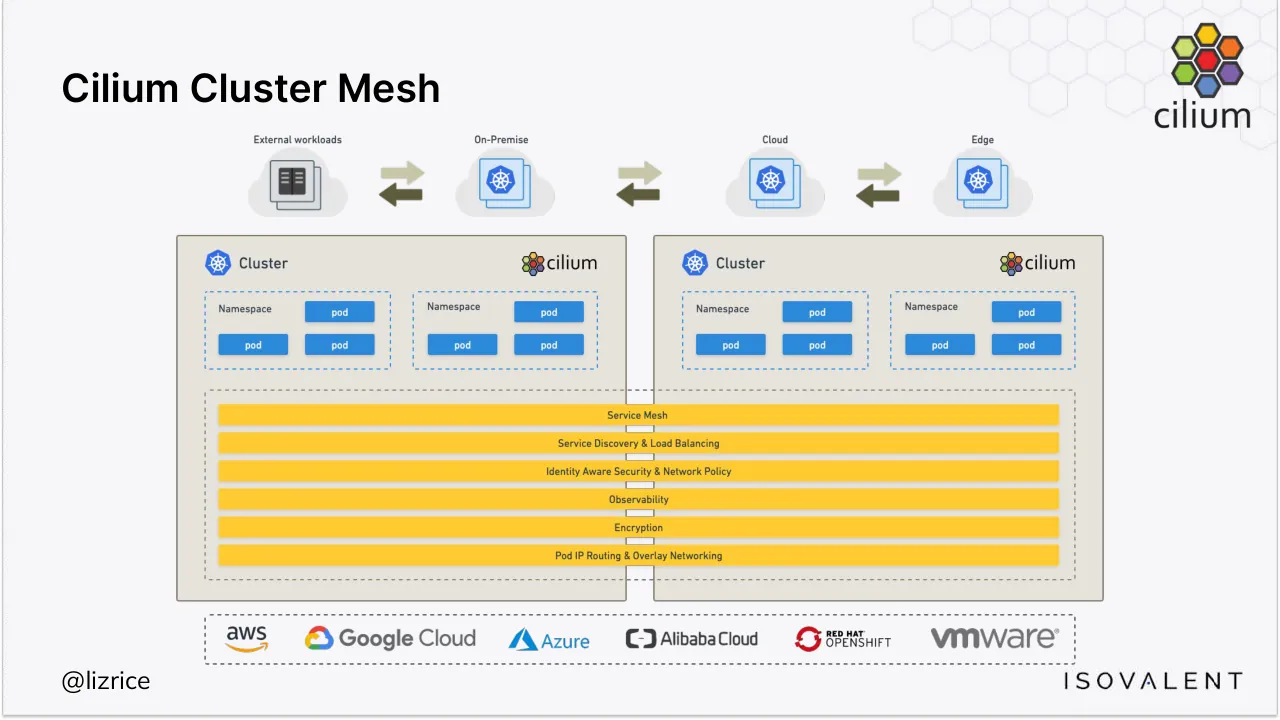
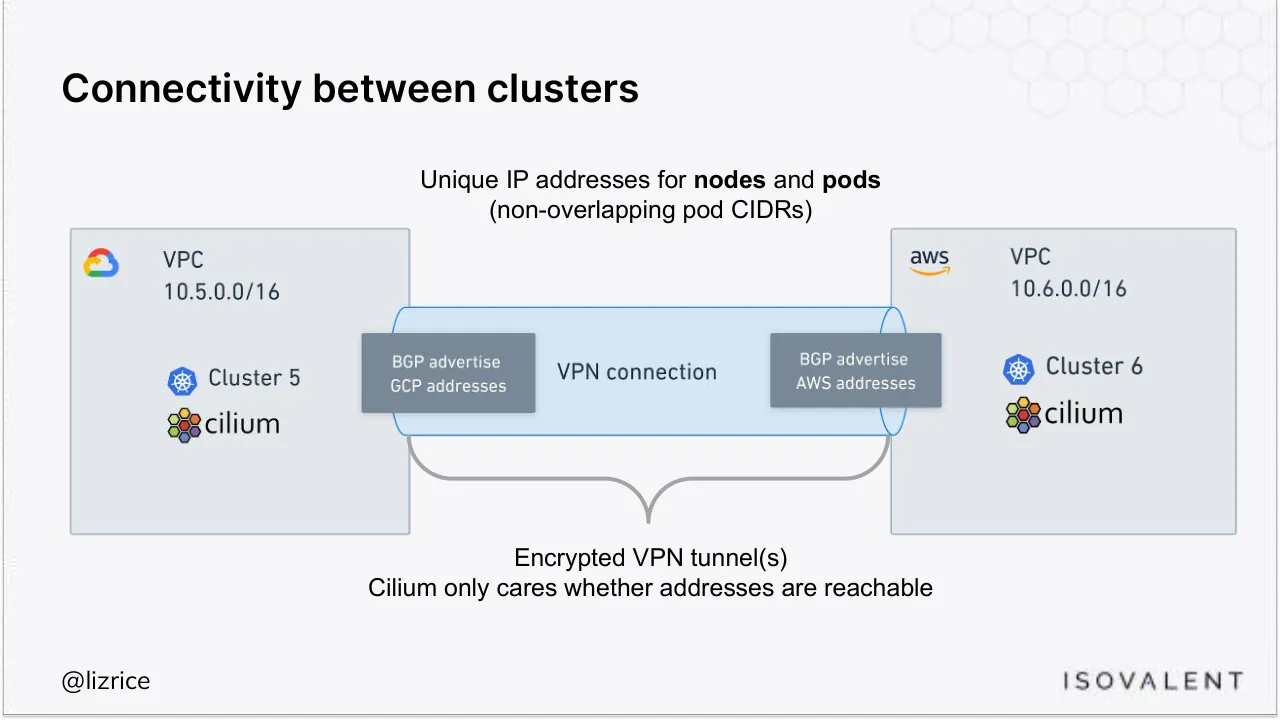
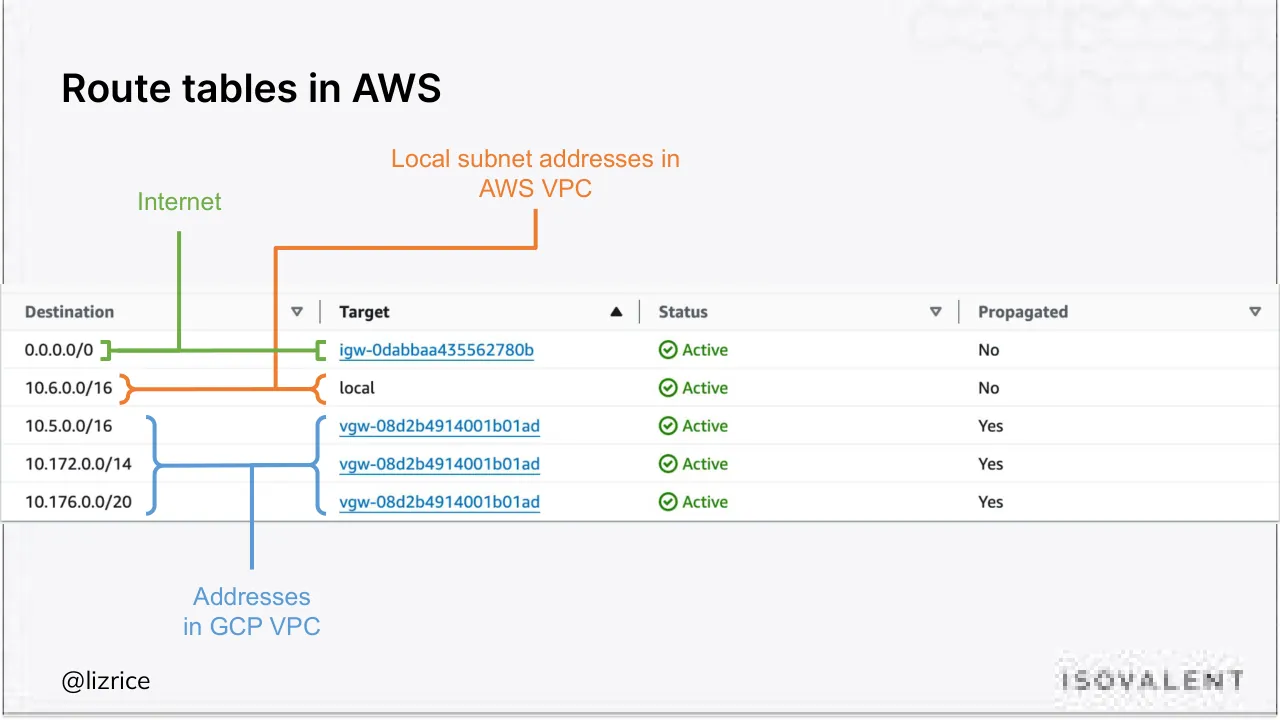
The deck opens with a title slide naming Liz Rice, Chief Open Source Officer at Isovalent, and an overview slide of Cilium Cluster Mesh. It then works through connecting Kubernetes clusters across clouds: the connectivity model, route tables in AWS and GCP, route propagation and firewall rules. The next section covers enabling Cluster Mesh, with steps for unique cluster names and IDs, matching routing modes, enabling the feature and connecting clusters, followed by status checks. A section on global services shows a service annotation, cross-cluster traffic results and how endpoints appear from both the Kubernetes and Cilium views. Further sections cover topology-aware routing that prefers local or remote endpoints, and multi-cluster network policies that select clusters by label. The closing section discusses scale limits, with a trade-off between connected clusters and security identities, and ends with a thank-you slide pointing to labs and downloads. Slides worth studying include the clean connectivity diagram on slide 4, the route table annotations on slides 5 and 6, and the global service demonstration on slide 21.
Slides worth studying
Questions about this deck
What does the Isovalent deck say about global services in Cilium Cluster Mesh?
Slide 19 shows the rebel-base service in the farfaraway namespace with the annotation service.cilium.io/global: true. Slide 21 shows curl responses from the xwing pod alternating between a Cluster EKS-6 at Dantooine and a Cluster GKE-5 at Alderaan.
How many slides does the Isovalent deck have?
The Isovalent deck has 39 slides. Slide 39 is the thank-you slide, which points to isovalent.com, isovalent.com/labs and cilium.io.
How is the Isovalent Cilium Cluster Mesh deck structured?
The deck opens with a title slide (slide 1) and then covers connecting Kubernetes clusters (slides 3 to 8) and enabling Cilium ClusterMesh (slides 9 to 16). It continues with global Kubernetes services (slides 17 to 26), multi-cluster network policies (slides 30 to 33), and scale limits (slides 35 and 36), and ends with a summary on slide 37 and a labs slide on slide 38.
What does the Isovalent deck say about the trade-off between maximum connected clusters and security identities?
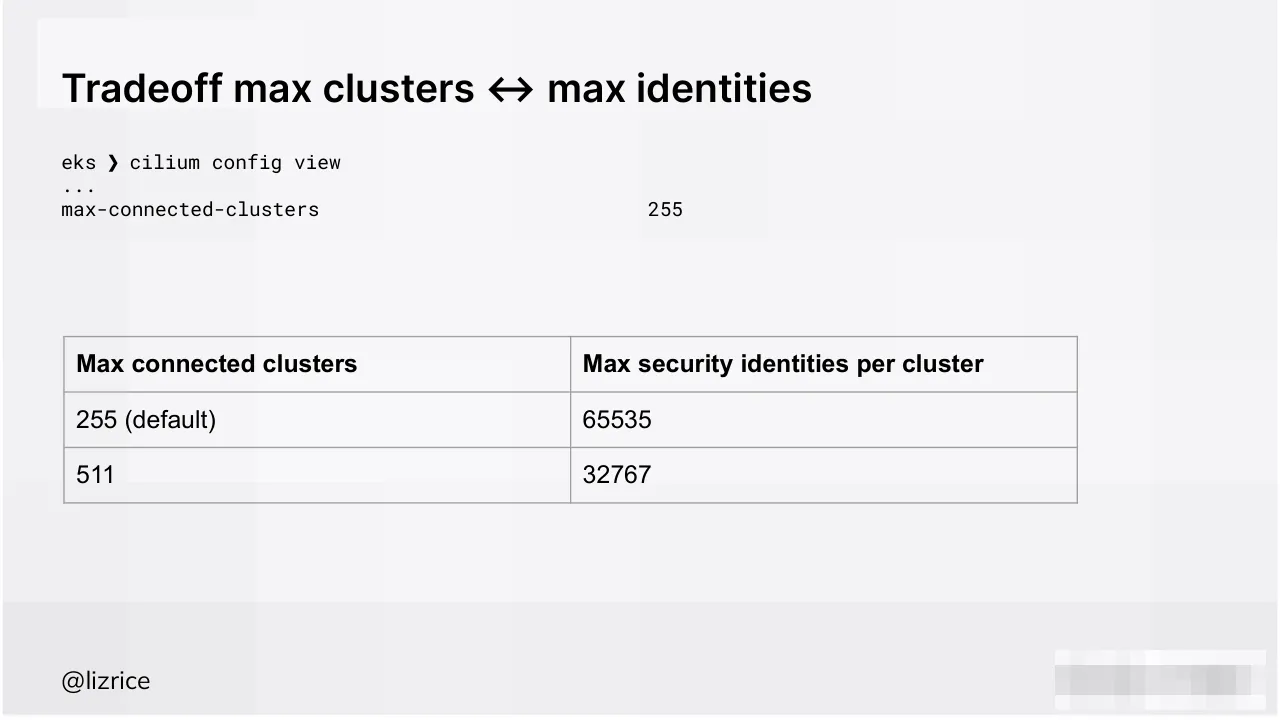
Slide 36 presents a table titled Tradeoff max clusters and max identities. It lists max-connected-clusters 255 (default) against 65535 max security identities per cluster, and 511 against 32767.
Details
- Company: Isovalent
- Type: Conference talk
- Industry: Cloud networking
- Pages: 39
More from Isovalent
All Isovalent decks in the library
Review score: 7 out of 10, Effective
Presentation quality, judged with the SlideDeck Co review heuristic. Ask, evidence and idea merit are not rated here.
The talk follows a clear route: connectivity (slides 4 to 8), enabling (9 to 16), global services (17 to 24), topology routing (25 to 29), policies (30 to 33), then scale (34 to 36). Dark section dividers with a yellow keyword, a consistent title style and footer, and the annotated diagrams on slides 4 and 5 make the argument easy to follow and show real craft. The diagrams on slides 27 to 29 repeat one layout and change only the affinity line, which teaches the contrast well. The weaknesses are the many text-only terminal slides (10 to 13, 15, 16, 19, 22 to 24, 26, 31 to 33), which are small monospace on a large pale canvas with long lines clipped at the right edge on slides 15, 23, 24 and 33. Slides 19, 22 and 26 repeat the same annotation output, and slide 6 has a blurred logo and a tiny table, so the demo evidence is hard to read from a room.
Worth keeping: Keep the section divider rhythm, the clean connectivity diagram on slide 4, the colour-annotated route table on slide 5 and the repeated diagram layout on slides 27 to 29.
Most useful repair: Crop terminal output to the few lines that matter at a much larger size, fix the clipped lines on slides 15, 23, 24 and 33, and replace the blurry footer logos and the low-resolution table on slide 6.
What would change the score: Cut the duplicate global annotation slides (19, 22, 26), make the slide 6 table and slide 36 trade-off readable at a glance, and state the takeaway in each terminal slide's title.
Confidence medium. 39 of 39 pages inspected on contact sheets, 4 at readable size. Reviewed 2026-11-08. Model-assisted review (claude-sonnet-5-5).
Full text of the slides (39 slides)
Every slide's words and a description of its charts and images, so the deck can be searched and rebuilt. Also available as Markdown.
Slide 1
ISOVALENT
Simplifying Multi-Cloud and
Multi-Cluster Deployments with Cilium
Liz Rice | @lizrice
Chief Open Source Officer, Isovalent
Emeritus Chair, CNCF Technical Oversight Committee | CNCF & OpenUK boards
Visuals: Background photograph-style illustration of a dark navy honeycomb of hexagonal tiles with faint gold-edged outlines, spanning the full slide and fading darker toward the left. Three gold/copper hexagon-based icons: a cluster of seven small hexagons (a honeycomb icon) at about centre x 56%, y 60%, roughly 9% wide; a stylised bee logo at about x 79%, y 33%, roughly 8% wide and 12% tall, in copper-gold line art with a speech-bubble shape; and no others. The ISOVALENT wordmark at top-left is a white letter-spaced sans-serif logotype, about 24% wide and 3% tall, at x 5%, y 7%. Lighting is uniform and dark with subtle gold rim highlights on the hexagon edges.
Slide 2
Cilium Cluster Mesh / External workloads / On-Premise / Cloud / Edge / Cluster / cilium / Namespace / pod / pod / pod / pod / Namespace / pod / pod / pod / pod / Cluster / cilium / Namespace / pod / pod / pod / pod / Namespace / pod / pod / pod / pod / Service Mesh / Service Discovery & Load Balancing / Identity Aware Security & Network Policy / Observability / Encryption / Pod IP Routing & Overlay Networking / aws / Google Cloud / Azure / Alibaba Cloud / RED HAT OPENSHIFT / vmware / @lizrice / ISOVALENT
Visuals: Diagram (raster image, about 74% wide by 78% high of the slide). Top row: four cloud shapes, light grey #E6E6E6 with white-grey gradient, each with a label above. From left: External workloads, a grey icon of a book-like document stack in dark grey #3A3A3A; On-Premise, Cloud and Edge, each showing a blue Kubernetes wheel icon #326CE5 on a light blue-white document stack #CFE3F5. Between each pair of clouds is a double arrow: a pale olive arrow #C9C8A0 pointing right above a dark olive arrow #5C5B36 pointing left. Middle: two beige cluster panels #E6E1D8 with dark taupe border #7A6F60, each headed by a blue Kubernetes wheel icon, the word Cluster in dark grey #333333 and a cilium logo at right. Each cluster holds two dashed blue #3A8DDE rounded namespace boxes, each with the label Namespace and four solid blue #2D8AD9 pod rectangles with white text. Across both panels a dashed taupe #7A6F60 rounded rectangle contains six full-width yellow #FFC72C bars with dark text, from top: Service Mesh, Service Discovery & Load Balancing, Identity Aware Security & Network Policy, Observability, Encryption, Pod IP Routing & Overlay Networking. Bottom: a dashed grey rounded rectangle containing the logos aws, Google Cloud (multicolour cloud mark), Azure (blue triangle mark), Alibaba Cloud, RED HAT OPENSHIFT (red hat mark) and vmware, all in grey or brand colours. No photographs.
Slide 3
ISOVALENT
Connecting Kubernetes clusters
Visuals: Background pattern on the right side: a field of dark navy hexagonal cells in a honeycomb arrangement, covering roughly the right 40% of the slide, fading out toward the left. A few hexagon outlines and connecting edges are rendered as faint gold/amber lines, and a few cells are slightly lighter blue-grey. No photograph or illustration beyond this pattern. Logo: the ISOVALENT wordmark in white, widely letter-spaced uppercase sans-serif, top-left.
Slide 4
Connectivity between clusters / Unique IP addresses for nodes and pods / (non-overlapping pod CIDRs) / VPC / 10.5.0.0/16 / Cluster 5 / cilium / BGP advertise / GCP addresses / VPN connection / BGP advertise / AWS addresses / VPC / 10.6.0.0/16 / Cluster 6 / cilium / Encrypted VPN tunnel(s) / Cilium only cares whether addresses are reachable / @lizrice / ISOVALENT
Visuals: Diagram: two light grey rectangles (VPC boxes) with square corners and no visible shadow. The left box holds the Google Cloud logo, the text VPC and 10.5.0.0/16, a Kubernetes wheel icon with the label Cluster 5, and the cilium logo. The right box holds the aws logo, the text VPC and 10.6.0.0/16, a Kubernetes wheel icon with the label Cluster 6, and the cilium logo. Between them is a light blue pill-shaped VPN connection bar with a blue outline, with a dark slate label box at each end (left: BGP advertise GCP addresses; right: BGP advertise AWS addresses) and the centre label VPN connection. Beneath the bar is a grey curly brace pointing down to the caption Encrypted VPN tunnel(s). Logos: Google Cloud, aws, Kubernetes wheel (two), cilium (two), ISOVALENT wordmark. No photographs. Faint hexagon pattern in the top-right corner, decorative and very low contrast.
Slide 5
Route tables in AWS / Local subnet addresses in / AWS VPC / Internet / Destination / Target / Status / Propagated / 0.0.0.0/0 / igw-0dabbaa435562780b / Active / No / 10.6.0.0/16 / local / Active / No / 10.5.0.0/16 / vgw-08d2b4914001b01ad / Active / Yes / 10.172.0.0/14 / vgw-08d2b4914001b01ad / Active / Yes / 10.176.0.0/20 / vgw-08d2b4914001b01ad / Active / Yes / Addresses / in GCP VPC / @lizrice / ISOVALENT
Visuals: Screenshot of AWS Console route table, a table with four columns and six rows. Columns: Destination (with sort arrow), Target (sorted ascending, up-triangle arrow), Status (sort arrow), Propagated (sort arrow). Rows: 0.0.0.0/0 | igw-0dabbaa435562780b (underlined link) | Active with green check circle | No; 10.6.0.0/16 | local | Active with green check circle | No; 10.5.0.0/16 | vgw-08d2b4914001b01ad (underlined link) | Active with green check circle | Yes; 10.172.0.0/14 | vgw-08d2b4914001b01ad | Active | Yes; 10.176.0.0/20 | vgw-08d2b4914001b01ad | Active | Yes. Column headers are bold grey text on a light grey header band. Annotations overlaid on the table as coloured brackets and lines: a green line with brackets from the Destination 0.0.0.0/0 row to the igw target, labelled Internet above; an orange line with brackets from the 10.6.0.0/16 row to the local target, rising to the orange label Local subnet addresses in AWS VPC; a blue bracket spanning rows 10.5.0.0/16 to 10.176.0.0/20 on both the Destination and Target sides, with a blue line descending from its midpoint to the label Addresses in GCP VPC. ISOVALENT logo is a grey pixelated wordmark, bottom right.
Slide 6
Route tables in GCP
Local subnet addresses
in GCP VPC - pod &
service CIDRs
Name / Type / IP version / Destination IP range / ↑ Priority / Scope limits ? / Next hop
default-route-14f425533af607a7 / Subnet / IPv4 / 10.5.0.0/16 / 0 / — / Virtual network liz-vpc
default-route-569b993289640561 / Subnet / IPv4 / 10.176.0.0/20 / 0 / — / Virtual network liz-vpc
default-route-5f7768aa58fecd3c / Subnet / IPv4 / 10.172.0.0/14 / 0 / — / Virtual network liz-vpc
liz-cloud-router-liz-aws-conn1-tunn2-2991274078 / Dynamic / IPv4 / 10.6.0.0/16 / 100 / — / VPN tunnel liz-tunnel-2
liz-cloud-router-liz-aws-conn2-tunn1-0026042055 / Dynamic / IPv4 / 10.6.0.0/16 / 100 / — / VPN tunnel liz-tunnel-3
default-route-5a2655b442bf5fea / Static / IPv4 / 0.0.0.0/0 / 1000 / — / Default internet gateway
Addresses in AWS VPC
Internet
@lizrice
Visuals: Screenshot of a Google Cloud Console route table with 7 columns (Name, Type, IP version, Destination IP range, Priority with an up-arrow sort indicator, Scope limits with a black question-mark icon, Next hop) and 6 data rows listed in the text field. Route names in the Name column are blue underlined links; the Next hop entries 'liz-vpc' are purple underlined links and 'liz-tunnel-2' and 'liz-tunnel-3' are blue underlined links. Rows are separated by thin light grey horizontal rules on a white table area. Hand-drawn style annotations overlay the table: a blue curly bracket spanning rows 1 to 3 (Destination IP range and Next hop columns) joined by a blue line running up to the label 'Local subnet addresses in GCP VPC - pod & service CIDRs'; an orange curly bracket spanning rows 4 and 5 joined by an orange line running down to the label 'Addresses in AWS VPC'; a green bracket under the 0.0.0.0/0 destination with a green line running right to a green bracket beside the 'Default internet gateway' next hop, with the green label 'Internet' centred on that line. The table and annotations are not cropped, boxed as a screenshot with a light grey backdrop, no shadow; the page background shows pale grey pixelated blur around edges.
Slide 7
Routes have to be propagated
aws
Services
Search
[Option+S]
VPC > Route tables > rtb-0be8848efb9e6e2b0 > Edit route propagation
Edit route propagation
Route table basic details
Route table ID
rtb-0be8848efb9e6e2b0
Edit route propagation
Virtual Private Gateway
Propagation
vgw-03cdfb1fffbff6152 / liz-cm
Enable
Cancel
Save
@lizrice
Visuals: One screenshot of the AWS Management Console (a photo-like UI capture, boxed, not cropped, full rectangle with square corners, no shadow beyond a faint panel edge). Header bar: dark navy #1B2430 strip across the top with the white 'aws' wordmark with orange smile arrow at left, a grid icon followed by 'Services', and a dark search field with a magnifier icon, placeholder 'Search' in italic grey and '[Option+S]' at right. Below it on a light grey #F2F3F3 background: breadcrumb 'VPC > Route tables > rtb-0be8848efb9e6e2b0 > Edit route propagation' with blue underlined links for VPC, Route tables and the route table ID; large heading 'Edit route propagation'. First white card titled 'Route table basic details' with label 'Route table ID' and value 'rtb-0be8848efb9e6e2b0' beside a copy icon. Second white card titled 'Edit route propagation' with label 'Virtual Private Gateway' and blue link 'vgw-03cdfb1fffbff6152 / liz-cm', and label 'Propagation' with a checked blue checkbox (#1F6FB2) labelled 'Enable'. At bottom right of the card area, grey text button 'Cancel' and orange button 'Save' (#F5A030) with bold dark text. A thick orange (#E8731E) hand-drawn ellipse outline, about 3 px stroke, encircles the 'Propagation' label and the 'Enable' checkbox, overlapping the card edge. Lighting is flat, even, screen-capture style. Dominant colours are navy, white, light grey and orange.
Slide 8
Traffic has to be permitted
Firewall rules / security groups /
network ACLs have to allow traffic
from remote cluster
VPC
10.5.0.0/16
Cluster 5
cilium
BGP advertise
GCP addresses
VPN connection
BGP advertise
AWS addresses
VPC
10.6.0.0/16
Cluster 6
cilium
@lizrice
Visuals: Diagram: two light grey-blue rectangles (VPC boxes) with thin grey-blue borders. Left box: Google Cloud logo (multicolour cloud) at top-left corner, label 'VPC' and '10.5.0.0/16' in dark grey text, a blue Kubernetes wheel icon followed by 'Cluster 5' text, and the Cilium logo (multicoloured hexagon cluster with 'cilium' wordmark) below. Right box: AWS logo (black 'aws' wordmark with orange smile arrow) at top-left, label 'VPC' and '10.6.0.0/16', a blue Kubernetes wheel icon followed by 'Cluster 6', and the Cilium logo below. Between the boxes is a light blue horizontal rounded band (VPN connection) with elliptical end caps at each box edge, outlined in medium blue. Two dark slate grey rectangles with light text sit on the band's ends: left 'BGP advertise / GCP addresses' and right 'BGP advertise / AWS addresses', with the text 'VPN connection' in dark text in the band's centre. No arrows. Bottom-right has a pixelated light grey blurred rectangle.
Slide 9
ISOVALENT / Enabling Cilium ClusterMesh
Visuals: A faint dark-navy hexagonal honeycomb pattern with thin connecting line segments fills the right-hand portion of the slide, roughly from x 65% to 100%, fading toward the left. Hexagons are slightly lighter than the background (about #1E2540 to #232B4A) with dark edges. A few small node-and-line motifs are scattered among the hexagons. The pattern is low contrast and sits behind everything. It is a background texture, not a photograph, and is not cropped, boxed or overlaid.
Slide 10
Unique cluster names and IDs / eks ❯ cilium config view | grep cluster- / cluster-id 6 / cluster-name liz-cm-eks-6 / gke ❯ cilium config view | grep cluster- / cluster-id 5 / cluster-name liz-cm-gke-5 / @lizrice
Visuals: None apart from the background mosaic pattern and a small pixelated rectangle at bottom right (about 16.4% by 8.2% of the slide) that appears blurred or redacted. Nothing is a chart, table, photo or diagram; the two terminal blocks are plain text.
Slide 11
Same routing mode
eks ❯ cilium config view | grep routing
ipv4-native-routing-cidr 10.0.0.0/8
routing-mode native
gke ❯ cilium config view | grep routing
ipv4-native-routing-cidr 10.0.0.0/8
routing-mode native
@lizrice
Visuals: A faint, low-contrast blurred or pixelated background pattern of pale grey and white rectangular blocks covering the whole slide. A small blurred rectangle at bottom-right (about 82.5% to 98.9% wide, 90.3% to 98.5% tall) appears as a pixelated white and light-grey placeholder with no legible content. A faint lighter rectangle sits behind the top-left title area. No charts, tables, photographs or diagrams.
Slide 12
Enable Cluster Mesh
❯ cilium clustermesh enable
❯ cilium status
/¯¯\
/¯¯\__/¯¯\ Cilium: OK
\__/¯¯\__/ Operator: OK
/¯¯\__/¯¯\ Envoy DaemonSet: disabled (using embedded mode)
\__/¯¯\__/ Hubble Relay: OK
\__/ ClusterMesh: OK
Deployment cilium-operator Desired: 1, Ready: 1/1, Available: 1/1
Deployment hubble-relay Desired: 1, Ready: 1/1, Available: 1/1
DaemonSet cilium Desired: 1, Ready: 1/1, Available: 1/1
Deployment clustermesh-apiserver Desired: 1, Ready: 1/1, Available: 1/1
Containers: cilium Running: 1
cilium-operator Running: 1
hubble-relay Running: 1
clustermesh-apiserver Running: 1
Cluster Pods: 12/12 managed by Cilium
...
@lizrice
Visuals: Terminal-style text output, no photograph or chart. Three highlighted rows in yellow (#FFFF00) bar fills behind text: the 'ClusterMesh: OK' status line (x 18.5%, y 46.2%, w 20.2%, h 3.3%), the 'clustermesh-apiserver' deployment name (x 25.9%, y 62.5%, w 19.2%, h 3.3%), and the 'clustermesh-apiserver' container name (x 25.9%, y 75.6%, w 19.2%, h 3.3%). The ASCII Cilium logo is drawn in monospaced text at upper left of the status block. A blurred or pixelated white-grey rectangle (x 82.5%, y 90.3%, w 16.4%, h 8.2%) sits bottom right, likely a redacted or obscured corner logo with no legible content.
Slide 13
Enable Cluster Mesh
❯ cilium clustermesh status
✅ Service "clustermesh-apiserver" of type "LoadBalancer" found
✅ Cluster access information is available:
- 10.5.0.6:2379
📗 Deployment clustermesh-apiserver is ready
🔌 No cluster connected
🔀 Global services: [ min:0 / avg:0.0 / max:0 ]
❯ ks get svc
NAME TYPE CLUSTER-IP EXTERNAL-IP PORT(S) AGE
clustermesh-apiserver LoadBalancer 10.176.9.226 10.5.0.6 2379:31144/TCP 3d2h
clustermesh-apiserver-metrics ClusterIP None <none> 9962/TCP,9964/TCP,9963/TCP 3d2h
@lizrice
Visuals: Terminal-style text, no photographs or charts. Two command blocks: a first block with the prompt ❯ cilium clustermesh status followed by four status lines, each starting with a colour emoji (green check mark ✅ twice, green book 📗, plug 🔌, shuffle arrows 🔀) and a dash bullet line '- 10.5.0.6:2379' indented beneath the second check line; and a second block with the prompt ❯ ks get svc followed by a plain-text table with columns NAME, TYPE, CLUSTER-IP, EXTERNAL-IP, PORT(S), AGE. Rows: (1) clustermesh-apiserver | LoadBalancer | 10.176.9.226 | 10.5.0.6 | 2379:31144/TCP | 3d2h; (2) clustermesh-apiserver-metrics | ClusterIP | None | <none> | 9962/TCP,9964/TCP,9963/TCP | 3d2h. Yellow highlights (#FFFF00 fill, black text) sit behind the '10.5.0.6' in the status line and behind the EXTERNAL-IP value '10.5.0.6' in row one of the table. The redacted box at bottom right is a pixelated light grey block, not readable. The background is a faint mosaic of very pale grey tiles.
Slide 14
Slide 15
Connect clusters
eks ❯ cilium clustermesh connect --destination-context $CLUSTER5
✅ Detected Helm release with Cilium version 1.15.0
✨ Extracting access information of cluster liz-cm-gke-5...
🔑 Extracting secrets from cluster liz-cm-gke-5...
ℹ Found ClusterMesh service IPs: [10.5.0.6]
✨ Extracting access information of cluster liz-cm-eks-6...
🔑 Extracting secrets from cluster liz-cm-eks-6...
Hostname based ingress detected, trying to resolve it
Hostname resolved, using the found ip(s)
ℹ Found ClusterMesh service IPs: [10.6.13.164 10.6.142.91]
ℹ Configuring Cilium in cluster 'liz-cm-eks-6.eu-west-1.eksctl.io' to connect to cluster 'gke_cilium-demo_europe-west1_liz-cm-gke-5'
ℹ Configuring Cilium in cluster 'gke_cilium-demo_europe-west1_liz-cm-gke-5' to connect to cluster 'liz-cm-eks-6.eu-west-1.eksctl.io'
✅ Connected cluster liz-cm-eks-6.eu-west-1.eksctl.io and gke_cilium-demo_europe-west1_liz-cm-gke-5!
@lizrice
Visuals: A terminal output transcript rendered in monospace text, with emoji status icons (green book, sparkles, key, info symbol, check mark) at the start of lines. Four yellow highlight bars sit behind lines: 'Found ClusterMesh service IPs: [10.5.0.6]', 'Hostname based ingress detected, trying to resolve it', 'Hostname resolved, using the found ip(s)' (together), and 'Found ClusterMesh service IPs: [10.6.13.164 10.6.142.91]'. A blurred pixelated rectangle (about 16.4% by 8.2% of slide) sits at bottom-right, mostly light grey and white. No charts, photographs or diagrams.
Slide 16
Connected cluster status
eks ❯ cilium clustermesh status
Hostname based ingress detected, trying to resolve it
Hostname resolved, using the found ip(s)
✅ Service "clustermesh-apiserver" of type "LoadBalancer" found
✅ Cluster access information is available:
- 10.6.142.91:2379
- 10.6.13.164:2379
✅ Deployment clustermesh-apiserver is ready
✅ All 1 nodes are connected to all clusters [min:1 / avg:1.0 / max:1]
🔌 Cluster Connections:
- liz-cm-gke-5: 1/1 configured, 1/1 connected
🔀 Global services: [ min:1 / avg:1.0 / max:1 ]
gke ❯ cilium clustermesh status
✅ Service "clustermesh-apiserver" of type "LoadBalancer" found
✅ Cluster access information is available:
- 10.5.0.6:2379
✅ Deployment clustermesh-apiserver is ready
✅ All 1 nodes are connected to all clusters [min:1 / avg:1.0 / max:1]
🔌 Cluster Connections:
- liz-cm-eks-6: 1/1 configured, 1/1 connected
🔀 Global services: [ min:1 / avg:1.0 / max:1 ]
@lizrice
Visuals: Four flat yellow (#FFFF00) rectangles highlight text rows: a long band behind 'All 1 nodes are connected to all clusters [min:1 / avg:1.0 / max:1]' at x 7.3, y 44.5, w 55.8, h 3.0; a band behind '- liz-cm-gke-5: 1/1 configured, 1/1 connected' at x 4.8, y 50.5, w 39.2, h 3.0; a band behind the gke 'All 1 nodes...' row at x 7.3, y 74.2, w 55.8, h 3.0; and a band behind '- liz-cm-eks-6: 1/1 configured, 1/1 connected' at x 4.8, y 80.1, w 39.2, h 3.0. Icons are emoji glyphs in the text: green square tick icons (✅, rendered as green squares) on the status rows, a plug icon (🔌) on the Cluster Connections rows, and an orange-and-tan shuffle/exchange icon (🔀) on the Global services rows. A pixelated, blurred light-grey and white rectangle sits bottom-right at x 82.5, y 90.3, w 16.4, h 8.2, with no legible content. No photographs, charts or diagrams.
Slide 17
Global Kubernetes service
Visuals: A full-bleed dark background image covering the whole slide, showing a faint, low-contrast pattern of hexagonal cells and outlines in slightly lighter navy blue, concentrated in the right-hand 25 to 30% of the slide and fading toward the centre. Lighting is flat and even. Dominant colours are near-black navy with muted blue-violet hexagons. The pattern is cropped by the right edge and is not a photograph of identifiable objects. Top-left, the ISOVALENT wordmark is set as a logo in widely letter-spaced light grey capitals, with pixelated, slightly blurred edges, over a faint dark rectangle of the same navy as the background.
Slide 18
Intergalactic
Kubernetes service
Image: John ‘K’ on Flickr
20
Visuals: One photograph, full-bleed: a grey-and-white model starfighter of the X-wing type seen from a three-quarter front-above angle in deep space. The fuselage runs diagonally from lower-centre to upper-right, with a small R2-style astromech dome on the top of the fuselage near the centre. Four engine nozzles glow orange-yellow at the rear: two prominent ones at centre-right and lower-centre, one at upper-right and one at lower-right. Wing panels show red-and-white markings and dark panel lines; the upper-right wing tip and the lower-left wing are cropped by the frame edges. Lighting is a bright key light on the hull with the nozzles as the brightest points; the background is a near-black starfield with scattered white stars. Dominant colours: black, light grey, white, red and orange-yellow. No tint or overlay is visible over the photo.
Slide 19
Global service annotation
eks ❯ k describe svc rebel-base
Name: rebel-base
Namespace: farfaraway
Labels: <none>
Annotations: service.cilium.io/global: true
Selector: name=rebel-base
Type: ClusterIP
IP Family Policy: SingleStack
IP Families: IPv4
IP: 172.20.135.230
IPs: 172.20.135.230
Port: <unset> 80/TCP
TargetPort: 80/TCP
Endpoints: 10.6.1.60:80,10.6.9.41:80
Session Affinity: None
Events: <none>
@lizrice
Visuals: One pixelated, low-resolution image at bottom-right (about 82.5% to 98.9% wide, 90.3% to 98.5% high) that reads as a blurred light grey and white block, possibly a redacted logo, with no legible content. A faint lighter rectangle sits at top-left behind the title area. A yellow (#FFFF00) highlight bar spans the Annotations line of the code listing, marking the line service.cilium.io/global: true. No charts, tables, photographs or diagrams.
Slide 20
Global services
VPC CIDR
10.5.0.0/16
Cluster 5
cilium
aws
VPC CIDR
10.6.0.0/16
xwing
rebel-base
service
rebel-base
rebel-base
xwing
rebel-base
service
rebel-base
rebel-base
global: true
@lizrice
Visuals: A network diagram in two side-by-side boxed panels. Left panel is headed by the Google Cloud logo, the text VPC CIDR 10.5.0.0/16, a Kubernetes wheel icon with the label Cluster 5, and the cilium logo. Right panel is headed by the aws logo and the text VPC CIDR 10.6.0.0/16. Each panel contains a teal box labelled xwing with a teal downward arrow to a light-blue box labelled rebel-base service. From each rebel-base service box a blue elbow connector splits into two arrows pointing down to two blue boxes labelled rebel-base. A single horizontal blue line runs from the left service connector across the gap between the panels to the right service connector, so the two services link across the panels. The text global: true sits to the right of the left rebel-base service box. Logos: Google Cloud (multicolour cloud), Kubernetes (blue wheel), cilium (multicolour hexagon cluster with wordmark), aws (black wordmark with orange smile). The watermark at bottom-right is a blurred light-grey pixelated rectangle. The diagram is a raster image, not cropped, placed boxed on the slide.
Slide 21
Global service annotation / gke ❯ for i in {1..10} do / k exec -it xwing -- curl rebel-base / {"Cluster": "EKS-6", "Location", "Dantooine"} / {"Cluster": "EKS-6", "Location", "Dantooine"} / {"Cluster": "EKS-6", "Location", "Dantooine"} / {"Cluster", "GKE-5", "Location": "Alderaan"} / {"Cluster": "EKS-6", "Location", "Dantooine"} / {"Cluster", "GKE-5", "Location": "Alderaan"} / {"Cluster": "EKS-6", "Location", "Dantooine"} / {"Cluster", "GKE-5", "Location": "Alderaan"} / {"Cluster": "EKS-6", "Location", "Dantooine"} / {"Cluster": "EKS-6", "Location", "Dantooine"} / {"Cluster": "EKS-6", "Location", "Dantooine"} / @lizrice
Visuals: none. The slide has no charts, photographs, logos or icons; the only non-text element is a blurred pixelated rectangle at the bottom right, which is a light grey-white mosaic with darker grey blocks.
Slide 22
Global service annotation
eks ❯ k describe svc rebel-base
Name: rebel-base
Namespace: farfaraway
Labels: <none>
Annotations: service.cilium.io/global: true
Selector: name=rebel-base
Type: ClusterIP
IP Family Policy: SingleStack
IP Families: IPv4
IP: 172.20.135.230
IPs: 172.20.135.230
Port: <unset> 80/TCP
TargetPort: 80/TCP
Endpoints: 10.6.1.60:80,10.6.9.41:80
Session Affinity: None
Events: <none>
@lizrice
Visuals: One pixelated/blurred rectangle at bottom-right (x 82.5%, y 90.3%, 16.4% by 8.2%) with white and light grey blocks, apparently a blurred logo or photo placeholder. A faint pixelated background texture of light grey tiles covers the whole slide. Two yellow highlight bars sit behind text lines: 'Annotations: service.cilium.io/global: true' (#FFFF00) and 'Endpoints: 10.6.1.60:80,10.6.9.41:80' (#FFFF00). No charts, tables or photographs; the terminal output is text.
Slide 23
Kubernetes view of service endpoints / eks ❯ k get endpoints / NAME ENDPOINTS AGE / rebel-base 10.6.1.60:80,10.6.9.41:80 5d18h / eks ❯ k get pods -o wide / NAME READY STATUS RESTARTS AGE IP NODE NOMINATED NODE READINESS GATES / rebel-base-67fbdbbcb-4fpbj 1/1 Running 0 26h 10.6.1.60 ip-10-6-6-51.eu-west-1.compute.internal <none> <none> / rebel-base-67fbdbbcb-6bpt4 1/1 Running 0 26h 10.6.9.41 ip-10-6-6-51.eu-west-1.compute.internal <none> <none> / @lizrice
Visuals: Two monospace terminal listings with yellow highlighter marks. Listing 1: the command 'eks ❯ k get endpoints' followed by a table with columns NAME, ENDPOINTS and AGE and one row: rebel-base, 10.6.1.60:80,10.6.9.41:80 (highlighted in yellow), 5d18h. Listing 2: the command 'eks ❯ k get pods -o wide' followed by a table with columns NAME, READY, STATUS, RESTARTS, AGE, IP, NODE (continuing off the right edge), NOMINATED NODE, READINESS GATES, and two rows: rebel-base-67fbdbbcb-4fpbj, 1/1, Running, 0, 26h, 10.6.1.60 (highlighted yellow), ip-10-6-6-51.eu-west-1.compute.internal, <none>, <none>; and rebel-base-67fbdbbcb-6bpt4, 1/1, Running, 0, 26h, 10.6.9.41 (highlighted yellow), ip-10-6-6-51.eu-west-1.compute.internal, <none>, <none>. The yellow highlights are flat rectangles behind the IP values and the endpoints value. A small pixelated grey-white mosaic image sits at bottom right with no recognisable content; it is not a logo or readable text.
Slide 24
Cilium view of service endpoints / eks ❯ k get svc rebel-base -o wide / NAME TYPE CLUSTER-IP EXTERNAL-IP PORT(S) AGE SELECTOR / rebel-base ClusterIP 172.20.135.230 <none> 80/TCP 5d18h name=rebel-base / eks ❯ ks exec -it $CPOD -- cilium-dbg service list / ID Frontend Service Type Backend / ... / 6 172.20.135.230:80 ClusterIP 1 => 10.6.9.41:80 (active) / 2 => 10.6.1.60:80 (active) / 3 => 10.172.0.99:80 (active) / 4 => 10.172.0.23:80 (active) / Non-overlapping pod CIDRs / gke ❯ k get pods -o wide / NAME READY STATUS RESTARTS AGE IP NODE NOMINATED NODE READINESS GATES / rebel-base-6cf4b8c8b-5r2zq 1/1 Running 0 2d15h 10.172.0.99 gke-liz-cm-gke-5-liz-ng-5-2a96d70f-t122 <none> <none> / rebel-base-6cf4b8c8b-thh2g 1/1 Running 0 2d15h 10.172.0.23 gke-liz-cm-gke-5-liz-ng-5-2a96d70f-t122 <none> <none> / @lizrice
Visuals: Three monospace terminal text blocks, with no table borders or rules. Highlights: a yellow (#FFFF00) rectangle behind 172.20.135.230 in the svc output at x27.7 y27.4 w12.8 h3.3, and a yellow rectangle behind 172.20.135.230 in the service list Frontend column at x9.4 y50.2 w12.8 h3.3. Green (#00FF00) rectangles sit behind 10.172.0.99 and 10.172.0.23 in the service list backend lines 3 and 4 (about x46.9 y56.7 w10.0 h3.3 and about x46.9 y60.0 w10.0 h3.3), behind the word gke in the prompt (about x4.8 y69.8 w2.7 h2.9), and behind the IP column values 10.172.0.99 and 10.172.0.23 in the pods table (about x65.3 y76.3 w10.0 h3.3 and about x65.3 y79.5 w10.0 h3.3). A blue (#5B9BD5) arrow, about 2 px stroke with a filled triangular head at its left end, runs from about x84.2 y48.6 to a head tip at about x67.3 y53.3, pointing from the annotation to the backend lines. A small pixelated grey-white block (a 14 by 4 pixel image, about #D9DADD with lighter squares) sits at bottom right, x82.5 y90.3 w16.4 h8.2, reading as a blurred or redacted placeholder. No photographs, logos or icons.
Slide 25
Global service with
topology-aware routing
Visuals: A full-bleed background image covering the whole slide: a heavily pixelated, low-resolution dark texture of blue-grey blocks, brightest in the upper-left corner (a small pixelated bright horizontal-stripe block at roughly x 5-20%, y 0-18%) and concentrated as faint navy blocks along the right edge and lower right. It reads as a blurred or downscaled screenshot or abstract data-centre/map pattern, with no legible content. Dominant colours are near-black navy with dark blue-grey blocks; no lighting or subject is discernible; the image is not boxed and has no visible tint beyond the dark overlay.
Slide 26
Global service annotation
eks ❯ k describe svc rebel-base
Name: rebel-base
Namespace: farfaraway
Labels: <none>
Annotations: service.cilium.io/global: true
Selector: name=rebel-base
Type: ClusterIP
IP Family Policy: SingleStack
IP Families: IPv4
IP: 172.20.135.230
IPs: 172.20.135.230
Port: <unset> 80/TCP
TargetPort: 80/TCP
Endpoints: 10.6.1.60:80,10.6.9.41:80
Session Affinity: None
Events: <none>
@lizrice
Visuals: none apart from a pixelated, blurred rectangle at the bottom right corner (about 14 by 4 pixels of blur, light grey and white blocks) and two yellow highlight bars behind the Annotations line and the Endpoints value in the terminal text. The blur is a redacted area with no legible content.
Slide 27
Prefer local endpoint / VPC CIDR / 10.5.0.0/16 / Cluster 5 / cilium / VPC CIDR / 10.6.0.0/16 / aws / xwing / rebel-base / service / global: true / affinity: local / xwing / rebel-base / service / rebel-base / rebel-base / rebel-base / rebel-base / @lizrice
Visuals: One diagram of two cloud environments drawn as two boxes side by side. Left box: a Google Cloud logo (multicolour cloud icon), label VPC CIDR 10.5.0.0/16, a Kubernetes wheel icon in blue with the text Cluster 5, and the cilium logo (multicoloured hexagon cluster with the word cilium). Right box: an aws logo (dark grey wordmark with orange smile arrow), label VPC CIDR 10.6.0.0/16. In each box a teal rectangle labelled xwing sits at the top centre; a teal solid arrow points straight down from xwing to a pale-blue rectangle labelled rebel-base service (two lines, rebel-base over service). Beside the left service box, the text global: true over affinity: local. From each service box a blue connector splits into two arrows that point down to two blue rectangles labelled rebel-base; the left service's right-hand branch continues as a horizontal dashed blue line running across the gap between the two boxes to the right service's left branch, so the two clusters are linked by that dashed line. There are no photographs; all elements are flat vector shapes, lines and logos.
Slide 28
Prefer local endpoint if available
VPC CIDR
10.5.0.0/16
Cluster 5
cilium
xwing
rebel-base
service
global: true
affinity: local
aws
VPC CIDR
10.6.0.0/16
xwing
rebel-base
service
rebel-base
rebel-base
@lizrice
Visuals: Diagram with two boxed panels. Left panel: Google Cloud logo (multicolour cloud icon, red/yellow/green/blue) at top-left, label 'VPC CIDR 10.5.0.0/16', Kubernetes wheel icon in blue beside 'Cluster 5', and the Cilium logo (cluster of coloured hexagons in green, yellow, orange, red, purple with 'cilium' wordmark) at top-right. Inside: a teal box labelled 'xwing' with a teal arrow pointing straight down to a pale-blue box labelled 'rebel-base service' with a dark-grey outline; beside that box the text 'global: true' and 'affinity: local'. Right panel: AWS logo (black 'aws' wordmark with orange smile arrow) at top-left, label 'VPC CIDR 10.6.0.0/16', a teal box 'xwing' and a pale-blue box 'rebel-base service' aligned vertically with the left panel. From the right 'rebel-base service' box, a blue connector runs down then splits into two arrows pointing down into two solid blue boxes labelled 'rebel-base' side by side. A blue horizontal connector line also runs from the bottom of the left 'rebel-base service' box across the gap between panels and joins that split. Lines are mid-blue about 2px wide with small arrowheads. No chart, table or photograph.
Slide 29
Or prefer remote
VPC CIDR / 10.5.0.0/16
Cluster 5
cilium
xwing
rebel-base / service
global: true / affinity: remote
rebel-base
rebel-base
VPC CIDR / 10.6.0.0/16
aws
xwing
rebel-base / service
rebel-base
rebel-base
@lizrice
Visuals: A network architecture diagram in two side-by-side rectangular panels with thin grey-blue borders and light grey-blue fill. Left panel: Google Cloud logo at top-left, text 'VPC CIDR 10.5.0.0/16', a Kubernetes wheel icon with 'Cluster 5', and the cilium logo at top-right. Inside the panel, a teal box labelled 'xwing' has a solid teal arrow pointing down to a pale blue box labelled 'rebel-base service' with a blue outline; to the right of that box is the text 'global: true' above 'affinity: remote'. From the bottom of the service box, a blue connector splits: a dashed blue arrow runs left and down to a blue box labelled 'rebel-base' on the left, and a solid blue arrow runs down to a second blue box labelled 'rebel-base'. A solid horizontal blue line runs from the split across the panel gap into the right panel. Right panel: AWS logo at top-left, text 'VPC CIDR 10.6.0.0/16'; a teal box labelled 'xwing', a pale blue box labelled 'rebel-base service' with a blue outline, and two blue boxes labelled 'rebel-base' each fed by a blue arrow branching from the horizontal line. No photographs. Dominant colours: teal #1AAE9A for xwing boxes, blue #2D86D8 for rebel-base boxes and connectors, pale blue #DCEBFA for the service boxes, panel fill #E3E8ED, panel border #B8C2CC. Flat illustration, no shadows, no gradients.
Slide 30
Multi-cluster network policies
Visuals: A pixelated, low-resolution dark background image covers the full slide. Along the top-left corner there is a block of grey pixel cells (roughly 0-20% width, 0-18% height) with a lighter horizontal streak. Along the right edge (roughly 81-100% width, from about 18% to 100% height) there is a dark navy blurred-pixel texture with faint blue highlights. Dominant colours are near-black navy and slate grey; no people, text or logos within the image beyond the title.
Slide 31
Policies can specify clusters
apiVersion: "cilium.io/v2"
kind: CiliumNetworkPolicy
metadata:
name: "ingress-to-rebel-base"
namespace: "farfaraway"
spec:
description: "Only allow local xwing to contact rebel-base"
endpointSelector:
matchLabels:
name: rebel-base
ingress:
- fromEndpoints:
- matchLabels:
class: xwing
io.cilium.k8s.policy.cluster: liz-cm-eks-6
@lizrice
Visuals: A monospace code listing of a CiliumNetworkPolicy YAML file, set as plain black text with no syntax colouring. The final line, 'io.cilium.k8s.policy.cluster: liz-cm-eks-6', sits on a solid bright yellow (#FFFF00) highlight bar that spans from about x 4.8% to 50.6% and y 66.5% to 69.8%, running behind the text. In the bottom right corner at about x 82.5%, y 90.3%, w 16.4%, h 8.2% there is a small pixelated, blurred rectangle built from light grey and white blocks (dominant #D8D8DA and #FFFFFF), apparently an obscured logo or image that is not legible. A faint, semi-transparent white rectangle sits at the top left behind the title area, at about x 2.9%, y 2.7%, w 21.1%, h 12.2%.
Slide 32
Implicit label
eks ❯ k get pods --show-labels
NAME READY STATUS RESTARTS AGE
LABELS
...
xwing 1/1 Running 0 5d22h app.kubernetes.io/name=xwing,
class=xwing,org=rebel-alliance
eks ❯ ks exec -it $CPOD -- cilium endpoint list
ENDPOINT POLICY (ingress) POLICY (egress) IDENTITY LABELS (source:key[=value])
...
934 Disabled Disabled 448568 k8s:app.kubernetes.io/name=xwing 10.6.10.44 ready
k8s:class=xwing
k8s:io.cilium.k8s.namespace.labels.kubernetes.io/metadata.name=farfaraway
k8s:io.cilium.k8s.policy.cluster=liz-cm-eks-6
k8s:io.cilium.k8s.policy.serviceaccount=default
k8s:io.kubernetes.pod.namespace=farfaraway
k8s:org=rebel-alliance
3101 Enabled Disabled 403136 k8s:io.cilium.k8s.namespace.labels.kubernetes.io/metadata.name=farfaraway 10.6.1.60 ready
k8s:io.cilium.k8s.policy.cluster=liz-cm-eks-6
k8s:io.cilium.k8s.policy.serviceaccount=default
k8s:io.kubernetes.pod.namespace=farfaraway
k8s:name=rebel-base
@lizrice
Visuals: No charts, photographs, logos or icons. Two monospaced terminal output blocks, the first a kubectl pod listing and the second a cilium endpoint list, with three yellow highlight bars: one behind the LABELS value app.kubernetes.io/name=xwing, class=xwing,org=rebel-alliance (x 64.8, y 30.6 and 33.9), one behind k8s:io.cilium.k8s.policy.cluster=liz-cm-eks-6 on the endpoint 934 row (x 56.1, y 63.2). A pixelated grey-white mosaic box sits at bottom right (x 82.5, y 90.3, 16.4 by 8.2) and obscures part of the text there.
Slide 33
Policy enforced on cluster where it is applied
eks ❯ hubble observe --from-namespace farfaraway --to-namespace farfaraway --type policy-verdict
Mar 18 13:32:11.321: farfaraway/xwing:59200 (ID:448568) ->
farfaraway/rebel-base-67fbdbbcb-6bpt4:80 (ID:403136) policy-verdict:L3-Only INGRESS ALLOWED (TCP Flags: SYN)
Mar 18 13:32:18.796: farfaraway/xwing:50208 (ID:373826) <>
farfaraway/rebel-base-67fbdbbcb-4fpbj:80 (ID:403136) policy-verdict:none INGRESS DENIED (TCP Flags: SYN)
@lizrice
Visuals: Terminal-style text listing rather than a chart, table or photograph. It shows a shell prompt line 'eks ❯ hubble observe --from-namespace farfaraway --to-namespace farfaraway --type policy-verdict' followed by two two-line Hubble policy-verdict records. The first record is an ALLOWED flow from farfaraway/xwing:59200 (ID:448568) to farfaraway/rebel-base-67fbdbbcb-6bpt4:80 (ID:403136) with policy-verdict:L3-Only INGRESS and (TCP Flags: SYN), where ALLOWED is green #70AD47. The second record is a DENIED flow from farfaraway/xwing:50208 (ID:373826) to farfaraway/rebel-base-67fbdbbcb-4fpbj:80 (ID:403136) with policy-verdict:none INGRESS, where DENIED is orange #ED7D31, followed by (TCP Flags: SYN). In the rendered slide the first record's flags text runs to the right edge and is clipped at the slide border. There are no charts, icons or logos except a small pixelated rectangle at bottom-right with no legible content.
Slide 34
It’s a big
universe
Image: John ‘K’ on Flickr
36
Visuals: One photograph, full-bleed, covering 100% of the slide. Subject: a detailed scale model of an X-wing style starfighter in space, seen three-quarter from above and to the left. Four wing-mounted engine nacelles are visible, three with bright orange-yellow glowing exhaust nozzles, and a small astromech-style droid dome sits on the forward fuselage top. The fuselage shows panel detail and grey weathering, and the wings carry red and white markings. Lighting is directional and warm on the craft, with the glowing engine tips as the brightest points. Background is a black starfield with many small white stars. Dominant colours: black, grey-white, red, orange-yellow. Composition: the craft runs diagonally across the frame and is cropped at the left wing tip, the lower-left wing and the top edge. No overlay or tint is visible on the photograph.
Slide 35
>500 clusters
Visuals: A faint, low-contrast pixelated mosaic of dark rectangular blocks, slightly lighter and bluish-grey, covering the full slide as a background texture. Top-left: a lighter grey-blue block band from about x 0 to 20%, y 4 to 14%, and a darker block column beneath it to about y 36%. Right edge: scattered dark navy and slightly lighter grey-blue blocks in a column from x 80% to 100%, y 8% to 73%. Bottom-right: a faint navy block near x 94% to 100%, y 73% to 100%. No photograph, chart, logo or icon.
Slide 36
Tradeoff max clusters ↔ max identities
eks ❯ cilium config view
...
max-connected-clusters 255
Max connected clusters
Max security identities per cluster
255 (default)
65535
511
32767
@lizrice
Visuals: One two-column table with a bold header row and two data rows. Columns: 'Max connected clusters' and 'Max security identities per cluster'. Rows: '255 (default)' / '65535' and '511' / '32767'. Table cells have thin grey (#A0A0A0 approx.) 1px borders and a very light grey fill (#F5F5F7 approx.). The terminal snippet is plain text, not a boxed image. A small blurred/pixelated white-and-grey rectangle (about 16.4% wide, 8.2% high) sits at bottom-right, appearing to be a logo placeholder with no legible content.
Slide 37
Cilium Cluster Mesh - simplifying multi-cloud / multi-cluster / External workloads / On-Premise / Cloud / Edge / Cluster / cilium / Namespace / pod / pod / pod / Namespace / pod / pod / pod / Cluster / cilium / Namespace / pod / pod / pod / Namespace / pod / pod / pod / Service Mesh / Service Discovery & Load Balancing / Identity Aware Security & Network Policy / Observability / Encryption / Pod IP Routing & Overlay Networking / aws / Google Cloud / Azure / Alibaba Cloud / RED HAT OPENSHIFT / vmware / @lizrice
Visuals: Diagram (single placed image, 1632 by 957 pixels, covering x 12.8% to 87.2%, y 16.5% to 94.1%). Top row: four cloud shapes in pale grey #E6E6E8 with labels External workloads, On-Premise, Cloud, Edge above them. The External workloads cloud holds a dark grey book/document icon with a dark #3A3A3A spine. The On-Premise, Cloud and Edge clouds each hold a Kubernetes helm-wheel icon in blue #2F6FD0 on light blue #CFE3F8 stacked card panels. Between clouds are double-headed arrows in pairs: a pale olive #C9C7A5 arrow pointing right above a dark olive #5E5A3A arrow pointing left, three pairs in total. Two large rectangular cluster panels in beige #E6E1D8 with thin brown-grey #8C8474 borders, the left at x 13.9% to 48.9% and the right at x 51.1% to 86.1%, y 22% to 84%, with a narrow light gap between them. Each cluster has a Kubernetes helm icon and the word Cluster at top-left in dark grey #333333, and the cilium logo (hexagon cluster of orange, red, green and purple hexagons with lowercase wordmark) at top-right. Each cluster contains two dashed blue #3B8FE0 rounded namespace boxes, each holding three blue #2E86DE pods with white bold lowercase pod labels arranged as one pod top-right and two pods bottom. Namespace labels are dark grey #333333 at top-left of each box. Below the namespace boxes a dashed olive-grey #7A7560 frame spans both clusters and holds six full-width yellow #FFC93C bars with dark text, each bar with a faint drop shadow: Service Mesh, Service Discovery & Load Balancing, Identity Aware Security & Network Policy, Observability, Encryption, Pod IP Routing & Overlay Networking, all centred. Bottom strip: a dashed olive-grey rounded frame x 13.2% to 83.7%, y 90.6% to 97.9%, holding logos in one row from left to right: aws wordmark in black with orange smile arrow, Google Cloud wordmark in grey with multicolour cloud mark, Azure wordmark in blue #1E88E5 with blue triangle mark, Alibaba Cloud wordmark in grey with bracket mark, RED HAT OPENSHIFT in red #EE0000 with red swirl mark, and vmware wordmark in grey #7A7A7A. Lighting is flat, no photographs, no gradients.
Slide 38
Try it out at isovalent.com/labs
UPDATED
EARN A BADGE
Cilium
Cluster
Mesh
CLUSTER MESH
Certified by
ISOVALENT
cilium
Labs
Cilium
@lizrice
Visuals: One screenshot-style illustration in a white card, showing a Cilium Cluster Mesh promotional graphic. Top-left: a solid blue tag reading UPDATED beside an outlined blue tag reading EARN A BADGE. Left, stacked in large black sans-serif: Cilium / Cluster / Mesh. Centre-bottom: a navy outline flask/round-bottom flask icon with a blue liquid wave and dark bubbles, sitting on a faint dotted circular arc with a small blue dot and a small orange dot at its ends. Right: a large hexagonal badge with light grey metallic bevel, labelled CLUSTER MESH at the top, containing a cluster of seven hexagons in yellow-green, yellow, orange, red, purple, blue and green, with blue circuit-trace line art on both sides, the word cilium in dark grey lowercase, and Certified by above the ISOVALENT wordmark with a blue hexagon emblem at the bottom. Bottom-left of the card: blue text Labs and a light-blue pill tag reading Cilium. The graphic is full card, not cropped, with a pale blue-white background, lit evenly, dominant colours blue #3B5BDB, navy #1E2A4A, grey #D9DCE1 and white. A blurred pixelated rectangle sits at bottom-right, light grey and white blocks, as a redaction.
Slide 39
ISOVALENT / Thank you / Download from / isovalent.com / isovalent.com/labs / cilium.io / Book signing: Booth E5 18:30 today / O'REILLY / What Is eBPF? / An Introduction to a New / Generation of Networking, Security, / and Observability Tools / Liz Rice / REPORT / O'REILLY / Learning eBPF / Programming the Linux Kernel for Enhanced / Observability, Networking, and Security / Liz Rice
Visuals: Photographs of two book covers. Back cover: 'What Is eBPF?' report cover, black background with scattered purple and blue dots forming a vertical streak on the right, white title text, O'REILLY logo in red at top-left, red band 'REPORT' at bottom, placed at about x 48.0%, y 14.6%, w 22.0%, h 57.6%, sharp-edged, unrotated. Front cover: 'Learning eBPF' by Liz Rice, white background, black title, orange-brown subtitle, O'REILLY logo in red top-left, and a line illustration of a bumblebee in yellow, black and tan with translucent wings, placed at about x 72.9%, y 39.9%, w 25.0%, h 57.6%, boxed with a thin grey edge. A small orange-tan line-drawn bee icon sits between the covers near x 78%, y 27%. Starburst callout: light blue #4DBBFC filled jagged starburst with white text, at x 73.3%, y 5.0%, w 24.2%, h 20.6%, with two light blue #4DBBFC arrows: one from the callout's left point to the purple dots on the back cover, another from the callout's bottom to the front cover. Icons: GitHub mark in white at x 3.9%, y 47.0%, w 3.1%, h 5.5%; globe icon in white at x 3.9%, y 55.7%, w 3.1%, h 5.3%. Background image covers the full slide: dark navy hexagonal mesh pattern with faint orange-brown glow lines.
Download this deck
The hosted PDF of every library deck is free for readers of the SlideDeck Co newsletter. Join with your email and the viewer and download appear here.
Building a deck of your own? The SlideDeck Co Standard Deck is a slide library for business presentations: reviews, updates and plans.