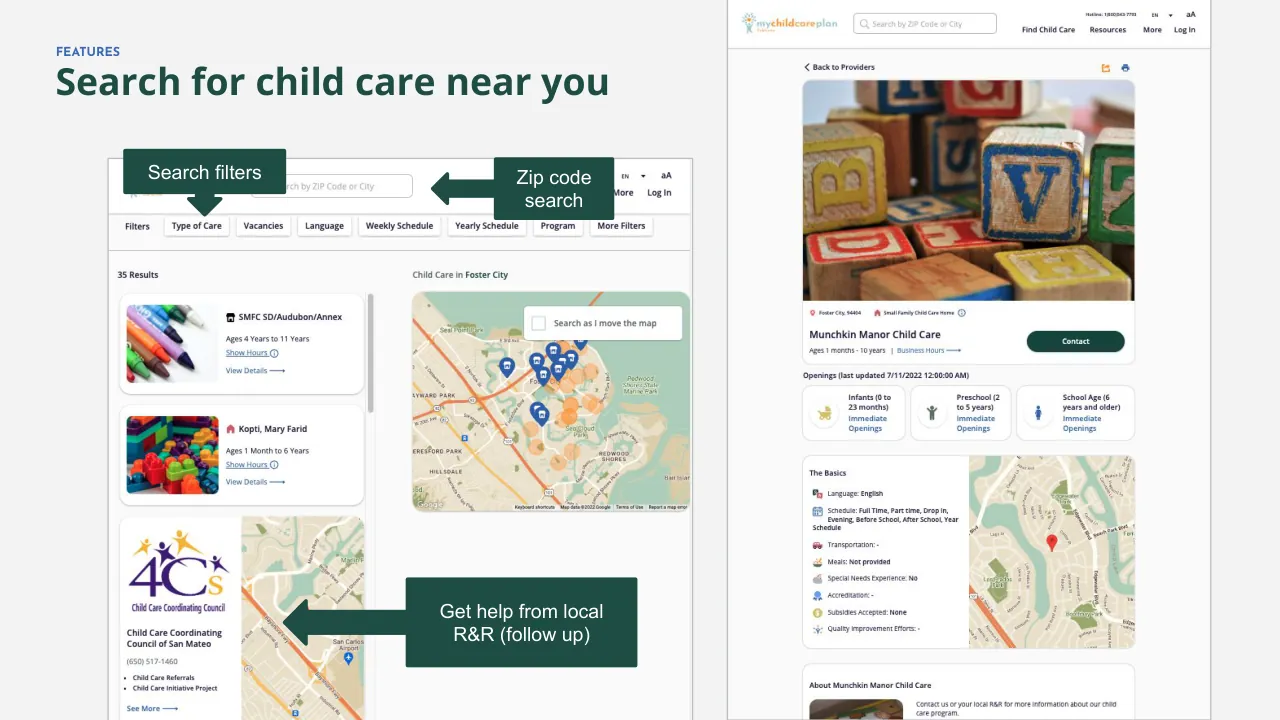
The deck opens with a problem statement: online child care searches are confusing, hard to compare, and may not be reliable. It then introduces MyChildCarePlan.org as a state-funded, no-cost consumer education tool available in four languages. The middle sections explain how the tool works, including search filters, saved searches and personalized plans, and how families can get one-on-one help from local Child Care Resource & Referral Agencies. Next it describes what those agencies are and the free and paid tiers of referral services, including a search widget that employers can add to their own websites. A preview section then walks through the main features with screen-style slides covering search, resource libraries, and parent account tools. The deck closes with a summary of benefits and a contact slide for the digital project manager. Slides worth studying include the problem-and-solution opening on slides 2 and 3, the step-by-step explanation on slide 5, the tier comparison on slides 8 through 10, and the feature preview on slides 12 through 14, which shows the product through simple labeled visuals rather than dense text.
Full text of the slides (16 slides)
Every slide's words and a description of its charts and images, so the deck can be searched and rebuilt. Also available as Markdown.
Slide 1
Introducing
MyChildCarePlan.org
California’s child care consumer
education website
mychildcareplan California
California Child Care Resource & Referral
NETWORK
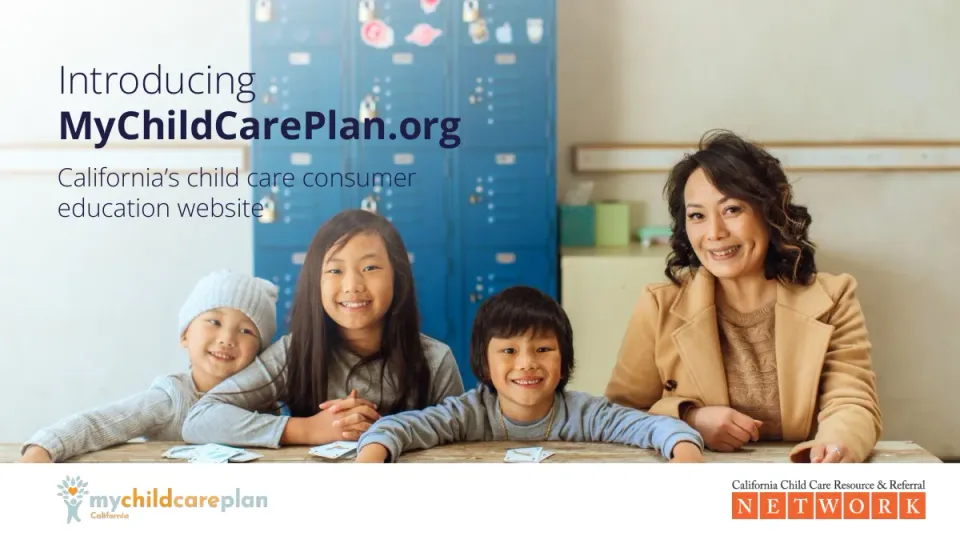
Visuals: Full-width photograph of four people smiling at the camera behind a weathered wooden table. From left: a small child in a light grey knit beanie and grey ribbed top leaning in, an older girl with long dark hair in a grey top with hands clasped, a boy with a dark bowl-cut in a blue-grey sweater with a thin gold chain and arms stretched on the table, and a woman with wavy dark hair in a camel coat over a tan knit sweater. Playing cards lie on the table. Behind them is a wall of blue lockers with stickers and padlocks in the centre-top, a cream wall to the right with a pale yellow cabinet and teal and green boxes, and a white-washed wall to the left. Soft natural light, with a pale white wash fading over the left side behind the title. Dominant colours are blue, cream, camel and grey. Bottom left logo: mychildcareplan California, with a pale blue tree-and-child figure with an orange heart, and wordmark 'my' in light blue, 'child' and 'care' in orange, 'plan' in light blue, with 'California' in small orange text below. Bottom right logo: serif text 'California Child Care Resource & Referral' in dark grey above the word NETWORK in white capitals, each letter in its own orange box.
Slide 2
Finding child care can
be challenging.
Online searches can be confusing,
difficult to compare, and the results
may not be reliable.
That's why we created
My Child Care Plan.
Visuals: A large semi-transparent, lighter pink silhouette logo of a child with raised arms and a round head, whose arms form the trunk of a tree. The crown is a cluster of about 12 leaf shapes with a heart shape in the centre. It is tinted about 15% white over the background, sits on the right side, spans from near the top to near the bottom, and is partly covered by the bottom-right text.
Slide 3
mychildcareplan
The information you need
to find child care you can trust.
Visuals: Two images. (1) Logo lockup at left: a pale blue-grey (about #A9C9CF) child figure with raised arms, topped by a tree canopy of pale blue-grey leaves around an orange heart (#F7941D), beside the wordmark 'mychildcareplan' in rounded geometric sans lowercase. 'my' and 'plan' are pale blue-grey, 'child' is orange, 'care' fades from orange to light orange-peach. (2) Large watermark at right: the same tree/child/heart mark as a tone-on-tone silhouette in slightly lighter green (about #365F57), leaves fanning around a heart above a child with raised arms, cropped tightly with no background box.
Slide 4
What is My Child Care Plan?
My Child Care Plan is an easy-to-use online tool that helps California families find trusted information to make the best possible child care choices.
The tool is funded by the State of California and available at no cost.
MyChildCarePlan.org is available in 4 languages. It allows you to search for child care in your community, and filter for your specific needs.
The tool allows you to do your own research while also providing navigation assistance when and if you need it.
California Child Care Resource & Referral Network
Visuals: One full-bleed photograph on the right: a close, over-the-shoulder view of a person's lap holding a MacBook Pro, tilted diagonally. The laptop screen shows the mychildcareplan website with a pale blue background, the heading 'The information you need to find child care you can trust.', a blue 'Get Started' button, small text below it, and a circular photo of a man holding a smiling child. The keyboard and Touch Bar are visible in dark grey and black. Blurred background shows a red child's chair, a rug and a warm wooden floor, and the person wears blue jeans. Lighting is warm and soft, with orange, red, blue and grey tones. Four orange round bullet dots sit beside the list items.
Slide 5
How does it work?
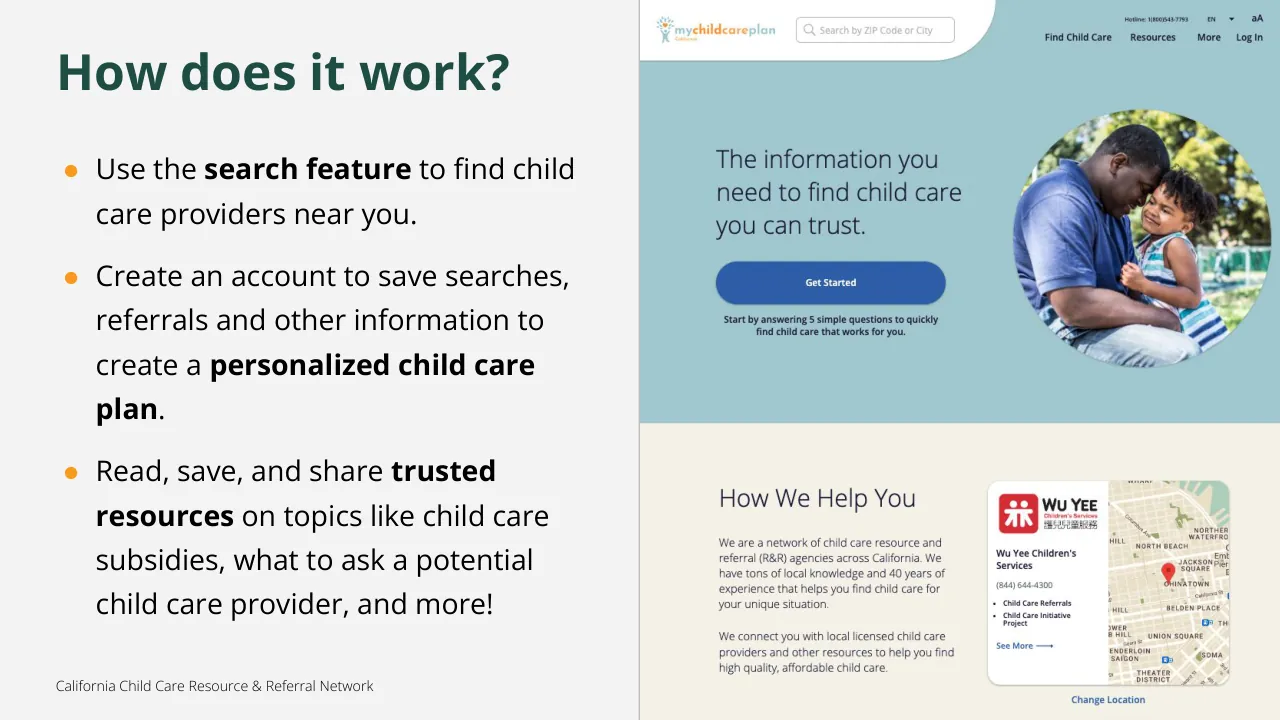
● Use the search feature to find child care providers near you.
● Create an account to save searches, referrals and other information to create a personalized child care plan.
● Read, save, and share trusted resources on topics like child care subsidies, what to ask a potential child care provider, and more!
California Child Care Resource & Referral Network
Visuals: Right half: a screenshot of the mychildcareplan California website homepage. Top has a white header with a curved lower-right corner, containing the logo (a small colorful tree/child icon with 'mychildcareplan California' wordmark in orange and teal) and a rounded search box reading 'Search by ZIP Code or City' with a magnifier icon. At the top right are tiny 'Hotline: 1(800)543-7793', 'EN' with a dropdown arrow, 'aA', and the nav links 'Find Child Care', 'Resources', 'More', 'Log In'. The hero area is light blue-teal (about #A0C6CC) with the heading 'The information you need to find child care you can trust.', a blue pill button 'Get Started' (about #3558A8) with white text, and a small caption 'Start by answering 5 simple questions to quickly find child care that works for you.' To the right is a circular photo of a smiling Black father with a short beard touching foreheads with his young daughter, who has curly hair and a striped top. He wears a blue polo. They are outdoors in a sunlit green park with warm natural light. The lower part of the screenshot has a cream background (about #F4F0E4) with the heading 'How We Help You', two paragraphs of grey text, and a white rounded card. The card holds a red Wu Yee Children's Services logo, 'Wu Yee Children's Services', '(844) 644-4300', bullets 'Child Care Referrals' and 'Child Care Initiative Project', a 'See More' link with an arrow, and a map of San Francisco with a red pin at Chinatown. Below the card is the blue link 'Change Location'.
Slide 6
What if I need more support?
The state of California’s network of Child Care Resource & Referral Agencies offer one-on-one support to help you find what you’re looking for.
Child Care Resource & Referral Agencies can help you:
Help you screen for the best match for you and your child
Ask prospective providers the questions you’re concerned about
Understand your rights and where to go for further information
Connect with local child care specialists
children's council San Francisco because child care matters
Children's Council of San Francisco
San Francisco | (415) 343-3300
Child Care Initiative Project
Child Care Referrals
See More >
California Child Care Resource & Referral Network
Visuals: Top right: a boxed, uncropped photo of a smiling woman sitting cross-legged on a wooden floor, talking on a phone with a laptop on her lap. A toddler in a grey hoodie plays beside her with a pink toy house. Behind them are a striped sofa with a mustard cushion, a grey armchair, bookshelves and a plant. The shot is taken from above in warm light, with brown, mustard and pink tones. Below it: a screenshot of a map card headed 'Connect with local child care specialists'. The card has a white rounded panel on the left with the Children's Council San Francisco logo (an orange and teal swirl icon with teal text), the name, phone number, two bullet items and a blue 'See More >' link. The right side is a beige street map with a red location pin and street labels such as Church St, 16th St, Landers St, 17th St and Chula. Bottom right: a small logo of a light blue stylised child figure with tree-like leaves and an orange heart. Bullet markers are orange filled circles for the first level and hollow circles for the second level.
Slide 7
What is a Child Care Resource / & Referral Agency?
Child Care Resource and Referral Agencies serve as a bridge between families and local child care providers.
They are staffed by child care counselors who have a deep understanding of child care needs and the child care search process.
There is at least one in every county of the state, and they have extensive knowledge of and connection to child care providers in the communities they serve.
Connect with local child care specialists
children's council San Francisco because child care matters
Children's Council of San Francisco
San Francisco | (415) 343-3300
Child Care Initiative Project
Child Care Referrals
See More >
California Child Care Resource & Referral Network
Visuals: 1) Photograph, boxed, upper right: a smiling woman with dark hair sits cross-legged on a wooden floor in a living room, talking on a phone and holding a laptop on her lap. A toddler in a gray hoodie and blue overalls plays beside her with a pink toy house. Striped sofa with a mustard cushion on the left, olive armchair with patterned pillows on the right, bookshelf and plants behind. Warm natural light, shot from above, browns, oranges and teal. 2) Screenshot of a search-result card on a cream background: heading 'Connect with local child care specialists' in dark navy. A white rounded card on the left holds the Children's Council San Francisco logo (colourful pinwheel with teal wordmark), the name, address line, two bullets and a blue 'See More >' link. A beige street map on the right shows a red pin near Church St and 16th St, with street labels (Church St, Landers St, 16th St, Chula, 17th St). 3) Small logo at bottom right: a light blue stylised tree with a person figure and an orange heart in the canopy. 4) Orange round bullet markers.
Slide 8
Tiers of Resource & Referral Services (Free)
Free services available for all CA residents:
Standard child care referrals: An R&R referral is a list of child care programs from which a family may choose, as well as information regarding how to select child care services which will meet the needs of the parent(s) and the child(ren).
A referral is not a recommendation. R&Rs provide information to any person who requests a child care referral, regardless of income level or other eligibility requirements.
MyChildCarePlan.org child care search tool: Find child care providers near you.
California Child Care Resource & Referral Network
Visuals: Small logo at bottom right: a stylised tree made of pale blue-grey leaves whose trunk is a child figure with raised arms. An orange heart sits in the canopy. Bullet markers: an orange filled circle at level 1, dark navy hollow circles at level 2, and a dark navy filled square at level 3.
Slide 9
Tiers of Resource & Referral Services (Paid)
●
Paid services available for all CA
residents:
○
Enhanced child care referrals: The R&R
advisors will conduct a detailed search of
programs that fit the criteria the parent is
looking for and contact those programs to
confirm space is available for the family’s
child(ren).
In these uncertain times, availability (or unavailability) of child care programs changes
minute to minute. Some companies and organizations contract with R&Rs to provide
enhanced referral services to their employees.
California Child Care Resource & Referral Network
Visuals: Photograph, boxed with square corners on the right: a smiling woman with shoulder-length dark hair and glasses sits at a dark wooden table, talking on a mobile phone held to her left ear. She wears a black cardigan over a magenta top and types on a silver open laptop in front of her. Behind her are tall white-framed windows with soft daylight, a plant at the left and a framed artwork. The lighting is warm and natural, the palette muted browns, greys and black. Small logo at bottom right: a pale blue stylised tree with a leafy canopy and an orange heart, with a blue figure of a child forming the trunk.
Slide 10
Tiers of Resource & Referral Services (Paid)
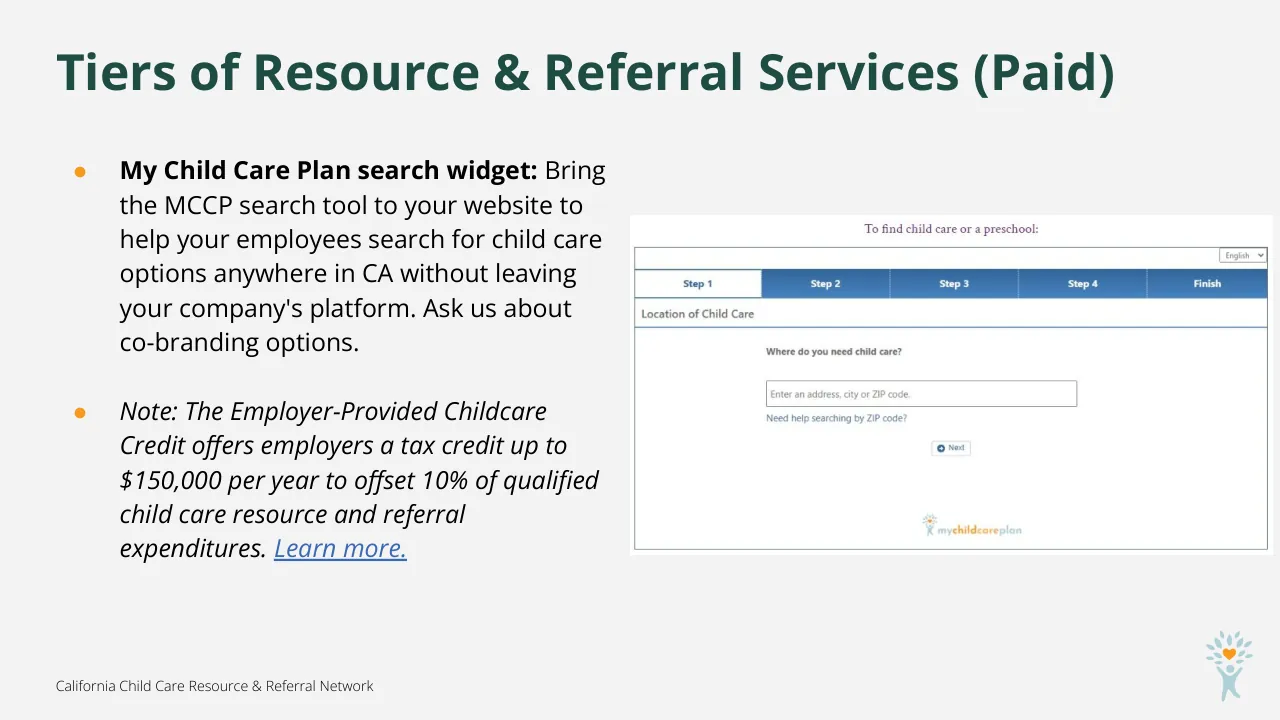
My Child Care Plan search widget: Bring the MCCP search tool to your website to help your employees search for child care options anywhere in CA without leaving your company's platform. Ask us about co-branding options.
Note: The Employer-Provided Childcare Credit offers employers a tax credit up to $150,000 per year to offset 10% of qualified child care resource and referral expenditures. Learn more.
To find child care or a preschool:
English
Step 1
Step 2
Step 3
Step 4
Finish
Location of Child Care
Where do you need child care?
Enter an address, city or ZIP code.
Need help searching by ZIP code?
Next
mychildcareplan
California Child Care Resource & Referral Network
Visuals: A screenshot of the My Child Care Plan search widget on a white panel with a thin grey border. Top shows purple serif text 'To find child care or a preschool:'. Below is a white box with an 'English' dropdown at the top right. A row of five tabs follows: 'Step 1' (white, selected, blue text), 'Step 2', 'Step 3', 'Step 4' and 'Finish' (blue #2F6EB5 fill with white bold text). Beneath is a 'Location of Child Care' header bar with a blue underline. The form has the bold question 'Where do you need child care?', a text input with placeholder 'Enter an address, city or ZIP code.', a blue link 'Need help searching by ZIP code?', and a small 'Next' button with a blue circle icon. At the bottom of the form is the mychildcareplan logo with a small tree icon, 'my' in grey-blue, 'childcare' in orange and 'plan' in light blue. A small corner logo at bottom right shows a light blue stylised tree with leaves above a child figure, with an orange heart in the canopy. Orange round bullet markers sit beside each bullet.
Slide 11
Preview:
Meet MyChildCarePlan.Org
Visuals: A large semi-transparent, lighter-green silhouette logo/illustration on the right: a tree canopy of about 12 pointed leaf shapes of varied sizes and angles arranged around a central heart shape, with a child figure beneath (round head, arms raised in a V forming the trunk). The leaves at the right edge are cropped by the slide edge, and the base runs off the bottom. It is tone-on-tone, about #2E5A52 on the dark green, with no outlines.
Slide 12
FEATURES
Search for child care near you
Search filters
Zip code
search
Get help from local
R&R (follow up)
Visuals: Two website screenshots. Left: mychildcareplan search results page (cropped at the bottom). It has a header with a search field 'Search by ZIP Code or City', EN, aA, More and Log In. A row of filter buttons reads Filters, Type of Care, Vacancies, Language, Weekly Schedule, Yearly Schedule, Program, More Filters. Below that '35 Results' and 'Child Care in Foster City'. Result cards: 'SMFC SD/Audubon/Annex' (Ages 4 Years to 11 Years, Show Hours, View Details) with a crayon photo; 'Kopti, Mary Farid' (Ages 1 Month to 6 Years, Show Hours, View Details) with a colourful building-block photo; and a card for 'Child Care Coordinating Council of San Mateo' with a purple/yellow 4Cs logo, phone (650) 517-1460, bullets Child Care Referrals and Child Care Initiative Project, and See More, next to a map. On the right is a map of Foster City with blue pins and orange circles and a 'Search as I move the map' checkbox. Right screenshot: mychildcareplan provider page with the logo, search box, nav (Find Child Care, Resources, More, Log In), a 'Back to Providers' link, a photo of colourful wooden alphabet blocks (B, V, and others), 'Munchkin Manor Child Care', 'Ages 1 months - 10 years', a dark green Contact button, an openings section with three cards (Infants, Preschool, School Age), 'The Basics' list with a map showing a red pin, and an 'About Munchkin Manor Child Care' section at the bottom. Overlays: dark green callout 'Search filters' with a downward arrow pointing at the filter row; dark green 'Zip code search' box with a left-pointing arrow toward the search field; dark green 'Get help from local R&R (follow up)' box with a left-pointing arrow toward the 4Cs card.
Slide 13
FEATURES
Read, save & share resources
Visuals: Two UI screenshots of the MyChildCarePlan website. Left (desktop, thin grey border): a header with the logo, a search field and nav links; a pale green 'Find child care you can trust.' banner with a dark green 'Get Started' button; a Topics sidebar with 8 small icons; an 'All Resources' search box; a 'Featured Resources' card with three thumbnail photos (child on a bed with striped socks, child walking in a field with sky, black and white child on a path) and excerpts; a 'Local R&R' card with the Wu Yee Children's Services red logo; a dark green 'Chat' button at bottom right. Right (full height): a white header, a heading 'You are the expert on your child and family...' with small decorative yellow, red and blue sparkle marks, four tabs (the 'Resources' tab filled blue), a 'Saved Resources' card with three rows with red trash icons and the same three thumbnails, and a navy wavy footer with logo, orange 'Create Child Care Plan' button, and link lists.
Slide 14
FEATURES
Parent features
Save your search
Keep lists of providers
Add notes about
providers
Save and share
resources
Visuals: One screenshot of the mychildcareplan California parent website, with a thin light-grey border. Top bar is white with the mychildcareplan logo (a small figure with a sun-like orange and teal burst, wordmark 'my' in blue-grey, 'child' in orange, 'care' in orange/yellow, 'plan' in teal, 'California' underneath), a rounded search box reading 'Search by ZIP Code or City' with a magnifier icon, a small 'Hotline: 1(800)543-7793', 'EN' with dropdown arrow, 'aA' text-size icon, and nav links 'Find Child Care', 'Resources', 'More' and a black round user icon. Below, a pale grey page with the headline in dark navy bold: 'You are the expert on your child and family. Look for a child care provider who respects your input.' Decorative small crosses in yellow, red and blue sit at the upper right and lower left of the headline. Four rounded tab buttons in a row: 'Child Care Plan' (blue #3A69B3 fill, white text), 'Resources', 'Announcements', 'Profile' (white with soft shadow, dark text). Beneath is a white rounded card titled 'My Child Care Plan' with an underlined 'Edit Plan' link at the right. It shows a black round avatar icon, the name 'Ramona', 'Age: 11 Months', 'Part Time Care', 'From 8/17/2022', '12:00AM - 12:00AM', and a blue link 'View All Child Care Results' with an arrow. At the right of the card is a Google map of the Burbank area in beige tones, orange highways, a translucent pink circle over Burbank, green park markers (Brand Park), and labels such as VERDUGO, FREMONT PARK, IA PARK, with Google logo and map footer text. A blue round chat button with a white speech icon sits at the lower right of the screenshot.
Slide 15
The benefits of My Child Care Plan
An easier way for families to find quality child care that meets their needs.
Access a library of trusted information for families, covering topics like how to navigate the child care search process, understanding different types of child care, available subsidies, how licensure works, and more!
Everything that MyChildCarePlan.org offers is free to both child care providers and families.
California Child Care Resource & Referral Network
Visuals: Three orange hand-drawn style checkmark icons, one beside each bullet. A photograph on the right: a man with short dark hair and a beard, in a dark grey and white sweatshirt, crouches in a kitchen looking down while he plays with a small child in a grey knit beanfactor and striped sweater. They hold a red-orange toy airplane. Behind them is a stainless steel range and oven with a towel hanging from the handle, white tile backsplash. A toy duck sits at the bottom. Warm, soft, moody lighting with a muted palette of steel grey, orange-red and denim blue. The photo is boxed with a rounded top-left corner and bleeds off the right and bottom edges. A small image sits at the bottom right over the photo (303 by 451 px), its content not discernible.
Slide 16
Thank you!
Questions? Contact:
Gretchen Howard
Digital Project Manager
[email protected]
415-494-4665
Visuals: Left: flat illustration in pale blue (#AECED5) of a child with raised arms whose body forms a tree trunk; the head is a circle, the arms rise in a V, and about a dozen pale blue leaf shapes of varying size and tilt form the canopy. An orange (#F7981D) heart sits in the center of the canopy above the head. The illustration is cropped at the left slide edge and bottom of the green panel. Footer: California Child Care Resource & Referral NETWORK logo, with the serif text 'California Child Care Resource & Referral' in dark grey above seven orange tiles with white serif letters N E T W O R K. At far right: 'mychildcareplan California' logo, with a small pale blue child and orange heart and leaves icon at left, 'my' in pale blue, 'child' in orange, 'care' in orange, 'plan' in pale blue, and a small orange 'California' beneath.