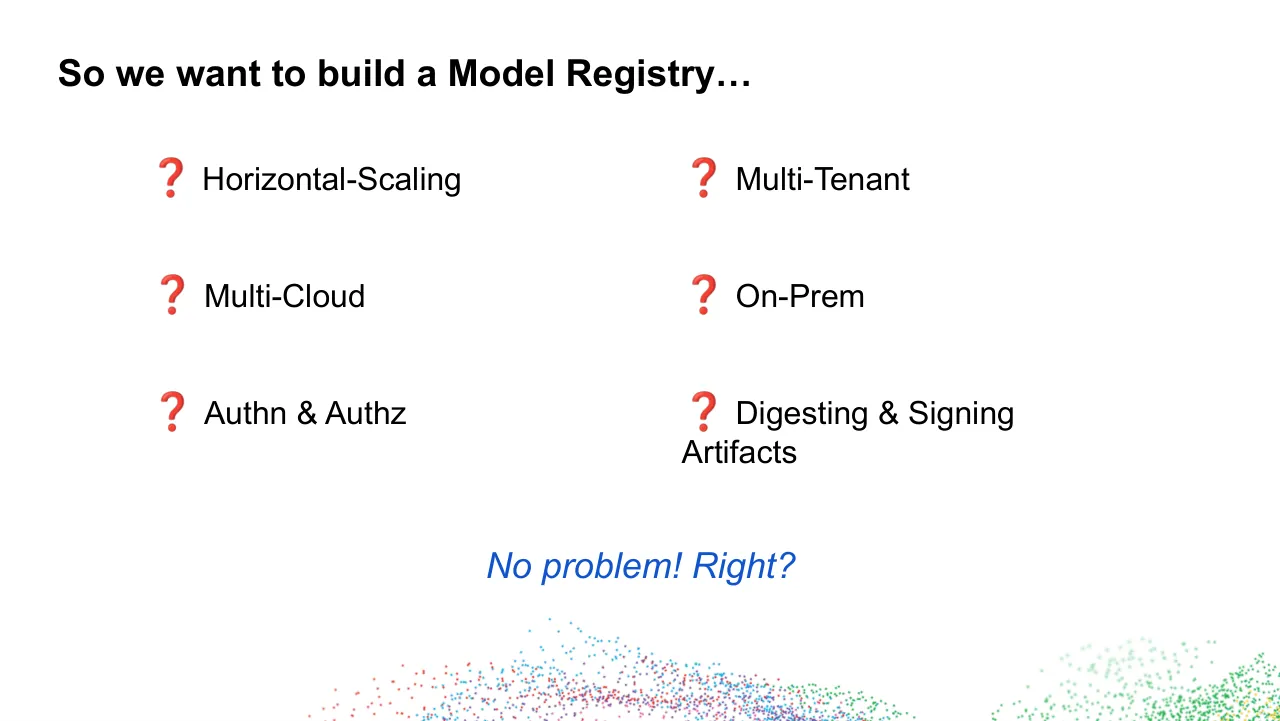
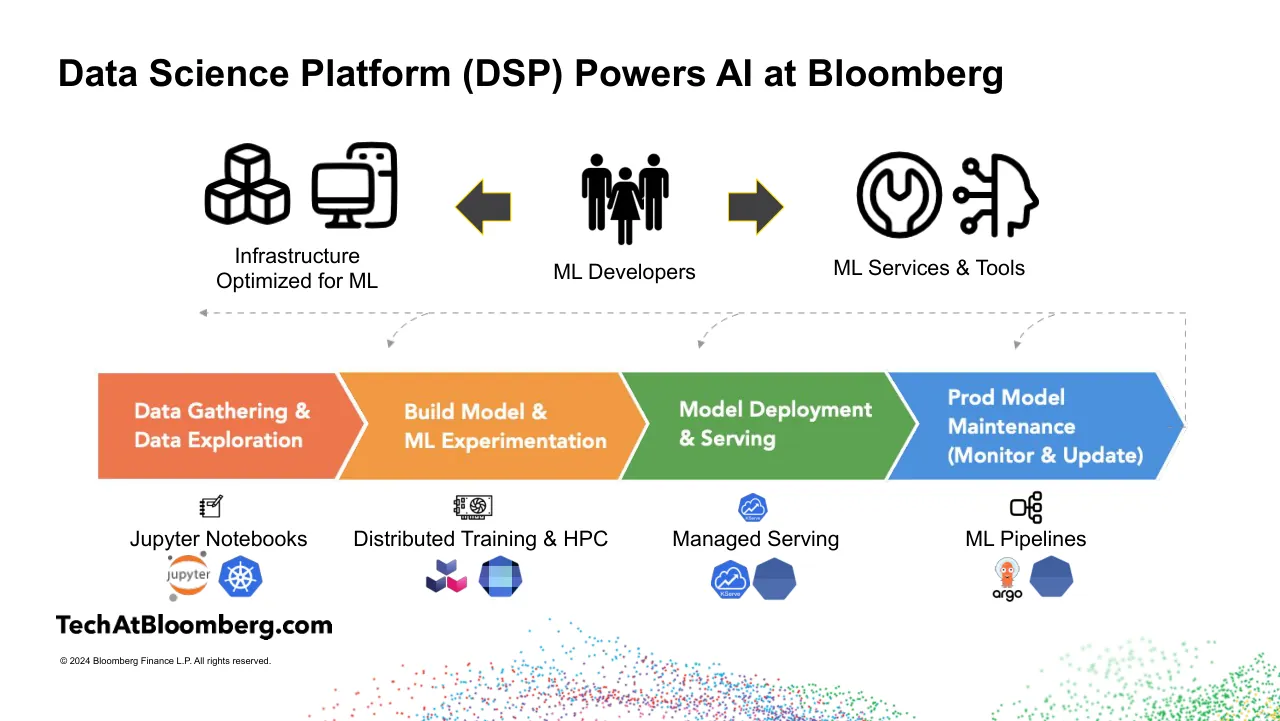
The deck opens with a KubeCon and CloudNativeCon Europe 2024 title slide, then introduces speakers Peyman Norouzi and Eric Koepfle and the talk, OCI as a Standard for ML Artifact Storage and Retrieval. It moves to a short overview of the Bloomberg Terminal, a set of data-volume figures that frame the scale of the problem, and a description of Bloomberg's Data Science Platform and its ML development lifecycle. The middle section sets out a requirements problem: developers want familiar tools and easy collaboration, while software practice demands immutability, provenance and compliance. A series of questions then asks what a model registry must handle, leading to a checklist organised around storage, format, security and discoverability. The core section explains the OCI image, distribution and runtime specifications, how registries scale and redirect to storage, how artifacts are pushed and pulled, and how authorisation is scoped. The deck closes with the catalog, future possibilities and remaining challenges, followed by a hiring slide.
Slides worth studying
Questions about this deck
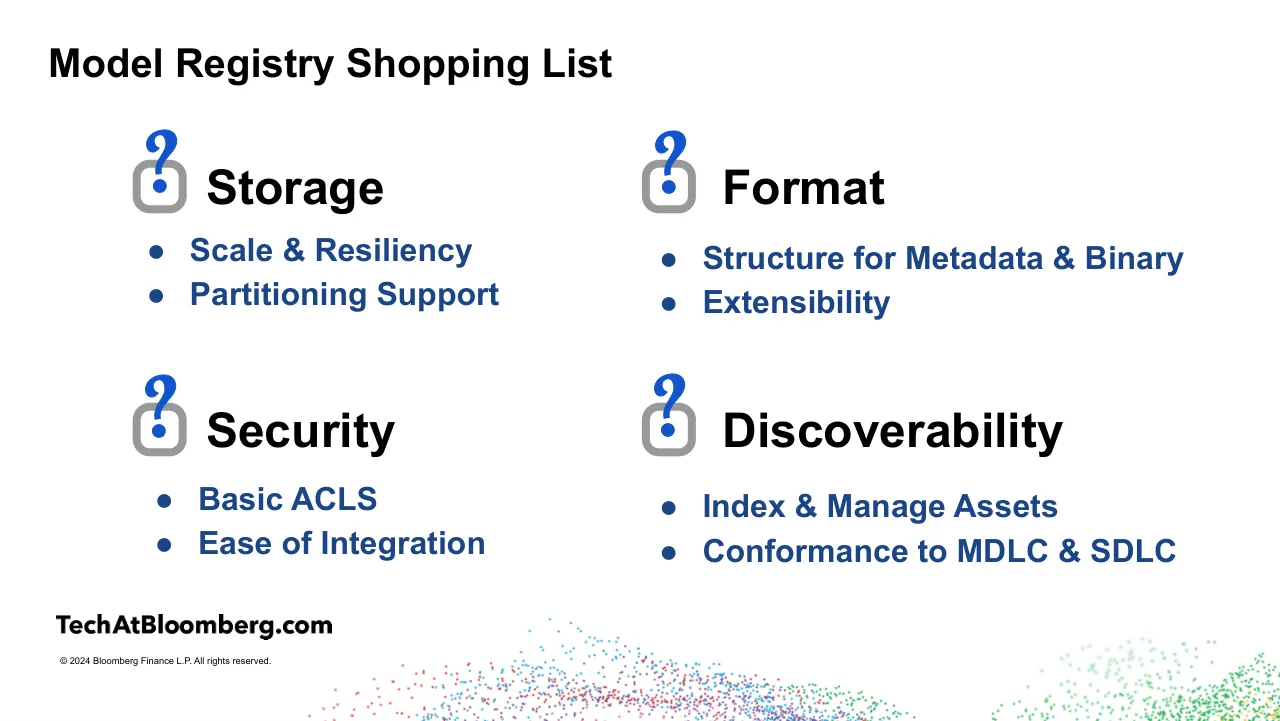
What does the Bloomberg deck say about the storage requirements in its Model Registry shopping list?
Slide 12 lists Scale & Resiliency and Partitioning Support under the Storage heading of the Model Registry Shopping List. Slide 12 also lists Structure for Metadata & Binary and Extensibility under Format.
How many slides does the Bloomberg deck have?
The Bloomberg deck has 38 slides. Slide 38 is the closing slide, titled Thank you! We are hiring.
What data volumes does the Bloomberg deck give for market data and news?
Slide 4 states that 300 Billion market messages (ticks) from exchanges are collected, normalized, analyzed, and redistributed in real time to clients. The same slide states that 1.5 Million curated news stories in 30 languages are ingested from over 125,000 sources.
What does the Bloomberg deck say about the Model Catalog and its functions?
Slide 33 says that maintaining and distributing models is handled by the internal Model Catalog. Its listed functions include model listings across multiple registries, model provenance, viewing model contents, copying models between registries, promoting and deprecating revisions, and tenancy management.
Details
More from Bloomberg
All Bloomberg decks in the library
Review score: 7 out of 10, Effective
Presentation quality, judged with the SlideDeck Co review heuristic. Ask, evidence and idea merit are not rated here.
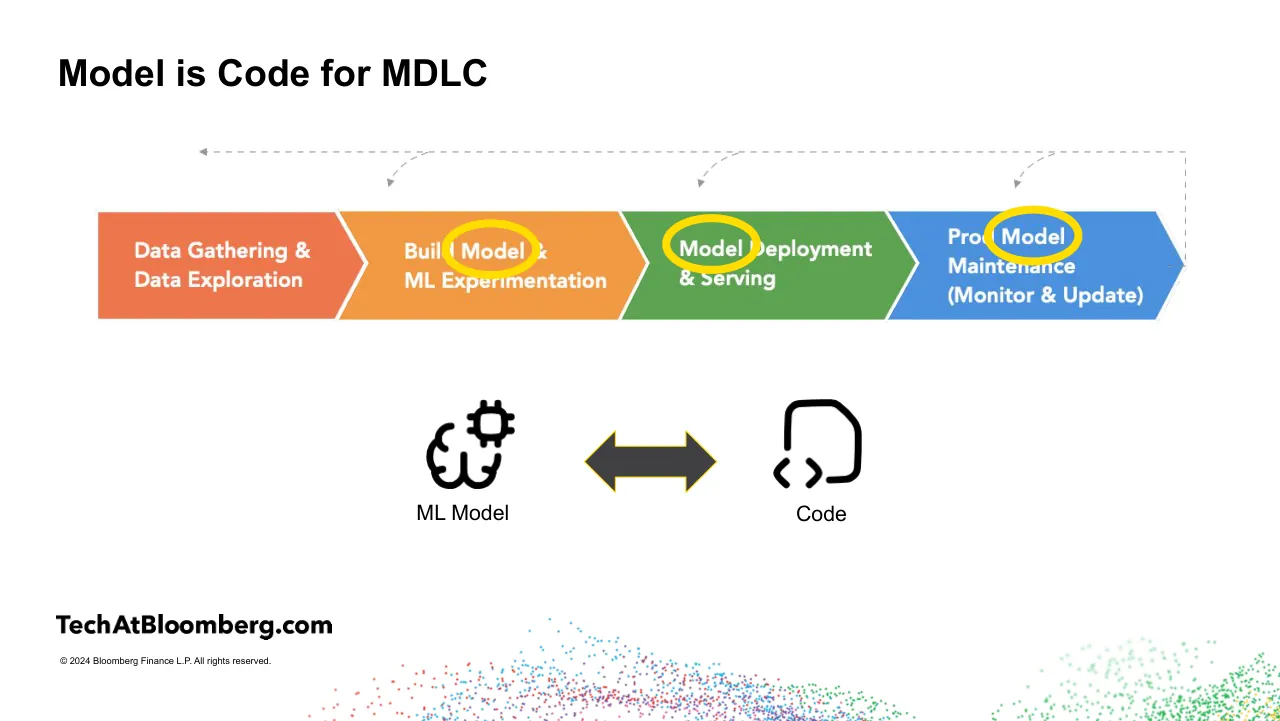
The deck tells a clear problem-to-solution story: requirements (slides 7-9), a shopping list of four needs (slide 12), the OCI specs, then push, pull, authorization and catalog, and finally a checklist that fills in with ticks on slides 21, 24, 29, 32 and 34. The progressive checklist is a strong navigational device, and the pull and push diagrams (slides 27, 28), the scaling diagram (slide 22) and the big-picture architecture (slide 35) carry the technical content well. Weaknesses are consequential: yellow ovals on slide 6 cut through the stage labels, slides 11 and 20 are decorative filler, slides 26, 27 and 30 pack small text into tiny labels, and the stock grocery-shelf photo on slide 13 is loosely tied to the point. Several diagrams are small at conference-room distance, and footer and brand clutter recur on almost every page.
Worth keeping: Keep the recurring four-part shopping-list checklist that fills in as the talk progresses, plus the consistent title style and the clear diagram-led explanations of registry scaling, push and pull.
Most useful repair: Fix the highlight ovals on slide 6 so stage names stay legible, fix the wrapped label on slide 9, and enlarge or simplify the dense small-text diagrams on slides 19, 26, 27 and 30.
What would change the score: I would cut or merge the filler and repeated checklist pages (slides 11, 20, 21, 24) and replace the generic photo on slide 13 with a figure that shows the actual problem.
Confidence medium. 38 of 38 pages inspected on contact sheets, 4 at readable size. Reviewed 2026-11-08. Model-assisted review (claude-sonnet-5-5).
Full text of the slides (38 slides)
Every slide's words and a description of its charts and images, so the deck can be searched and rebuilt. Also available as Markdown.
Slide 1
KubeCon
CloudNativeCon
Europe 2024
Visuals: Flat paper-cut style vector illustration. Right half: a large pale-blue arc (sky) rising from the lower left to the top right, with four white-to-pale-blue paper clouds with soft drop shadows. Lower right: a skyline of Paris landmarks in flat colours with a dark purple city silhouette behind: a green domed building (left), a red Grande Arche-style arch with a peach Arc de Triomphe-style arch in front, a light blue Sacré-Cœur with three domes, a red Eiffel Tower (centre, tallest point near the top of the skyline), a peach Louvre pyramid building, and a red Notre-Dame style cathedral at the right edge, cut off by the slide edge. The skyline sits on a light grey band with white cloud bumps. Lower left: a mid-blue curved band and a dark purple curved band in the corner. Logos: the Kubernetes wheel logo in white, above the word 'KubeCon'; the CloudNativeCon logo, a white square outline with a grey-striped diagonal pattern, above the word 'CloudNativeCon'. A thin white vertical divider separates the two logos.
Slide 2
OCI as a Standard for ML
Artifact Storage & Retrieval
Peyman Norouzi
Product Manager, ML Platforms, Office of the CTO, Bloomberg
Eric Koepfle
Software Engineer, AI Data Platform, Bloomberg
Visuals: Abstract illustration filling the whole slide. A diagonal boundary runs from the top edge at about 69% of the width down to the bottom edge at about 12.5% of the width, splitting the slide into a cyan area on the upper-left and bottom-left and a light grey area on the upper-right. In the lower right, a large cyan arc (a segment of a circle) rises from the bottom edge near 56% of the width and sweeps up to the right edge at about 45% of the height. Inside the arc on the right edge is a lighter cyan rectangle spanning from about 75.7% of the width to the right edge and from about 55% to 86.7% of the height, which overlaps the arc. No photographs, logos or icons. Flat vector shapes with no gradients, shadows or textures. The title and name text overlap the diagonal boundary.
Slide 3
About Bloomberg
The Bloomberg Terminal facilitates
financial decision-making
News
Research
Markets
Analytics Tools
Communication
Tools
TechAtBloomberg.com
© 2024 Bloomberg Finance L.P. All rights reserved.
Visuals: Five black outline icons: a newspaper/news page icon above 'News'; a microscope icon above 'Research'; a candlestick chart with a dollar sign above 'Markets'; a line chart with connected circular data points on axes above 'Analytics Tools'; and two overlapping speech bubbles above 'Communication Tools'. One photograph of a dual-monitor Bloomberg Terminal setup: two flat-panel monitors on a silver stand with circular base, mounted side by side with a slim gap, showing dense financial screens with red and green price tables, line charts, candlestick charts, and pie or donut charts. Below the monitors sits a black keyboard with green, yellow, red and blue keys. The photo is shown unboxed on a white ground, with a neutral grey/black and green/red palette, front-on framing, and even studio lighting with soft reflections. A decorative field of tiny dots in red, blue, purple, green and yellow fills the bottom edge in two clusters, one centre-left and one right, fading into white. The image sits full-slide as a transparent PNG with no border.
Slide 4
Massive Amounts of Data Each Day -> AI to Make It Useful
300 Billion
market messages (ticks) from exchanges / are collected, normalized, analyzed, and / redistributed in real time to clients
1.5 Million
curated news stories in 30 languages are / ingested from over 125,000 sources / around the globe and made available / and searchable
450 Billion
data points served by our core data and / analytics services each day to enable / clients to perform world-class financial / analysis
200 Million
data points handled by our systems for / roughly 200,000 bonds across global / markets when producing FI indices
200 Million
trusted documents (e.g., sell-side research, company filings, transcripts) / housed by Bloomberg’s research system / {DS <GO>}
TechAtBloomberg.com
© 2024 Bloomberg Finance L.P. All rights reserved.
Bloomberg
Engineering
Visuals: A decorative upward-trending arrow (a 512 by 512 pixel square image, transparent background) sits behind and partly under the lower-right cards, rising from lower-left to upper-right, with its head near the bottom edge of the top-right card. The arrow is a flat, rounded-corner, two-tone blue-grey shape: a lighter grey-blue (about #A9B8D6) on the left shank and a deeper periwinkle (about #8FA3CC) on the right shank and head, with no outline. Along the bottom of the slide, a 1734 by 1344 pixel image of scattered small dots (particles) spans from about 22% to the right edge and from about 85% to the bottom edge, with dots in red, blue, purple, green and yellow, denser in the centre and fading toward the edges, on a white background, not cropped and not overlaid. The Bloomberg logo (379 by 153 pixels) is at bottom right, a black Bloomberg wordmark with a black rectangular tag reading Engineering in white monospace beneath it. The TechAtBloomberg.com wordmark (629 by 57 pixels) is black bold sans-serif at bottom left.
Slide 5
Data Science Platform (DSP) Powers AI at Bloomberg / Infrastructure / Optimized for ML / ML Developers / ML Services & Tools / Data Gathering & / Data Exploration / Build Model & / ML Experimentation / Model Deployment / & Serving / Prod Model / Maintenance / (Monitor & Update) / Jupyter Notebooks / Distributed Training & HPC / Managed Serving / ML Pipelines / TechAtBloomberg.com / © 2024 Bloomberg Finance L.P. All rights reserved.
Visuals: Diagram and icons. (1) Top-left group: a black outline icon of three stacked cubes beside a monitor-with-server icon, labelled 'Infrastructure / Optimized for ML'. (2) Centre: a black silhouette pictogram of three people (two men flanking a woman holding hands), labelled 'ML Developers'. (3) Top-right: a black circle outline containing a wrench, beside a black head-profile icon with circuit-node lines, labelled 'ML Services & Tools'. (4) Two solid dark grey (#3D3D3F) block arrows with thin yellow (#F5C518) outlines: a left-pointing arrow between Infrastructure and ML Developers, and a right-pointing arrow between ML Developers and ML Services & Tools. (5) Below, a dashed grey (#A0A0A0) feedback line runs from the right chevron's right edge leftward to a small arrowhead at the left under Infrastructure, with three curved dashed grey connectors dropping down with arrowheads to the Build Model, Model Deployment and Prod Model chevrons. (6) Four chevrons, flat fills: Data Gathering & Data Exploration in orange-red #EE7451; Build Model & ML Experimentation in orange #F0A040; Model Deployment & Serving in green #5FA34F; Prod Model Maintenance (Monitor & Update) in blue #4A90DD. Thin white gaps separate them. (7) Icons above labels: a notebook-with-pencil line icon over Jupyter Notebooks; a GPU-chip line icon over Distributed Training & HPC; a blue hexagon with a cloud-chart mark (KServe) over Managed Serving; a line icon of linked boxes over ML Pipelines. (8) Logo rows beneath labels: under Jupyter Notebooks, the Jupyter logo (orange ring with grey text 'jupyter') and a blue Kubernetes wheel hexagon; under Distributed Training & HPC, a dark-navy and magenta stacked-cube logo and a blue-and-navy pixel-sphere hexagon; under Managed Serving, a blue KServe hexagon and a plain blue hexagon; under ML Pipelines, an orange octopus-in-helmet Argo logo with the word 'argo' and a plain blue hexagon. (9) Decorative stippled dot clouds: red, blue, purple and green dots at the bottom centre and a green fading cloud at bottom right. Lighting is flat; no photographs.
Slide 6
Model is Code for MDLC
Data Gathering &
Data Exploration
Build & Model
ML Experimentation
Model Deployment
& Serving
Production Model
Maintenance
(Monitor & Update)
TechAtBloomberg.com
ML Model
Code
© 2024 Bloomberg Finance L.P. All rights reserved.
Visuals: 1) Four-step process chevron graphic (a single raster image, 77.0% wide, 16.4% tall, at x 15.5, y 20.6 region of the process band): chevrons left to right: (a) orange-red #EE7150 chevron reading 'Data Gathering & / Data Exploration'; (b) orange #F0963F chevron reading 'Build & / ML Experimentation' with a yellow ring (about #FFD700, stroke about 0.5% of slide height) circling the word 'Model'; (c) green #5CA653 chevron reading 'Model Deployment / & Serving' with a yellow ring circling 'Model'; (d) blue #4A90E2 chevron reading 'Production / Maintenance / (Monitor & Update)' with a yellow ring circling 'Model'. Chevrons are abutting with thin white gaps, white bold sans text. 2) Dashed grey feedback arrows (about #A0A0A0, dashed stroke, thin) above the chevrons: one long horizontal dashed line running from the top-right corner down to the right edge of the blue chevron, with an arrowhead pointing left at the far left end (x about 25%, y about 28%), and three short curved dashed arrows with arrowheads pointing down onto the orange, green and blue chevrons. 3) Icon of a brain with a gear/chip (ML Model), black line icon, about 7.5% wide by 13.3% tall, at x 33.0, y 55.0. 4) Dark grey #414042 double-headed arrow, filled, about 10.3% wide by 8.6% tall, at x 45.7, y 59.8, with thin yellow outline. 5) Code icon: black rounded document outline containing '< >' brackets, about 7.5% wide by 13.3% tall, at x 60.0, y 55.0. 6) Small raster wordmark 'TechAtBloomberg.com' in bold black sans, at x 4.4, y 85.3, 21.5% wide by 3.5% tall. 7) Decorative scatter of small dots at the bottom: a cluster of red, blue, purple and pink dots spanning centre-bottom, and a cluster of green and light-green dots at the bottom right, both fading into white.
Slide 7
ML Developers Needs <> Software Best Practices / ML developers want… / Software Best Practices / To use tools I’m used / to (PyTorch, etc.) / Immutability & / Proper / Versioning / Model Registry!! / Proper Release / Process & Reviews / Auditability & / Provenance / Easy / collaboration / No/minimal / change in my / workflow / Experiment/ / Dataset tracking / & comparison / (CI/CD) / Compliance / Checks / Security & / Vulnerability / Checks / Easy model / evaluation and / deployment / TechAtBloomberg.com / © 2024 Bloomberg Finance L.P. All rights reserved.
Visuals: Two overlapping-free circles: left circle filled light lavender #D9D2E9 with a purple outline about 0.5% of slide width, right circle filled light blue #CFE2F3 with a blue outline about 0.5% of slide width; each circle holds text clusters arranged in loose rows and no bullets. Between them is a horizontal double-headed block arrow filled dark grey #414042 with a thin yellow (#F1C232) outline, with its label Model Registry!! above it. Bottom edge has an illustration of a scattered particle cloud of small dots in red, blue, purple, green and yellow with soft fading transparency, concentrated in the lower-middle and lower-right area and cropped by the slide bottom. Bottom-left has the TechAtBloomberg.com wordmark in heavy black sans-serif, with no icon.
Slide 8
Model Registry (PM Edition) / ML Orientation / ● Meet ML Developers where they are! Easy to experiment, track, compare and deploy / ● Discover, collaborate, and use within the team and across the company / SDLC Best / Practices / ● Models are immutable and versioned / ● Models have proper governance / ● Models are checked for vulnerability & compliance checks / And… / ● Cloud native! Let's build with and on top of the community’s work / ● Should work and provide a seamless user experience both on-prem and in the cloud / ● It is multi-tenant / ● Should integrate well with the rest of our Data Science Platform (DSP) / © 2024 Bloomberg Finance L.P. All rights reserved.
Visuals: Three-row table-like arrangement built from rectangles, with no chart. Row 1: label cell 'ML Orientation' in pale lilac #D9D2E9 beside a light grey #EEEEEE cell containing two bulleted lines. Row 2: label cell 'SDLC Best Practices' in pale blue #CFE2F3 beside a #EEEEEE cell with three bulleted lines. Row 3: label cell 'And…' in dark charcoal #434343 beside a #EEEEEE cell with four bulleted lines. Bottom of slide: decorative scatter of small dots (about 2 to 3 pixels) forming a fading cloud along the bottom edge, mostly red, blue, purple, green and a few yellow dots; the cloud is densest in the centre-bottom and right, and the dots fade toward their edges. Bottom-left: TechAtBloomberg.com wordmark logo in black bold sans-serif. No photographs.
Slide 9
So we want to build a Model Registry…
❓ Horizontal-Scaling
❓ Multi-Tenant
❓ Multi-Cloud
❓ On-Prem
❓ Authn & Authz
❓ Digesting & Signing
Artifacts
No problem! Right?
Visuals: One illustration: a field of small scattered dots forming two cloud-like clusters across the bottom of the slide, cropped by the bottom edge. The left-centre cluster spans about x 25% to 72% and rises to about y 85% at its peak, with dots in red, blue, purple, magenta and green. The right cluster spans about x 77% to 100%, rises to about y 88%, and is mostly green with faded light-green dots fading upward and a few yellow dots at the lower right. The dots are on a transparent background over the white slide, with no tint or overlay. Six red question-mark emoji (rendered glyphs, 136 by 128 px each) sit in front of the list items, one per item, in two columns of three. No photographs, charts, tables or logos.
Slide 10
Slide 11
Audentes Fortuna Iuvat! / (Fortune Favors the Brave) / TechAtBloomberg.com / © 2024 Bloomberg Finance L.P. All rights reserved. / Bloomberg / Engineering
Visuals: Photograph-style generative illustration: a dense field of small dots (roughly 1 to 2 px) forming a flowing diagonal cloud that enters from the top right and sweeps down toward the lower right, with a sparser trail of green dots in the top left corner. Dot colours: green #00A651-like, purple #8E44AD-like, red #E8362D-like, blue #2E86DE-like, cyan #1EC8E8-like, pink #E85DA0-like, scattered on white. The dots are densest at the top right and thin out toward the centre-left and bottom right. Full-bleed in the top 65.4% of the slide, no border, no overlay. Logos: TechAtBloomberg.com wordmark in black bold sans-serif at lower left; Bloomberg wordmark in black sans-serif at lower right; 'Engineering' in white monospace text on a black rectangular label beneath the Bloomberg wordmark.
Slide 12
Model Registry Shopping List
Storage
● Scale & Resiliency
● Partitioning Support
Format
● Structure for Metadata & Binary
● Extensibility
Security
● Basic ACLS
● Ease of Integration
Discoverability
● Index & Manage Assets
● Conformance to MDLC & SDLC
TechAtBloomberg.com
© 2024 Bloomberg Finance L.P. All rights reserved.
Visuals: Four identical lock-style icons, one above each heading: a grey (#999999-ish) rounded-square padlock body outline about 4.5% of slide width, with a solid blue (#1155CC) dot at its centre and a blue Lobster-style question mark (?) sitting above the body, overlapping its top edge. Icons are at Storage (top-left), Format (top-right), Security (bottom-left) and Discoverability (bottom-right). Also one decorative dot-scatter image in the bottom right-centre, about 77.5% of slide width by 66.8% of slide height, bleeding off the bottom and right edges, not boxed and with no overlay: thousands of small dots (about 2 to 3 px each) in red, cyan-blue, purple, pink, green and yellow, dense near the centre-bottom and fading into sparse, semi-transparent green dots at the far right. One logo: the TechAtBloomberg.com wordmark in black bold geometric sans-serif, a placed image about 21.5% of slide width by 3.5% of height. Icons: none beyond the four lock icons.
Slide 13
Uh oh..
TechAtBloomberg.com
© 2024 Bloomberg Finance L.P. All rights reserved.
Bloomberg
Engineering
Visuals: One photograph: a supermarket aisle photographed from the floor looking down a row of shelving toward the back of the store. The foreground shelves are almost entirely empty, with a few bottles of water and soft drink in packs on the lower shelves, and a row of bottled drinks and water packs remains on the upper shelves at the top left. Price tags on the shelf edges read £1.50, £2 and £3. At the back right a 'patisserie' sign is visible above a bakery counter, a red 'GREAT PRICES' and 'Trick or treat' sign hangs on the right, and a teal sign at the top right reads 'Look out for the ... around the store' and is cropped at the right edge. The composition is a one-point perspective with the shelves receding from the lower left toward the vanishing point at the centre right. Lighting is overhead fluorescent tube lighting with bright reflections on the glossy floor. Dominant colours are off-white and beige shelving, grey-beige walls, a speckled tan terrazzo floor, and blue, red and green product packaging. The photo is boxed, not full-bleed, with a thin dark navy border of about 0.3% of slide height and no overlay or tint. Separately, a Bloomberg logo and an Engineering tag sit at bottom right, a TechAtBloomberg.com wordmark sits at bottom left, and a decorative field of small confetti dots in red, blue, purple, pink and green sits along the bottom edge from about x 24% to 100%.
Slide 14
DIY Estimate / Server / ML / Probably More Like: / Server / Scaling / What we need … / Server / Scaling / Machine Learning / TechAtBloomberg.com / © 2024 Bloomberg Finance L.P. All rights reserved.
Visuals: Three rows of block arrows, no chart, table or photograph. Row 1: one long blue (#0B5394) arrow labelled Server running from about 7% to 81% of slide width, overlapped at its tip by a shorter dark green (#274E13) arrowhead labelled ML ending at about 93%. Row 2 (under the caption Probably More Like:): a short blue arrow labelled Server (about 7% to 27%), then a long red (#CC0000) arrow labelled Scaling (about 23% to 92%), then a thin dark green arrowhead tip (about 78% to 93%) that shows no visible label because the red arrow covers the ML text. Row 3 (under the caption What we need …): a blue arrow labelled Server (about 7% to 25%), a red arrow labelled Scaling (about 21% to 40%) overlapping its tip, and a long dark green arrow labelled Machine Learning (about 37% to 93%). Each arrow has a pointed right-hand head and a flat fill with no outline or shadow. Below the rows, bottom left, is the TechAtBloomberg.com wordmark in black. At the bottom edge, a scatter of small dots forms a fading cloud: red, cyan, blue, purple and pink dots centred around the lower middle, and green and pale green dots at bottom right, partly cut off by the slide bottom.
Slide 15
Serendipity Strikes! Rise of the Not-Containers / Inspiration hit when OCI began collaborating on its Artifact specification with ORAS. / Open Container Initiative: / Established in June 2015 by Docker and other leaders in the container industry, OCI the governs the creation of open industry standards around container formats and runtimes. / ORAS (OCI Registry As Storage) / Oras provides CLI and client libraries to distribute artifacts across OCI-compliant registries. / It seemed registries might be a very simple solution for storing & serving ML assets — registries are everywhere.
Visuals: Illustration: a blue line-art lightbulb (about 314 by 389 px, placed at x 8.4%, y 31.8%, w 17.6%, h 36.9%) with a blue outline brain drawn inside the bulb glass. The bulb has a solid blue screw base with three horizontal ribbed bands and a rounded tip. Around the bulb are eight short light-grey rays (#C8C8C8 approx.) arranged radially at the top, sides and lower sides. The bulb is not cropped and sits on the white background. Logo: the Open Container Initiative logo (375 by 83 px, at x 74%, y 70%, w 23.2%, h 9.1%): a dark navy square (#2B2A6B approx.) containing a white and light-grey stylised 'Ci' monogram, followed by the word OPEN in grey (#8C8C8C approx.) in a wide sans-serif capital and the words CONTAINER and INITIATIVE stacked in small navy (#2B2A6B approx.) capitals, right-aligned. Particle field: a full-width-of-bottom scatter of tiny dots (image box x 22.5%, y 33.2%, w 77.5%, h 66.8%, transparent background, covers the slide) concentrated in a band along the bottom edge from about x 24% to 100%, y 88% to 100%. Dot colours: red (#E53935 approx.), blue (#29B6F6 approx.), purple (#8E44AD approx.), green (#34A853 approx.) and yellow-green (#B5D334 approx.), with the green dots fading to pale mint toward the right and the dots thinning toward the top edge of the cloud. The particles are not boxed and have no overlay.
Slide 16
What does Open Container Initiative provide? / OCI is a combination of 3 specifications: / 1. Distribution Spec / Defines a REST API to facilitate the distribution / of images, agnostic of type. / 2. Image Spec / Defines the format, an Image, consisting of a / manifest, layers, and a configuration file. / 3. Runtime Spec / Specifies the configuration, execution / environment, and life-cycle of the container. / TechAtBloomberg.com / © 2024 Bloomberg Finance L.P. All rights reserved. / Bloomberg / Engineering
Visuals: Five illustrations and two logos, plus a decorative particle image. (1) Ship icon at top right: a flat dark navy (#051F5A) cargo ship seen from the side with four light blue (#1FA9FF) rounded container blocks on deck, a navy wheelhouse with a white porthole and a white window notch, and light blue wave lines beneath the hull; no outline. (2) Shipping container icon at centre-left: a flat blue (#0A95D0) 3/4-perspective intermodal container with two left doors and a right side with vertical white slats, two small white horizontal handle marks on the doors, no outline, sharp corners. (3) Gear icon at lower right: a glossy blue (#1679D4 to #0B4FA0) cog with eight teeth enclosing two light cyan (#5FD3F5) circular arrows forming a refresh cycle, shaded with a gradient from lighter top-left to darker bottom-right. (4) Particle image spanning the lower part of the slide: scattered small dots in red, blue, purple, green and yellow, dense in the lower-centre and fading toward the bottom-right corner, not boxed. (5) TechAtBloomberg.com wordmark: black bold sans-serif logotype. (6) Bloomberg wordmark: black bold sans-serif logotype with the word Engineering below in white monospace text on a black rectangular label.
Slide 17
OCI Distribution-Spec: Registries
The distribution API mimics basic repository concepts.
Data takes the form of Blobs:
Content-Addressable TAR files – location is content digest
Registry Workflows:
Pull: Clients are able to pull an image via GET URI.
Push: Clients are able to push an image, using PUT semantics.
Discovery: List or inspect content by name, reference, or digest.
Management: Update and delete content by name, reference, or digest.
OCI Reference Implementation:
https://github.com/distribution/distribution
GET/PUT/DELETE
registry nodes
storage-provider:s3
Bloomberg
Engineering
Visuals: Diagram: a block arrow in pale blue #CFE2F3 with the label GET/PUT/DELETE in grey #434343 bold Courier-style monospace points right into a stack of two database-style cylinders. The front upper cylinder is blue #3D85C6 with a lighter top ellipse #8AB5DC and a white outline, labelled registry nodes in white monospace. Behind it, a darker blue cylinder #073763 with a grey-blue rim #6A87A1 is offset up and left, and a further black cylinder with a grey rim #666666 sits behind it at the right. The lower cylinder is dark purple #20124D with a mauve rim #797094 and a white outline, labelled storage-provider:s3 in white monospace; it has a black cylinder behind it offset left and right. The stack has no arrows between cylinders. Decorative image: a dot-cloud particle graphic along the bottom edge in red, blue, purple and green dots fading upward, with no text. Logo: the Bloomberg wordmark in black with an Engineering tag, white text on a black rectangle. Link: a blue underlined URL in #0B9DDB.
Slide 18
OCI Image-Spec
A Manifest bundles layer and
configuration locations in json.
Layers are simply tar files.
Other Requirements Met:
• Digests prevent tampering
• Versioning and Tag Support
• OCI integrates with existing
Software-Supply Chain tech
JSON Manifest
JSON Config
tar Layer
tar.gz Layer
tar.z Layer
Bloomberg
Engineering
Visuals: One large rounded-rectangle container, light grey #EFEFEF with a thin dark grey (#444444, about 1 px) outline and generous corner radius, titled 'JSON Manifest' in large black sans-serif at its top centre. Inside are four full-width, stacked, rounded-corner horizontal bars of equal width, top to bottom: a dark blue bar #0B5394 labelled 'JSON Config', then three lighter blue bars #6FA8DC labelled 'tar Layer', 'tar.gz Layer' and 'tar.z Layer'. Labels are white, centred. No arrows or connectors. Along the bottom edge is a decorative speckle illustration of small scattered dots in red, cyan-blue, purple, pink, green and yellow, forming two dense clusters (left-centre and bottom-right) and cropped by the bottom edge of the slide with no box or overlay. The Bloomberg Engineering logo sits over the green dots at bottom-right.
Slide 19
Example Manifest
A manifest references content
using the Blob Digests. This
creates an implicit deduplication
storage side.
Annotations serve as front-matter,
or labels containing more metadata.
OCI 1.1 also introduces the concept
of an Artifact – custom image types.
Manifest URI
https://<reg>/v2/<name>/manifests/<tagref>
{
"schemaVersion": 2,
"mediaType": "application/vnd.oci.image.manifest.v1+json",
"annotations": {
"com.example.key1": "value1",
"com.example.key2": "value2"
},
"config": {
"mediaType": "application/vnd.oci.image.config.v1+json",
"digest": "sha256:b5b2b2c507a0944348e0303114d8d93aaa0...",
"size": 7023
},
"layers": [
{
"mediaType": "application/vnd.oci.image.layer.v1.tar+gzip",
"digest": "sha256:9834876dcfb05cb167a5c24953eba58c4...",
"size": 32654
},
{
"mediaType": "application/vnd.oci.image.layer.v1.tar+gzip",
"digest": "sha256:3c3a4604a545cdc127456d94e421c1d35...",
"size": 16724
},
{
"mediaType": "application/vnd.oci.image.layer.v1.tar+gzip",
"digest": "sha256:ec4b8955958665577945c89419d1af06...",
"size": 73109
}
]
}
"Front-matter" key-values
Config Location & Type
Layer Locations & Types
Visuals: Right column: a wide light-grey rounded-corner-free rectangle with a thin blue border (about #3B87D6) holds a JSON manifest in monospace type. At top, a narrower blue-bordered bar holds the URI https://<reg>/v2/<name>/manifests/<tagref> in bold monospace. Four pale-blue pill callouts (#E9EFFF, dark navy #1E1B4B outline, soft drop shadow) are labelled 'Manifest URI' (above the URI bar), '"Front-matter" key-values' (beside the annotations block), 'Config Location & Type' (beside the config block) and 'Layer Locations & Types' (beside the first and second layer blocks). Bottom of slide: a decorative scatter of tiny dots in red, blue, pink, green and yellow forms two clusters, one lower-left (about x 22-50%, y 85-100%) and one lower-right (about x 77-100%, y 90-100%), partly passing under the code panel. The dots are on a transparent background. No photographs, charts, tables or logos.
Slide 20
Can OCI provide the foundation
for a Model Registry?
TechAtBloomberg.com
© 2024 Bloomberg Finance L.P. All rights reserved.
Bloomberg
Engineering
Visuals: Full-bleed particle illustration covering the top 65.4% of the slide: thousands of tiny round dots (about 1 to 2 px) in green, blue, red, purple, pink and cyan, dense and clustered along a diagonal band from the top centre down to the right edge, sparse and faded toward the top left and the centre top. Dots fade to white at the edges. No overlay or tint. Logo image 1: 'TechAtBloomberg.com' wordmark in black bold sans-serif (379 by 153 px at bottom right is logo 2). Logo image 2: 'Bloomberg' black wordmark with a black box containing white monospace 'Engineering' beneath it.
Slide 21
Model Registry Shopping List / Storage / Scale & Resiliency / Partitioning Support / Format / Security / Discoverability / TechAtBloomberg.com / © 2024 Bloomberg Finance L.P. All rights reserved.
Visuals: Four padlock-style icons, each a rounded-square body with a dot and a large blue Lobster-style question mark on top of the shackle. The Storage icon is dark grey body with #1155CC blue question mark and dot, marking the active item. The Format, Security and Discoverability icons are light grey body (#D9D9D9) with pale blue (#A4C2F4) question mark and dot, dimmed. Bottom-right and bottom-centre: a full-width-at-base scatter of roughly 1,700 by 1,344 pixel dot-cloud illustration with coloured dots in red, cyan, blue, purple, pink, yellow and green, fading to lighter green and grey at the right edge, partly covered by translucent white overlays (opacity 0.66) on the upper-middle and left-middle areas. The TechAtBloomberg.com wordmark is a black bold logo, 629 by 57 pixels.
Slide 22
Distribution with OCI: Scaling out / Registry nodes are largely stateless, and backed by distributed / file systems, so the cluster is very easy to scale out / horizontally. / Layering brings partitioning that / goes all the way to storage provider. / Storage Redirects / The CNCF implementation can also redirect clients / directly to S3 using pre-signed URLs, eliminating overhead / Blob Descriptor Cache / This registry can also cache Blob Descriptors, which contain their type, size, / hash, annotations, and location — to further reduce traffic to your storage / layer. / load-balancing / 302 https://s3 / Client / registry nodes / Pre-signed S3 GET / data / blob-cache:redis / storage-provider:s3
Visuals: Diagram: a vertical stack of four cylinder-like database shapes on the right, drawn as flat rectangles with elliptical top and bottom caps and white separator lines. From top to bottom: (1) a pale blue-white cylinder with a dashed black outline on its top ellipse, labelled 'load-balancing' in white-on-pale Courier New Bold black text, fill #E9EFFF at about 71% opacity with a #F1F5FF top ellipse; (2) a medium blue cylinder labelled 'registry nodes' in white Courier New Bold, fill #3D85C6, with a lighter #8AB5DC thin band on top; (3) a dark blue cylinder labelled 'blob-cache:redis' in white Courier New Bold, fill #1C4587, with a grey-violet band #768FB7 above it; (4) a very dark indigo cylinder labelled 'storage-provider:s3' in white Courier New Bold, fill #20124D, with a band #797094 above it. A purple rounded rectangle labelled 'Client' in white Courier New Bold sits at the upper-left of the stack, fill #472291. Connectors: a light grey #999999 block arrow points left from the top of the stack (registry nodes) to the Client box, labelled '302 https://s3' in white Courier New Bold, rotated slightly upward. A mid-grey #666666 block arrow runs diagonally from the Client box down-right to the storage-provider cylinder, with a head at the lower-right end, labelled 'Pre-signed S3 GET' along its length. A dark charcoal #434343 block arrow runs diagonally from the storage-provider cylinder back up-left to the Client box, with its head at the upper-left end, labelled 'data' along its length. Decorative illustration: scattered dot-cloud particles in red, blue, purple, green and yellow along the bottom edge, mostly at x 25 to 60% (red, blue, purple) and x 68 to 100% (green), partly transparent and not boxed; the placed image covers the full slide area with transparent background. No photograph.
Slide 23
Registries are Everywhere!
Another key aspect of utilizing OCI-compliant registries is that they are ubiquitous. All major cloud providers offer them, and there are numerous open source implementations.
We have focused on the CNCF implementation, in part to maintain compliance.
Copying between Registries
Moving OCI assets between registries can be easily accomplished with open source tools such as Skopeo or Crane.
On-Prem
CNCF Distribution
GCP
Artifact Registry
AWS
Amazon ECR
skopeo
Visuals: Diagram: three large rounded rectangles and one central circle. Top rounded rectangle, orange #F6B26B, labelled 'On-Prem' in Courier New Bold black, containing a dark olive #7F6000 rounded rectangle labelled 'CNCF Distribution' in white Courier New Bold. Bottom-left rounded rectangle, light blue #C9DAF8, labelled 'GCP' in black Courier New Bold, containing a dark blue #0B5394 rounded rectangle labelled 'Artifact Registry' in white Courier New Bold. Bottom-right rounded rectangle, light green #B6D7A8, labelled 'AWS' in black Courier New Bold, containing a dark green #274E13 rounded rectangle labelled 'Amazon ECR' in white Courier New Bold. Central circle, teal #45818E, labelled 'skopeo' in white Courier New Bold. Three double-headed block arrows in grey-teal #A2C4C9 connect the circle to On-Prem (upward arrow), GCP (lower-left diagonal arrow) and AWS (lower-right diagonal arrow). Decorative scatter: a field of small dots in red, blue, purple, pink, green and yellow concentrated along the bottom edge, bottom-left cluster around x 22 to 72 and bottom-right cluster around x 77 to 100, fading into the white background; no photograph, no logos, no chart.
Slide 24
Model Registry Shopping List
✔ Storage
? Format
● Structure for Metadata & Binary
● Extensibility
? Security
? Discoverability
TechAtBloomberg.com
© 2024 Bloomberg Finance L.P. All rights reserved.
Visuals: Four padlock icons drawn as rounded-square outlined bodies with a shackle-like question mark or check on top. Storage: grey (#999999) padlock with a red (#CC0000) hand-drawn check mark. Format: grey (#999999) padlock with a bright blue (#1155CC) question mark and blue dot. Security and Discoverability: pale grey (#D9D9D9) padlocks with pale blue (#A4C2F4) question marks, shown as inactive. Bottom of slide: a decorative scatter of small dots forming a rising cloud across the lower edge, spanning about x 22.5% to 100% and y 33% to 100%. Dots are red (#FF4444), cyan-blue (#33BBEE), purple, pink, green (#22BB55) and yellow, densest in the centre and bottom right; the green cluster at right is faded and semi-transparent. The dot field is transparent and unboxed. One logo: the TechAtBloomberg.com wordmark in black bold rounded sans-serif, bottom-left.
Slide 25
Can OCI-Artifacts provide a format for ML?
No additional structure is needed to contain AI/ML content. They just run differently.
Container
Model
manifest
config json
blob:sha-256:af74dc1b9ff0
blob:sha-256:bb9cdec9c7f3
blob:sha-256:11f73de8f0d
blob:sha-256:76610ec20bf
blob:sha-256:fce5728aad85
tar layers
{env, cwd, user}
/etc/conf/foo.txt
/usr/lib/app_lib
/usr/lib/ext_lib
/usr/lib64/libfoo
/usr/local/fizz.so
/opt/bin/entry.sh
{params, io, mtrx}
/model/abc.bin
/model/def.bin
/model/card.pdf
/model/train.log
/docs/readme.md
/model/conda.json
Visuals: Left: a white rectangular panel with a thin black border holding a pale yellow header box containing the monospace text {env, cwd, user} and a larger gold-yellow (#FFE599) box listing six file paths (/etc/conf/foo.txt, /usr/lib/app_lib, /usr/lib/ext_lib, /usr/lib64/libfoo, /usr/local/fizz.so, /opt/bin/entry.sh). Centre: a light blue (#C9DAF8) manifest box with a black border and the word manifest in dark indigo; inside it a mid-blue (#31699B) config json band with one white rounded blob box, and below it a dark navy (#073763) tar layers band with four white rounded blob boxes and the label tar layers at the bottom. Right: a white panel with a black border holding a pale blue (#CFE2F3) header box with {params, io, mtrx} and a light blue (#9FC5E8) box listing six paths (/model/abc.bin, /model/def.bin, /model/card.pdf, /model/train.log, /docs/readme.md, /model/conda.json). Between the panels: two flat light-grey (#D9D9D9) block arrows, the left one with its point at the Container panel and the right one with its point at the Model panel, each sitting behind the manifest box edge. Bottom edge: a scattered dot pattern in red, blue, purple, green and yellow dots, concentrated under the manifest and at the bottom-right corner; the dots are not cropped by any frame. No photographs, logos or icons.
Slide 26
Pulling the Manifest
The Config is deserialized into runtime properties, and Layers are expanded into files.
MANIFEST.JSON
{
"schemaVersion": 2,
"mediaType": "application/vnd.oci.image.manifest.v1+json",
"annotations": {
"com.example.key1": "value1",
"com.example.key2": "value2"
},
"config": {
"mediaType": "application/vnd.oci.image.config.v1+json",
"digest": "sha256:b5b2b2c507a0944348e0303114d8d93aaa0...",
"size": 7023
},
"layers": [
{
"mediaType": "application/vnd.oci.image.layer.v1.tar+gzip",
"digest": "sha256:9834876dcfb05cb167a5c24953eba58c4...",
"size": 32654
},
{
"mediaType": "application/vnd.oci.image.layer.v1.tar+gzip",
"digest": "sha256:3c3a4604a545cdc127456d94e421c1d35...",
"size": 16724
},
{
"mediaType": "application/vnd.oci.image.layer.v1.tar+gzip",
"digest": "sha256:ec4b8955958665577945c89419d1af06...",
"size": 73109
}
],
}
Unpacked
{env, cwd, user}
/etc/conf/foo.txt
/usr/lib/app_lib
/usr/lib/ext_lib
/usr/lib64/libfoo
/usr/local/fizz.so
/opt/bin/entry.sh
metadata
artifact-type
untarred layers
Visuals: Diagram with a multicolour confetti-dot illustration in the bottom band. Shapes: (1) a large light grey rectangle #EFEFEF with a thin navy #073763 border holding a monospace JSON code block headed MANIFEST.JSON, shown with partially hidden digests; (2) three solid navy #073763 block arrows pointing right, labelled metadata (top, pointing to the blue box), artifact-type (middle, pointing from the JSON panel toward the Unpacked container, overlapping the panel edge), and untarred layers (bottom, pointing to the file list); (3) a white rectangle with thin black border titled Unpacked, containing a light blue #C9DAF8 box with black border holding {env, cwd, user} and a larger light blue #CFE2F3 box with black border listing six file paths, one per line, from /etc/conf/foo.txt to /opt/bin/entry.sh. The arrows connect the JSON panel to the Unpacked container. The confetti illustration is a scattered field of small dots in red, blue, purple, yellow and green, densest at the bottom edge and fading upward, with the green cluster at bottom right.
Slide 27
Creating Artifacts: PUSH
uri
4. The artifact is given a consistent
logical URI, that can be used to pull the
contents for testing, evaluation, or serving.
push
oci-registry
oci-artifact
1. Using builder-style APIs,
the user builds a conceptual
ArtifactContainer with
their experiment files and
metadata.
3. The artifact layers, configuration,
and manifest are published to
their local Registry as a
potential release.
bin
json
md
maintain
serve
experiment
MDLC
catalog api
oci-artifact
2. On close, the contents are
packaged into layers,
collecting and preserving
metadata and provenance.
5. Lastly, using Catalog APIs,
the it through their model development
the artifact owners can move
lifecycle.
Visuals: Five illustrations: (1) a dark-outlined purple bucket with a black handle arc, body filled #351C75 with a #0C183D outline, containing four lavender tags labelled bin (rounded rectangle), pdf (folded-corner square), json (folded-corner square) and md (ellipse), tags about #B4A7D6 with white Courier New Bold labels. (2) A stack of five isometric diamond layers, top to bottom #B4A7D6, #8E7CC3, #674EA7, #351C75, #20124D, the top layer labelled oci-artifact in white Courier New Bold. (3) A push graphic: a rounded rectangle #674EA7 labelled oci-registry in white Courier New Bold above a dark teal house-shaped arrow #0C343D labelled push in white Courier New Bold, above a rounded rectangle #B4A7D6 labelled oci-artifact in white Courier New Bold. (4) A double-headed horizontal arrow #3D85C6 with a dark navy circle #0C183D at its centre containing uri in white Courier New Bold. (5) A tall upward arrow: body #3D85C6 with an arrowhead, carrying stacked rounded bars from top: maintain #434343, serve #351C75, experiment #0B5394, with MDLC in white Courier New Bold at the base; below it a short dark arrow pointing up to a navy rounded rectangle #0C183D labelled catalog api in white Courier New Bold. A background image of scattered confetti dots in red, blue, purple and green sits along the bottom, mostly bottom-centre and bottom-right, partly behind the body text and the catalog api box. Composition is flat, no photographs, no lighting, no shadows.
Slide 28
Using Artifacts: PULL
1. Find a model URI.
uri
oci-registry
pull
oci-artifact
3. The artifact layers are deserialized
and exploded to a Mount Directory.
Local applications can now access the content!
json
bin
md
kserve
4. The entire sequence can also be automated to serve your URI with just a click in KServe.
2. Using the URI, the client pulls the artifact to the local host. Authorization headers are required during all interactions to maintain security.
Back-end services determine which artifact and which registry contains the content.
Visuals: Left: a blue double-headed block arrow (#3D85C6) with a dark navy circle (#0C183D) on its centre containing the white monospace word uri. Centre-left: a purple rounded box (#674EA7) labelled oci-registry in white monospace, a dark teal downward arrow (#0C343D) labelled pull in white monospace overlapping the lower part of the registry box and pointing down into a pale lavender rounded box (#B4A7D6) labelled oci-artifact in white monospace. Centre: a gold starburst (#BF9000) with about 14 spiky points behind a dark indigo (#20124D) folder with a tab at its upper right; inside the folder are four lavender (#8E7CC3) file icons in a two-by-two grid: pdf and json on top, bin and md below, where md is an ellipse and the others are page-shaped rectangles with folded corners. Right: a pale yellow (#FFDD00 at 30 percent opacity, appearing #FFF5B8) inverted trapezoid light beam widening upward, above a dark blue (#073763) dome labelled kserve in white monospace, with a small blue (#0B5394) diamond at its top, sitting on a dark blue base bar. Bottom edge: a full-width scattered particle field of small dots in red, blue, purple, yellow and green, densest at the bottom centre and fading toward the bottom right, cropped by the slide edge.
Slide 29
Model Registry Shopping List / ✔ / Storage / ✔ / Format / ? / Security / ? / Discoverability / ● Basic ACLS / ● Ease of Integration / TechAtBloomberg.com / © 2024 Bloomberg Finance L.P. All rights reserved.
Visuals: Four icons and one scatter illustration. (1) Storage icon: a grey (#999999) rounded-square outline about 5 percent wide with a red (#CC0000) hand-drawn check mark overlapping its upper right corner. (2) Format icon: identical grey rounded square with red check mark. (3) Security icon: a grey rounded-square padlock body with a bright blue (#1155CC) question mark above it and a blue dot as keyhole. (4) Discoverability icon: the same padlock with question mark, but in pale grey (#D9D9D9 body, #B7C7E8 question mark) because it sits under a 66 percent white overlay. (5) Bottom scatter illustration: about 1734 by 1344 px, spanning x 22.5 to 100 and y 33.2 to 100, cropped by the bottom edge. It is a field of small round dots of red, cyan, blue, purple, yellow and green, densest in a band along the bottom middle and fading to pale green dots toward the right corner. No overlay on the dots themselves. Logo: the TechAtBloomberg.com wordmark in black bold sans-serif.
Slide 30
Authorization / OCI URI / https://<reg>/v2/<name>/manifests/<reference> / Authz is one of the less mature concepts in the OCI / specs. The current reference implementation breaks / down operations into a handful of categories, such as / push, pull, and delete. / The target of these operations is just the manifest / name. These leave some operations, / such as tagging, unspecified. / Namespacing Customization / We’ve also broken down the name into a namespace / and name, a fairly common technique with registries. / It also improves mgmt UX. / If the registry can verify the OAuth token / accompanying the request, the operation is allowed. / URI with Namespace / https://<reg>/v2/<tenancy>/<name>/manifests/<reference> / Namespaced OAuth Scope / repository:<tenancy/name>:push / Bloomberg / Engineering
Visuals: Three pill-shaped labels in pale lavender #E9EFFF with navy outlines, reading OCI URI, URI with Namespace and Namespaced OAuth Scope. Under the first two pills are pale yellow #FFF2CC rectangles with thin green #4CAF50 outlines containing Courier-style URI templates, with <name> bold in the first and <tenancy> and <name> bold in the second. Under the third pill is a pale blue #CFE2F3 rectangle with a blue #6FA8DC outline containing the bold monospace text repository:<tenancy/name>:push. Behind the lower part of the slide is a particle-cloud image of scattered dots in red, blue, purple, green and yellow forming dense clusters along the bottom band and fading to white above; it is cropped by the bottom edge and not boxed. Bottom-right is the Bloomberg Engineering logo: black Bloomberg wordmark above a small black label with white text reading Engineering. No charts, tables or photographs of people.
Slide 31
Authorization Topology
Each supported Registry must include an / Authorization service. Unauthorized requests / will be redirected to the authz server to acquire / the appropriate registry token.
On-prem, this might be our internal OAuth2 / service. In the cloud, an offering such as Amazon / Cognito might suffice.
The intention for supporting external registries and / authorization is that some workloads might require / more compute than the current datacenter can / provide.
Resource A
Registry A
OAuth-B
Resource B
OAuth-B
Registry B
Client
AWS Resource
Cognito
AWS ECR
TechAtBloomberg.com
© 2024 Bloomberg Finance L.P. All rights reserved.
Bloomberg
Engineering
Visuals: Diagram (not a chart or table) with three dashed rounded rectangular containers, two at the top and one at the bottom. Top left: a container labelled Resource A (navy dashed border, #0B3A66) holding two rounded dark-blue boxes side by side: Registry A (larger, fill #073763) and OAuth-B (fill #083763). Top right: a container labelled Resource B (dark-teal dashed border, #0C343D) holding two rounded dark-teal boxes: OAuth-B (fill #0C343D, left) and Registry B (fill #0C343D, right, slightly taller). Bottom centre: a container labelled AWS Resource (dark-green dashed border, #274E13) holding two green boxes: Cognito (fill #274E13, left) and AWS ECR (fill #274E13, right, taller). Centre: an orange rounded box labelled Client (fill #B45F06) at the horizontal centre of the slide. Two grey double-headed arrows (#B7B7B7, about 0.3% stroke) run from the top of Client diagonally up-left to the bottom edge of Resource A and up-right to the bottom edge of Resource B, with arrowheads at the containers. One grey single-headed arrow runs straight down from the bottom of Client to the top edge of the AWS Resource container. Behind the lower-right and lower-left corners sits a decorative field of small scattered dots in red, blue, purple, green and yellow, fading out toward the bottom edge of the slide; it is not cropped and is not boxed. No photographs or icons.
Slide 32
Model Registry Shopping List
✔
Storage
✔
Format
✔
Security
?
Discoverability
● Index & Manage Assets
● Conformance to MDLC & SDLC
TechAtBloomberg.com
© 2024 Bloomberg Finance L.P. All rights reserved.
Visuals: Four ballot-box style icons, each a rounded-square outline in grey #999999 about 4.3% of slide width and 7.4% of slide height, with stroke about 0.6% of slide height. Three icons (Storage, Format, Security) carry a bold red #CC0000 check mark overlapping the top-right corner. The Discoverability icon carries a blue #1155CC question mark in a Lobster-style script above a blue dot inside the box, and has no check. A TechAtBloomberg.com wordmark in bold black sans-serif, a raster image 629 by 57 pixels, is at bottom left. A decorative particle scatter (illustration, not a photograph) of small dots in red, blue, purple, green and pale green fades out along the bottom edge, denser near the bottom centre and right, with no background of its own and no overlay.
Slide 33
Discoverability
Maintaining and distributing models is handled by our internal Model Catalog.
Functionality includes:
●
Model listings across multiple registries
●
Model provenance
●
Viewing model contents
●
Copying models between registries
●
Promoting and deprecating revisions
●
Tenancy management
Bloomberg
Engineering
SCREENSHOT TEXT: Bloomberg Data Science Platform / Need Help? / AM / Models > / intent-classifier / Tenancy : sample-tenancy / Revisions : 4 / Last Revision Creation Time : Thu, 14 Sep 2023 14:45:08 GMT / First Revision Creation Time : Mon, 11 Sep 2023 22:27:56 GMT / Description / Model for intent classification of posts. / Revisions / Filters / Name / Name / Registration Time / Accessibility Zones / Registered By / Source Project Run / Size / Actions / Clear filters / v1 / Tue, 12 Sep 2023 02:27:52 GMT / Dev / aniabot / experiment-new-pytorch-123 / 308 kB / v2 / Tue, 12 Sep 2023 02:28:55 GMT / Dev / aniabot / experiment-new-pytorch-123-2 / 308 kB / v3 / Tue, 12 Sep 2023 02:29:09 GMT / Dev / aniabot / experiment-new-pytorch-123-param-update / 308 kB / v4 / Thu, 14 Sep 2023 18:45:05 GMT / Prod / davidbot / experiment-new-pytorch-large-data / 308 kB / 1 / 10 / page / Contact us to send feedback. / Home / Blueprints / New / Train / Deploy / Models / New / Monitor / Identities / Documentation
Visuals: Screenshot of the Bloomberg Data Science Platform web application, boxed with a thin dark navy border, at about x 41.3% y 7.1% w 53.5% h 53.6%. It shows a left dark navy sidebar with menu items Home, Blueprints (yellow New badge), Train, Deploy, Models (highlighted in bright blue with a yellow New badge), Monitor, Identities and Documentation, and a collapse chevron at the bottom. The main panel shows the breadcrumb Models, the model name intent-classifier, metadata, a Description section and a Revisions table with columns Name, Registration Time, Accessibility Zones, Registered By, Source Project Run, Size and Actions. Rows: v1, Tue 12 Sep 2023 02:27:52 GMT, Dev (pink tag), aniabot, experiment-new-pytorch-123, 308 kB; v2, Tue 12 Sep 2023 02:28:55 GMT, Dev, aniabot, experiment-new-pytorch-123-2, 308 kB; v3, Tue 12 Sep 2023 02:29:09 GMT, Dev, aniabot, experiment-new-pytorch-123-param-update, 308 kB; v4, Thu 14 Sep 2023 18:45:05 GMT, Prod (blue tag), davidbot, experiment-new-pytorch-large-data, 308 kB. A Filters panel with a Name input and Clear filters button sits to the left of the table. Pagination shows page 1 and 10 / page. Footer reads Contact us to send feedback. Flat UI, light grey panels, blue link text. Bottom edge: scattered multicoloured dots (red, blue, purple, green, yellow) forming a cloud-like band across the lower slide, unboxed, full-width at the bottom, partly cropped by the slide edge. Bloomberg Engineering logo: black Bloomberg wordmark with a black label reading Engineering in white monospace on a black box, bottom right.
Slide 34
Bringing it all together / ✔ Storage / ✔ Format / ✔ Security / ✔ Discoverability / TechAtBloomberg.com / © 2024 Bloomberg Finance L.P. All rights reserved. / Bloomberg / Engineering
Visuals: Decorative particle cloud image covering the full slide: thousands of small dots in green, red, blue, purple, pink and cyan, dense in the upper-right corner, thinning diagonally down toward the centre-right and sparse green dots in the upper-left corner, on a white field. Four checklist icons, each a grey rounded-square outline with a bold red hand-drawn check mark overlapping its upper-right corner, one before each checklist word. Bloomberg logo wordmark in black, and a small black rectangle with white monospace text 'Engineering' beneath it. TechAtBloomberg.com is a bold black wordmark.
Slide 35
The Big Picture / Registry Cluster Ecosystem / OCI Registry / Registry Cluster 1 / Centralized Cataloging / Registry Client / pull / push / OAuth Authorization / AI/ML Workloads / Catalog APIs / <copy> / Additional / Registry Clusters
Visuals: Architecture diagram drawn as flat vector shapes with icons. Shapes: (1) a large rounded-rectangle container with a dark indigo outline (#2B2360) and a white fill, labelled Registry Cluster Ecosystem. (2) A dark navy wedge (#15133A) fanning from the container edge to Registry Cluster 1. (3) A solid blue rounded square (#0866B0) labelled Registry Cluster 1. (4) A white rounded box with a purple-indigo outline containing an OCI Registry icon (blue cloud #0078D4 with three lime-green cubes #7DC242 and a light blue up arrow, with a grey down arrow below) and the label OCI Registry. (5) A white rounded box with a purple outline (#7B1FA2) containing an AI/ML Workloads icon: a light blue cloud, a blue gear with circular arrows, a cyan flask and a purple liquid; a white circle labelled Registry Client in blue text sits on the cloud; the box is labelled AI/ML Workloads. (6) Two dark slate rectangles (#2D4B68) with white monospace labels pull and push sitting on the top edge of the AI/ML box. (7) A white rounded box with a purple outline containing a blue shield with a gold padlock, labelled OAuth Authorization. (8) A thick purple-outlined rounded box labelled Centralized Cataloging containing an inner rounded box with a purple outline holding a blue monitor icon with a cube, labelled Catalog APIs. (9) A stack of three rounded cards at the lower right: a back dark navy card with a purple outline (#15133A), a middle dark blue card (#0A4A7A) and a front charcoal card (#444444) carrying the white text Additional / Registry Clusters. Arrows: a solid black arrow from AI/ML Workloads up to OCI Registry; a solid black arrow from AI/ML Workloads left to OAuth Authorization; a solid black arrow from AI/ML Workloads right to Centralized Cataloging; a solid black arrow from Registry Cluster 1 down to Centralized Cataloging; a dark blue arrow from Additional Registry Clusters left to Centralized Cataloging; a black dotted double-headed arrow between Registry Cluster 1 and Additional Registry Clusters with a black label box reading <copy> in white monospace. Overlaps: the wedge joins the container edge and Registry Cluster 1; the pull and push tabs overlap the top edge of the AI/ML box. Nothing is photographic; all elements are flat vector illustrations.
Slides 36 to 38 continue in the full text file.
Download this deck
The hosted PDF of every library deck is free for readers of the SlideDeck Co newsletter. Join with your email and the viewer and download appear here.
Building a deck of your own? The SlideDeck Co Standard Deck is a slide library for business presentations: reviews, updates and plans.