The deck opens with a KubeCon + CloudNativeCon Europe 2024 title slide and introduces the two speakers and their Cloud-Native Compute Services Workflow Orchestration team at Bloomberg. It explains the team's offering: a workflow orchestration platform for general utility compute, where users supply containerised code, an execution plan and a trigger schedule. It then briefly introduces Argo Workflows and its use cases. Next, it lists user expectations, split into non-functional and functional requirements. The central sections follow a four-stage journey to multi-cluster Kubernetes. The stages are getting the platform working with federation over workflow runs and static resources, re-examining Kubernetes and a highly available database, re-architecting with Kine as an etcd shim and cross-data-centre federation, and evaluating functionality, performance and user impact. Problems appear as a running workflow example, with question-led slides on data centre resilience, bookkeeping and deployment consistency. The closing slides give three numbered key takeaways and end with a questions slide. Diagrams of the API server and cluster layout, along with short quoted user questions, frame each problem.
Slides worth studying
Questions about this deck
What does the Bloomberg deck say about the workflow orchestration platform it offers?
On slide 3, Bloomberg's team describes a Workflow Orchestration Platform for general utility compute, where users provide custom code in containers, an execution plan that defines ordering, fan-out and synchronization, and a triggering schedule.
How many slides does the Bloomberg presentation deck have?
The Bloomberg deck has 33 slides, with the final slide 33 showing the Questions? slide.
What are the four stages in Bloomberg's journey to multi-cluster Kubernetes?
Slide 6 lists four stages: getting the platform working with basic federation over workflow runs and static resources, re-examining the toolkit (Kubernetes and HA Database), re-architecture (Kine as an etcd shim and cross-data center federation), and evaluation of functionality, performance and user impact.
What are the key takeaways in the Bloomberg deck?
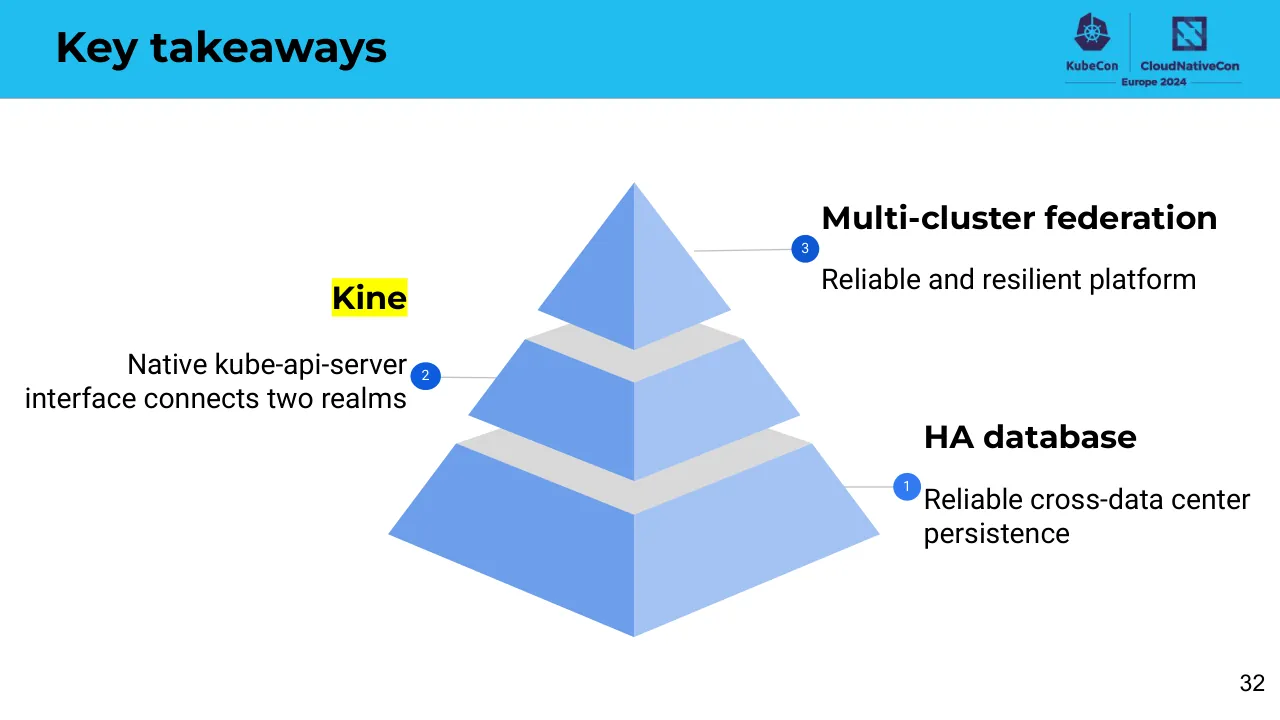
Slide 32 gives three numbered key takeaways: multi-cluster federation, a reliable and resilient platform, and Kine, which connects two realms through a native kube-api-server interface.
Details
More from Bloomberg
All Bloomberg decks in the library
Review score: 6 out of 10, Needs substantial work
Presentation quality, judged with the SlideDeck Co review heuristic. Ask, evidence and idea merit are not rated here.
The deck has a clear spine: the journey roadmap (slides 6, 16, 21, 27) returns at each stage, and the running workflow example with quoted user problems and diagrams (slides 7-15) makes the problems concrete. Execution is uneven: titles are mostly topic labels rather than claims, slide 24 is an unreadable code dump, slides 22-23 use dense borrowed diagrams, and the closing pyramid on slide 32 lists the takeaways in an unclear order. Several slides are unfinished or weak, including the stray emoji on slide 33, tiny diagram labels on slides 25 and 26, and uneven spacing and image quality on slides 3, 5 and 17. A talk audience could follow the logic with the speaker, but the slides need substantial tightening to stand on their own.
Worth keeping: Keep the repeated journey roadmap with the current stage highlighted, and the pattern of a quoted user question above a diagram on slides 8-15.
Most useful repair: Replace topic-label titles with statements of the point, enlarge or crop the diagram labels on slides 22-26, and redo slide 24 as a short highlighted excerpt or remove it.
What would change the score: Rebuild the takeaways on slide 32 as three plainly ordered statements and replace the empty emoji closing on slide 33 with a real closing slide.
Confidence high. 33 of 33 pages inspected on contact sheets, 4 at readable size. Reviewed 2026-11-08. Model-assisted review (claude-sonnet-5-5).
Full text of the slides (33 slides)
Every slide's words and a description of its charts and images, so the deck can be searched and rebuilt. Also available as Markdown.
Slide 1
KubeCon / CloudNativeCon / Europe 2024 / 1
Visuals: Full-bleed flat paper-cut style illustration of a Paris skyline at the bottom right, with a large cyan arc sweeping from bottom-centre to top-right. Elements: a green domed building (Panthéon-like) at left-centre, a red Arc de Triomphe de l'Étoile-like arch with a red square arch above it, an orange-beige arch at centre-left, a blue Sacré-Cœur-like basilica at centre, a red Eiffel Tower at centre-right, a beige glass pyramid (Louvre-like) at right, and a red Notre-Dame-like cathedral at far right. A dark purple silhouette skyline sits behind them. Four white-and-light-blue paper-cut clouds float in the sky, with soft drop shadows; one large cloud at top right, one medium at right, two smaller at centre-left. A thick teal arc band enters from the left edge at the bottom. Lighting is flat with no directional shading apart from the clouds' half-shade. Dominant colours: purple #4E3B73, cyan #56D2F4, teal #45A3CB, white #FFFFFF, green #3DBE8B, red #E8334A, beige #F9C9A0, light grey base #E8E8E8. Nothing is cropped; the skyline is cut by the bottom edge of the slide. Logos: KubeCon ship-wheel logo (white, centre-left top); KubeCon wordmark; CloudNativeCon logo mark (white outlined square with grey diagonal stripes); CloudNativeCon wordmark.
Slide 2
Bloomberg's Journey to / a Multi-Cluster / Workflow Orchestration / Platform / Yao Lin, Senior Software Engineer / Reinhard Tartler, Software Engineering Team Lead / Cloud-Native Compute Services Workflow / Orchestration Engineering team @ Bloomberg / 2
Visuals: Full-bleed geometric background illustration: a large light steel-blue (#4A76A0) area fills the upper-left, separated by a diagonal edge from a deep indigo-purple (#332557) field that covers the upper-right and centre. At the lower right a large purple (#4E3A72) quarter-circle arc shape rises from the bottom edge, with a steel-blue (#4A76A0) rectangular block and arc overlapping it at the right side, forming an abstract stepped form. No people, photographs or logos; the shapes are flat with no gradients or shadows.
Slide 3
What our team offers / Workflow Orchestration Platform / For General utility compute / ● Users provide: / ○ Custom code in containers / ○ An execution plan that defines ordering, fan-out and synchronization / ○ A triggering schedule / 3
Visuals: One photograph: a glossy orange cartoon-like octopus character with two large black eyes and a small smile, centred and facing forward, with its tentacles curled up holding and juggling colourful 3D cubes and blocks (green, blue, orange, red, yellow tiles) floating around it. Background is a muted teal-grey gradient. Lit softly from above with a gentle highlight on the head; full-frame square image, not cropped, boxed at the right edge of the slide with its right side touching the slide edge. Also a logo lockup at top-right: a KubeCon logo (purple Kubernetes-style wheel icon with the word KubeCon below) next to a vertical divider and a CloudNativeCon logo (purple-navy square icon with the word CloudNativeCon below), with the line 'Europe 2024' centred beneath between two thin horizontal rules. No other visuals.
Slide 4
What is argo-workflow?
KubeCon / CloudNativeCon / Europe 2024
Orchestrate container execution at your service
Run-to-completion job
Argo Workflows
github.com/argoproj/argo-workflows
Use cases
ML orchestration
CI/CD
Virtual and Physical Machine maintenance
Financial analysis
Data processing pipelines
4
Visuals: Two non-text elements besides logos. (1) Screenshot of an Argo Workflows DAG in a boxed grey-blue panel (about 78.1% to 95.8% horizontally, 28.2% to 93.1% vertically): a vertical diagram of five green circular nodes with white checkmarks, each labelled. Top node labelled 'argo-diamond-dag-sbc4b' with a thin grey connector down to node 'A'; from A, grey arrows diverge down-left to node 'C' and down-right to node 'B'; from C and B, grey arrows converge down to node 'D' at the bottom. Node labels are small dark grey sans-serif text beneath each circle. Panel background is light blue-grey, about #DCE3EA. (2) Mascot illustration: a cartoon orange-red character (about #EE7050) with a rounded bald head, two large white eyes with black pupils, and a wide smile with white teeth, shown inside a pale translucent light-blue bubble helmet (about #CFE9F5) with a white highlight arc and blue-grey rim, positioned at about 58.9% to 71.9% horizontally and 43.2% to 66.3% vertically, not cropped, no overlay. Logos: KubeCon wordmark with a red-purple hexagonal ship's-wheel mark and CloudNativeCon wordmark with a dark navy square 'N'-style mark, both in dark navy #2B2A6B, with 'Europe 2024' beneath, all on the cyan band at top right.
Slide 5
What our users expect
KubeCon | CloudNativeCon
Europe 2024
Non-Functional
Functional
● Bookkeeping
● Network Zone
● Observability
● Approval guard
● Debuggability
● Scheduling / Events
● Data Center Resiliency
5
Visuals: One square illustration, about 19.1% by 33.9% of the slide, centred under the lists. It shows a smiling, glossy, three-dimensional orange octopus mascot seen from the front, with two small black oval eyes, a small black smile and a white shield-with-check emblem on its head. Its tentacles splay out and rest on a flat surface, casting soft dark shadows. Around the octopus, in a loose circle, are small dark-blue line icons (a monitor, a server rack, a shield, a gear, a lock, a network node, a compass-like emblem, a printer, a chair and others). The background is a muted teal-grey blue (about #7FA3B5) with a faint texture. Lighting is soft and even from above. Dominant colours are orange (about #E8711F), teal-grey blue and dark navy-grey. The image is not cropped, not full-bleed, boxed as a square with no border. A tiny grey speck sits at about x 11.8%, y 50.1%. The header band contains the KubeCon ship-wheel logo and CloudNativeCon logo with the text Europe 2024, all in dark indigo (about #3B2A6B).
Slide 6
Journey to Multi-Cluster Kubernetes / KubeCon / CloudNativeCon / Europe 2024 / Get the platform working / With basic federation over: / Workflow runs / Static resources / Re-examine the toolkit / Kubernetes / HA Database / Re-architecture / Kine - an etcd shim / Cross-data center federation / Evaluation / Functionality / Performance / User impact / 6
Visuals: Timeline graphic: a vertical bar of light blue (#6D9EEB), about 1.4% of slide width, running from y 19.1% to y 97.6% at x 24.2% to 25.6%. Four thin horizontal tick lines of the same blue, each about 5.8% wide (x 22.0% to 27.8%), sit at y 19.1%, 38.6%, 58.0% and 76.6%, marking the four agenda stages. Logos: the KubeCon logo (a dark navy #2B2A6B hexagonal Kubernetes-style wheel mark above the wordmark 'KubeCon') and the CloudNativeCon logo (a navy square icon with a diagonal stylised N above the wordmark 'CloudNativeCon'), separated by a thin vertical navy divider at x 88.3%, with 'Europe 2024' beneath between two thin horizontal lines. A tiny grey dot at x 11.9%, y 50.2%, about 0.3% in size, is the only other mark on the slide.
Slide 7
“To generate an analysis report weekly - I need:”
Workflow
1.
Generate an awesome report
2.
Persist report in several backends
3.
Notify me when it finishes
Workflow runs
That requires some additional ingredients -
Config Map
DB connection strings
Secret
passwords
Workflow Template
generate-awesome-report
Workflow Template
persist-report
Cluster Workflow
Template
notify-me-on-finish
7
Workflow example
Visuals: Two tables and one callout box with a connector line, no photographs or charts. Table 1 has one row and two columns: left cell reads Workflow; right cell holds a numbered list 1. Generate an awesome report, 2. Persist report in several backends, 3. Notify me when it finishes. Table 2 has five rows and two columns with the header-less rows: Config Map | DB connection strings; Secret | passwords; Workflow Template | generate-awesome-report; Workflow Template | persist-report; Cluster Workflow Template | notify-me-on-finish. A thin dark purple elbow connector runs from the right edge of table 1 at about y 37% right, then down to the top edge of the Workflow runs box, joining it. Logos: KubeCon (Kubernetes wheel icon above the KubeCon wordmark) and CloudNativeCon (stylised square N icon above the CloudNativeCon wordmark) with Europe 2024 beneath, separated by a thin vertical divider, all in dark indigo.
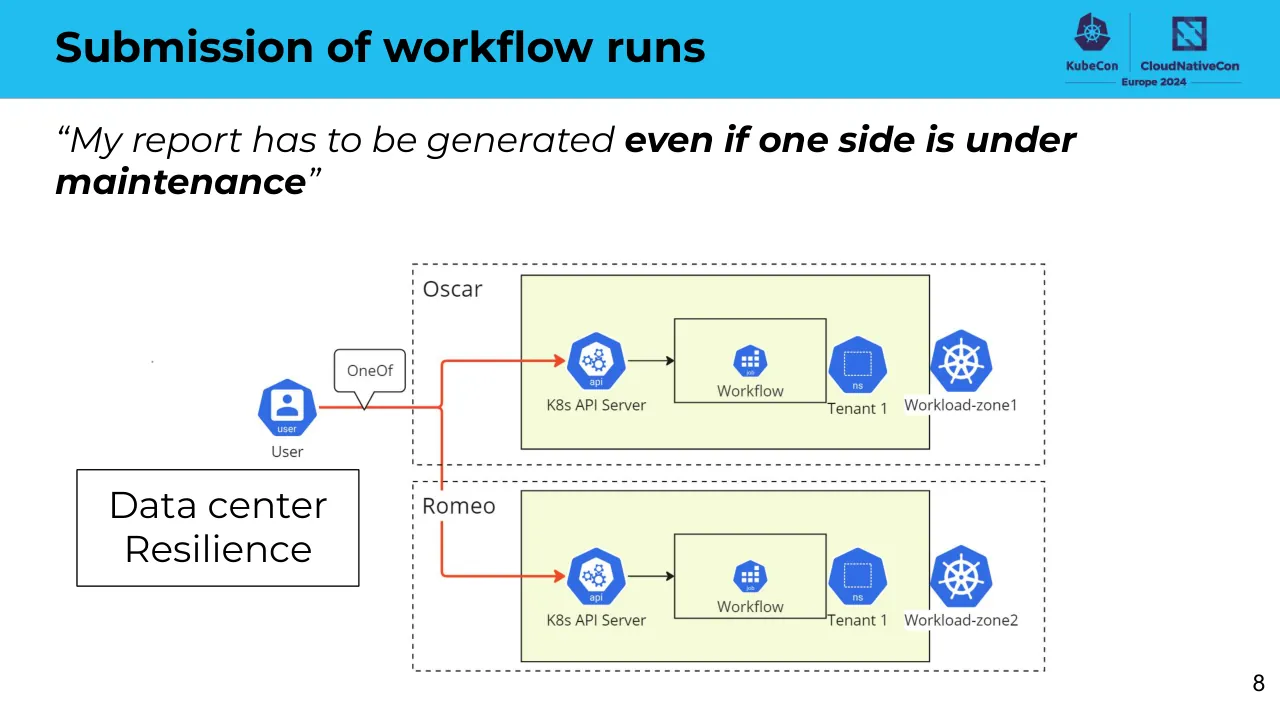
Slide 8
Submission of workflow runs
“My report has to be generated even if one side is under
maintenance”
Oscar
Romeo
User
OneOf
K8s API Server
Workflow
Tenant 1
Workload-zone1
K8s API Server
Workflow
Tenant 1
Workload-zone2
Data center
Resilience
8
KubeCon
CloudNativeCon
Europe 2024
Visuals: Diagram. Shapes: a 'user' icon (blue Kubernetes-style hexagon, white person silhouette, label 'user', caption 'User' beneath) at about x20-25%, y52-61%; a speech-bubble callout labelled 'OneOf' with a downward pointer toward the red arrow. Two large dashed black-outlined rectangles, labelled 'Oscar' (top) and 'Romeo' (bottom), each spanning about x32-82%. Inside each cluster is a pale yellow-green (#F5FADB) rounded-corner-free rectangle with a thin dark outline. Each inner rectangle contains, left to right: a blue hexagon icon labelled 'api' with caption 'K8s API Server'; a black arrow pointing right into a white rectangle labelled 'Workflow' with a small blue hexagon icon labelled 'job' above it; a blue hexagon labelled 'ns' with caption 'Tenant 1'; and a blue Kubernetes helm-wheel icon with caption 'Workload-zone1' (Oscar) or 'Workload-zone2' (Romeo). Connections: a red line leaves the User icon horizontally, turns upward at about x34%, and terminates with a red arrowhead at the Oscar API icon; a second red branch drops from that vertical segment and terminates with a red arrowhead at the Romeo API icon. The red lines are about 3 px wide. A tiny grey dot sits at about x11.9%, y50.2%, not part of the diagram. Composition is flat and full, with no photograph, no cropping and no overlay. Dominant colours: Kubernetes blue #326CE5, pale yellow-green #F5FADB, red #E8322B, black outlines.
Slide 9
Submission of workflow runs
“Good, the API will automatically put my workflow to at least one
active side.”
Oscar
Management
OneOf
Workload-zone1
K8s API Server
Workflow
Tenant 1
User
API
UI
Workflow-
controller
Workflow
Tenant 2
Workload-zoneN
9
KubeCon
CloudNativeCon
Europe 2024
Visuals: One diagram (architecture flow, Kubernetes components) occupying about x 16.5% to 83.5%, y 30.3% to 97.3%. Shapes: a dashed-outline rectangle labelled Oscar spanning about x 26.8% to 79.3%, y 33% to 83.6%, containing a light blue rectangle labelled Management (about x 30.6% to 40.1%, y 43% to 79.2%, fill #E6F2FB, dark grey #333333 border 1 px) and a pale yellow-green rectangle labelled Workload-zone1 (about x 48% to 78%, y 43% to 81.8%, fill #F4FADB, dark border 1.5 px). Icons are blue (#2F6FDE) hexagons with white glyphs: a user icon with a person silhouette labelled user and text User at left; a Kubernetes wheel icon above Management and above Workload-zone1; deploy icons labelled deploy (one labelled API, one labelled UI inside Management, one labelled Workflow-controller inside Workload-zone1); an api icon labelled K8s API Server with gear glyph; job icons labelled job (two, each in a small square black-outlined box labelled Workflow); ns icons labelled ns (two, each beside Tenant 1 and Tenant 2 labels, with dashed white square glyph). A speech-bubble callout labelled OneOf with a pointer at about x 41% to 42%, y 49% to 52%. Two Kubernetes wheel icons side by side labelled Workload-zoneN at about x 53% to 63.5%, y 85% to 93%. Connectors: thin dark grey (#333333, about 1 px) orthogonal lines with filled arrowheads: User to API and to UI (split bracket); API to K8s API Server; API to UI as dashed line; API to Workload-zoneN via a long vertical line down at about x 45.8%; Workflow-controller to two job boxes (right side); thick dark arrow (about 3 px) from Workflow-controller up to K8s API Server. A small grey dot at about x 11.9%, y 50%.
Slide 10
Submission of workflow runs
KubeCon CloudNativeCon Europe 2024
“How can I retrieve my original input spec?”
“The API Server is suffering from frequent updates!”
Oscar
Management
OneOf
Workload-zone1
User
API
K8s API Server
Workflow
Tenant 1
Workflow
Tenant 2
UI
Workflow-controller
Workload-zoneN
Original input bookkeeping
Tenant-cluster isolation
10
Visuals: One architecture diagram (image, 733 by 413 pixels, placed at x 22.6 percent, y 31.7 percent, 57.1 percent wide and 57.1 percent high, not cropped, boxed with no border). It is a line-art style diagram with blue Kubernetes-style hexagon icons on white and light fills. A large dashed grey rectangle labelled Oscar encloses two regions: a light blue rectangle labelled Management containing a blue deploy hexagon labelled API and a blue deploy hexagon labelled UI, and a pale yellow-green rectangle labelled Workload-zone1 containing a blue api hexagon labelled K8s API Server, a blue deploy hexagon labelled Workflow-controller, two small framed boxes each with a blue workflow icon and label Workflow, and two blue ns hexagons labelled Tenant 1 and Tenant 2 beside them. A blue Kubernetes wheel hexagon sits on top of the Oscar, Management and Workload-zone1 labels. A blue user hexagon labelled User sits at the left. A speech-bubble callout labelled OneOf points toward the API. Thin dark grey arrows connect User to API and to UI, API to K8s API Server via the speech bubble path, a dashed arrow runs from API down to UI, a solid thick dark arrow runs from Workflow-controller up to K8s API Server, and thin arrows run from Workflow-controller to both Workflow boxes and from the speech path down to Workload-zoneN. Workload-zoneN is shown as two overlapping blue Kubernetes wheel hexagons below the dashed rectangle. Two purple-violet elbow arrows add emphasis: one rises from the Original input bookkeeping box up to the UI, and one runs from the Tenant-cluster isolation box right and up to point left at the K8s API Server area. Dominant colours are blue #2F6FE0, pale blue #E6F2FB, pale yellow-green #F5FADB, and purple #4B3C8C. Lighting is flat.
Slide 11
Workflow example
“To generate an analysis report weekly - I need:”
Workflow
1. Generate an awesome report
2. Persist report in several backends
3. Notify me when it finishes
That requires some additional ingredients -
Workflow runs
Static resources
Config Map
DB connection strings
Secret
passwords
Workflow Template
generate-awesome-report
Workflow Template
persist-report
Cluster Workflow
Template
notify-me-on-finish
11
Visuals: Logos at top right: a KubeCon emblem (dark navy #2E2A6B ship's-wheel hexagon icon) above the word KubeCon, a thin vertical divider, and a CloudNativeCon emblem (navy #2E2A6B square with a diagonal stripe pattern) above the word CloudNativeCon, with a horizontal rule and the text Europe 2024 beneath, all in navy #2E2A6B on the blue band. Table 1: two columns with a vertical divider at about 34.5% of width; left cell reads Workflow; right cell is a numbered list 1. Generate an awesome report, 2. Persist report in several backends, 3. Notify me when it finishes. Table 2: two columns, five rows: Config Map | DB connection strings; Secret | passwords; Workflow Template | generate-awesome-report; Workflow Template | persist-report; Cluster Workflow Template | notify-me-on-finish. Connector lines: from the right edge of table 1 at about 36.9% height, a horizontal stroke to about 88.4% x then down to the top of the Workflow runs box; from the bottom of the Static resources box at 88.4% x, down to about 78.2% y, then left back to the right edge of table 2. Lines are dark slate #3D3D6B, about 1 pt.
Slide 12
Deployment of static resources
“What if workload clusters need to recover from transient failure?”
“Performance concern and complexity rise at the management
API”
Oscar
Management
API
Workload-zone1
Workflow
Template
Tenant
User
Romeo
Management
API
Workload-zone2
Workflow
Template
Tenant
KubeCon
CloudNativeCon
Europe 2024
12
Visuals: One diagram, drawn as a boxed architecture schematic with dashed cluster boundaries. A blue user icon (hexagon with white person silhouette, labelled 'user') labelled 'User' sits at left, at about x 21%, y 57%. Two dashed grey rounded-corner rectangles labelled 'Oscar' (top) and 'Romeo' (bottom) act as cluster boundaries. Inside each cluster, a light-blue (#E6F1FB) rectangle labelled 'Management' contains a blue Kubernetes-style hexagon icon with a circular arrow labelled 'deploy' and the word 'API' below it. To the right of each management box, a pale-yellow-green (#F4F9DC) rectangle labelled 'Workload-zone1' (top) or 'Workload-zone2' (bottom) contains a blue Kubernetes hexagon icon above it, an inner white-bordered box labelled 'Workflow Template' with a blue CRD puzzle-piece hexagon icon, and a blue hexagon icon labelled 'ns' next to the word 'Tenant'. Thin dark grey connector lines with arrowheads run from User to the Oscar API and from User to the Romeo API, with a thin grey line continuing down from the Oscar connector to the Romeo API. Two bright red arrows (#E8221F, about 2px stroke) leave the right side of each management API box, join a vertical red line at about x 56%, and point right into the Workload-zone1 and Workload-zone2 boxes respectively. A tiny dot sits at about x 11.8%, y 50.2%, outside the diagram. The diagram is placed as a rectangular image, not cropped, on white.
Slide 13
Deployment of static resources
“Resources have a good place to survive.”
Oscar
Management
Workload-zone1
ns
System
ns
Tenant
deploy
API
user
User
ns
System
pod
Syncer
crd
Tenant
Workflow
Template
Postgres
template-foo-zone1
template-foo-zone2
Workload-zone2
13
Visuals: One architecture diagram (image, 1466 by 825 pixels, placed at x 10.6%, y 24.3%, w 72.9%, h 72.9%, not cropped, boxed on white). Shapes and connections: a dashed-outline rectangle labelled Oscar encloses the Management box and the Workload-zone1 box. Management is a light-blue (#DDEFFB approx.) rectangle with a thin dark outline containing a Kubernetes-style hexagon icon above its title and an API hexagon icon with a blue 'deploy' badge and a circular-arrow symbol, labelled API. A blue hexagon with white 'user' person icon, labelled User, sits left of Management and connects by an elbow arrow pointing right into the API icon. An elbow arrow leaves the right side of API and runs down to a cylinder labelled Postgres (white with dark outline) at the bottom centre. Workload-zone1 is a pale yellow-green (#F4FADB approx.) rectangle with thin dark outline containing two inner boxes: System, containing a blue hexagon 'ns' icon above and a blue 'pod' cube icon above the label Syncer; and Tenant, containing a blue hexagon 'ns' icon above and a blue 'crd' puzzle-piece icon above the labels Workflow Template. A straight arrow runs from the pod icon in System to the crd icon in Tenant. An elbow arrow leaves Postgres to the right, rises to the Syncer pod icon with an arrowhead, and a second arrow from Postgres runs right to a Kubernetes hexagon icon labelled Workload-zone2 (blue hexagon, white ship-wheel symbol). Below Postgres is a stacked document shape (two wavy-bottom page outlines, white fill, dark outline) containing the text template-foo-zone1 and template-foo-zone2. A Kubernetes hexagon icon also sits above the Workload-zone1 box. All diagram text is dark grey (#404040 approx.) in a humanist sans-serif (Open Sans-like, regular weight). Lighting is flat, no shadows.
Slide 14
As we grow …
Workflow stats (in percentage of current)
Workflows Errors Max Latency
100.00%
75.00%
50.00%
25.00%
0.00%
2021 2022 2023 2024
*Stats for illustration only
14
Visuals: One line chart. Title: 'Workflow stats (in percentage of current)', grey sans-serif, centred above the plot. Legend centred below the title, in order: Workflows (light steel-blue line swatch), Errors (dark navy line swatch), Max Latency (orange line swatch). Y axis: percentage, labelled 0.00% to 100.00% in 25-point steps, with light grey horizontal gridlines at each step. X axis: years 2021, 2022, 2023, 2024 at evenly spaced vertical gridlines, with the axis baseline in dark grey. Series values (printed on the slide: none; the following are estimates read from the plot): Workflows, light steel-blue #5B93B5, about 1% in 2021, about 20% in 2022, about 60% in 2023, 100% in 2024. Errors, dark navy #00405C, about 25% in 2021, 50% in 2022, 80% in 2023, 100% in 2024. Max Latency, orange #FF6B35, about 30% in 2021, 40% in 2022, about 70% in 2023, 100% in 2024. All three lines converge at 100% in 2024. No highlighted points and no data markers; lines are straight segments of about 2.5 pt width. Also present: a tiny stray grey dot at about x 11.8%, y 50% outside the chart, and the KubeCon and CloudNativeCon Europe 2024 logos at top right.
Slide 15
Deployment of static resources
KubeCon / CloudNativeCon / Europe 2024
“What if update succeeds on only some records?”
“What if I need to add a third cluster?”
Oscar
Management
User
API
Workload-zone1
System
Tenant
Syncer
Workflow / Template
Postgres
template-foo-zone1 / template-foo-zone2
Workload-zone2
Consistency
Cluster joining / leaving
15
Visuals: One architecture diagram, boxed in the centre of the slide (image box x 19.6%, y 32.3%, w 54.9%, h 54.9%), on a white background. A dashed-outline rectangle labelled 'Oscar' contains a light blue box labelled 'Management' with a blue Kubernetes-wheel icon above it and a blue 'deploy' icon labelled 'API' inside it; a light yellow-green box labelled 'Workload-zone1' with a blue Kubernetes-wheel icon above it, containing two dark-outlined boxes labelled 'System' (with a blue 'ns' namespace icon above and a small blue 'Syncer' icon labelled 'Syncer' below) and 'Tenant' (with a blue 'ns' namespace icon above and a small blue puzzle-piece icon labelled 'Workflow Template' below). A blue 'user' icon labelled 'User' sits outside the dashed box on the left. Solid arrows: from User to API; from API down to Postgres; from Postgres right to a blue Kubernetes-wheel icon labelled 'Workload-zone2' outside the dashed box; from Postgres up and right into Syncer, then from Syncer right to the Workflow Template icon. A cylinder labelled 'Postgres' sits below the dashed box, and below it a stacked wavy-bottom document labelled 'template-foo-zone1' and 'template-foo-zone2'. Two purple annotation connectors are overlaid on the diagram: one elbow arrow runs from the 'Consistency' box to the template document; the other runs from the 'Cluster joining / leaving' box up to the Workload-zone2 icon. A small dot sits at the left near x 12%, y 50%.
Slide 16
Journey to Multi-Cluster Kubernetes
KubeCon
CloudNativeCon
Europe 2024
Get the platform working
With basic federation over:
● Workflow runs
● Static resources
Re-examine the toolkit
● Kubernetes
● HA Database
Re-architecture
● Kine - an etcd shim
● Cross-data center federation
Evaluation
● Functionality
● Performance
● User impact
16
Visuals: Vertical timeline graphic: a solid light-blue bar (about #6D9EEB) at x 24.2% spanning y 19.1% to 97.5% (1.5% wide), with four thin light-blue horizontal tick lines (about 0.2% thick, #6D9EEB) at y 19.1%, 38.6%, 58.0% and 76.7%, each spanning x 22.0% to 27.8%. The tick lines and bar mark the four sections: the first two sections (Get the platform working, Re-examine the toolkit) are active in blue, the last two (Re-architecture, Evaluation) are greyed out. A tiny grey dot sits at about x 11.8%, y 50.0% (about 0.2% across), with no other meaning. Logos at top right: the KubeCon logo (dark navy #2E2A6B hexagonal ship's-wheel mark with the word KubeCon beneath) at about x 83.0%, y 1.5%, and a vertical white divider line at about x 88.2% between the two logos; the CloudNativeCon logo (dark navy #2E2A6B square mark with a diagonal stripe pattern, word CloudNativeCon beneath) at about x 91.0%, y 2.0%; the text Europe 2024 centred under both logos between two thin navy rules at about y 10.8%.
Slide 17
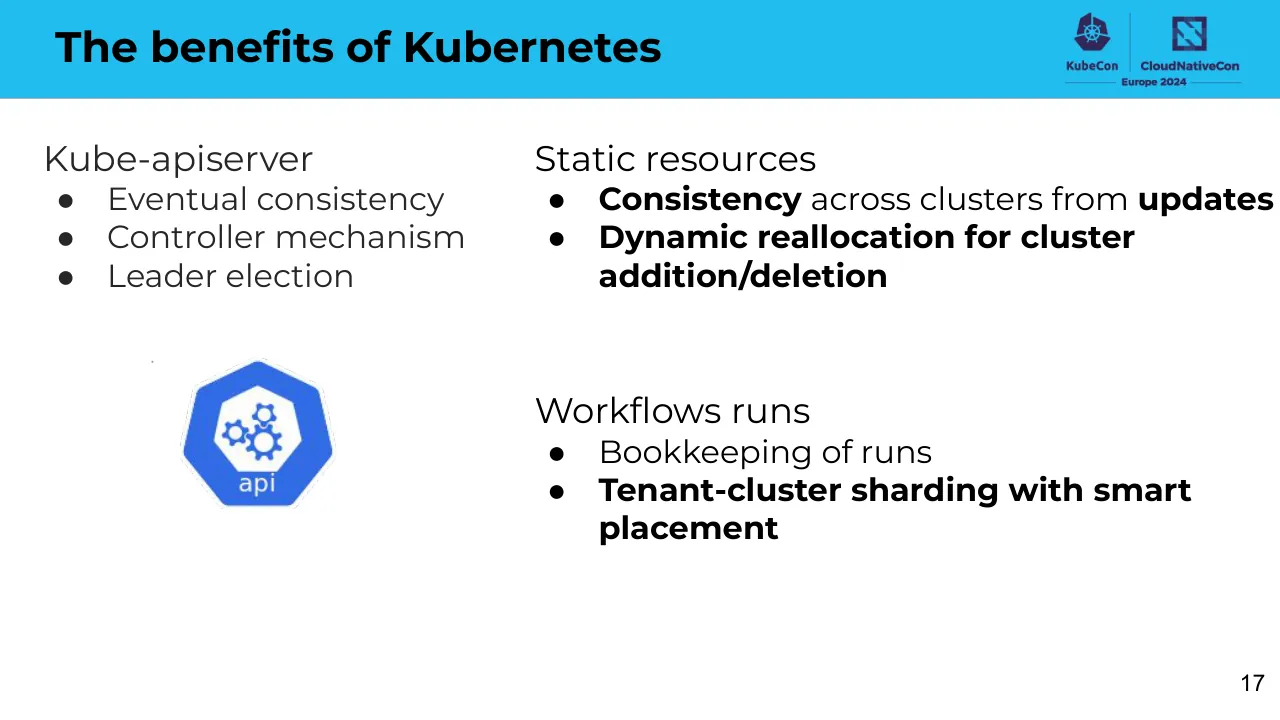
The benefits of Kubernetes / KubeCon / CloudNativeCon / Europe 2024 / Kube-apiserver / ● Eventual consistency / ● Controller mechanism / ● Leader election / Static resources / ● Consistency across clusters from updates / ● Dynamic reallocation for cluster addition/deletion / Workflows runs / ● Bookkeeping of runs / ● Tenant-cluster sharding with smart placement / 17
Visuals: One Kubernetes-style api logo: a blue heptagon (dark-blue outer #2F6FDB-like heptagon with a lighter inner hexagon) containing three gears in white/blue, with the word 'api' in white beneath the inner hexagon; about 12.3% wide by 21.2% tall at x 14.0%, y 49.6%, on white with no border. Top-right logo lockup in dark purple (#3B1F5C-like): KubeCon wheel icon with the word 'KubeCon', a vertical divider, a CloudNativeCon square icon with the word 'CloudNativeCon', and 'Europe 2024' beneath with thin horizontal rules on either side.
Slide 18
The benefits of Database / Modern database / ● Reliability / ● Operability / ● Observability / Static resources / ● Consistency across clusters from updates / ● Dynamic reallocation for cluster addition/deletion / Workflows runs / ● Bookkeeping of original input / ● Tenant-cluster sharding with smart placement / 18
Visuals: One square photograph/illustration (orange cartoon octopus) placed at x 5.3%, y 47.4%, 25.3% by 45.0%, boxed with hard square edges and no border. Subject: a smiling orange octopus with large eyes holding a grey database cylinder in its upper-right tentacle, with its other tentacles holding and touching small teal icons arranged in a dashed circle around it: a folder (top left, teal), an orange coin or cloud-like shape (top), a globe/network icon (left), a stacked-document icon (right, grey and teal), a clock or timer (lower left), a padlock (bottom, teal), a server or document stack (bottom right, teal), and a key-like icon (lower right, orange). Composition is centred and fills the square. Lighting is flat and even. Dominant colours are orange #E8772E, teal #1E9C93 and light teal background #7FC4C4. Not cropped, not full-bleed, no overlay or tint. Two pale grey rectangles (#EAE9E8 and #F2F1F1) sit behind the top-left of the image and are almost fully hidden by it.
Slide 19
Affordable HA Database
KubeCon
CloudNativeCon
Europe 2024
Request
Oscar
Leader replica
Follower replica
Romeo
Follower replica
Follower replica
19
Visuals: One diagram, a replication architecture drawing with no chart axes, legend or table. Shapes and connections: a rectangle labelled 'Request' at the top centre, outlined in near-black #222222 at about 2px stroke, with no fill, 0 corner radius. A solid black elbow arrow leaves the bottom of the Request box, runs down, turns left, and points down into the top of the Leader replica cylinder. Two dotted near-black rounded-rectangle group boxes (about 1px dotted stroke, #222222): the left group is labelled 'Oscar' at its top-left and contains two cylinders; the right group is labelled 'Romeo' at its top-left and contains two cylinders. Each cylinder is a database symbol with an outlined top ellipse, white fill, #222222 outline about 2px. Left group: top cylinder labelled 'Leader replica' (two lines), bottom cylinder labelled 'Follower replica' (two lines). Right group: top cylinder labelled 'Follower replica' (two lines), bottom cylinder labelled 'Follower replica' (two lines). Blue replication arrows, colour about #2FA8F0, dashed stroke about 3px with dash segments: a horizontal dashed arrow leaves the right side of the Leader replica, runs right, and points into the top right Follower replica; a branch from that horizontal line at about x 56% of the slide drops down and turns right into the bottom right Follower replica with an arrowhead; a short dashed vertical arrow drops from the bottom of the Leader replica into the bottom left Follower replica. Labels use a humanist sans-serif (Open Sans-like) regular weight, dark grey #333333. A tiny stray dark dot sits at about x 11.8%, y 50%, almost invisible. Composition is flat, no photographs, no shadows, no gradients, no lighting.
Slide 20
Affordable HA Database
KubeCon
CloudNativeCon
Europe 2024
Request
Oscar
Unhealthy
replica
Romeo
Leader
replica
Follower
replica
Follower
replica
20
Visuals: One diagram (flow and replica architecture, drawn as a raster image covering about x 27.3 to 72.8 percent and y 17.4 to 91.6 percent). Shapes: a rectangle labelled Request at the top centre, with a black 2px elbow connector running down from its bottom edge, then right and down to an arrowhead touching the top of the Romeo Leader replica cylinder. Two dotted grey rounded-corner group boxes: the left one labelled Oscar contains an Unhealthy replica cylinder (outlined and text in red-orange #E8432E) above a Follower replica cylinder; the right one labelled Romeo contains a Leader replica cylinder above a Follower replica cylinder. All four cylinders are white with black-grey outlines and dark grey text. A solid blue #2E9BEB arrow runs from the bottom of the Romeo Leader replica down to the top of the Romeo Follower replica. A dashed blue #2E9BEB elbow connector runs from the left edge of the Leader replica, left and down along the gap between the groups, then left to an arrowhead pointing into the right edge of the Oscar Follower replica. Lighting is flat; no photograph, no shadows, no gradients. A tiny dot mark sits at about x 11.8 percent, y 50 percent on the left margin.
Slide 21
Journey to Multi-Cluster Kubernetes
KubeCon
CloudNativeCon
Europe 2024
Get the platform working
With basic federation over:
●
Workflow runs
●
Static resources
Re-examine the toolkit
●
Kubernetes
●
HA Database
Re-architecture
●
Kine - an etcd shim
●
Cross-data center federation
Evaluation
●
Functionality
●
Performance
●
User impact
21
Visuals: A vertical timeline graphic: a light blue (#6F9FEA approx.) vertical bar about 3 percent of slide width running from about y 19 to y 97 percent, with four short horizontal tick lines (light blue, thin, about 0.2 percent height) at the top of each stage at about y 19, 38.5, 57.5 and 76.5 percent, spanning x 22 to 28 percent. Each tick line marks the start of a stage; the bar is solid, no shadow. A small dot is visible at about x 11.8, y 50 percent, faint grey. Logos at top right: a KubeCon logo (purple-navy kubernetes-wheel icon above the wordmark KubeCon) and a CloudNativeCon logo (navy-purple square icon above the wordmark CloudNativeCon), separated by a thin vertical divider, with the line 'Europe 2024' flanked by two thin horizontal rules beneath, all in dark navy-purple (#2B2A6E approx.) and white-on-cyan contrast.
Slide 22
What is kine? / K3s Servers / K3s Agents / Server Node / Agent Node / Load Balancer / K3s User / kubectl get pods / Load Balancer / External Traffic / Server Node / Agent Node / Server Node / Agent Node / Agent Node / External Database / Example configuration for nodes running your apps and services / https://docs.k3s.io / https://github.com/k3s-io/kine / 22
Visuals: Diagram (architecture, rendered as an image covering x 6.6 to 93.3 percent and y 15.1 to 87.7 percent). Shapes: a yellow circular icon with black centre dot labelled K3s User with subtext kubectl get pods, connected by a black arrow to a rounded-corner yellow rectangle labelled Load Balancer. The Load Balancer's output dot connects by three black elbow arrows fanning out to three Server Node rectangles stacked in a pale yellow panel headed K3s Servers. Each Server Node has a yellow dot on its right edge; each dot sends straight black arrows to the Agent Node rectangles in the K3s Agents column, and diagonal crossing arrows from each server to every agent node. Agent Node 1 and Agent Node 2 each have a dark arrow to the right-hand Load Balancer through a bracket shape; a yellow dot below Agent Node 2 has a short downward arrow to Agent Node 3's left side area. The right Load Balancer receives an arrow from an External Traffic yellow circular icon labelled External Traffic. A downward arrow from a yellow dot under the bottom Server Node leads to a rectangle labelled External Database. A curly brace below the three Agent Nodes is captioned Example configuration for nodes running your apps and services. A red rectangular outline (highlight, about 2 px stroke, #E00000) surrounds the External Database box and the area beneath the server panel, spanning about x 33.9 to 50.7 percent and y 63.3 to 87.8 percent. Icons: yellow circles with black centre dots, used as connection points, not logos. Logos: KubeCon and CloudNativeCon Europe 2024 logos at top right, with KubeCon ship-wheel mark in dark navy and CloudNativeCon mark as a dark navy square with a diagonal stripe pattern. Photograph: none. Charts: none. Tables: none.
Slide 23
What is kine? / Kine / Kine is not etcd / K3s Servers / Server Node / Server Node / Server Node / External Database / https://docs.k3s.io / https://github.com/k3s-io/kine / KubeCon / CloudNativeCon / Europe 2024 / Cluster / user / User / api / K8s API Server / deploy / Kine / 23
Visuals: Two diagrams. (1) Left: a K3s Servers diagram titled 'K3s Servers' in bold dark grey sans-serif above a pale yellow (#FFF5CC) rounded column. Three light yellow (#FFE699) rounded rectangles labelled 'Server Node' stacked vertically, each with a black arrow entering from the left and a yellow-ringed black dot on its right edge with black connector lines fanning to the right edge of the crop. Below the lowest server node, a single yellow-ringed black dot on the column's bottom edge, which is the origin of a red line and of a short black arrow pointing down to a yellow rectangle labelled 'External Database'. The diagram is cropped at its right edge. (2) Right: a flat architecture diagram on white. A black-outlined rectangle labelled 'Cluster' in dark grey contains three elements. Outside it at left is a blue (#3B6FE0) hexagon with a white rounded square containing a white person silhouette and the word 'user' in white, captioned 'User' below in small grey text. Inside the cluster is a blue hexagon with a white inner hexagon holding blue gears, the word 'api' in white, captioned 'K8s API Server'. Next is a blue hexagon with a white circular arrow and the word 'deploy' in white, captioned 'Kine'. Double-headed black arrows connect user to api, api to deploy, and deploy to a white cylinder with black outline at far right, outside the cluster, with no label. A red line (#FF0000, about 3 px stroke) runs from the bottom yellow dot of the K3s column right to x about 41% and up to the Kine heading level, with a horizontal segment ending at the heading. No photographs.
Slide 24
Data sample / id name value / 2 /registry/health {"health":"true"} / 3 /registry/apiregistration.k8s.io/apiservices/v1.apiextensions.k8s.io {"kind":"APIService","apiVersion":"apiregistration.k8s.io/v1","metadata": (cut off at right edge) / 4 /registry/apiregistration.k8s.io/apiservices/v1.admissionregistration.k8s.io {"kind":"APIService","apiVersion":"apiregistration.k8s.io/v1","metadata": (cut off) / 5 /registry/apiregistration.k8s.io/apiservices/v1.authentication.k8s.io {"kind":"APIService","apiVersion":"apiregistration.k8s.io/v1","metadata": (cut off) / 6 /registry/apiregistration.k8s.io/apiservices/v1.autoscaling {"kind":"APIService","apiVersion":"apiregistration.k8s.io/v1","metadata": (cut off) / 7 /registry/prioritylevelconfigurations/system [bytes] / 8 /registry/apiregistration.k8s.io/apiservices/v2.autoscaling {"kind":"APIService","apiVersion":"apiregistration.k8s.io/v1","metadata": (cut off) / 9 /registry/apiregistration.k8s.io/apiservices/v1. {"kind":"APIService","apiVersion":"apiregistration.k8s.io/v1","metadata": (cut off) / 10 /registry/apiregistration.k8s.io/apiservices/v1.authorization.k8s.io {"kind":"APIService","apiVersion":"apiregistration.k8s.io/v1","metadata": (cut off) / 11 /registry/ranges/servicenodeports k8s / 24
Visuals: One screenshot of a spreadsheet-style data table, full width (0 to 100 percent), placed as an image at y 37.1 percent with height 31.1 percent. It has three columns: id (narrow, right-aligned numbers), name (wide, left-aligned paths), and value (widest, left-aligned, JSON text truncated at the right slide edge). Column headers in row 1: id, name, value. Rows 2 to 11 with id and name: 2 /registry/health; 3 /registry/apiregistration.k8s.io/apiservices/v1.apiextensions.k8s.io; 4 /registry/apiregistration.k8s.io/apiservices/v1.admissionregistration.k8s.io; 5 /registry/apiregistration.k8s.io/apiservices/v1.authentication.k8s.io; 6 /registry/apiregistration.k8s.io/apiservices/v1.autoscaling; 7 /registry/prioritylevelconfigurations/system; 8 /registry/apiregistration.k8s.io/apiservices/v2.autoscaling; 9 /registry/apiregistration.k8s.io/apiservices/v1.; 10 /registry/apiregistration.k8s.io/apiservices/v1.authorization.k8s.io; 11 /registry/ranges/servicenodeports. Values: row 2 {"health":"true"}; rows 3, 4, 5, 6, 8, 9, 10 begin with {"kind":"APIService","apiVersion":"apiregistration.k8s.io/v1","metadata": and are cut off at the right edge; row 7 [bytes]; row 11 k8s. Monospaced black text on white, thin light grey horizontal row rules and a thin grey vertical rule between columns, no outer border. The table is unboxed and not rounded. The logo block at top right is an image of a Kubernetes wheel icon above the word KubeCon, a vertical divider, a stylised N-shaped icon above the word CloudNativeCon, and a horizontal line with the text Europe 2024 beneath; colours are dark navy/purple (#2E2A5A approx) on the blue band.
Slide 25
How do we use kine?
Kine-apiserver does not operate cluster directly
Oscar
Kine-apiserver
K8s API Server
Management- / zone1
ETCD
User
Ingress
HA Database
Romeo
Kine-apiserver
K8s API Server
Management- / zone2
ETCD
25
Visuals: Diagram (architecture, drawn as one raster image of 1466 by 825 pixels placed at x 13.6%, y 23.2%, w 72.7%, h 72.7%). Shapes: a left-hand blue rounded-hexagon 'user' icon (white person silhouette on a white card) labelled User; a blue hexagon 'ing' icon with a white crossed-arrows glyph labelled Ingress; a grey-outlined cylinder labelled HA Database with a blue PostgreSQL elephant logo on its face. Two dashed black rectangles (about 1.5 pt, dashes) labelled Oscar (top) and Romeo (bottom). Inside each, a light-blue (#E6F4FC) rectangle with a thin dark-grey (#333333) border holds two blue hexagon icons with white gears marked api: in Oscar, Kine-apiserver and K8s API Server; in Romeo, Kine-apiserver and K8s API Server. Outside each dashed box at its upper right, a blue Kubernetes-wheel hexagon icon labelled Management-zone1 (Oscar) and Management-zone2 (Romeo). A blue hexagon icon with a white etcd skull-like glyph labelled ETCD sits at the right of each dashed box. Arrows (dark grey #222222, about 1.5 pt, filled arrowheads, right-angled elbow connectors): User to Ingress (horizontal, pointing right). Ingress to Oscar Kine-apiserver (up, then right, into the api icon). Oscar Kine-apiserver to HA Database (right, then down into the top of the cylinder). Oscar K8s API Server to Oscar ETCD (right, down, then right into ETCD). Ingress to Romeo Kine-apiserver (down, then right into the api icon). Romeo Kine-apiserver to HA Database (right, then up into the bottom of the cylinder). Romeo K8s API Server to Romeo ETCD (right, up, then right into ETCD). Lighting flat; colours are blue #2F6FE4 icons, white glyphs, dark grey text, no photographs; nothing is cropped or tinted.
Slide 26
How do we use kine? / KubeCon / CloudNativeCon / Europe 2024 / Management-zone1 / Workload-x / Read / Operate / Kine-apiserver / Deployer / Workload-x / Ingress / HA Database / Operate / Read / Kine-apiserver / Deployer / Management-zone2 / K8s API Server / Workload-x / 26
Visuals: Diagram. Left: an Ingress icon (blue hexagon with white crossed-arrows glyph and label 'ing', caption 'Ingress' below). Centre: an HA Database drawn as a white cylinder with a blue-grey PostgreSQL elephant logo and caption 'HA Database'. Top-left box labelled Management-zone1 (light blue fill #E6F2FB, dark grey 1 px border, Kubernetes helm logo at its top right with caption 'Management-zone1' beneath) containing a blue hexagon icon labelled 'api' with caption 'Kine-apiserver', a dashed-outline box labelled 'Workload-x' containing a blue hexagon icon labelled 'deploy' with caption 'Deployer'. A solid arrow with label 'Read' points from the Deployer icon left to the Kine-apiserver icon. A solid arrow from the Ingress icon goes up, then right, into the Kine-apiserver icon of zone1. A solid arrow goes down from the zone1 Kine-apiserver icon to the HA Database cylinder. Bottom-left box labelled Management-zone2 (same styling) containing the same Kine-apiserver (api) and Deployer (deploy) icons inside a dashed Workload-x box, with a 'Read' arrow from Deployer to Kine-apiserver, a solid arrow from the Ingress icon going down then right into the zone2 Kine-apiserver icon, and a solid arrow going up from the zone2 Kine-apiserver icon into the HA Database. Two vertical lines labelled 'Operate' run from each Deployer icon down or up and join a horizontal line with an arrowhead pointing right into the K8s API Server icon. Right: a pale yellow-green (#F4FAD8) box with dark grey border containing a blue hexagon icon labelled 'api' with caption 'K8s API Server', and to its right outside the box a blue Kubernetes helm icon with caption 'Workload-x'. Icons are blue hexagons (#326CE5 approx) with white glyphs. Flat style, no shadows, no gradients, not cropped.
Slide 27
Journey log
KubeCon
CloudNativeCon
Europe 2024
Get the platform working
With basic federation over:
●
Workflow runs
●
Static resources
Re-examine the toolkit
●
Kubernetes
●
HA Database
Re-architecture
●
Kine - an etcd shim
●
Cross-data center federation
Evaluation
●
Functionality
●
Performance
●
User impact
27
Visuals: A vertical timeline graphic: one light-blue bar (fill #6E9FEA, about 1.5% of slide width) running from about 19% to about 98% of slide height, with four thin horizontal tick lines (#6E9FEA, about 0.1% height stroke) crossing the bar's left side at about 19%, 39%, 58% and 77% of slide height, each spanning about 22% to 28% of slide width, marking the start of each phase. Two logos at top right: the KubeCon wordmark with its Kubernetes-wheel icon in dark navy (#1F2A6B), separated by a thin vertical rule from the CloudNativeCon wordmark with its square CNCF-style icon in dark navy, with the text 'Europe 2024' centred beneath them between two thin horizontal rules. A tiny grey speck about 0.2% of slide width sits at the left margin around 50% of slide height.
Slide 28
Concerns - Functionality limitation
✋ No real control-plane and worker pod
💡 It’s not used to operate real cluster / directly anyway!
👑 Use it for resource management / only
28
Visuals: One diagram and three small emoji images, plus two logos. Diagram: a black-outlined rectangle (about x 12.6 to 26.4%, y 22.8 to 82.0%, thin stroke about 1 px, no fill) with a blue Kubernetes-wheel hexagon icon labelled Management sitting on its top-left edge, a blue hexagon api icon labelled K8s API Server in the upper part, and a second blue hexagon api icon labelled Kine API Server in the lower part. Blue hexagons are about #2F6FE0 with white centres and blue gear glyphs. A double-headed black arrow runs horizontally from the Kine API Server icon to an open-top black-outlined cylinder (database symbol, white fill) on the right, outside the rectangle. Emoji images: a yellow raised hand (✋) before the first line, a yellow light bulb (💡) before the second line, and a yellow crown (👑) before the third line. Logos at top right: the KubeCon hexagon-wheel logo with the wordmark KubeCon, a vertical divider, and the CloudNativeCon logo with the wordmark CloudNativeCon and the line Europe 2024 beneath, all in dark navy #2B2A66.
Slide 29
Concerns - Performance
KubeCon / CloudNativeCon / Europe 2024
✋ Database (replicated) may be slower
(given the same r/w rates)
💡 Access patterns are just different for
resource management purpose!
👀 Read-only for deployer
OR
📌 Writes back critical updates only
vs.
29
Visuals: Diagram: a rectangular box labelled 'Request' at top centre, with a black connector line running from its bottom edge down and left, then down into the top of the Oscar group. Two dotted-outline rounded-rectangle group boxes: the left group labelled 'Oscar' contains a blue cylinder labelled 'Leader replica' with a short blue dashed arrow down to a cylinder labelled 'Follower replica' below it; the right group labelled 'Romeo' contains two cylinders labelled 'Follower replica' (upper) and 'Follower replica' (lower). Two blue dashed arrows run from the Leader replica to the upper Romeo follower, and from a dashed blue path that drops from that arrow line down to the lower Romeo follower. Cylinders are outlined in dark grey on white. Below the diagram, the lowercase text 'vs.' is centred under the diagram. Logo: the etcd logo, a blue gear-shaped icon with a face (two eyes and a smile) to the left of the black lowercase wordmark 'etcd'. Emoji icons: raised hand, light bulb, eyes, and pushpin used as bullet markers.
Slide 30
Concerns - User impact on existing platform
KubeCon
CloudNativeCon
Europe 2024
Before
Management
user
User
deploy
API
Postgres
template-foo-zone1
template-foo-zone2
After
Management
user
User
api
Kine
Postgres
kind: WorkflowTemplate
30
Visuals: One diagram image (1466 by 825 pixels) spanning about x 9 to 91 and y 15 to 97 of the slide, placed on a white ground. Upper panel: dashed black rectangle (about 1.5 px dashes) labelled Before at top left. Inside it, a light blue (#DDEFFB) rectangle labelled Management with a blue Kubernetes wheel hexagon icon (#326CE5) overlapping its top edge; inside it a blue hexagon icon with a circular arrow labelled deploy and the text API beneath. A blue hexagon icon with a white person silhouette labelled user sits left of the Management box with the text User beneath it. A solid black arrow runs from user to API, and a second solid black arrow runs from API to a Postgres database cylinder (white fill, black outline). To the right, a stacked document shape (white fill, black outline, wavy bottom edge, three stacked sheets) contains the text template-foo-zone1 and template-foo-zone2. A light blue (#8FC4F2) block arrow with a black outline points downward from the Before panel into the After panel. Lower panel: dashed black rectangle labelled After, with the same structure: Kubernetes wheel icon above a light blue Management box, user icon with label User at left, a dashed black arrow from user to a blue hexagon icon with gears labelled api and the text Kine beneath, a dashed black arrow from Kine to a Postgres cylinder, and a stacked document with the text kind: WorkflowTemplate. Logos top right: KubeCon Europe 2024 logo (dark purple #3B2A6B hexagon wheel icon with the word KubeCon beneath) and CloudNativeCon logo (dark purple square icon with a stylised N, wordmark CloudNativeCon in bold dark purple, and Europe 2024 beneath a horizontal rule), separated by a thin vertical divider. Overall palette: blue, light blue, black and white.
Slide 31
Concerns - User impact on existing platform
Management API
● Hide away “implementation” details
● Long-term benefits (user-friendliness, maintenance needs, etc.)
Management
User
Management API (new)
API (old)
Postgres
template-foo-zone1
template-foo-zone2
Kine
Postgres
kind: WorkflowTemplate
31
Visuals: One architecture diagram (boxed, not cropped, placed as a raster image at x 16.9%, y 31.9%, width and height 66.2% of the slide) on a white background. Inside it, a light blue rectangle with a thin dark grey border labelled 'Management' at its top contains: a blue hexagon 'API (old)' with a circular-arrow deploy icon, a blue hexagon 'Management API (new)' with a circular-arrow deploy icon, and a blue hexagon 'Kine' with a gears icon and the badge 'api'. Above the light blue rectangle sits a blue hexagon with a white Kubernetes helm wheel, labelled 'Management'. Outside the rectangle on the left is a blue hexagon with a white person badge and the badge 'user', labelled 'User'. Solid black arrows with arrowheads: User to Management API (straight, horizontal); Management API up to API (old) (elbow connector); Management API down to Kine (elbow connector); Kine to the lower Postgres (straight horizontal). A dashed black arrow runs from API (old) to the upper Postgres. Two Postgres cylinders (outlined dark grey, white fill) sit at the right, one upper and one lower. To the right of each Postgres is a stacked document shape with a wavy bottom edge, outlined dark grey on white: the upper contains 'template-foo-zone1' over 'template-foo-zone2'; the lower contains 'kind: WorkflowTemplate'. Diagram labels are dark grey sans-serif text. A tiny stray dot sits at about x 11.9%, y 50% to the left of the diagram.
Slide 32
Key takeaways
Multi-cluster federation
Reliable and resilient platform
Kine
Native kube-api-server / interface connects two realms
HA database
Reliable cross-data center / persistence
3
2
1
32
Visuals: Diagram: a stepped three-tier pyramid made of trapezoid faces, each split vertically into a darker left face (#6D9EEB) and a lighter right face (#A4C2F4) meeting at a central vertical edge. Thin light grey (#D9D9D9) bands separate the tiers. Bottom tier spans about x 30.3 to 69.7 and y 61.6 to 88.5; middle tier about x 36.6 to 63.5 and y 47.1 to 66.8; top tier about x 42.0 to 57.1 and y 25.3 to 48.7. Three numbered callouts: blue circular badges with white numerals, 1 (bottom right, #1A73E8-like), 2 (middle left, #1155CC-like) and 3 (top right, #1155CC-like), each joined by a thin grey (#B7B7B7) hairline connector to its tier. Badge 1 links to the bottom tier right face, badge 2 to the middle tier left face, badge 3 to the top tier right face. Logos: top-right KubeCon logo (dark navy Kubernetes wheel-style emblem above the word 'KubeCon') separated by a thin vertical rule from the CloudNativeCon logo (dark navy square emblem above the word 'CloudNativeCon'), with 'Europe 2024' beneath between two thin horizontal rules; logo colour dark navy #2B2A5C-like. Highlight: the word 'Kine' sits on a yellow (#FFFF00) rectangular highlight.
Slide 33
Questions?
33
Visuals: A teacup emoji (Noto Color Emoji style, a steaming cup of green tea) centred horizontally just below the middle of the slide, occupying about x 43.1% to 56.9%, y 38.1% to 61.2%. The cup is pale grey-blue (#BAC9CF) with a white rim, a green tea surface (#7CB342 tone) and white wisps of steam rising above. It is not cropped and is not boxed. A tiny dot of grey is visible at about x 11.8%, y 50.2%, apparently a stray mark. Logo lockup at top-right: the KubeCon wheel-hexagon mark in dark navy-purple (#2E2A6B-like) with the word KubeCon beneath it, a vertical divider line, the CloudNativeCon mark (a navy-purple square with a diagonal cut-out pattern) with the words CloudNativeCon beneath it, and a horizontal rule either side of the words Europe 2024 on a second line below. Both logos are navy-purple on the cyan band.
Download this deck
The hosted PDF of every library deck is free for readers of the SlideDeck Co newsletter. Join with your email and the viewer and download appear here.
Building a deck of your own? The SlideDeck Co Standard Deck is a slide library for business presentations: reviews, updates and plans.