This KubeCon + CloudNativeCon Europe 2024 maintainer track talk, given by Falco maintainers from Chainguard, Sysdig and Apple, opens with a title slide and a timeline from 2016 first commit through eBPF probes, Falcosidekick, plugins, falcoctl and CNCF incubation to the 2024 Rules Maturity Framework. It then covers community and governance, a graduation announcement, and a section titled What's new in Falco. That section moves through detection improvements, rule language overrides, testing and stability, performance and reliability, rule maturity tiers, plugins and Kubernetes metadata enrichment, ecosystem projects such as Falcosidekick and falcoctl, and the Falco Playground. The closing part sets out the roadmap toward Falco 1.0 and beyond, followed by community contact details. Slides worth seeing include the timeline on slide 2, the override code example on slide 12, and the base_syscalls hookpoint flow on slide 20. The deck mixes diagrams, code samples and tables, with a few playful section breaks such as the bypass-of-the-day slide.
Slides worth studying
Questions about this deck
How many slides does the Sysdig Falco maintainer talk deck have?
The deck has 41 slides. Slide 1 is the title slide, and slide 41 is the closing Thank you slide with falco.org.
What does the Sysdig Falco deck say about the timeline of the project?
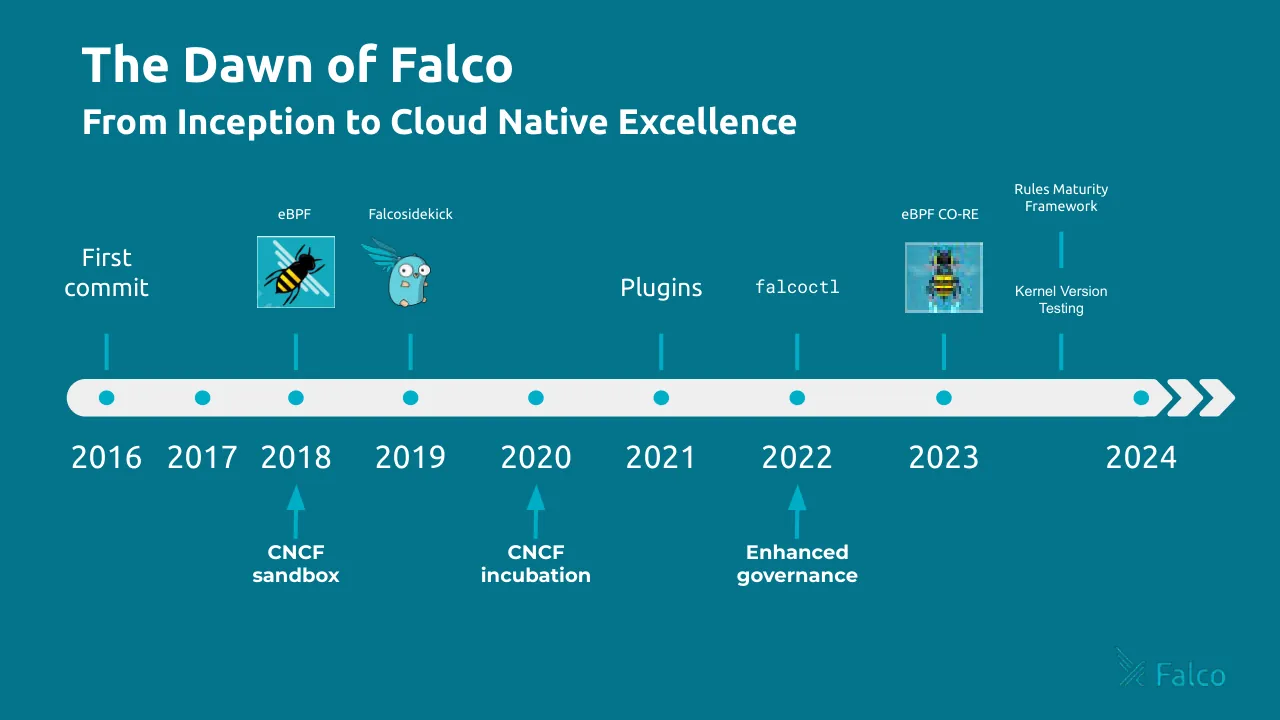
Slide 2 shows a timeline from the first commit in 2016 through eBPF, Falcosidekick, plugins, falcoctl, CNCF sandbox and incubation, and the Rules Maturity Framework, up to 2024. It is titled The Dawn of Falco.
What does the Sysdig Falco deck say about performance and reliability?
Slide 15 says Falco handles thousands to millions of events per second, so it should optimize what matters and balance overhead and capabilities. Slide 21 adds that the userspace state engine should inspect time-ordered incoming kernel events as fast as possible.
What does the Sysdig Falco deck say about the roadmap toward Falco 1.0?
Slide 38, titled Towards Falco 1.0, lists core enhancements such as standardizing feature adoption and deprecation policies, streamlining configuration and CLI standardization, and making the modern eBPF the default driver. Slide 37 says Falco is on track to release its 1.0.0 version.
Details
- Company: Sysdig
- Year: 2024
- Type: Conference talk
- Industry: Cloud security
- Pages: 41
Review score: 6 out of 10, Needs substantial work
Presentation quality, judged with the SlideDeck Co review heuristic. Ask, evidence and idea merit are not rated here.
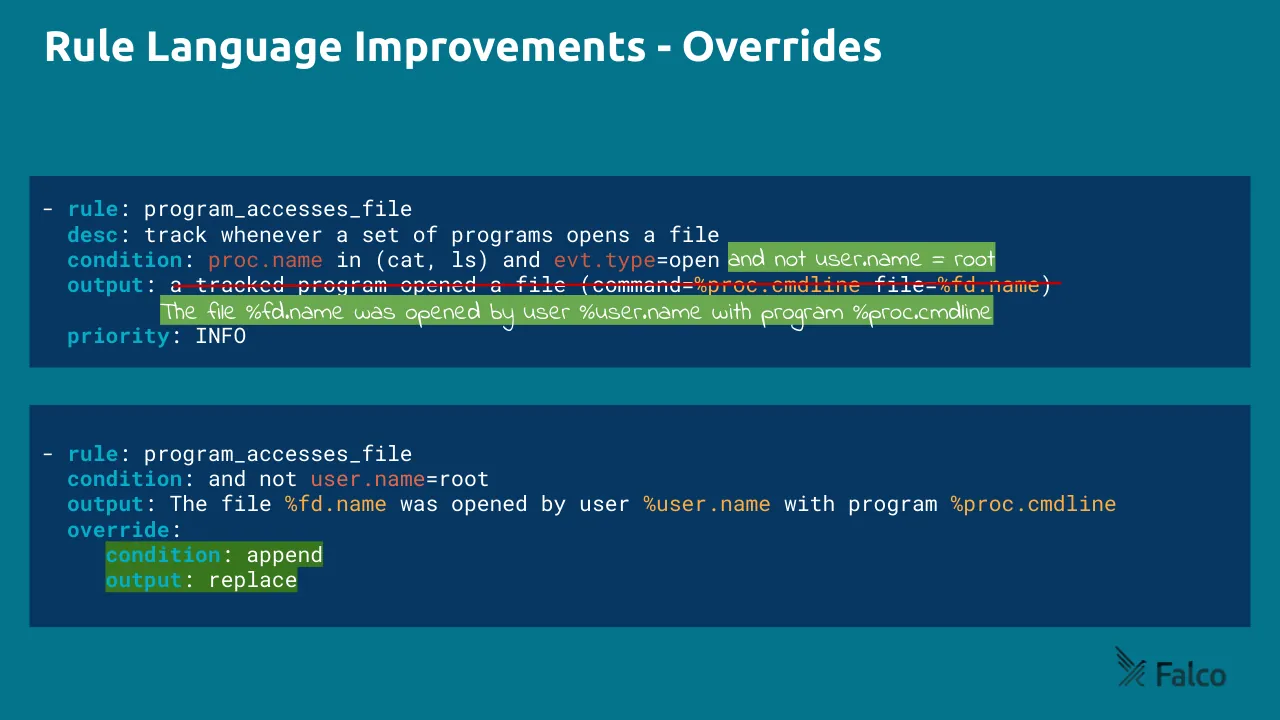
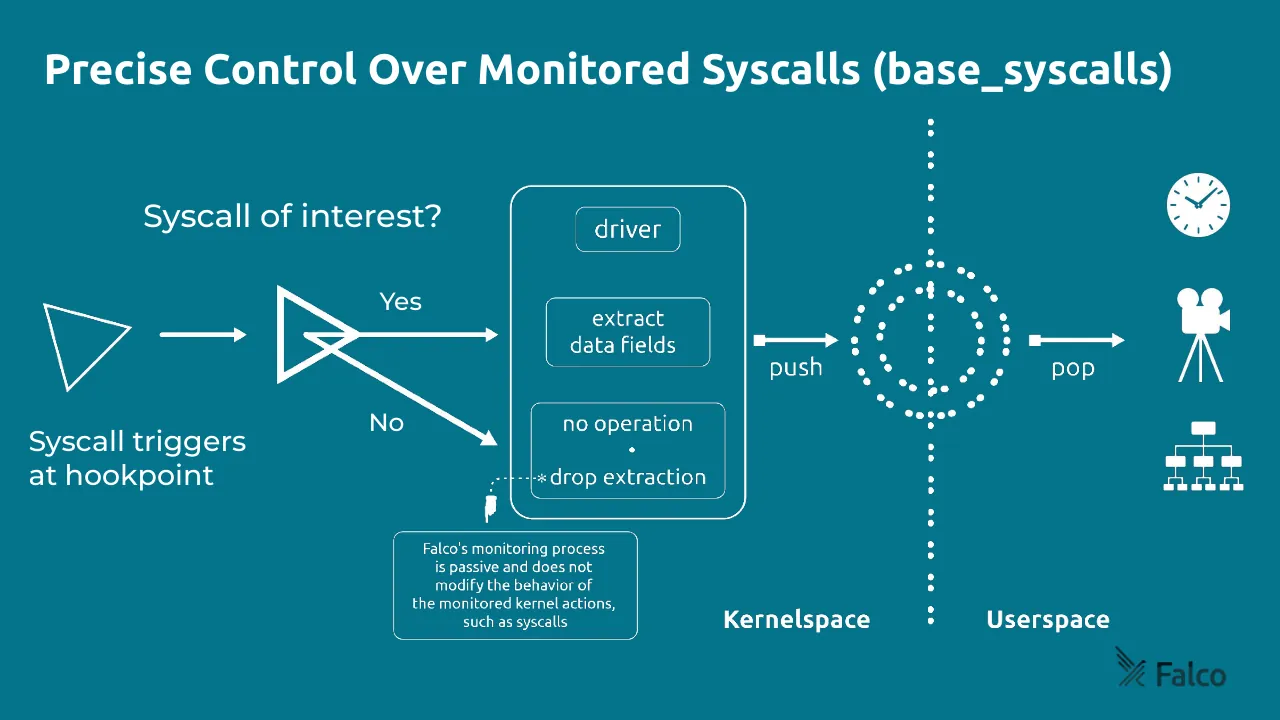
The deck has a consistent teal identity, a clear section structure (slides 7, 14, 25, 31 as dividers) and a readable route from history to news to roadmap to community. The execution weakens in the middle: slides 16 and 17 show blurred, unlabeled buffer images and slide 15 has an empty frame where the kernel module image should be, so the performance explanation does not land. Slide 12's override example is hard to follow, with a struck-through output, handwritten green highlights and a second rule that does not obviously map to the first, and slide 20's diagram has small text and an unclear flow. Many content slides are dense with tiny code or field lists (slides 28, 38, 39), and this is only workable for a live technical audience who already know Falco.
Worth keeping: Keep the consistent teal template with the Falco mark, the clean timeline on slide 2, the four-tier status chips on slide 24, and the plain icon-plus-sentence layout of slides 13 and 22.
Most useful repair: Replace the placeholder-looking images on slides 15 to 17 with labeled diagrams, restructure slide 12 as a clear before and after with readable annotations, and enlarge and simplify the flow on slide 20.
What would change the score: I would cut the near-empty filler slides (5, 8, 41's weak layout), add one takeaway per technical slide, and trim the long field lists and roadmap bullets on slides 28, 38 and 39 to the few items the speakers will actually say.
Confidence medium. 41 of 41 pages inspected on contact sheets, 4 at readable size. Reviewed 2026-11-08. Model-assisted review (claude-sonnet-5-5).
Full text of the slides (41 slides)
Every slide's words and a description of its charts and images, so the deck can be searched and rebuilt. Also available as Markdown.
Slide 1
Falco: A Grand Promenade / Through Cloud Native / Runtime Security
Carlos Panato, Chainguard
Jason Dellaluce, Sysdig
Leonardo Grasso, Sysdig
Luca Guerra, Sysdig
Melissa Kilby, Apple
Wednesday March 20, 2024 11:15 - 11:50 CET (Pavilion 7 | Level 7.3 | W02-03 Maintainer Track, Falco)
Visuals: Decorative graphic in the lower right: a set of bright cyan (#00B4CC approx.) rounded diagonal bars forming the Falco chevron mark, cropped by the bottom and right edges of the slide, rendered as a tonal overlay on the teal background. Top-right: a white KubeCon wheel-and-hexagon emblem with the wordmark 'KubeCon', a thin white vertical divider, then a white square CloudNativeCon emblem with the wordmark 'CloudNativeCon', and below them a horizontal white rule line either side of 'Europe 2024'. Top-left: white Falco logo (stylised slashes plus the word 'Falco').
Slide 2
The Dawn of Falco
From Inception to Cloud Native Excellence
First
commit
eBPF
Falcosidekick
Plugins
falcoctl
eBPF CO-RE
Rules Maturity
Framework
Kernel Version
Testing
2016
2017
2018
2019
2020
2021
2022
2023
2024
CNCF
sandbox
CNCF
incubation
Enhanced
governance
Falco
Visuals: Timeline diagram: a horizontal light grey (#EEEEEE) pill-shaped bar from about x 5.2% to 90.6% (body) ending in three chevron arrowheads reaching about x 96.5%, vertically centred at y 55%. Nine teal (#00A8C6) filled circular dots, about 1.2% wide, sit on the bar at x 8.3, 15.8, 23.1, 32.1, 41.9, 51.7, 62.3, 73.8 and 89.2 percent, matching years 2016 to 2024. Teal vertical tick lines (about 0.25% wide) rise from the bar at x 8.3 (First commit), 23.1 (eBPF), 32.1 (Falcosidekick), 51.7 (Plugins), 62.3 (falcoctl), 73.8 (eBPF CO-RE) and 82.9 (Rules Maturity Framework and Kernel Version Testing). Three teal upward arrows point from below the year labels to the bar at x 23.1 (CNCF sandbox), 41.9 (CNCF incubation) and 62.3 (Enhanced governance). Image 1 at x 20.1 to 26.1%, y 32.8 to 42.7%: a square icon of a stylised bee with yellow and black stripes and white speed lines on a teal background, boxed with a thin light border, labelled eBPF above. Image 2 at x 28.3 to 33.8%, y 32.9 to 42.7%: a cartoon light-blue gopher with blue wings and large round eyes, no box, labelled Falcosidekick above. Image 3 at x 70.7 to 76.8%, y 33.6 to 43.4%: a small pixelated square image of a bee on a light blue-grey background with a thin light border, labelled eBPF CO-RE above. Image 4 at x 87.1 to 95.8%, y 89.8 to 95.6%: the Falco logo, a stylised teal bird or wing mark next to the word Falco in teal (#17A9C4), on the background with no box. Ticks at 82.9% carry two text labels, one above (Rules Maturity Framework) and one below (Kernel Version Testing) the tick line.
Slide 3
Innovations &
Contributions
The Core of Falco's Growth
Visuals: Eleven placed images. The first (decorative left panel) is a flat cyan field with two lighter pale-cyan arcs in its upper area. The remaining ten are screenshots of web pages with a thin cyan (#1BB3CC) border and a soft drop shadow, overlapping in a diagonal cascade. The front-most screenshot is a Driver Testing Matrix amd64 table with a light background; the Rules Maturity Framework, Blog, falcoctl and Plugins pages sit behind it in that order, and the rest are mostly hidden. Last is the Falco logo, a stylised spider-web mark with the word Falco in cyan, placed at the bottom right. Full-bleed photographs: none. Crop: the screenshots are cropped by the cascade overlaps. No photographs, charts or diagrams.
Slide 4
Community & / Governance
A Flourishing Community / and an Open Governance
Our Principles:
➔ Open
➔ Respectful
➔ Diverse
➔ Transparent
➔ Vibrant
“The open nature of The Falco Project, its / first principle, will never be a matter of / change.” - Falco’s governance
Falco
Visuals: Left panel (0 to 45.6% width, full height): a flat illustration of a bright cyan field (#00AEC7) with one large, slightly lighter cyan (#1DB5CF) curved band, a quarter-circle arc sweeping from the top edge around x 20 to 46% and down to the panel's right edge at about y 48%. The arc is a tonal shape with no outline and no shadow. Right side: no photograph or chart; a flat dark teal field. Logo at bottom-right: the Falco mark, a stylised crossed-stroke emblem in dark slate grey (#2B4A52), next to the lowercase wordmark 'Falco' in the same dark slate grey; the logo is about 8.7% of width and 5.9% of height.
Slide 5
/hold
a moment
Falco
Visuals: One logo in the bottom-right corner: the Falco wordmark with a stylised mark of three diagonal strokes crossing to the left of the word 'Falco'. The mark and wordmark are dark navy/near-black (about #0B2A35) on the teal background. No photographs, charts or other graphics.
Slide 6
We made Falco fly!
FALCO GRADUATION 2024
CLOUD NATIVE COMPUTING FOUNDATION
Falco
Visuals: Left: a teal (#00A7C2) rectangular graduation badge with a white ribbon-bookmark cut-out on its left side. The ribbon contains the Falco logo (stylised bird-wing mark over the word 'Falco' in teal). To the right of the ribbon, inside the badge, the Cloud Native Computing Foundation logo (small blue-and-white CNCF mark with the words 'CLOUD NATIVE / COMPUTING FOUNDATION' in white) sits above the white bold text 'FALCO GRADUATION' and the thin dark-grey outlined numerals '2024'. The badge is flat with no shadow, no gradient and no rotation. Top-right corner: a soft out-of-focus gradient blur fading from deep blue (#3F5BFF) through cyan (#33C8FF) to white and lavender (#C9B8F5) toward the centre-left, bleeding off the top and right edges. Bottom-right: small Falco logo in dark navy (#0E2F3F) with the bird-wing mark and the word 'Falco'.
Slide 7
Falco
What’s new in Falco?
Visuals: Two non-text visuals. (1) A pale cyan watermark illustration of the Falco X-feather mark, made of rounded diagonal strokes, fills the lower-right portion of the slide (roughly x 68 to 98%, y 40 to 100%) and runs off the bottom and right edges; it is part of a full-bleed 1200 by 628 px image covering the whole slide. (2) The Falco logo at top left: a stylised X made of double diagonal strokes followed by the lowercase-style wordmark 'Falco' in dark teal. No photograph, chart or table.
Slide 8
Falco Keeps Flying - Where are we improving Falco? / Rules Maturity / & Language / Plugins & / Integrations / User Space / Plugins / Rules / Performance & / Security / eBPF / OR / Kernel Module / Falco driver / Kernel Space / Detections / Ecosystem & / Community / Falco
Visuals: Isometric diagram on a flat teal field. Five translucent white rectangles (#FAFAFA at 33% opacity) hold the labelled icons. Top-left: a parchment scroll with faint printed text, 160 by 160 px, representing rules. Next to it, a stack of three white-grey book or document blocks with teal stripes, about 37% x and 33% y, about 4% wide by 8% high. Top-right: a blue Kubernetes wheel logo, 94 by 94 px, on a white heptagon, at about 70% x and 18% y. Beside it, a stack of three overlapping white browser windows with teal title bars and a small cursor, about 58.7% x and 25.8% y, about 8.3% wide by 16.9% high. Centre: a grey 3D gear on a pale cyan ellipse, 80 by 80 px, at about 46.6% x and 42% y. Bottom-left: a gold key, 80 by 80 px, at about 26.8% x and 66.2% y. Bottom-right: a blue faceted diamond, 80 by 80 px, at about 69.9% x and 65% y. Also a white three-sided prism with a small teal A, about 60% x and 61% y, about 4.5% wide by 8% high. A pale-cyan pill labelled Falco driver (about 28.8% x, 55.6% y, 18.4% wide, 19% high) contains two white 3D chips: the left one with an eBPF bee logo (about 31.3% x, 56% y) and the right one labelled Kernel Module in teal (about 38.3% x, 63.3% y), joined by the small word OR. Dark grey pill labels read User Space (about 45.9% x, 32.4% y), Kernel Space (about 48.4% x, 73.4% y) and a white pill labelled Plugins with a small teal icon (about 57.3% x, 38.7% y). A faint dashed teal diagonal line runs from the Rules box toward the lower right, and a faint isometric grid sits behind the scene.
Slide 9
Detection Improvements
Every detection can be bypassed…
… so we are adding more!
Detection Improvements - Symlink resolution
$ ln -s /bin/cat /tmp/dog
$ /tmp/dog hello.txt
Field name / Before 0.36.0 / Falco 0.36.0
proc.name / dog / dog
proc.exe / /tmp/dog / /tmp/dog
proc.exepath / /tmp/dog / /bin/cat
Falco
KubeCon | CloudNativeCon
North America 2023
Falco
Visuals: Embedded screenshot of a presentation slide (1272 by 515 px, boxed, not cropped, with a thin purple frame). Left panel: teal slide titled 'Detection Improvements - Symlink resolution' in white bold sans-serif. Below it is a dark terminal box (near-black #111A1A, rounded corners, three traffic-light dots red, amber and green at top-left) showing '$ ln -s /bin/cat /tmp/dog' with '$' and 'ln' and '-s' tinted, and '$ /tmp/dog hello.txt' beneath it in pale monospace text. Below the terminal is a table with 3 columns and 4 rows (one header row) with thin light-grey-white borders on teal: header row (italic) 'Field name' | 'Before 0.36.0' | 'Falco 0.36.0'; row 1 'proc.name' | 'dog' | 'dog'; row 2 'proc.exe' | '/tmp/dog' | '/tmp/dog'; row 3 'proc.exepath' | '/tmp/dog' | '/bin/cat' with '/bin/cat' in bold. Right panel: a photograph of a conference stage from the audience, framed by a purple border; four people stand on stage (three men, one woman on right), one man at a podium with a microphone; audience seated in dark blue chairs in the foreground; lighting is dim with a bright blue-white screen strip at upper left; dominant colours dark grey, navy and blue. Below the photo, on a pale pink-white background, is the KubeCon logo (purple hexagon with ship wheel) divided by a vertical line from the CloudNativeCon logo (purple square with abstract mark), with text 'KubeCon', 'CloudNativeCon' and a rule-flanked 'North America 2023' in purple. Falco logo (teal stylised double slash with 'Falco' text) appears in the bottom-right of the teal left panel and again as a dark logo outside the screenshot at bottom-right of the slide.
Slide 10
Detection Improvements
So what is the Falco bypass of the day?
Slide 11
Detection Improvements - eBPF and IA32 Emulation
Falco
kmod
eBPF
Modern
eBPF
0.36.0
0.37.0
#include <stdio.h>
#include <unistd.h>
#include <sys/syscall.h>
#include <sys/types.h>
int main() {
syscall(__NR_close, -1);
return 0;
}
$ gcc ia32.c -o ia32 -m32
Visuals: Left: two dark rounded code panels. The upper panel shows a macOS-style window with three coloured dots at top left (red, yellow, green) above a C source listing in monospace type with syntax colouring: #include lines in cyan, int and return in yellow, main and syscall in blue, the number 0 and the value -1 in red, and the closing brace in grey. The lower panel is a single-line terminal command, $ gcc ia32.c -o ia32 -m32, in monospace with the $ and gcc in cyan and the flags -o and -m32 in green. Right: a table with a white 1px outline and white internal dividers. Columns: Falco, kmod, eBPF, Modern eBPF. Rows: header row; 0.36.0 with a check mark under kmod, a sad face under eBPF and a sad face under Modern eBPF; 0.37.0 with check marks under kmod, eBPF and Modern eBPF. The emoji are rendered as small pixelated glyph images. Falco logo bottom right: dark wordmark with a stylised slash mark.
Slide 12
Rule Language Improvements - Overrides
- rule: program_accesses_file
desc: track whenever a set of programs opens a file
condition: proc.name in (cat, ls) and evt.type=open
and not user.name = root
output: a tracked program opened a file (command=%proc.cmdline file=%fd.name)
The file %fd.name was opened by user %user.name with program %proc.cmdline
priority: INFO
- rule: program_accesses_file
condition: and not user.name=root
output: The file %fd.name was opened by user %user.name with program %proc.cmdline
override:
condition: append
output: replace
Falco
Visuals: Two code-listing panels rendered as monospace text on dark navy #073763 rectangles with square corners and no shadow. Upper panel: a YAML rule listing with keys rule, desc, condition, output and priority in bold cyan #06ADC7; the values are white #FFFFFF except proc.name and evt.type in red-orange #CD5840, and the output placeholders %proc.cmdline and %fd.name in amber #FFAB40. Two green #6AA84F highlight rectangles behind handwritten annotations: 'and not user.name = root' at the end of the condition line, and 'The file %fd.name was opened by user %user.name with program %proc.cmdline' beneath the output line. A thin red #D0021B-like strike line runs horizontally across the output line from about x 13.2% to 82.7% at about y 39% to cross out the original output text. Lower panel: the corrected rule with condition 'and not user.name=root' (user.name in red-orange) and output 'The file %fd.name was opened by user %user.name with program %proc.cmdline', followed by override: condition: append and output: replace, where the override keys sit on two dark green #38761D highlight rectangles. Falco logo: dark charcoal icon of crossed diagonal strokes with the wordmark Falco in dark grey #222222 at bottom-right.
Slide 13
Testing and Stability Improvement
● New kernel and Linux distribution versions for kernel testing
● Significantly expanded the e2e test suite to increase coverage
● Vastly increased the use of security checking tools which catch potential memory errors daily
Visuals: Four overlapping screenshots and one logo. (1) Top right, a dark-mode GitHub pull-request Checks panel, boxed with square corners, at about x 49.6%, y 12.6%, w 30.5%, h 66.4%. Its tabs read Conversation 4, Commits 1 and Checks 47 (Checks selected). Below is a commit line, 'fix(driver): CC variable for debian 8d12807', with a green circular check icon. Next is a 'Semgrep Checks' group, 'on: pull_request', and a partly visible 'check-absolut...' card reading 'succeeded yesterd...'. A bottom group, 'e2e C...', 'on: pul...', is cut off by the terminal. (2) White boxed table over the middle right, at about x 51.1%, y 33.2%, w 46.9%, h 38.2%, with columns KERNEL, CMAKE-CONFIGURE, KMOD BUILD, KMOD SCAP-OPEN, BPF-PROBE BUILD, BPF-PROBE SCAP-OPEN and MODERN-BPF SCAP-OPEN. Rows: amazonlinux2-4.19 (green dots in every column except MODERN-BPF SCAP-OPEN, which is yellow); amazonlinux2-5.10 (green dots in all six status columns); a row reading amazon... with 5.15 visible; a row reading amazon... with 6.1 visible; a row reading archlinu... (cut off). Green dots are filled circles. (3) Dark terminal log, a boxed image at about x 55.4%, y 47.3%, w 44.6%, h 52.7%, in front of the table and the Checks panel, with a monospace font on a near-black background. Lines, top to bottom: '[ OK ] sys_call_test.container_docker_bad_socket (5041 ms)'; '[ RUN ] sys_call_test.container_libvirt'; a rule of equals signs; a red line '==26348==ERROR: AddressSanitizer: heap-use-after-free on address 0x510000644180'; 'READ of size 8 at 0x510000644180 thread T89' in cyan; stack frames #0 to #8 (std::__cxx11::basic_string, std::operator==, std::operator!=, sinsp_parser::process_event, sinsp::next, event_capture::capture, execute_native_thread_routine, libc.so.6 entries), cut at the right edge; a green line '0x510000644180 is located 64 bytes inside of 184-byte region [0x510000644140,0x...'; a magenta line 'freed by thread T89 here:'; frames #0 to #4 (operator delete, sinsp_fdinfo::~sinsp_fdinfo, std::default_delete, std::__uniq_ptr_impl) cut at the right edge. (4) A placed image of 1024 by 850 pixels at about x 37.6%, y 25.7%, w 60.9%, h 74.3% is covered by the other screenshots and is not clearly visible. (5) Falco logo, bottom right at about x 87.1%, y 89.6%, w 8.7%, h 5.9%: a dark charcoal stylised X-shaped mark followed by the lowercase wordmark 'Falco' in dark charcoal bold sans-serif. Lighting is flat screenshot lighting with no photography.
Slide 14
Falco
Performance and
Reliability
Visuals: Falco logo at top left: a stylised double-stroke X-and-arrow icon in dark teal next to the lowercase-style wordmark 'Falco' in dark teal #1B3A40. Behind everything is a full-bleed background image with a pale aqua watermark of the same X-and-arrow mark, drawn as thick rounded diagonal strokes. The strokes run from the upper-middle right (around x 68 to 88, y 40) down to the bottom-right corner, where they are cropped by the slide edge. The watermark is pale aqua, about #E3F6F8, on white, with no overlay.
Slide 15
The Busy Person's Tour of Falco Performance
Thousands to millions of events/second.
Optimize what matters.
Balance overhead and capabilities.
Falco
Visuals: Three white line/solid icons: a stopwatch (top, beside 'Thousands to millions of events/second.'), a light bulb (middle, beside 'Optimize what matters.'), and a balance scale with a central post and base (bottom, beside 'Balance overhead and capabilities.'). Each icon is white, roughly 4-7% of slide width. A photograph-like background shows a blue aerial/abstract image of a curving road or field pattern with fine horizontal streaking, filling the whole slide and tinted dark teal over the top, with the lighter blue detail visible on the right side and centre-right. The Falco logo at bottom right is a small dark stylised mark with the word 'Falco' in dark navy/black, sitting on the blue background.
Slide 16
Kernel Driver Options / Kernel Module / eBPF / Modern eBPF / (CO-RE) / Falco / CO-RE: Compile-Once-Run-Everywhere
Visuals: Three framed visuals in a row, with no chart, table or photograph. (1) Left: an empty square outline with a white stroke of about 0.3% of slide width on the teal background, containing no image and no fill, labelled Kernel Module. (2) Centre: a square illustration with a white border showing a black and yellow striped bee in flat vector style, flying diagonally from upper right to lower left. Three pale cyan diagonal streaks run behind it from upper left to lower right, and the background is bright cyan (#14A9C2) with faint lighter speckles. It is labelled eBPF. (3) Right: a square illustration with a white border showing a bee-like robot seen from above: a black head with yellow eyes, grey mechanical legs and wing joints, translucent pale wings, a black and yellow striped abdomen, and cyan jet exhaust flames at the bottom of the legs. It has a blue-teal gradient background (#3A9FB5 to #5CB8CC) and a soft glow. It is labelled Modern eBPF (CO-RE). The two illustrations are not cropped, and they are boxed. The Falco logo is a dark stylised double-slash mark followed by the word Falco in a bold sans-serif, dark grey-black #1A1A1A.
Slide 17
Kernel Buffers per CPU (pre-allocated memory)
Kernelspace
Userspace
Falco
Visuals: Four stacked rectangular images, all the same width and horizontally centred, forming a vertical sequence from top to bottom. Top strip (8 by 5 px): a heavily pixelated, blocky mosaic of dark and mid teal squares, with a lighter band across the middle third and a brighter lower-right cluster. Second strip (32 by 17 px): a pixelated horizontal glowing band of light teal running left to right, brightest near the right third. Third strip (128 by 68 px): a softened, blurred version of a light-streaked horizon with a bright vertical cluster of pixels at the right third. Bottom strip (512 by 272 px): a smooth, high-detail render of light streaks converging on a glowing square microchip-like circuit motif at the right third, dark teal ground. All strips are boxed with hard rectangular edges, no border, no overlay, not cropped. Dominant colours are dark teal and pale cyan. Falco logo: a dark near-black stylised mark of crossed diagonal strokes with the wordmark Falco in bold dark sans-serif, at bottom right.
Slide 18
Kernel Buffers per (shared) CPU(s) - modern_ebpf
Kernelspace
Userspace
Falco
Visuals: Diagram with no arrows or connectors, made of two rectangular pixelated blocks. The upper block is a 4 by 3 pixel image, 38.0% wide and 33.5% high, with its top edge at 21.6% and its bottom edge at about 55.1%. It has three horizontal bands: the top band and bottom band are darker teal, about #054C5C, with four columns of slightly varying shade, and the middle band is lighter teal, about #135A69, with four columns of slightly varying shade. The lower block is a 2 by 2 pixel image, 38.0% wide and 33.5% high, with its top edge at 60.6%, made of two columns of dark teal blocks, about #0B4F5F on the left and #0C5566 on the right, with no visible band divisions. Both blocks are sharp-edged, unshadowed and unbordered. Labels: Kernelspace is the left label and Userspace the right label, both in white. Logo: the Falco logo (a dark near-black slash-mark icon followed by the wordmark Falco) is placed bottom-right, as a small raster image 4 by 2 pixels, 8.7% wide and 5.9% high, in a dark near-black colour, about #0A1A1F, on the teal background.
Slide 19
Precise Control Over Monitored Syscalls (base_syscalls)
Syscalls activated / via Falco Rules
execve
openat
execvat
fork
clone3
procexit
vfork
close
clone
...
Syscalls required / by libsinsp to keep state
Mapping / to Linux architecture / specific Syscall IDs
Push map into / kernel driver
Userspace
Kernelspace
Falco
Visuals: Diagram with no photographs or charts. Left group: a large dashed white rounded rectangle (outer container) enclosing two dashed sub-boxes. The upper sub-box holds three outlined rounded tags labelled execve, openat and execvat, with a caption below it reading 'Syscalls activated via Falco Rules'. The lower sub-box holds tags labelled fork, clone3, procexit, vfork, close and clone, followed by an ellipsis of three dots, with a caption below reading 'Syscalls required by libsinsp to keep state'. Two solid white right-pointing block arrows run horizontally: the first from the left group to a central icon, the second from the central icon to a vertical divider. The central icon is a white solid triangular-rounded link/gear-like glyph with three circular holes, labelled 'Mapping to Linux architecture specific Syscall IDs'. A vertical dotted white line separates Userspace on the left from Kernelspace on the right. On the right is a white icon of a stacked block: three horizontal bars above a rounded rectangle with a small slot, representing a kernel driver, labelled 'Push map into kernel driver'. Falco logo at bottom right: a stylised dark-navy crossed-arrow mark followed by the word Falco in dark navy bold sans-serif. Lighting and shading are flat; there is no photograph.
Slide 20
Precise Control Over Monitored Syscalls (base_syscalls)
Syscall of interest?
Yes
Syscall triggers
at hookpoint
No
driver
extract data fields
no operation
·
* drop extraction
Falco's monitoring process
is passive and does not
modify the behavior of
the monitored kernel actions,
such as syscalls
push
pop
Kernelspace
Userspace
Falco
Visuals: Diagram with no chart data. Shapes and labels, in order: (1) an open white outlined triangle pointing right at about x 3.4%, y 42.2%, w 7.0%, h 12.2%, labelled by the text 'Syscall triggers at hookpoint' below it. (2) A white horizontal arrow with a solid triangular head from the triangle to the decision shape. (3) A large open white outlined triangle at about x 21.6%, y 39.7%, w 6.4%, h 13.6%, with the question 'Syscall of interest?' above it. (4) A white arrow labelled 'Yes' running right from the decision shape to the left edge of the tall rounded box. (5) A thick white diagonal arrow labelled 'No' running from the decision shape down-right to the 'drop extraction' box. (6) A tall rounded white-outlined rectangle at about x 39.9%, y 26.0%, w 18.4%, h 46.2% (Kernelspace process) containing three stacked rounded boxes: 'driver' at about x 45.0%, y 28.9%, w 8.2%, h 6.2%; 'extract data fields' at about x 42.7%, y 41.4%, w 12.8%, h 9.6%; and 'no operation / · / * drop extraction' at about x 41.5%, y 56.0%, w 15.2%, h 13.3%. (7) A dotted white line from the 'drop extraction' box leading down-left to a small white pointing-hand icon at about x 37.9%, y 68.9%, w 1.0%, h 3.6%, which points at the callout. (8) A rounded-rectangle callout at about x 30.8%, y 73.9%, w 19.0%, h 14.8% with the explanatory text. (9) A white arrow labelled 'push' at about x 58.9%, y 47.3%, w 6.5%, from the Kernelspace box to a dotted white circle (orbit of dots) at about x 66.5%, y 36.4%, w 12.3%, h 21.8%, which sits on a vertical dotted white line at x 72.6% from y 16.6% to 86.6%. (10) A white arrow labelled 'pop' at about x 80.4%, y 47.3%, w 7.4%, pointing right to three white icons: a clock (about x 91.1%, y 24.0%, w 5.0%, h 9.0%), a video camera on a tripod (about x 91.9%, y 39.9%, w 4.2%, h 13.2%) and an org-chart hierarchy icon (about x 90.9%, y 58.6%, w 6.2%, h 9.5%). The clock is a white filled circle with teal hands and ticks, the camera is white with a teal lens, and the hierarchy icon shows white boxes joined by lines. (11) The Falco logo (a dark stylised slash mark with the wordmark 'Falco') at about x 87.1%, y 89.6%, w 8.7%, h 5.9%.
Slide 21
Userspace state engine / Inspect time-ordered incoming / (kernel) events as fast as possible. / Process and container caches, / correlations, rules matching. / Reduce processing time to scale / to modern infrastructures. / Falco
Visuals: 1) Magnifying-glass icon, white line icon, at left of row 1, roughly 4% to 8% across and 27% to 38% down. 2) Jigsaw-puzzle-piece icon, solid white, at left of row 2, about 4% to 10% across and 52% to 63% down. 3) Rising bar-and-line chart icon, solid white bars with a white trend line ending in an arrowhead, at left of row 3, about 4% to 10% across and 78% to 87% down. 4) Right-panel illustration, a stylised top-down technical scene with no people or text beyond the logo. Composition: four rounded-octagon panels in a 2x2 grid, filled sage green (top-left, about #6B8A63), warm taupe (top-right, about #6E6A5C), mid green (bottom-left, about #3A8A6E) and light green (bottom-right, about #7DAA6E). Each panel has faint lighter seams and small grey-blue tabs on its outer edges. Blue-grey braided hoses (about #5E8FA3) with segment ridges run between them. Top-left panel holds a triangular play-shaped funnel outline; top-right panel holds a coiled spiral hose; a teal capsule node (about #4E8EA0) sits at the centre with a small glowing cyan emblem (about #1FA9C4); a hexagonal coiled cell sits bottom-left; a canister-shaped cylinder with two cyan dots sits bottom-right. A dark teal cone protrudes from the left edge of the image. Lighting is flat with no visible light source; the whole image is overlaid with a dark navy-teal tint (about #0B4A66 at roughly 35% opacity) so colours are muted. A darker vertical band (about #245E6E) runs along the image's left edge. The image is not cropped and is placed full-bleed to the top, bottom and right edges. 5) Falco wordmark logo, bottom-right of the illustration, at about 87% to 96% across and 90% to 95% down, rendered in a muted olive-gold (about #8A7A3A) with a stylised X-shaped mark to the left of the word 'Falco'.
Slide 22
Risks / Slowing down the / kernel or applications / Dropping events on / busy servers / Create backpressure / Cause increased kernel / side event drops / Kernelspace / Userspace
Visuals: One dotted illustration centred on the slide. A vertical dotted white line runs from about 18% to about 92% of the slide height at x about 49.2%. It passes through a concentric pair of dotted white rings, an outer ring about 14.6% wide and 24% tall and a smaller inner ring, centred at about x 49.3%, y 50%. The dots are small white filled circles of uniform size. Three flat teal rectangles (#04748C, no stroke) lie over the lower part of the dotted line behind the Kernelspace and Userspace labels. In the bottom-right corner is the Falco logo: a stylised dark stroke mark followed by the dark wordmark Falco in a bold sans-serif, dark near-black (#1A1A1A) on the teal. No photographs.
Slide 23
New CNCF Benchmarking Initiatives
CNCF Environmental Sustainability TAG
Green Reviews Working Group
Falco as First Project
Starting the Journey Towards Enhanced Performance
New Falco Metrics Framework
https://github.com/falcosecurity/cncf-green-review-testing
Visuals: Full-bleed photograph of a symmetrical tunnel of teal light streaks radiating from a central vanishing point, with bright cyan lines, faint blue-violet glints, and green lit panels near the upper-left and upper-right and lower-left and lower-right. Framing is centred and symmetrical, uncropped at the edges, and the image covers the whole slide. A teal tint overlay makes it dominantly blue-teal (about #0B5F73 with cyan highlights about #3FB8C8 and green about #5CC46A). Logo: the Falco wordmark, a stylised slash-and-cross mark followed by the word Falco, in near-black about #1A1A1A, placed bottom-right and not overlapping text.
Slide 24
Rules Maturity Framework
STATUS
STABLE
Rules included in the default Falco package; address / broader threats; provide universal system-level detections; / follow best practices for optimal robustness.
STATUS
INCUBATING
Rules address relevant threats; provide certain level of / robustness; cater to more specific use cases.
STATUS
SANDBOX
Experimental rules; can serve as inspiration; adhere to / minimum acceptance criteria.
STATUS
DEPRECATED
Rules no longer actively maintained.
https://github.com/falcosecurity/rules
Visuals: Full-bleed photograph of a stepped, geometric concrete staircase architecture seen from above, with a small person holding a camera at the top-left (about x 11 to 21%, y 12 to 25%). The photo is tinted teal by a full-slide #04748C overlay, giving a muted blue-teal monochrome look. Four status tags: each is a two-part label bar; the left part is dark grey #595959 with white bold 'STATUS' text, the right part is a colour-coded block: STABLE green #4BC616, INCUBATING orange #FF9900, SANDBOX coral #E3664C, DEPRECATED grey #9C9696, each with white bold uppercase text. Falco logo at bottom-right: a stylised X-shaped mark beside the word 'Falco' in dark grey, about #555555. No charts, tables or other diagrams.
Slide 25
Falco
Plugins and K8S
Visuals: Large pale teal watermark of the Falco chevron icon (a double-stroke arrow mark with rounded line ends) at the lower right, about x 72 to 100 and y 40 to 100, bleeding off the right and bottom edges. Its strokes are pale aqua #E3F6F8 on white. Top-left Falco logo: a small dark teal icon of two diagonal strokes beside the lowercase-style wordmark 'Falco', in dark teal #163C44. A small 4 by 2 pixel image also sits at the bottom right (x 87.1, y 89.6), not distinguishable from the watermark.
Slide 26
Plugins – New detections, metadata, data sources
syslog
GKE Audit Events
GCP Audit Logs
Anomaly Detection 🚧
Enterprise Events
Real-Time Event Monitoring
K8S Cluster Metadata
Falco
Visuals: Seven service logo tiles and one warning-sign icon, plus a rocket illustration and the Falco logo. Top row, left to right: a syslog icon (black document with three text lines and a gear on a light grey #EEEEEE rounded square); the GKE Audit Events logo (blue hexagon with a white cube symbol on a white rounded tile); the GCP Audit Logs logo (Google Cloud multicolour cloud, red, yellow, green and blue, on a white rounded tile); an Anomaly Detection icon (grey magnifying glass over a warning triangle with two arrows on a light grey #EEEEEE rounded square). Bottom row, left to right: the Box logo (blue lowercase wordmark on white tile); the Salesforce logo (white lettering on a blue #009EDB cloud on white tile); the Kubernetes K8S logo (white helm wheel on a blue #326CE5 heptagon on white tile). Rocket illustration in the lower right: a white and light grey rocket with red fins and a yellow flame, with white speed lines trailing to the left, flat vector style, no shadow. Falco logo: dark grey slash mark and the word Falco in dark bold sans-serif, bottom right, not boxed. Image boxes are as measured from the file; the rocket image box includes transparent margin.
Slide 27
Kubernetes – Reinventing metadata enrichment
Rethinked for maximum / performance and scalability
Optional module built / on top of Plugin API
30.000+ lines of legacy code / removed from core Falco
Built in Go leveraging / native K8S client code
Available from Falco v0.37.0
Falco Instance
Meta Collector
Meta Collector SVC
Falco Instance
Falco Instance
Node 1
Node 2
Node n
api
falcosecurity/k8s-metacollector
falcosecurity/plugins/tree/master/plugins/k8smeta
Visuals: One diagram (architecture illustration) at x 50.2%, y 19.9%, w 47.2%, h 64.0%, 801 by 611 px. It is a white rounded-rectangle panel with a thin dark grey outline and large corner radius (about 8% of the panel width), fully opaque and not cropped. A blue Kubernetes wheel icon in a blue hexagon overlaps the top-left corner of the panel. Top centre: a blue hexagon with a gear-cluster icon and the small label 'api'. Left middle: a blue hexagon with a network-hierarchy icon labelled 'Meta Collector / SVC' in black sans-serif text to its left. Three rectangular boxes with thin black outlines sit along the bottom: 'Node 1' (left, box contains one blue cube-hexagon icon labelled 'Falco Instance' with a small Falco logo on it), 'Node 2' (middle, contains a Falco Instance icon and a Meta Collector cube icon, labelled 'Falco Instance' and 'Meta Collector'), and 'Node n' (right, contains one Falco Instance icon). Each node box has a small blue Kubernetes wheel hexagon at its top-left corner and its node label below the box. Connectors: a blue-grey double-headed arrow runs vertically from the Meta Collector SVC hexagon down to the Node 1 Falco Instance; a blue-grey elbow arrow runs from Node 2 Falco Instance up to the SVC hexagon; a blue-grey elbow arrow runs from the SVC hexagon right and down into Node 2 Meta Collector (arrowhead at Meta Collector); a blue-grey elbow arrow runs from the SVC hexagon right along the top and down into Node n Falco Instance; a green arrow runs from the Meta Collector upward to the api hexagon with an arrowhead at api, and a green arrow runs from api downward to the Meta Collector with an arrowhead at the Meta Collector. Lines are about 1 px thick with rounded corners. Palette: Kubernetes blue #326CE5 for hexagons and cube icons, light steel blue #7FA0D8 connectors, green #6DBE45 for the api arrows, black text and outlines on white.
Slide 28
Kubernetes – Detection and enrichment fields
Core Falco (from containers engine)
K8S Meta Plugin (from API server)
k8s.ns.name
k8s.pod.name
k8s.pod.id
k8s.pod.uid
k8s.pod.sandbox_id
k8s.pod.full_sandbox_id
k8s.pod.label
k8s.pod.labels
k8s.pod.ip
k8s.pod.cni.json
(others are still available but deprecated since v0.37…)
k8smeta.pod.name
k8smeta.pod.uid
k8smeta.pod.label
k8smeta.pod.labels
k8smeta.pod.ip
k8smeta.ns.name
k8smeta.ns.uid
k8smeta.ns.label
k8smeta.ns.labels
k8smeta.deployment.name
k8smeta.deployment.uid
k8smeta.deployment.label
k8smeta.deployment.labels
k8smeta.svc.name
k8smeta.svc.uid
k8smeta.svc.label
k8smeta.svc.labels
k8smeta.rs.name
k8smeta.rs.uid
k8smeta.rs.label
k8smeta.rs.labels
k8smeta.rc.name
k8smeta.rc.uid
k8smeta.rc.label
k8smeta.rc.label
Visuals: A two-column table with no grid lines other than the outer white border and the centre divider. Left column header: 'Core Falco (from containers engine)'. Left body: 10 light grey (#EEEEEE) chips of monospace code names, arranged in four rows, followed by an italic note. Right column header: 'K8S Meta Plugin (from API server)'. Right body: 26 light grey (#EEEEEE) chips of monospace code names in 16 rows, the last two rows being 'k8smeta.rc.label' twice as printed. Left column rows: k8s.ns.name, k8s.pod.name, k8s.pod.id / k8s.pod.uid, k8s.pod.sandbox_id / k8s.pod.full_sandbox_id, k8s.pod.label / k8s.pod.labels, k8s.pod.ip, k8s.pod.cni.json. Right column rows: k8smeta.pod.name, k8smeta.pod.uid / k8smeta.pod.label, k8smeta.pod.labels / k8smeta.pod.ip, k8smeta.ns.name / k8smeta.ns.uid, k8smeta.ns.label / k8smeta.ns.labels, k8smeta.deployment.name / k8smeta.deployment.uid, k8smeta.deployment.label / k8smeta.deployment.labels, k8smeta.svc.name / k8smeta.svc.uid, k8smeta.svc.label / k8smeta.svc.labels, k8smeta.rs.name / k8smeta.rs.uid, k8smeta.rs.label / k8smeta.rs.labels, k8smeta.rc.name / k8smeta.rc.uid, k8smeta.rc.label / k8smeta.rc.label. The Falco logo at bottom right is a dark stylised mark of crossed diagonal strokes beside the lowercase wordmark 'Falco' in dark grey-black (#1A1A1A), with no photograph, chart or diagram.
Slide 29
Plugins – Developers are our top priority / Plugin API is becoming the backbone of Falco’s tech innovation / New features / Time-sensitive async events / Native logging / Dynamic reconfiguration / Fully-fledged C++ and Go SDKs / Coming soon… / Access file descriptors info / Complex state data types / Native metrics reporting / New language SDKs…
Visuals: Three small emoji-style illustrations and one mascot illustration, plus a logo. (1) A wrapped gift box with a red ribbon and bow, gold-orange box, placed inline after 'New features' at x 26.5%, y 31.8%, 3.8% by 6.4%. (2) A yellow-orange construction crane with a red base, placed inline after 'Coming soon…' at x 77.6%, y 31.8%, 3.8% by 6.4%. (3) An orange crab mascot (Ferris the Rust crab) with black eyes and a small smile, facing right and tilted slightly, unboxed with no shadow, at x 83.9%, y 76.9%, 8.5% by 13.3%, sitting just beside the end of 'New language SDKs…'. (4) The Falco logo, a dark stylised crossed-slash mark followed by the wordmark 'Falco' in dark grey-black, at x 87.1%, y 89.6%, 8.7% by 5.9%. No photographs, charts or tables. A thin white vertical divider line runs from about y 28.6% to y 90.2% at x about 50.6%.
Slide 30
Let’s not forget… / ● Participating in 2023 has been amazing / ○ Birth of falcosecurity/falco-playground / ○ New maintainer onboarded in Falco family / ○ Talk at Cloud Native Wasm Day NA 2023 / ● Falco is candidating for Summer 2024! / ○ Event-generator revamp and automation of Falco performance testing / ○ Waiting for your application! / github.com/cncf/mentoring/pull/1169 / github.com/falcosecurity/evolution/issues/362 / Google Summer of Code (inside logo image) / Falco (logo)
Visuals: One Google Summer of Code logo, placed as an image of 500 by 500 pixels in a white rounded-rectangle box. The box shows an orange (#F9A900) eight-pointed sunburst; inside it an orange (#E37400) circle holds a white code symbol '</>' with white slash. Below the sunburst are the words 'Google' and 'Summer of Code' in grey (#6E6E6E) sans-serif, centred. The image is not cropped and is not full-bleed; it is boxed with corner radius about 3% of its width and no shadow. One Falco logo at bottom right: a dark (#111111) stylised mark of crossed slanted strokes beside the bold dark wordmark 'Falco'. No charts, tables or photographs.
Slide 31
Falco Ecosystem Projects
Visuals: Two visual elements. (1) A Falco logo at top-left: a stylised icon of crossed diagonal strokes beside the lowercase-style wordmark 'Falco' in a dark slate-teal colour (about #1E3B3F). (2) A large, very faint watermark of the Falco icon, a set of diagonal rounded strokes forming a crossed 'X' shape, in pale teal (about #E3F4F6). It runs from the upper-middle of the right side down to the bottom-right corner and is cropped by the bottom and right slide edges. It is flat, with no shading, shadow or gradient. A tiny 4 by 2 pixel image sits at 87.1%, 89.6% and is not visible.
Slide 32
Falcosidekick
Falcosidekick is getting more outputs!
●
Quickwit
●
Dynatrace
●
OTEL Traces
●
Sumologic
●
AWS S3 compatibility with MinIO and IBM
Cloud COS
Release 2.29.0 coming soon…
Visuals: Gopher mascot illustration on the left panel, centred around x 9.4 to 35.7%, y 29.5 to 76.3%. It is the Go gopher mascot, a light blue rounded bean-shaped body with large white eyes with black pupils, a small tan-beige snout and feet, and translucent teal feathered wings extending to the upper left, drawn in a flat cartoon style with dark outlines. It is a boxed raster image with no crop and no overlay. A second, slightly smaller duplicate gopher image sits at x 9.7%, y 29.7%, w 25.7%, h 45.7%, and this is the same mascot. QR code at x 85.1%, y 66.7%, w 12.1%, h 21.3%: black square modules on a white square, with three finder squares in the corners and a small black dinosaur icon at the centre. Falco logo at bottom right, x 87.1%, y 89.6%, w 8.7%, h 5.9%: the Falco word mark in dark grey #2B2B2B with a stylised slash-mark symbol to its left.
Slide 33
Falcoctl gets new features 🧰
Flexible mechanism to download drivers, replacing an aging / bash script
falcoctl
Driver Repo
Falco
Artifact and registry inspection tools (artifact config)
More signature options (KMS…)
Falco
Visuals: Row one: a blue glossy globe icon (about 8.2% wide, centred at x 9.3%, y 49%) labelled 'Driver Repo' beneath it; a thin grey-brown arrow (about #5A4A42, 0.2% stroke) running horizontally from the globe to the Falco logo, with the italic label 'falcoctl' above it; a teal Falco logo mark (cyan #1FB5C4 chevron-like strokes) at x 24.6%, y 21.5%, labelled 'Falco' beneath it. Row two: a magnifying glass emoji (silver lens, black handle, about 8.8% wide at x 8.9%, y 71%). Row three: a gold key emoji (about 8.2% wide, x 5.7%, y 21%, drawn at bottom-left of the row). Bottom-right: the Falco logo in dark navy-black (#0B1F2A) with cyan chevron mark. Title toolbox emoji is a red toolbox (#D0302A) with grey clasps at x 46.2%, y 2.9%.
Slide 34
Helm Chart v4
✅ Out of the box compatibility with k8s / metacollector and plugin
✅ Automatic rule and plugin installation
✅ Driver selection using falcoctl
Falco
Visuals: Helm logo: a dark navy (#10188A) Helm ship's-wheel mark with six spokes or handles (three above, three below the wordmark) around the word HELM in bold capitals, centred on the cyan left panel, about 23% wide and 41% tall, drawn at 256 by 256 pixels, unboxed and uncropped. Left panel background: a 104 by 128 pixel cyan (#00B1CB) image with a lighter cyan (#1DB5CF) diagonal streak running from the top centre toward the lower right edge of the panel, visibly pixelated, with no overlay. Bullet markers: three small two-tone green squares (light green #8DBB4F with a darker green #6E9F3A lower-right block), each about 2.4% wide and 4% tall, one per bullet, reading as the emoji check-mark glyph. Falco logo: a dark charcoal (#1A1A1A) stylised double-slash mark followed by the wordmark Falco in bold dark lettering, bottom right.
Slide 35
The Falco Playground at play.falco.org
Falco
Docs
Blogs
Community
About
Star
15
Run
Import Yaml
Download
Copy
Load Examples
Run with scap
Share
Upload scap and run
Play with Falco right
form your browser
(also on mobile!)
Visit play.falco.org to
get started!
Falco
Code editor lines 1-26: - macro: user_ssh_directory / condition: (fd.name contains '/.ssh/' and fd.name glob '/home/*/.ssh... / - macro: never_true / condition: (evt.num=0) / - macro: open_read / condition: (evt.type in (open,openat,openat2) and evt.is_open_read=t... / - macro: open_directory / condition: (evt.type in (open,openat,openat2) and evt.is_open_read=t... / - macro: user_known_read_ssh_information_activities / condition: (never_true) / - rule: Read ssh information / desc: Any attempt to read files below ssh directories by non-ssh pro... / condition: > / ((open_read or open_directory) and / (user_ssh_directory or fd.name startswith /root/.ssh) and / not user_known_read_ssh_information_activities and / not proc.name in (ssh_binaries)) / output: > / ssh-related file/directory read by non-ssh program ( / user=%user.name user_loginuid=%user.loginuid / command=%proc.cmdline pid=%proc.pid file=%fd.name
Log output: Mon Nov 6 15:03:52 2023: Falco version: 0.37.0-81+dae1e66 (wasm) / Mon Nov 6 15:03:52 2023: CLI args: falco --validate rule.yaml -o json_output=true -o log_level=debug -v -o log_stderr=true / Mon Nov 6 15:03:52 2023: Validating rules file(s): / Mon Nov 6 15:03:52 2023: rule.yaml
Visuals: Photograph-style screenshot of the Falco Playground web app, boxed with rounded corners, not cropped, unshaded, placed at x 33.9 y 19.7 w 60.7 h 64.5 (1024 by 612 pixels). It is a dark UI mockup in near-black #1E1E1E. The top bar shows the Falco logo in cyan at left and the nav links Docs, Blogs, Community and About in cyan, a sun icon, and a white GitHub Star button showing 15. Below, on the left, is a code editor panel with line numbers 1 to 26 in grey and syntax-coloured YAML text: keys and macro names in cyan and green, conditions in orange and salmon, on a dark background with a faint minimap at its right edge. On the right are buttons: a filled cyan Run button with a play icon, Import Yaml, Download, Copy, Load Examples, Run with scap, Share, and Upload scap and run, all outlined in white with rounded corners. Below them is a dark grey output panel with green monospaced log text. Composition is a flat frontal view of the app window. Lighting is flat, with no shading. Dominant colours are near-black, cyan #1BB5D0 and green #7CC47A. A QR code with a dinosaur icon sits boxed at bottom left, x 5.3 y 68.7 w 13.9 h 24.9 (218 by 220 pixels). It is a black-and-white QR code on a white square with no border, centred on a white background. The small Falco logo at bottom right, x 87.1 y 89.6 w 8.7 h 5.9, is a dark navy-black mark with a stylised slash emblem and the word Falco, placed on the teal background.
Slide 36
Falco is a CNCF graduate
Now what?
Visuals: Falco logo (top-left): a stylised mark of crossed diagonal strokes resembling a falcon wing, followed by the lowercase-style wordmark 'Falco', in dark slate-teal #1F3B3F. Watermark (right and bottom): a large, low-contrast version of the same crossed-stroke mark in pale teal #E3F5F7, with rounded-ended strokes, cropped by the right and bottom slide edges and sitting behind the title area on the right side. No photographs, charts or other visuals.
Slide 37
Falco
About
Docs
Blog
Community
Training
Versions
Search
English
Try Falco
Falco is now a CNCF Graduated Project!
Thank you everyone for helping Falco soar! ❤️
The Falco Project
Getting Started
Install and Operate
Falco Rules
Falco Outputs
Falco Plugins
Event Sources
Metrics
gRPC API
Tutorials
Reference
Troubleshooting
Contribute
Roadmap
Available Documentation Versions
Edit this page
Create child page
Create documentation issue
Create project issue
On this page
Road to Falco 1.0.0
Falco Engine
Rules Syntax
Drivers
Distribution
Documentation
Integrations
The Falco Roadmap
The Project direction
The Falco maintainers team works daily to provide more features, robust security and stability and better user experience to all adopters.
The maintainer team frequently communicates and meets to decide the next important areas for the project. This page is updated to list the efforts that are currently ongoing.
Road to Falco 1.0.0
Falco is on track to release its 1.0.0 version. While "one point oh" is just a number, it is a signal from the community that the project has reached a certain degree of stability and maturity. Following the graduation within the CNCF, this is the next logical step. Below we are listing the main topics we wish to address for this milestone.
Falco Engine
Provide standardized features adoption and depreciation policies, to make sure users understand when features can be considered stable and when they are being removed
Make flagship features even more robust
Streamlining falco.yaml structure
CLI args consolidation and standardization
Advanced metrics support
Rules Syntax
Address current language inconsistencies arising from our commitment to backward compatibility
Introduce new constructs to address the most common user requests
Visuals: A full-slide screenshot of the Falco documentation web page (Roadmap section), shown full-bleed with no frame. Elements: the Falco logo (teal stylised X mark and wordmark 'Falco') at top left; a search magnifier icon beside 'Search'; a small chevron (down arrow) after About, Community, Versions and English; a teal rounded button labelled 'Try Falco'; in the announcement band, a blue CNCF logo square (white diagonal-hatched inner pattern) and a teal Falco mark; a red heart emoji after the second banner line; left sidebar chevrons (right-pointing) beside each section name; a teal rule under 'The Falco Project'; a 'graduation' hyperlink in teal inside the paragraph; an inline grey monospace code chip 'falco.yaml'; bullet dots for the two bullet lists; teal line icons for Edit this page (pencil square), Create child page (pencil square), Create documentation issue (GitHub mark) and Create project issue (checklist icon); a thin grey vertical rule to the left of the 'On this page' sub-items; a grey scrollbar with a darker thumb at the top right. Lighting is flat; colours are white, near-white, charcoal and teal. Two hidden raster images exist behind the screenshot: one 1200 by 628 pixels and a 4 by 2 pixel image at the bottom right, both obscured and not visible.
Slide 38
Towards Falco 1.0
Core Enhancements
➢
High-Level enanchements
○
Standardizing feature adoption and deprecation policies
○
Streamlined configuration and CLI standardization
○
Addressing legacy language inconsistencies and introducing new constructs
○
Introducing advanced metrics
○
Making the modern eBPF the default driver
➢
Distribution
○
Streamlined DEB/RPM packages, following Linux distro best practices
○
Switching to a distroless container image by default
○
Complete supply chain security initiative (ie. ensuring signatures for all artifacts and
SBOM)
Discover more 👉 falco.org
Falco
Visuals: No charts, tables or photographs. Two non-text elements are present. (1) A small Falco logo at bottom right, x 87.1%, y 89.6%, w 8.7%, h 5.9%, drawn in near-black #1A1A1A: a stylised double-slash mark followed by the lowercase wordmark 'Falco'. The file measurement for this image is 4 by 2 pixels, so the logo is rendered as a tiny raster placed over the box. (2) A small raster image at x 23.6%, y 90.6%, w 3.1%, h 5.2%, 136 by 128 pixels, sitting under the pointing-hand emoji in the footer line; it is a small pictogram in the pointing-hand style, with no other content. The arrow bullets (➢) and circle bullets (○) are glyphs, not images.
Slide 39
Falco 1.x and Beyond
Future Directions
➢
Falco in 3rd-party distributions
○
artifacthub.io integration
○
Curated presence in cloud marketplaces (ie. Azure, AWS, GCP, …)
○
Linux distros inclusion
➢
Advanced Integrations
○
Event enrichment with cloud provider metadata
○
Comprehensive K8s AuditLog support across cloud providers
○
More K8s enhancements
➢
Innovations
○
On-host anomaly detection
○
Plugin framework expansion with extended API access
○
Plugins SDK for Rust!
Discover more 👉 falco.org
Visuals: Falco logo at bottom right: a stylised icon of crossed diagonal strokes with the wordmark 'Falco' in dark charcoal, about #1A1A1A, on the teal background. A small pointing-hand emoji 👉 (about 34 by 32 pixels raster) sits between 'Discover more' and 'falco.org', rendered in full colour (yellow hand). A 4 by 2 pixel image sits at the logo's position and is effectively invisible. No charts, photographs or diagrams.
Slide 40
Join the our community / #falco channel on the / Kubernetes Slack / Falco community call / every Wednesday / Mailing list / [email protected] / 👉 falco.org 👈
Visuals: Small colour emoji and icon images only, no chart or photograph. (1) Colourful smiling mascot app icon, 88 by 88 px, at x 6.3%, y 35.7%, rounded-square, beside the words 'Kubernetes Slack'; quadrants green, blue, yellow and red with dark eyes and a dark smile. A 68 by 64 px raster copy of the same mascot sits inside its area at x 7.4%, y 37.5%. (2) Technologist emoji (person at a laptop, yellow skin, teal shirt, dark hair) 34 by 32 px at x 42.8%, y 37.5%, after 'Kubernetes Slack'. (3) Handshake emoji (yellow hands) 68 by 64 px at x 84.6%, y 38.1%, after 'every Wednesday'. (4) Incoming-envelope emoji (light blue envelope with motion lines) 68 by 64 px at x 35.8%, y 52.4%, before 'Mailing list'. (5) Same envelope emoji 34 by 32 px at x 60.1%, y 52.4%, after 'Mailing list'. (6) Pointing-right emoji (yellow hand) 17 by 16 px at x 36.5%, y 81.5%, before 'falco.org'. (7) Pointing-left emoji (yellow hand) 136 by 128 px at x 59.0%, y 81.5%, after 'falco.org'. (8) Falco logo bottom right, dark charcoal #1B1B1B: a stylised pair of slanted strokes forming a crossed mark, followed by the lowercase wordmark 'Falco'; at x 87.1%, y 89.6%, w 8.7%, h 5.9%. Nothing is cropped, overlaid or tinted.
Slide 41
Falco
Thank you!
We'd love to hear
your thoughts
👇
🔗 falco.org
Visuals: A QR code (black modules on white, square, about 490 by 490 px) in the lower-left column, with a quiet white border. A pale teal (#04748C tint, about 15% opacity) Falco chevron watermark fills the lower-right quadrant, bleeding off the right and bottom edges. A small Falco logo mark (4 by 2 px raster) sits top-left. A yellow pointing-hand emoji (👇) sits under the prompt, and a blue-grey link emoji (🔗) sits before the URL. A tiny unlabelled raster sits at the bottom right and is not visible.
Download this deck
The hosted PDF of every library deck is free for readers of the SlideDeck Co newsletter. Join with your email and the viewer and download appear here.
Building a deck of your own? The SlideDeck Co Standard Deck is a slide library for business presentations: reviews, updates and plans.