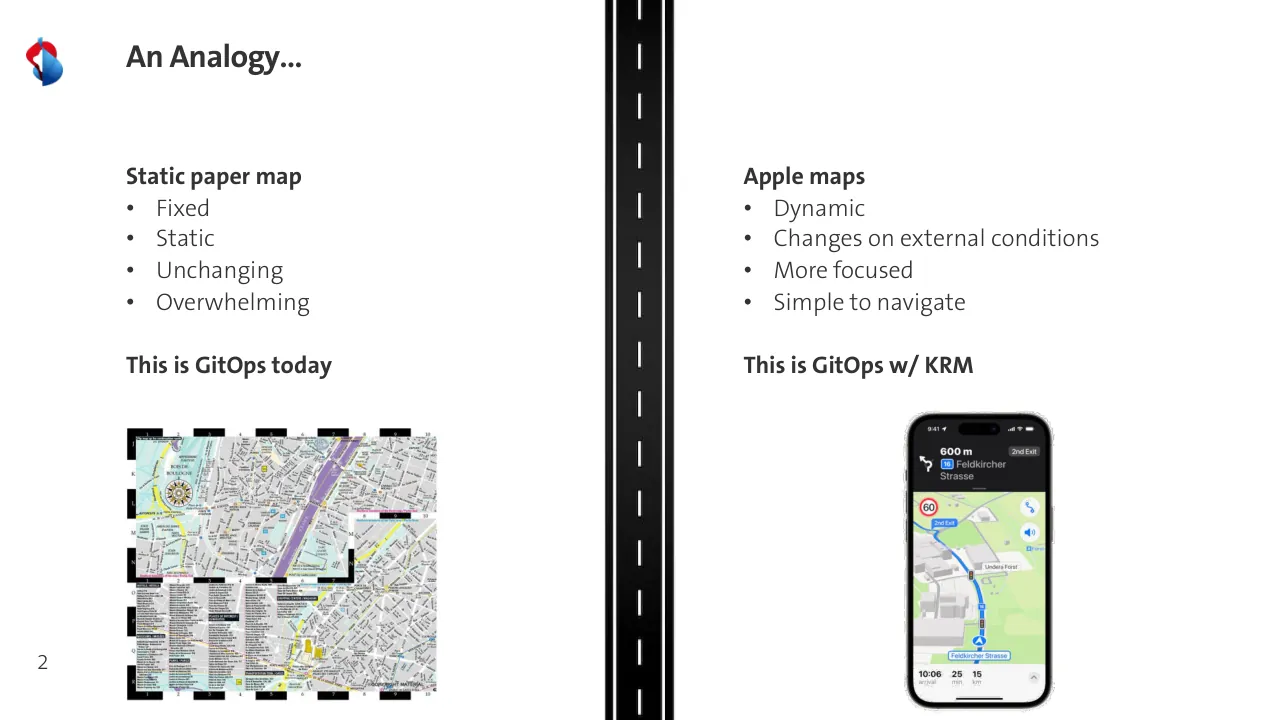
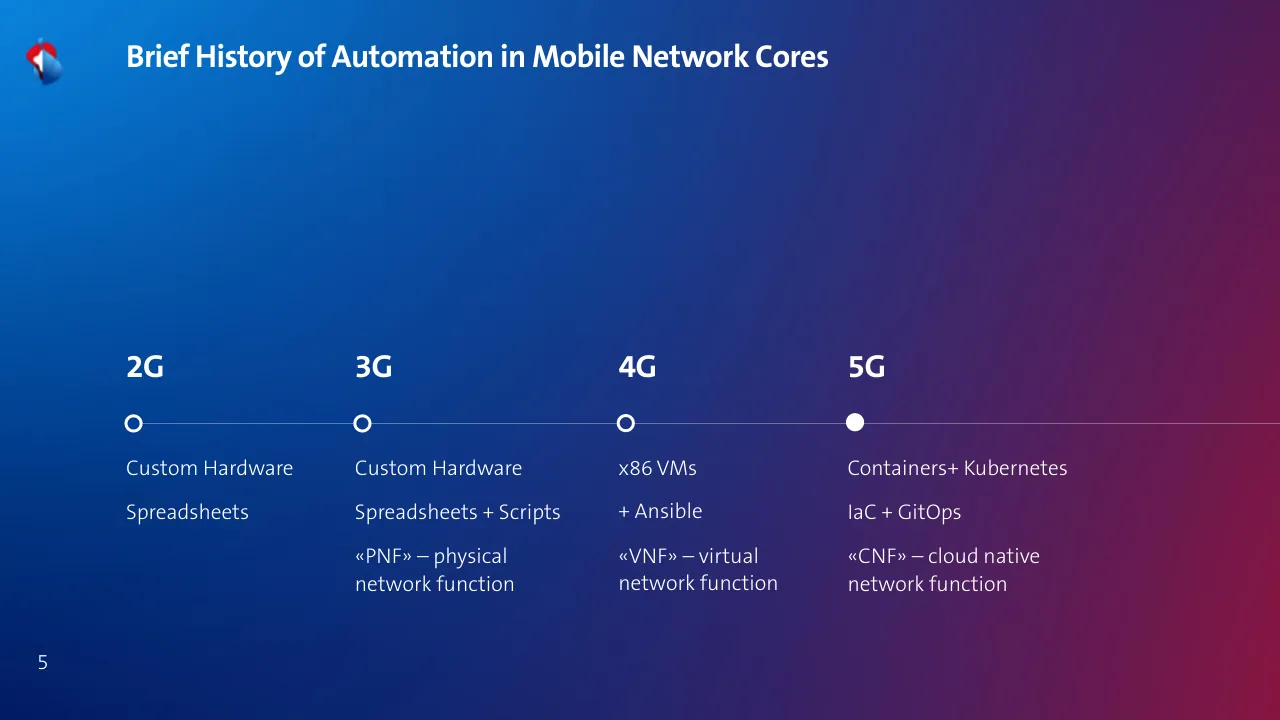
The deck opens with a title slide and a simple analogy: a static paper map stands for GitOps today, while a dynamic map app stands for GitOps with the Kubernetes Resource Model. It introduces the two presenters, then traces a brief history of automation in mobile network cores from 2G hardware through 5G cloud native functions. It defines GitOps through the OpenGitOps principles and shows examples of GitOps in practice in a comparison table. The middle section examines Swisscom's current automation pipeline with architecture diagrams, then lists key issues: missing reconciliation, out-of-band Kubernetes work, and no abstraction layer. Later slides show the proposed fix, moving configuration in-band with Kubernetes through a Config Sync Operator and an IP address management operator, with demo breaks along the way. The closing sections give learnings, do and avoid lists, further reading and a Q&A slide, followed by backup slides. Slides 2, 5 and 26 are the clearest examples of the approach, and the architecture diagrams on slides 8 to 11 show the problem visually.
Slides worth studying
Questions about this deck
How many slides does the Swisscom GitOps to Kubernetes Resource Model deck have?
The deck has 42 pages in total, starting with the title slide on slide 1 'How We Are Moving From GitOps to Kubernetes Resource Model in 5G Core'. Slide 38 is the Q&A slide and slides 39 to 42 are backup slides.
What does the Swisscom deck say about the Config Sync Operator?
Slide 21 describes the Config Sync Operator as using Schema Driven Configuration (SDC) with the gNMI and NETCONF protocols, supporting physical (PNF), virtual (VNF) and cloud native (CNF) targets. Its roadmap items on that slide are schema validation using YANG and reconciliation.
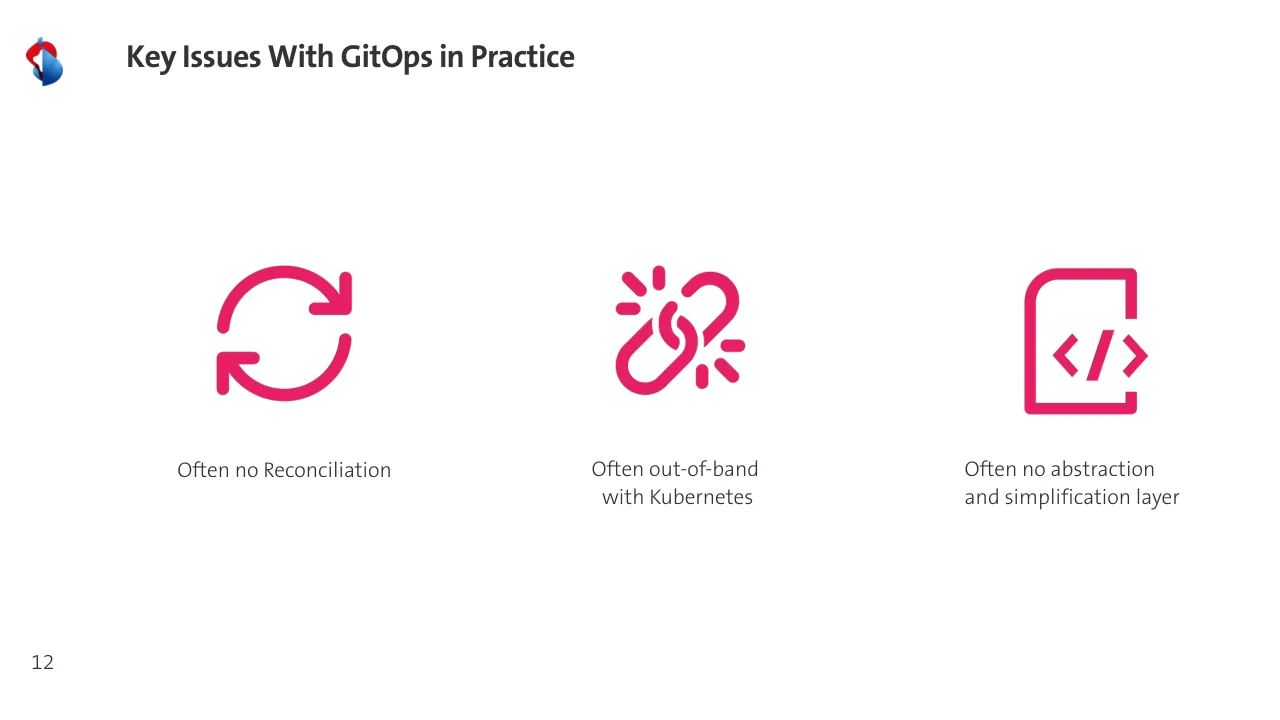
What key issues with GitOps in practice does the Swisscom deck list?
Slide 12 is titled 'Key Issues With GitOps in Practice' and lists three problems: often no reconciliation, often out-of-band work with Kubernetes, and often no abstraction and simplification layer.
What does the Swisscom deck propose as the new solution for automation?
Slide 32 asks 'So how will we improve with the new Solution?' and lists reconciliation, an abstraction and simplification layer, in-band work with Kubernetes, a K8s Operator for NETCONF, dynamic config generation, and K8s Operators in the cluster.
Details
- Company: Swisscom
- Year: 2024
- Type: Conference talk
- Industry: Telecommunications
- Pages: 42
Review score: 7 out of 10, Effective
Presentation quality, judged with the SlideDeck Co review heuristic. Ask, evidence and idea merit are not rated here.
The deck has a clear spine: analogy (2), history (5), GitOps definition and table (6, 7), current-state diagrams with pink callouts naming each problem (8 to 11), three key issues (12), then a stepwise build of the fix with a persistent checklist (17 to 27) and a do/avoid close (34, 35). The pink and teal overlays and the repeated before/after diagram layout let a technical audience follow the build without reading every label. Weaknesses are consequential: the diagram labels on slides 8 to 11, 19 to 29 and 40 to 42 are tiny, slide 3 has white caption text over the photos that is hard to read, slide 21 is a text list beside a small, low-contrast diagram on dark grey, and several icon-only slides (13, 32, 33) carry little content. The pages I could not read at size are judged from small contact sheets, so label legibility is assumed rather than confirmed.
Worth keeping: Keep the incremental overlay build and the checklist on slides 17 to 27, the pink problem callouts on 9 and 11, and the large-type icon layout of slide 12.
Most useful repair: Enlarge or crop the diagrams on slides 8 to 11 and 19 to 29 so labels are readable, fix the white-on-photo text on slide 3, and rebuild slide 21 with a legible diagram and fewer bullets.
What would change the score: I would tighten the repeated near-identical diagram slides, give slides 13, 32 and 33 a stated takeaway beyond icons, and replace the analogy's bullet lists on slide 2 with a stronger single visual contrast.
Confidence medium. 42 of 42 pages inspected on contact sheets, 4 at readable size. Reviewed 2026-11-08. Model-assisted review (claude-sonnet-5-5).
Full text of the slides (42 slides)
Every slide's words and a description of its charts and images, so the deck can be searched and rebuilt. Also available as Markdown.
Slide 1
How We Are Moving From / GitOps to Kubernetes / Resource Model in 5G Core / Ashan Senevirathne & Joel Studler / swisscom
Visuals: Photograph, full-bleed: misty grey-brown rocky mountain faces with patches of snow, a cloud bank drifting through the middle and upper right, and a tall grey steel telecom mast on the right edge carrying white panel antennas, dishes, cabinets and cables. A red and black striped flag with a small white and yellow crest flies from the upper part of the mast. Overcast, diffuse lighting; dominant colours are pale grey-white sky, slate grey and warm brown rock. The image covers the whole slide and fades to near-white at the top left, where the title sits. Logo: Swisscom mark, a blue and red stylised S-shaped emblem, top-left. Wordmark: white lowercase 'swisscom' set vertically, reading bottom to top, at the left edge.
Slide 2
An Analogy… / Static paper map / • Fixed / • Static / • Unchanging / • Overwhelming / This is GitOps today / Apple maps / • Dynamic / • Changes on external conditions / • More focused / • Simple to navigate / This is GitOps w/ KRM / 2
Visuals: Four visuals. (1) Centre road strip: a vertical photograph-style illustration of a dark asphalt road seen from above, spanning the full slide height at x 37.1% to 70.3%, with a white dashed centre line and two thin white edge lines close to the right side; it runs straight top to bottom and is full-height, not boxed. (2) Left lower: a printed street map of central Paris, a square image 456 by 401 px at x 9.8%, y 59.4%, w 24.4%, h 38.1%, unboxed with a black border of numbered grid cells 1 to 10 along the top and bottom and lettered cells A to Q down the sides; it shows a dense grey and beige street pattern, a purple highway band running diagonally, yellow main roads, green park areas, a compass rose near the top left, and small text blocks listing places and an index at the bottom; the words COPYRIGHT MAPS in faint text appear at bottom right. (3) Right lower: a photograph-style screenshot of an iPhone navigation screen, 258 by 480 px at x 70.1%, y 56.5%, w 12.9%, h 42.6%, shown with a dark rounded phone frame; the top dark banner shows 600 m, a turn arrow, 2nd Exit and 16 Feldkircher Strasse; the map beneath shows a blue route line, a red 60 speed-limit sign, a blue 2nd Exit label, the label Undera Forst, the destination label Feldkircher Strasse, and a bottom bar reading 10:06 arrival, 25 min, 15 km. Lighting is flat and even, dominant colours are dark grey, light grey, green and blue. (4) Logo: the Swisscom logo at top left, x 2.1%, y 5.2%, w 2.8%, h 6.7%, a red and blue abstract S-shaped mark.
Slide 3
Ashan Senevirathne
Product Owner
Slack: CNCF/Kubernetes/Nephio
Joel Studler
Senior DevOps Engineer
Slack: CNCF/Kubernetes/Nephio
Visuals: Two photographs. (1) Left panel, Ashan Senevirathne: studio portrait of a smiling young man with short, tousled dark-brown hair, facing the camera with his body turned slightly to the right; he wears a light blue shirt with a small dark blue geometric print and an open collar. The head and shoulders are framed in a head-and-shoulders crop that runs off the bottom edge. The background is a plain, pale light-grey seamless backdrop. Lighting is soft, even and frontal, with no visible shadows on the backdrop. Dominant colours: light grey #DDE3E7, light blue shirt, warm brown skin tones, near-black hair. The photo is full-bleed within the left panel and is not boxed. (2) Right panel, Joel Studler: low-key portrait of a bearded man with reddish-brown hair tied in a top knot, looking at the camera over his right shoulder; he wears a dark jacket with a light-grey open collar. The head and upper torso are framed in a head-and-shoulders crop running off the bottom edge. The background is pure black. Lighting is a single warm key light from the left, producing strong highlights on the face, hair and beard and a soft dark falloff toward the right side; the left-hand background shows a faint blurred warm shape. Dominant colours: black #000000, warm amber and brown tones, off-white collar. The photo is full-bleed within the right panel and is not boxed. No overlays or tints are visible on either photo. Other embedded images listed in the file are not visible on the rendered slide.
Slide 4
swisscom
Visuals: One Swisscom logo: a flame-like emblem on the left made of two overlapping ribbon shapes, one red (#FF3B4E) and one blue (#3A8CFF) that fades to light cyan (#8FF4FF), with a vertical split down its centre, followed to the right by the lowercase navy wordmark 'swisscom'. The emblem spans about 16% to 28% of the slide width and 34% to 66% of its height. The wordmark runs from about 39% to 83% of the width and sits at roughly the emblem's vertical centre, with its baseline near 56% of the height. No chart, table or photograph. A second small image is placed at the top left (x 2.1%, y 5.2%, 2.8% by 6.7%, 82 by 111 pixels); it is not visibly rendered on the slide and appears blank over a white box.
Slide 5
Brief History of Automation in Mobile Network Cores
2G
3G
4G
5G
Custom Hardware
Spreadsheets
Custom Hardware
Spreadsheets + Scripts
«PNF» – physical
network function
x86 VMs
+ Ansible
«VNF» – virtual
network function
Containers+ Kubernetes
IaC + GitOps
«CNF» – cloud native
network function
5
Visuals: A horizontal timeline with a thin white rule (about 1 px, white at roughly 50% opacity) running across the slide at y≈58.8%, from x≈10% to the right edge. Four markers sit on the rule: hollow white rings for 2G, 3G and 4G (ring about 1.4% of slide width, white stroke about 0.3% of slide width, unfilled) and a solid white filled dot for 5G, indicating the current generation. Each marker is centred under its generation label. A small logo at top-left: a stylised emblem of a red and white tilted shape with a blue-grey lower half, overlapping a dark blue base. No photographs, charts, tables or icons beyond the logo.
Slide 6
What is GitOps? / Declarative / Versioned and / Immutable / Continuously / Reconciled / GitOps Principles / by OpenGitOps / v1.0.0 / https://github.com/open- / gitops/documents/blob/v / 1.0.0/PRINCIPLES.md / Pulled Automatically / 6
Visuals: One logo at top-left: the Swisscom-style mark, a stylised red and blue twisted ribbon shape about 2.8% by 6.7% of the slide, placed at x 2.1%, y 5.2%. One large thin grey ring (outline circle, about 0.8 px stroke, colour about #888888, no fill) centred near x 51%, y 52%, spanning about 27% of width by 48% of height. Four small hollow circles sit on the ring at the diagonal positions, each about 4.2% by 7.5% of the slide with a stroke of about 3 px: top-left pink-red #E8215A at x 37.8%, y 34.1%; top-right purple #9B3A9E at x 58.8%, y 34.1%; bottom-left violet #5B3FC0 at x 37.8%, y 65.6%; bottom-right blue #1E7FE8 at x 58.8%, y 65.6%. Each circle has no fill and the ring passes behind it. Inside the ring is a centred text block of the principles name, author, version and a hyperlink.
Slide 7
Examples of GitOps in Practice / Example / Declarative / Versioned and / Immutable / Pulled / Automatically / Continuously / Reconciled / Infrastructure as Code (IaC) using Terraform, applied manually / Triggering Ansible playbooks or scripts from Jenkins pipeline / Scheduled Kubernetes deployments via CI tools / Flux or ArgoCD deployments / 7
Visuals: A table with a header row and four data rows, drawn with circular icons. Columns: Example (text labels), Declarative, Versioned and Immutable, Pulled Automatically, Continuously Reconciled. Row 1, Infrastructure as Code (IaC) using Terraform, applied manually: Declarative teal check; Versioned and Immutable teal check; Pulled Automatically red cross; Continuously Reconciled red cross. Row 2, Triggering Ansible playbooks or scripts from Jenkins pipeline: Declarative teal check; Versioned and Immutable teal check in dark parentheses (partial); Pulled Automatically red cross; Continuously Reconciled red cross. Row 3, Scheduled Kubernetes deployments via CI tools: Declarative teal check; Versioned and Immutable teal check; Pulled Automatically teal check in dark parentheses (partial); Continuously Reconciled red cross. Row 4, Flux or ArgoCD deployments: teal check in all four columns. Icons are outlined circles with a check or cross inside, about 4.2% of slide width each. Teal checks are about #1AA8A0 and red crosses about #E0245E. Parentheses are dark grey #333333. Rows are separated by thin grey rules and the header is closed by a thicker grey rule. Data cells in the four check columns have a pale blue-grey fill #EEF3F6. The Swisscom-style logo at top left is a red and blue abstract mark. No photographs or charts.
Slide 8
Current State of Automation
Automation Pipeline
Sourcing
Configuration
System Integration
Ansible
Software
Vendor
Helm &
Docker
Repo
Git
"EaC"
Vault
NETCONF
Network management tools
Flux
External
secret
UDM
UDR
PCF
SMF
AMF
BSF
UPF
PM/Logs
Monitoring tools
Alerts
Testkube
Testing tools
Privat & Public Cloud K8s Cluster
8
Visuals: Diagram. Left side: a grey office-building icon labelled 'Software Vendor' with an arrow pointing right to a green person-outline icon above the 'Helm & Docker Repo' hexagon; a black arrow runs from the Repo hexagon's bottom to the Flux hexagon. A stack of four mobile phones and a cell-tower antenna (black lattice tower with blue radio arcs) sits at bottom left; a line runs from the tower right to the cluster bottom. Pipeline band: a purple bell circle (#A6308A-like magenta) at the boundary between Sourcing and Configuration, with a dotted black arrow going up from Flux, via the dashed line at x about 34%, to the bell. Middle: an Ansible red circle logo on the Ansible hexagon (#EEF3F6 fill, #333333 bold label), with a solid black arrow down-left to the Git hexagon, a black arrow down-left to the Vault hexagon, and a black line down labelled NETCONF to the UDM pod. Git hexagon has the orange GitLab fox logo above it; Vault hexagon has a black inverted-triangle Vault logo above it. Flux hexagon has an arrow up to Git and an arrow right to External secret hexagon (with a dark teal circular secret icon). Dashed rounded rectangle (#333333 dashes) encloses the cluster: blue hexagons (#1781E3-like) labelled UDM, UDR, PCF, SMF, AMF, BSF, UPF, each with 'ns' under the label and dashed white inner outline; a circular sync arrows icon (black) sits between Flux and the pods. Right side: PM/Logs hexagon with a black stacked-chevron logo and a small orange logo; arrows go from PM/Logs to the 'Network management tools' box (solid rounded outline), to the 'Monitoring tools' box (with an orange Grafana-style icon at its right), and to the 'Testing tools' box (with a purple 'L'-style icon at its right). Testkube hexagon has a purple Testkube logo. Monitoring tools connects to an Alerts icon (blue bell with red notification dot, labelled Alerts). Bottom right inside cluster: a blue Kubernetes wheel logo and an orange Kubernetes-outline hex logo side by side.
Slide 9
Current State of Automation
Automation Pipeline
Sourcing
Configuration
System Integration
Out-of-band Kubernetes & no reconciliation
Ansible
Software
Vendor
Helm &
Docker
Repo
Git
"EaC"
Vault
NETCONF
Network management tools
Flux
PM/Logs
Monitoring tools
Alerts
Testing tools
External
secret
UDR
UDM
PCF
SMF
AMF
BSF
Testkube
UPF
Privat & Public Cloud K8s Cluster
9
Visuals: Diagram: a Software Vendor building icon at top-left links by a right-pointing arrow to a green pin/circle icon above the Helm & Docker Repo hexagon. The Helm & Docker Repo hexagon has an upward arrow from Flux. Git "EaC" hexagon (with GitLab fox logo above) receives a downward-left arrow from Ansible hexagon and has an upward arrow from Flux. Vault hexagon (with Vault logo above) receives an arrow from Ansible and an upward arrow from External secret. External secret hexagon has a right arrow from Flux and an arrow to Vault. Flux hexagon has a dotted line going up to the purple bell icon in the pipeline bar. Ansible hexagon has a solid line labelled NETCONF running down to the cluster. Inside the dashed cluster box, blue hexagons labelled UDM, UDR, PCF, SMF, AMF, BSF, UPF (each with ns below) are arranged in a cluster. A circular two-arrow cycle icon sits between Flux and the cluster. PM/Logs hexagon has an arrow up to Network management tools box, right arrow to Monitoring tools box, which has arrow to Alerts icon. Testkube hexagon has arrow to Testing tools box. A mobile-phone and antenna illustration at bottom-left has a line running right to the cluster and an arrow up to Helm & Docker Repo via Flux. Bottom-right of cluster: Kubernetes wheel logo and a K-hexagon logo. Icons: Grafana-style orange logo beside Monitoring tools, Alerts icon with red exclamation badge, Testing tools purple icon, PM/Logs black chevron icon with orange badge.
Slide 10
Current State of Automation
•
IP addresses
•
Subnets
•
VLANs
•
DNS Records
•
Network function variables
•
Infrastructure variables
•
Network function-Network function mapping
•
Secret references
•
Certificate references
10
(The right half is a pasted XML configuration image, not live text, with lines beginning <config xmlns="urn:ietf:params:xml:ns:netconf:base:1.0">, <af xmlns="urn:fiction:com:opennetworks:opennetworks-config">, <acl-acc operation=replace>, <acl-name>1</acl-name>, <conversion-id>1</conversion-id>, <als operation=replace>, <pei>test</pei>, <add>test</add>, <nf-set-support>test</nf-set-support>, <binding-support>test</binding-support>, <plmn-country-code>999</plmn-country-code>, <plmn-network-code>09</plmn-network-code>, <selected-dnn>test</selected-dnn>, <conversion-criteria operation=replace>, <original-ni-name>afad.online.net</original-ni-name>, <converted-ni-name>test</converted-ni-name>, <conversion-list operation=replace>, <bgp operation=replace>, <network-name>cp_cp</network-name>, <tx-timer>300</tx-timer>, <min-rx-timer>300</min-rx-timer>, <multiplier>4</multiplier>, <bgp-neighbor>, <address>8.50.23.1</address>, <network-name>cp_media</network-name>, <address>8.50.5.129</address>, <network-name>cp_af_nope</network-name>, <address>8.50.98.17</address>, <network-name>cp_sig</network-name>, <address>8.50.5.1</address>, <dns operation=replace>, <domain-name>000.999.afad.</domain-name>, <query-type>recursive</query-type>, <max-cache-ttl>604230</max-cache-ttl>, <max-local-cache-ttl>300</max-local-cache-ttl>; the lower lines are cut off by the slide edge.)
Visuals: 1) Full-slide white base. 2) Pasted XML configuration image covering the right half (x 47.1% to 100%, full height), showing monospaced dark grey XML text on white, cut off at the bottom edge; a second narrow grey XML strip (about 9.5% wide, 56% tall) overlaps it at x 32.1%. 3) Diagram (about 46.7% by 39.8%) titled 'Automation Pipeline' on a light grey-blue chevron band: 'Sourcing' (lavender #8E8FE0 pill), a magenta bell icon, 'Configuration' (blue #2F6FD6 pill), and 'Integration' (teal #1FAF9F pill) at the band's right end. Below the band: a 'Software Vendor' building icon with an arrow to a 'Helm & Docker Repo' hexagon; 'Git "EaC"' hexagon with GitLab fox icon; 'Ansible' hexagon with red A logo and label 'NETCONF' on a connector; 'Vault' hexagon with black shield icon; 'External secret' hexagon; 'Flux' hexagon; circular sync arrows icon; a dashed rounded rectangle labelled 'Privat & Public Cloud K8s Cluster' containing blue hexagons labelled 'UDM', 'UDR', 'SMF', 'AMF', 'PCF', 'UPF', 'BSF' each with 'ns' under it; 'PM/Logs' hexagon; 'Testkube' hexagon with a diamond icon; boxed labels 'Monitoring tools' and 'Testing tools' with arrows; a purple document icon; 'Alerts' icon with red badge at bottom right; Kubernetes and Helm logos at bottom of cluster; phone and cell-tower icons at bottom left connected by a line. Arrows are thin dark grey lines with arrowheads; a thick navy diagonal arrow crosses from the code icon toward the XML. 4) Navy magnifying-glass icon (#0B1F4D), about 7% wide, circular lens with thick handle, placed over the XML. 5) Small navy code-brackets '</>' icon in a rounded outlined box. 6) Dashed grey leader lines (about 1 pt) from XML lines to the bullets, four or five lines fanning out to the right column. 7) Logo: red and blue stylised Swisscom-like mark at top-left.
Slide 11
Current State of Automation
Lack of abstraction
IP addresses
Subnets
VLANs
DNS Records
Network function variables
Infrastructure variables
Network function-Network function mapping
Secret references
Certificate references
Automation Pipeline
Sourcing
Configuration
ntegration
Software Vendor
Helm & Docker Repo
GIT "EaC"
Ansible
NETCONF
Vault
Flux
Monitoring tools
Alerts
Testing tools
Privat & Public Cloud K8s Cluster
<config xmlns="urn:ietf:params:xml:ns:netconf:base:1.0">
<af xmlns="urn:fiction:com:opennetworks:opennetworks-config">
<acl-acc operation="replace">
<acl-name>1</acl-name>
<conversion-id>1</conversion-id>
</acl-acc>
<als operation="replace">
<pei>test</pei>
<add>test</add>
<nf-set-support>test</nf-set-support>
<binding-support>test</binding-support>
<plmn-country-code>999</plmn-country-code>
<plmn-network-code>09</plmn-network-code>
<selected-dnn>test</selected-dnn>
</als>
<conversion-criteria operation="replace">
<conversion-id>1</conversion-id>
<original-nf-name>afad.online.net</original-nf-name>
<converted-nf-name>test</converted-nf-name>
</conversion-criteria>
<conversion-list operation="replace">
<acl-name>1</acl-name>
</conversion-list>
<bgp operation="replace">
<tx-timer>300</tx-timer>
<min-rx-timer>300</min-rx-timer>
<multiplier>4</multiplier>
<bgp-neighbor>
<address>8.50.23.1</address>
</bgp-neighbor>
</bgp>
<bgp operation="replace">
<network-name>cp_media</network-name>
<tx-timer>300</tx-timer>
<min-rx-timer>300</min-rx-timer>
<multiplier>4</multiplier>
<bgp-neighbor>
<address>8.50.5.129</address>
</bgp-neighbor>
</bgp>
<bgp operation="replace">
<network-name>cp_af_nope</network-name>
<tx-timer>300</tx-timer>
<min-rx-timer>300</min-rx-timer>
<multiplier>4</multiplier>
<bgp-neighbor>
<address>8.50.98.17</address>
</bgp-neighbor>
</bgp>
<bgp operation="replace">
<network-name>cp_sig</network-name>
<tx-timer>300</tx-timer>
<min-rx-timer>300</min-rx-timer>
<multiplier>4</multiplier>
<bgp-neighbor>
<address>8.50.5.1</address>
</bgp-neighbor>
</bgp>
<dns operation="replace">
<domain-name>999.999.afad.</domain-name>
<query-type>recursive</query-type>
<max-cache-ttl>604230</max-cache-ttl>
<max-local-cache-ttl>300</max-local-cache-ttl>
11
Visuals: Full-height photograph of XML configuration text (744 by 2474 px, bleeds off top and bottom) on the right half, dark grey monospaced text on white with light blur; a second narrow tall copy of the same XML screenshot (x 32.1%, y 20.5%, w 9.5%, h 56.3%) sits behind the pink box and is largely hidden. Illustration/diagram (549 by 263 px) at lower left: a grey chevron header bar reading Automation Pipeline with stages Sourcing (lavender chevron with a magenta bell icon), Configuration (blue bar, partly hidden by the pink box and XML) and an Integration stage (teal chevron, partly hidden). Below it, a dashed rounded rectangle labelled Privat & Public Cloud K8s Cluster contains a grey Software Vendor building icon with an arrow to a Helm & Docker Repo hexagon, a GitLab fox icon hexagon labelled GIT EaC, an Ansible hexagon with a red A badge and a NETCONF connector label, a Vault hexagon, a Flux hexagon, a sync-cycle arrow icon, a cluster of blue hexagons with small illegible labels (about six to eight network function icons), a Kubernetes wheel icon and a helm icon at bottom, a PM rules stack icon, a Testing tools box with a small icon, and Monitoring tools box leading to an Alerts icon (blue bell-shaped icon with red and orange dots). Arrows: grey connector lines from Software Vendor to Helm, from Flux to Helm, from Flux to GIT, from GIT to Ansible, from Ansible to the blue hexagons; a dark navy diagonal arrow (x 24.3%, y 54.4%, w 5.6%, h 5.6%, navy #0B1F4F, thick, solid, arrowhead at upper right) points from a code-brackets icon towards Configuration. Also a phone and antenna icon bottom-left connected by a line to the cluster. Small code icon (</>) in a dark grey outlined rounded box (x 19.8%, y 57.6%). Swisscom logo at top-left: stylised red and blue mark. Pink callout box (#E61E64, opacity 0.90) with a faint magnifying-glass icon and the label Lack of abstraction in white bold; four to five grey dashed leader lines run from the pink box right edge to the bullet items.
Slide 12
Key Issues With GitOps in Practice
Often no Reconciliation
Often out-of-band
with Kubernetes
Often no abstraction
and simplification layer
12
Visuals: Three flat line icons in pink-red, drawn with rounded strokes, each above a caption. (1) Left: a circular refresh icon made of two curved arrows chasing each other clockwise and counter-clockwise, with arrowheads at the top-right and bottom-left. (2) Centre: a broken chain link, two interlocking chain links split apart, with short radiating spark or crack marks above, to the left, and to the right. (3) Right: a document outline with a folded top-right corner and a code symbol '</>' centred inside it. All three icons are the same colour, about #E6205F, on white. No photographs or charts.
Slide 13
What We Like About GitOps in Practice
Source of Truth
Review process
Declarative
13
Visuals: Three teal line icons in a row, each a single-weight outline with rounded corners, sitting above a centred caption. (1) Left icon: a hand held palm-up with a water droplet falling onto it, drawn as a teal outline with a flat cuff at the right end. (2) Centre icon: two stylised standing people, one at left and one at right, joined by a rectangular board or document held between them, drawn as teal outlines with round heads. (3) Right icon: a document or page outline with a folded top-right corner and a code symbol '</>' in the centre, drawn in teal outline. The top-left corner has the small multicolour Swisscom-style logo (red and blue) with no other visuals.
Slide 14
Configuration of Cloud Native Apps / Cloud Native App (simple case) / consumer / Service / App deployment / mount / Config / Map / Secret / Database / consumer / CI/CD / CREATE / DATABASE / mydb; / Service / DB deployment / mount / Config / Map / Secret / «Cloud Native» Network / Function (Telco App) / consumer / CI/CD / NETCONF / RFC 4741 / Service / Telco deployment / mount / Config / Map / Secret / 14
Visuals: Diagram with three parallel architecture stacks. Stack 1, 'Cloud Native App (simple case)': a 'consumer' label with an arrow pointing down into a box labelled 'Service'; a single arrow from 'Service' down to a box labelled 'App deployment'; two arrows fanning down from 'App deployment' to two boxes at the bottom, 'Config Map' (left) and 'Secret' (right), with the label 'mount' beside the right arrow. Stack 2, 'Database': 'consumer' arrow down into 'Service'; a second arrow labelled 'CI/CD' also points down into 'Service', with monospaced annotation 'CREATE / DATABASE / mydb;' to the right of the CI/CD arrow; arrow from 'Service' down to 'DB deployment'; two fanning arrows to 'Config Map' and 'Secret', with 'mount' label. Stack 3, '«Cloud Native» Network Function (Telco App)': 'consumer' and 'CI/CD' arrows point down into 'Service'; annotation 'NETCONF / RFC 4741' to the right of the CI/CD arrow; arrow from 'Service' to 'Telco deployment'; two fanning arrows to 'Config Map' and 'Secret', with 'mount' label. All boxes are white rectangles with thin dark grey hand-drawn-looking wavy outlines, not rounded; arrows are thin dark grey lines with small filled triangular arrowheads. No logos other than the small corner logo; no photographs.
Slide 15
Configuration of Cloud Native Apps
Cloud Native App (simple case)
consumer
Service
App deployment
Single Source of Config
Config Map
Secret
mount
Database
consumer
CI/CD
CREATE DATABASE mydb;
Config Source 2
Service
DB deployment
Config Source 1
Config Map
Secret
mount
«Cloud Native» Network Function (Telco App)
consumer
CI/CD
NETCONF RFC 4741
Config Source 2
Service
Telco deployment
Config Source 1
Config Map
Secret
mount
15
Visuals: Three architecture diagrams drawn in a hand-sketched style, each with a consumer arrow pointing down into a white Service box, a thin arrow down to a deployment box, and a teal box below holding a Config Source. Panel 1 (Cloud Native App, simple case): consumer arrow lands on Service; Service arrow goes to App deployment; teal box labelled Single Source of Config with two arrows fanning from its top centre to Config Map and Secret cells labelled mount. Panel 2 (Database): consumer arrow to Service; arrow to DB deployment; teal box labelled Config Source 1 with Config Map and Secret cells and mount arrows; a magenta-pink box overlaps the upper right of the panel, labelled CI/CD, with a sketched arrow down onto the Service box, its text in Consolas reading CREATE DATABASE mydb; and a white-on-pink label Config Source 2. Panel 3 («Cloud Native» Network Function, Telco App): same structure with Telco deployment; magenta-pink CI/CD box overlapping upper right with arrow down onto Service, Consolas-free text NETCONF RFC 4741 and label Config Source 2; teal Config Source 1 box with Config Map, Secret and mount arrows. Framing is flat and front-on, no photographs, no lighting, no gradients.
Slide 16
Configuration of Cloud Native Apps
Not Cloud Native!
Cloud Native App (simple case)
consumer
Service
App deployment
Single Source of
Config
Config
Map
Secret
mount
Database
consumer
CONGIG
CREATE
DATABASE
mydb;
Config
Source 2
Service
DB deployment
mount
Config Source 1
Config
Map
Secret
«Cloud Native» Network
Function (Telco App)
CI/CD
consumer
Config
Source 2
NETCONF
RFC 4741
Service
Telco deployment
mount
Config Source 1
Config
Map
Secret
16
Visuals: A three-column architecture diagram drawn in a hand-sketched style. Column 1 Cloud Native App (simple case): a consumer label with an arrow pointing down into a rectangle labelled Service, then an arrow down into a rectangle labelled App deployment, then a teal box containing a fan of two arrows from the top centre to two cells labelled Config Map and Secret, with the word mount at the upper right and the label Single Source of Config in white over the teal box. Column 2 Database: consumer with an arrow into Service, then arrow into DB deployment, then teal box with Config Source 1 in white, Config Map and Secret cells and mount label; a pink translucent box at upper right contains the text CREATE DATABASE mydb; in grey Consolas and a white label Config Source 2 with an arrow pointing down to the Service box. Column 3 Cloud Native Network Function (Telco App): consumer with an arrow into Service, then arrow into Telco deployment, then teal box with Config Source 1, Config Map and Secret cells and mount label; a pink translucent box at upper right labelled CI/CD with NETCONF and RFC 4741 in grey and a white label Config Source 2, with a line from CI/CD to Config Source 2. A large red prohibition sign (circle with a diagonal slash from upper right to lower left, ring about 3% of slide width thick, centre near x 48%, y 46%, diameter about 41% of slide width) covers columns 2 and 3 with partial transparency. Teal #0EABA9 boxes are at 80% opacity; pink #E61E64 boxes at 80% opacity. Logo: a stylised blue and red S-shaped mark at top left.
Slide 17
Introduce Reconciliation & K8s in-band / Configuration / trigger / read / read / Ansible / Vault / hostname: "gprs.swisscom.com" / ipv4: 192.168.0.1 / uuid: ca3f4ed8-0e73-4f74-9578-... / priority: 1000 / snssai: [1, 10] / datacenter: zurich / ... / push config via / NETCONF apply / CNF1 / CNF2 / 17
Visuals: Flow diagram. A Jenkins logo (smiling butler mascot, red and dark-blue tones) sits on the left end of a two-tone light blue-grey chevron band. A solid blue (#1781E3) chevron tag labelled 'Configuration' sits inside the band. A solid dark grey (#333333) arrow runs straight down from the Configuration tag to the Ansible hexagon and is labelled 'trigger'. A git logo (orange diamond with white branch icon and dark brown 'git' wordmark) sits above a grey (#E7E7E7) rectangle with a dashed dark grey (#333333) border containing monospace YAML-style key/value lines. A solid dark grey arrow points left from the Ansible hexagon to the git box and is labelled 'read'. A round red Ansible logo (white stylised A on red) overlaps the top-left corner of the Ansible hexagon. A solid dark grey arrow points right from Ansible to the Vault hexagon and is labelled 'read'. A black inverted-triangle Vault logo with white key-grid icon overlaps the top of the Vault hexagon. Two solid dark grey arrows run down from the Ansible hexagon: a diagonal arrow to the CNF1 hexagon and a vertical arrow to the CNF2 hexagon; the vertical arrow is labelled 'push config via / NETCONF apply'. Hexagons (light #EEF3F6 fill, thin dark grey outline) contain labels Ansible (bold), Vault, CNF1 and CNF2. A large rounded rectangle with dashed dark grey (#333333) border and white fill surrounds CNF1 and CNF2, and a blue Kubernetes wheel logo sits on its top-left corner. Lighting is flat; no photographs.
Slide 18
Introduce Reconciliation & K8s in-band
No Reconciliation / fire-and-forget
Out-of-band Kubernetes
Configuration
trigger
read
read
Ansible
Vault
hostname: "gprs.swisscom.com"
ipv4: 192.168.0.1
uuid: ca3f4ed8-0e73-4f74-9578-...
priority: 1000
snssai: [1, 10]
datacenter: zurich
...
push config via
NETCONF apply
CNF1
CNF2
18
Visuals: Diagram. Shapes: (1) top pink rectangle, fill #E61E64 at 80% opacity, no border, labelled 'No Reconciliation / fire-and-forget' in white; (2) lower pink rectangle, same fill at 80% opacity, labelled 'Out-of-band Kubernetes' in white; a faint blue (#1781E3) pentagon/arrow banner labelled 'Configuration' sits behind the top band and is largely obscured by the pink overlay, with a faint Jenkins-style logo at its upper-left; (3) a downward thin pink arrow labelled 'trigger' runs from the Configuration banner into the Ansible hexagon; (4) hexagon Ansible, fill #EEF3F6 under the pink overlay, bold label 'Ansible' in #333333, with a red circular Ansible logo (about 13 by 13 px) overlapping its upper-left edge; (5) hexagon Vault, fill #EEF3F6 under the pink overlay, label 'Vault', with a small dark-pink Vault logo (inverted triangle with dots) above its upper-left edge; (6) a pink horizontal arrow pointing left from Ansible to the git box, labelled 'read'; (7) a pink horizontal arrow pointing right from Ansible to Vault, labelled 'read'; (8) a grey (#E7E7E7) rectangle with dashed #333333 border, labelled with the git logo at top-left and containing monospace key-value lines; it overlaps the pink top-left corner of the lower block; (9) a Kubernetes wheel icon (blue, about 16 by 16 px) at the upper-left of the dashed boundary; (10) a large dashed rounded rectangle with #333333 dashed stroke, about 1.5 pt, corner radius large, white fill, enclosing CNF1 and CNF2; (11) two dark (#333333) arrows from Ansible's lower edge: a diagonal one to CNF1 and a vertical one to CNF2, labelled 'push config via NETCONF apply' to the right of the vertical arrow; (12) two light hexagons CNF1 and CNF2, fill #EEF3F6, thin dark grey outline, labels in #333333. Git logo (orange-red diamond with 'git' wordmark in dark brown) and Swisscom logo (red and blue swirl) are the only logos. Overall lighting is flat, with no photographs.
Slide 19
Introduce Reconciliation & K8s in-band
Configuration
trigger
read
read
Ansible
Vault
hostname: "gprs.swisscom.com"
ipv4: 192.168.0.1
uuid: ca3f4ed8-0e73-4f74-9578-...
priority: 1000
snssai: [1, 10]
datacenter: zurich
...
push config via
NETCONF apply
CNF1
CNF2
kind: Config
data:
hostname: "gprs.swisscom.com"
ipv4: 192.168.0.1
uuid: ca3f4ed8-0e73-4f74-9578-...
priority: 1000
snssai: [1, 10]
datacenter: zurich
...
Vault
Flux
External
Secret
Operator
watch/reconcile
Config
ref
External
Secret
Config
Config
Sync
Operator
push config via
NETCONF apply
CNF1
CNF2
19
Visuals: Left diagram: a grey-blue chevron band (#EEF3F6 with #D3DCE2 offset shadow band) at x 15.9-38.4%, y 23.5-33.6% holds a blue (#1781E3) pentagon-tab labelled 'Configuration' and a small pixelated grey-haired figure illustration (Jenkins-style cartoon, red jacket, x 16.1%, y 19.0%, 6.2% by 11.1%) at its left end. A solid dark arrow (#333333, about 2.5px) runs down from the Configuration tab to the Ansible hexagon, labelled 'trigger'. Ansible is a light hexagon (#EEF3F6, dark outline) at x 25.3%, y 44.6%, bold label 'Ansible', with a red pixelated round icon (x 24.3%, y 41.1%) overlapping its upper-left corner. From Ansible a left-pointing arrow labelled 'read' goes to a git logo (x 3.2%, y 35.0%) and a grey dashed-outline code box (#E7E7E7 fill, x 4.1%, y 38.2%, w 16.9%, h 19.1%) with monospace Courier New Bold text; a right-pointing arrow labelled 'read' goes to a Vault hexagon (#EEF3F6, x 35.3%, y 44.6%) with a black inverted-triangle Vault logo (x 34.8%, y 42.3%) overlapping its top-left. Two long diagonal/vertical dark arrows descend from Ansible to hexagons CNF1 (x 21.7%, y 80.5%) and CNF2 (x 27.9%, y 80.5%), both light hexagons with labels; the vertical arrow is labelled 'push config via NETCONF apply'. A kubernetes-style blue octagon logo (x 9.0%, y 60.3%, 4.1% by 7.2%) sits on the top-left corner of a large white rounded rectangle with dashed dark grey outline (x 9.6%, y 62.3%, w 30.8%, h 29.9%) that encloses CNF1 and CNF2. Centre: a teal (#00A19A) outlined chevron pointing right, white-filled, at x 48.5%, y 47.2%, w 5.3%, h 13.6%. Right diagram: a git logo (x 62.5%, y 8.0%) above a grey dashed code box (x 63.4%, y 11.2%, w 16.9%, h 19.1%) in monospace bold. A solid arrow points up from Flux to the code box. Flux is a light hexagon (x 70.8%, y 45.3%) with a small Flux icon (x 66.9%, y 40.0%) at its top-left. A kubernetes octagon logo (x 62.7%, y 33.2%) sits at the top-left of a large white rounded dashed rectangle (x 63.7%, y 34.9%, w 30.8%, h 57.4%). Arrows from Flux go to two Config hexagons (x 68.3% and 74.5%, y 56.2%), to External Secret (x 84.4%, y 54.9%), and to the External Secret Operator hexagon (x 83.5%, y 37.3%) above it, which has an arrow labelled 'watch/reconcile' pointing down to External Secret. A right-pointing arrow labelled 'ref' runs from the second Config hexagon to External Secret. Config Sync Operator is a hexagon (x 69.9%, y 65.5%) with arrows up to both Config hexagons, and down to CNF1 (x 68.6%, y 83.8%) and CNF2 (x 74.8%, y 83.8%); the right down-arrow is labelled 'push config via NETCONF apply'. A Vault hexagon (x 84.8%, y 18.1%) with a black Vault logo (x 84.4%, y 15.8%) sits at top-right, connected by an arrow from the External Secret Operator. Lighting and photography: none; all illustrations are flat vector or pixelated icons.
Slide 20
Introduce Reconciliation & K8s in-band / No abstraction / kind: Config / No Reconciliation / fire-and-forget / data: / hostname: "gprs.swisscom.com" / Vault / ipv4: 192.168.0.1 / Out-of-band Kubernetes / Configuration / uuid: ca3f4ed8-0e73-4f74-9578-... / priority: 1000 / Kubernetes In-Band / snssai: [1, 10] / ✓ Reconciliation / datacenter: zurich / trigger / ✓ K8s in-band / ... / External / ✗ Abstraction / Secret / Flux / Operator / read / read / Ansible / Vault / Reconciliation / watch/reconcile / hostname: "gprs.swisscom.com" / ref / External / ipv4: 192.168.0.1 / Config / Config / Secret / uuid: ca3f4ed8-0e73-4f74-9578-... / priority: 1000 / 20 / snssai: [1, 10] / datacenter: zurich / Config / push config via / ... / Sync / NETCONF apply / Operator / push config via / NETCONF apply / CNF1 / CNF2 / CNF1 / CNF2
Visuals: Diagram on left: a pink rectangle (#E61E64, 80 percent opacity) split into an upper band headed 'No Reconciliation / fire-and-forget' and a lower band headed 'Out-of-band Kubernetes'; a downward arrow labelled 'trigger' runs from the upper band into an Ansible hexagon (light #EEF3F6 hex with red Ansible logo), which has a left arrow labelled 'read' pointing to a grey dashed code box and a right arrow labelled 'read' pointing to a Vault hexagon. From the Ansible hexagon two dark #333333 arrows run down to two hexagons labelled CNF1 and CNF2 inside a dashed rounded rectangle; the right arrow is labelled 'push config via NETCONF apply'. Diagram on right: a teal rectangle (#0EABA9, 80 percent opacity) with a dashed rounded border titled 'Kubernetes In-Band', containing a Flux hexagon, two Config hexagons, a Config Sync Operator hexagon, CNF1 and CNF2 hexagons inside a darker teal 'Reconciliation' box, and an External Secret hexagon and External Secret Operator hexagon; arrows connect Flux to Config, Config to External Secret labelled 'ref', and Operator to External Secret labelled 'watch/reconcile'; an arrow goes up from Flux to a pink 'No abstraction' box and another from External Secret Operator up to a Vault hexagon. Chevron: a white outlined chevron with teal #0EABA9 stroke pointing right at centre. Legend: teal check mark, 'Reconciliation'; teal check mark, 'K8s in-band'; pink cross, 'Abstraction'. Two grey code boxes with dashed #333333 borders contain monospace YAML-like text.
Slide 21
Config Sync Operator SDC
“Schema Driven Configuration” (SDC)
Protocols: gNMI, NETCONF (Telco Industry Standard)
Supported Targets: Physical (PNF), Virtual Machines (VNF) Cloud Native (CNF)
Vendor agnostic
Declarative (Kubernetes CRs, Operators, API extension)
Roadmap: Schema validation using YANG (Telco Industry Standard)
Roadmap: Reconciliation
21
https://docs.sdcio.dev / https://github.com/sdcio
Visuals: Architecture diagram (not a chart or table) on a grey panel. Top row of three rounded rectangles with lavender-blue fill (about #9999FF) and black 1 px outlines: REST-API; K8s-API / Controller; Gitops / Other. Each has a bidirectional black arrow pointing down to the Config-Server. Config-Server is a stacked pink card (about #E8D0DE fill, black outline, rounded corners, three offset layers) with label Config-Server. A vertical bidirectional arrow labelled GRPC runs from Config-Server down to Data-Server. Middle row: Schema-Server is a stacked pink card on the left (three offset layers) with a bidirectional arrow labelled GRPC to Data-Server; Data-Server is a pink card in the centre front of a stack of layers; Cache is a stacked pink card on the right with a bidirectional arrow labelled GRPC to Data-Server. Bottom row: three steel-blue rounded rectangles (about #7FA7E0) labelled Targets (PNF/VNF/CNF), each connected to Data-Server by a bidirectional diagonal or vertical arrow labelled Gnmi / Netconf in small black type. The diagram is flat with no shadows, no photographs and no logos, on a neutral grey background.
Slide 22
Demo / SDC / Config Sync Operator / 22 / git / kind: Config / data: / hostname: "gprs.swisscom.com" / ipv4: 192.168.0.1 / uuid: ca3f4ed8-0e73-4f74-9578-... / priority: 1000 / snssai: [1, 10] / datacenter: zurich-1 / ... / Vault / External / Secret / Operator / watch/reconcile / ref / External / Secret / Flux / Config / Config / Config / Sync / Operator / push config via / NETCONF apply / CNF1 / CNF2
Visuals: Architecture diagram on a white background, drawn with light blue-grey hexagons (#EEF3F6) and dark grey (#333333) text and arrows. Elements: (1) git logo (red diamond with white branch icon and the word 'git' in dark serif) above a grey dashed-border box (#E7E7E7 fill, #333333 dashed border) containing a monospace YAML snippet: 'kind: Config', 'data:', indented 'hostname: "gprs.swisscom.com"', 'ipv4: 192.168.0.1', 'uuid: ca3f4ed8-0e73-4f74-9578-...', 'priority: 1000', 'snssai: [1, 10]', 'datacenter: zurich-1', '...'. A solid dark arrow runs from the top of the Flux hexagon up to the bottom of this box. (2) Blue heptagon icon (Kubernetes-style, #4F6FAE) at the upper left of a large dashed rounded rectangle (white fill, #333333 dashed border, corner radius large, about 2.5% of width). (3) Dark navy flux icon (#1F3A6E, a small diamond with wave mark) sitting on the top-left corner of the Flux hexagon. (4) Hexagon 'Flux' (#EEF3F6, dark grey outline) with arrows out to: Config (down-left), Config (down-right), and External Secret (long arrow to the right). (5) Hexagon 'Vault' top right, with a black inverted triangle logo containing a white keypad icon overlapping its upper-left edge; a solid arrow points up from External Secret Operator to Vault. (6) Hexagon 'External Secret Operator' with a downward arrow labelled 'watch/reconcile' to hexagon 'External Secret'. (7) Hexagon 'External Secret' with a horizontal arrow from the second Config hexagon labelled 'ref' (partly overlapped by the hexagon). (8) Two 'Config' hexagons in a row. (9) Hexagon 'Config Sync Operator' in bold, centred in the cluster, with arrows up-left to the first Config and up-right to the second Config, and arrows down-left to CNF1 and down-right to CNF2 with the label 'push config via NETCONF apply' to the right. (10) Two hexagons 'CNF1' and 'CNF2' at the bottom. (11) A hand-drawn purple-blue ellipse (#5B4BD0, stroke about 0.4% of slide height, no fill) that encloses Config, Config Sync Operator, CNF1 and CNF2, and crosses the dashed cluster boundary. Not cropped, no photographs, no gradients in the diagram.
Slide 23
«
The entire history of
software engineering is
that of the rise in levels
of abstraction.
»
Grady Booch
23
Visuals: None apart from the logo (top-left, a red and blue Swisscom mark, about 82 by 111 pixels) and the blue-to-crimson gradient background. The guillemet quote marks are typographic glyphs, not images.
Slide 24
What is Kubernetes Resource Model (KRM)?
API extensions
CRs as Instances
Business Logic
Custom Resource Definitions / and API Services extend the / Kubernetes API
Custom Resources instantiate / a CRD / APIService
Operator custom code to / execute your business logic.
e.g. Lifecycle, Backup, Self-heal
24
Visuals: Three line icons sit above the column headings, each about 5 to 6% wide. Column 1: a plus sign (+), two perpendicular strokes of equal length, magenta-purple stroke about 0.4% of slide height, no fill, centred at the top-left of its column. Column 2: an outline icon of two overlapping rounded rectangles, the rear one offset up and to the right of the front one, purple stroke, no fill. Column 3: a gear (cog) outline with eight teeth around a small circle at the centre, bright blue stroke, no fill. Corner logo at top-left: a small red and blue swirl mark (about 2.8% by 6.7%), not cropped. No photographs, charts or tables.
Slide 25
Introduce Abstraction
Configuration
trigger
read
Ansible
read
Vault
git
hostname: "gprs.swisscom.com" / ipv4: 192.168.0.1 / uuid: ca3f4ed8-0e73-4f74-9578-... / priority: 1000 / snssai: [1, 10] / datacenter: zurich-1 / ...
push config via NETCONF apply
CNF1
CNF2
✓ Reconciliation
✓ K8s in-band
✗ Abstraction
git
kind: Config / data: / hostname: "gprs.swisscom.com" / ipv4: 192.168.0.1 / uuid: ca3f4ed8-0e73-4f74-9578-... / priority: 1000 / snssai: [1, 10] / datacenter: zurich-1 / ...
No abstraction
Vault
Flux
External Secret Operator
watch/reconcile
External Secret
Config
Config
ref
Config Sync Operator
push config via NETCONF apply
CNF1
CNF2
25
Visuals: Left diagram: a grey-outlined light-blue chevron banner labelled with a blue tab reading Configuration, with a pixelated photo of a person above it; a line labelled trigger runs down from the tab to a hexagon labelled Ansible (bold) with a dark red filled circle at its upper left; Ansible has a left arrow labelled read pointing to a grey dashed box containing git code, and a right arrow labelled read pointing to a hexagon labelled Vault, which carries a black inverted triangle with a white keypad icon at its top right; two arrows run down from Ansible to hexagons labelled CNF1 and CNF2, the arrow to CNF2 labelled push config via NETCONF apply; a dashed rounded rectangle encloses CNF1 and CNF2 and a small blue Kubernetes-style heptagon sits on its top-left corner; the git logo sits above the grey code box. Centre: an outlined teal chevron pointing right, and a checklist. Right diagram: a pink box with git logo above it containing a semi-transparent (80%) pink overlay over a grey code block; the text No abstraction is printed in white across the pink box; a hexagon labelled Vault with a keypad triangle above it; a dashed rounded rectangle enclosing the Kubernetes heptagon, Flux (hexagon with a small navy Flux logo), two hexagons labelled Config, External Secret Operator hexagon, External Secret hexagon, Config Sync Operator hexagon, CNF1 and CNF2 hexagons. Arrows: Flux to the left Config (vertical), Flux to the right Config (diagonal), Flux to External Secret (long diagonal); Config Sync Operator to both Config hexagons and to CNF1 and CNF2; the right Config has a horizontal arrow labelled ref to External Secret; External Secret Operator has an arrow up to Vault and a downward arrow labelled watch/reconcile to External Secret. Dark grey #333333 arrows, 2 pt stroke. Hexagons are light #EEF3F6 with thin dark grey outlines.
Slide 26
Introduce Abstraction / git / kind: Config / data: / hostname: "gprs.swisscom.com" / ipv4: 192.168.0.1 / uuid: ca3f4ed8-0e73-4f74-9578-... / priority: 1000 / snssai: [1, 10] / datacenter: zurich-1 / ... / Vault / External / Secret / Operator / watch/reconcile / Flux / Config / Config / ref / External / Secret / Config / Sync / Operator / push config via / NETCONF apply / CNF1 / CNF2 / 26 / git / kind: dnn / spec: / hostname: "gprs.swisscom.com" / ipv4: true / region: ch-east / type: MobileInternet / snssai: [1, 10] / Vault / IPAM / External / Secret / External / Secret / Operator / IPAM / Operator / reconcile / reconcile / Flux / IP / Address / Claim / read / dnn / CNF / Config / Operator / Config / Config / Sync / Operator / CNF1 / CNF2
Visuals: Diagram 1 (left, before): a Git-sourced Config YAML box (grey code block, kind: Config, data with hostname, ipv4, uuid, priority, snssai, datacenter, ellipsis) with a git logo above it. Shapes: a blue Kubernetes-style emblem at top-left of the dashed box; a Flux hexagon (light #EEF3F6) with a small navy Flux icon; an arrow from Flux up to the code box; arrows from Flux down to a Config hexagon and a second Config hexagon, and from Flux diagonally to External Secret hexagon at right of the box; a Config Sync Operator hexagon (bold label) below, with arrows up to both Config hexagons and down to CNF1 and CNF2 hexagons, labelled push config via NETCONF apply; a Config hexagon on the right connects to External Secret hexagon with arrow labelled ref; External Secret Operator hexagon sits outside the box at top right with a black Vault triangle icon and Vault hexagon above it, connected by an arrow from External Secret Operator up to Vault and an arrow down labelled watch/reconcile to External Secret. Diagram 2 (right, after): a git label and dnn code box (kind: dnn, spec: hostname, ipv4: true, region: ch-east, type: MobileInternet, snssai: [1, 10]) with arrow up from Flux; Vault hexagon with black Vault triangle icon and IPAM hexagon with blue IPAM network icon at top right; External Secret Operator and IPAM Operator hexagons below them, with arrows up to Vault and IPAM and downward arrows labelled reconcile to External Secret hexagon and IP Address Claim hexagon; Flux hexagon with arrow down to dnn hexagon and arrows right to External Secret and IP Address Claim; CNF Config Operator bold hexagon with arrows to dnn, External Secret, IP Address Claim (labelled read), and two Config hexagons; Config Sync Operator bold hexagon at bottom with arrows to the Config hexagons and to CNF1 and CNF2 hexagons. Chevron: an open teal outline arrow pointing right, stroke about 3 pt, no fill, centred between the diagrams. Icons: blue Kubernetes-style emblem (left and right), git logos (two), Vault black triangle icons (two), navy Flux icons (two), IPAM blue network icon (one), Swisscom logo (one).
Slide 27
Introduce Abstraction / git / No abstraction / kind: Config / data: / hostname: "gprs.swisscom.com" / ipv4: 192.168.0.1 / uuid: ca3f4ed8-0e73-4f74-9578-... / priority: 1000 / snssai: [1, 10] / datacenter: zurich-1 / ... / Vault / push config via / NETCONF apply / watch/reconcile / ref / External / Secret / Flux / Config / Config / External / Secret / Config Sync Operator / CNF1 / CNF2 / git / kind: dnn / spec: / hostname: "gprs.swisscom.com" / ipv4: true / region: ch-east / type: MobileInternet / snssai: [1, 10] / Vault / IPAM / External Secret Operator / IPAM Operator / reconcile / reconcile / Flux / dnn / External Secret / IP Address Claim / CNF Abstraction Operator / read / Abstraction / Config / Config / Config Sync Operator / CNF1 / CNF2 / ✓ Reconciliation / ✓ K8s in-band / ✓ Abstraction / 27
Visuals: Left: a git logo (orange diamond with white git glyph and dark 'git' wordmark) at about x 9.1%, y 9.9%. A pink translucent rectangle (#E61E64 at 80% opacity) holds a Courier-style YAML snippet, with the text 'No abstraction' overlaid in white. Below it, a dashed-outline rounded panel (white fill, dark grey dashes) contains a blue-grey heptagon-like Kubernetes-style icon at about x 9.2%, y 35.1%, and the following hexagon nodes, all light grey (#EEF3F6) with dark grey (#333333) outlines and labels: Flux (x 16.4%, y 67.4%), Config (x 31.4%, y 20.0% region at top labelled Vault, Config at x 14.5% and x 30.1%), External Secret Operator (x 60%, y 44%), Config Sync Operator (x 33%, y 76%), CNF1 (x 14.5%, y 85.5%) and CNF2 (x 30%, y 85.5%), plus External Secret (x 31%, y 59%). A black inverted triangle with a white keypad glyph (Vault logo) sits above Vault at about x 62.4%, y 11.6%. Arrows are dark grey straight lines with filled heads: Flux up to the YAML box, Flux to Config (two), Flux to External Secret, Config Sync Operator to both Configs and to CNF1 and CNF2, External Secret Operator up to Vault and down to External Secret labelled 'watch/reconcile', and Config to External Secret labelled 'ref'. Right: a git logo at about x 62.4%, y 11.6%, a light grey (#E7E7E7) dashed-outline rectangle with dark YAML text (kind: dnn, spec: hostname ipv4 region type snssai), a Vault hexagon with black Vault logo, an IPAM hexagon with a blue-grey network icon at about x 88.5%, y 15.9%, a teal chevron outline in the centre, and a large teal (#0EABA9 at 80% opacity) rectangle at x 66.9%, y 49.1%, w 25.1%, h 30.9% containing faded nodes dnn, External Secret, IP Address Claim, CNF Abstraction Operator, Config, Config and Config Sync Operator, with teal connectors. Outside it, Flux, External Secret Operator, IPAM Operator, CNF1, CNF2 and the Kubernetes icon sit in a dashed rounded panel. Checkmarks are teal (#0EABA9) SegoeUI Symbol ticks. Lighting and photographs: none, the slide is purely diagrammatic and flat.
Slide 28
Introduce Abstraction / watch & read / IP / Address / Claim / read / CNF / Config / Operator / kind: dnn / spec: / hostname: "gprs.swisscom.com" / ipv4: true / region: ch-east / type: MobileInternet / snssai: [1, 10] / write / kind: Config / data: / hostname: "gprs.swisscom.com" / ipv4: 192.168.0.1 / uuid: ca3f4ed8-0e73-4f74-9578-... / priority: 1000 / snssai: [1, 10] / datacenter: zurich-1 / ... / watch & read / Config / Sync / NETCONF / Operator / CNF / 28
Visuals: Diagram. Shapes: (1) a grey dashed-border rectangle at top left showing a YAML block titled 'kind: dnn', with an arrow from the CNF Config Operator hexagon pointing to it labelled 'watch & read'. (2) A light hexagon labelled 'IP Address Claim' at upper centre-right, connected by an arrow from the CNF Config Operator hexagon labelled 'read'. (3) A hexagon labelled 'CNF Config Operator' (bold) at centre, connected downward by an arrow labelled 'write' to a grey dashed-border rectangle below it showing a YAML block titled 'kind: Config'. (4) A hexagon labelled 'Config Sync Operator' (bold) at lower right, connected by an arrow pointing left to the Config YAML box labelled 'watch & read', and connected by an arrow pointing right and down labelled 'NETCONF' to a hexagon labelled 'CNF' at far lower right. Arrows are single dark grey lines with filled triangular heads. Text in the boxes is monospaced bold, dark grey. No photographs, no charts, no tables.
Slides 29 to 42 continue in the full text file.
Download this deck
The hosted PDF of every library deck is free for readers of the SlideDeck Co newsletter. Join with your email and the viewer and download appear here.
Building a deck of your own? The SlideDeck Co Standard Deck is a slide library for business presentations: reviews, updates and plans.