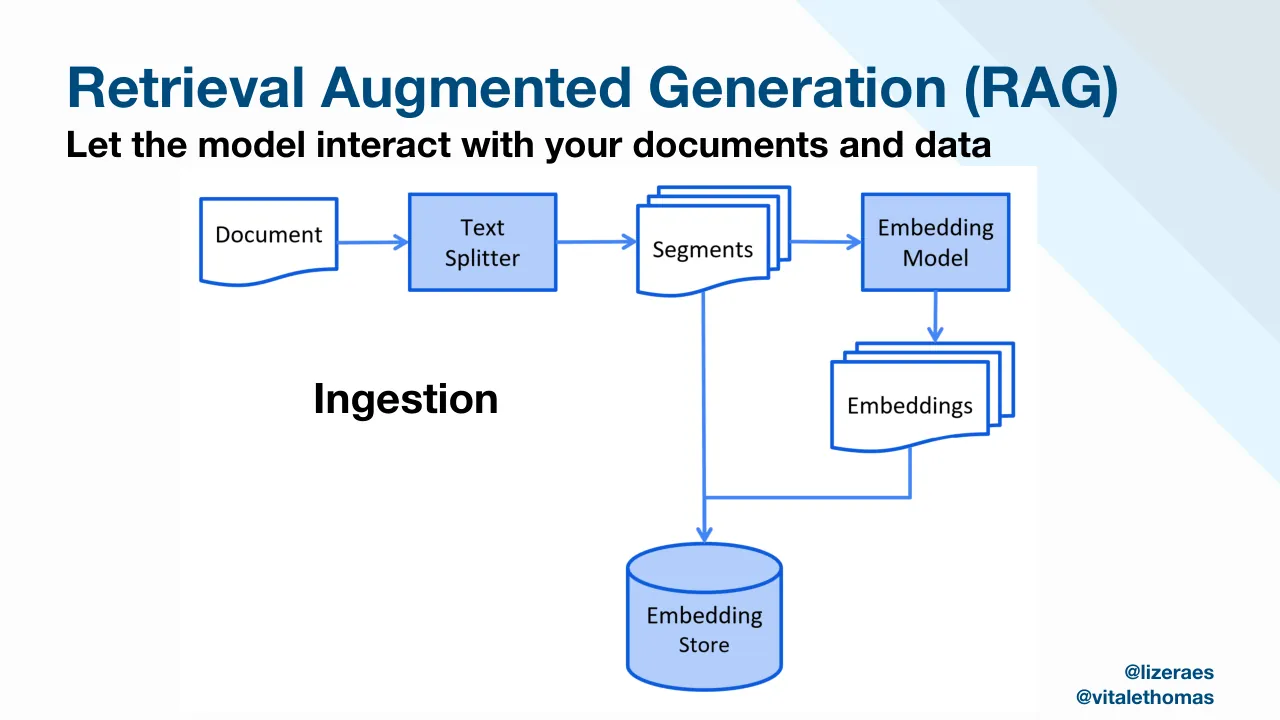
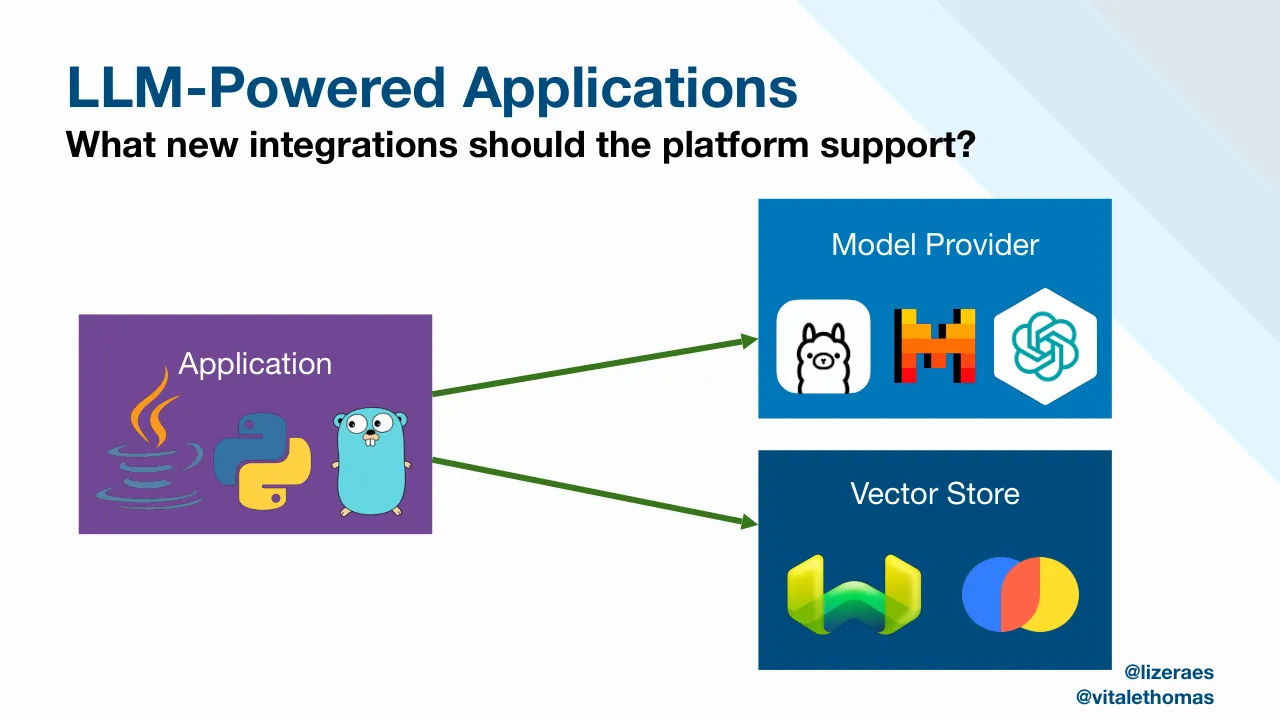
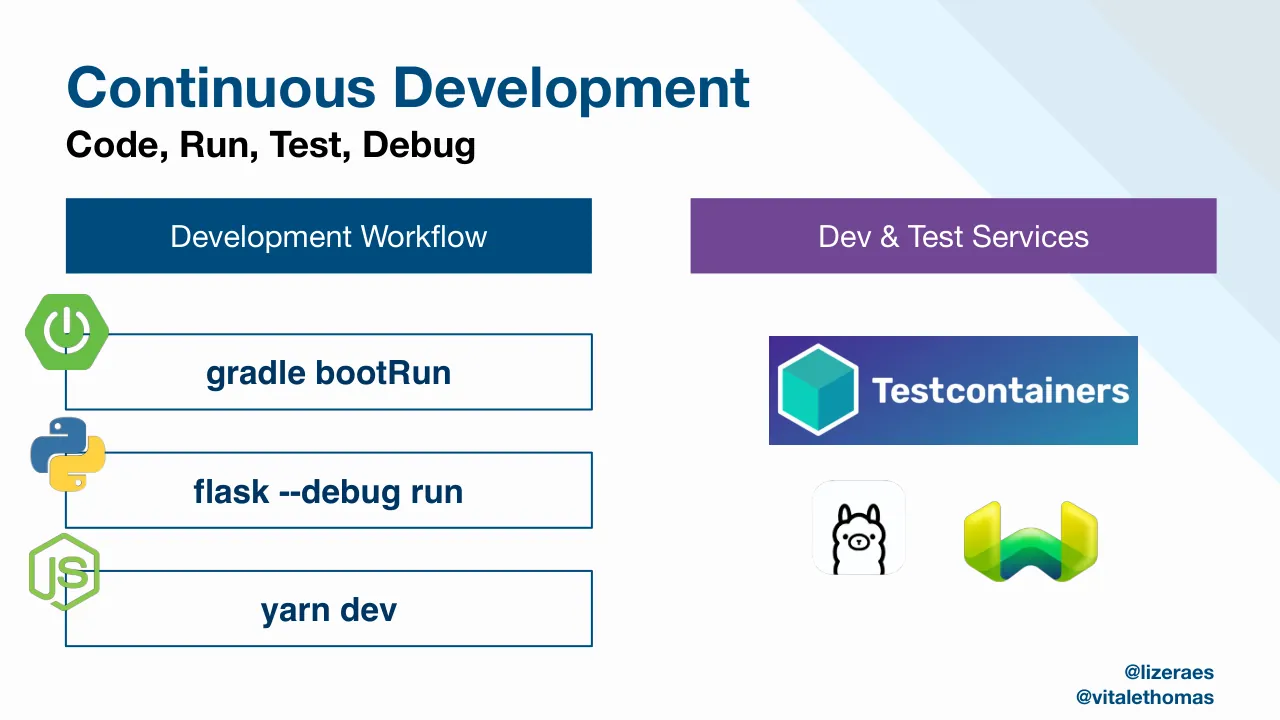
This KubeCon+CloudNativeCon Paris talk, given on March 20, 2024 by Lize Raes of Open Tide and Thomas Vitale of Systematic, opens with a title slide and a platform framing slide showing an end user, a platform API and a platform backend. It then introduces generative AI concepts such as large language models, embeddings, retrieval augmented generation and vector stores, with diagrams of the ingestion and retrieval flows. The speakers present themselves and ask what new integrations an LLM-powered application should require from the platform. The middle sections form a golden path for AI applications in two parts. Part one covers project bootstrapping with Backstage software templates, continuous development with local run commands and Testcontainers, and AI orchestration with LangChain4j. Part two covers building container images with Cloud Native Buildpacks, configuration through a workload API implemented with Crossplane compositions, packaging with Carvel, and observability for token usage and prompts. A seven-step journey summary follows, then a closing section uses a music orchestra analogy and a contact slide.
Slides worth studying
Questions about this deck
How many slides does the Open Tide and Systematic deck have?
The deck has 26 slides, and the final contact slide is slide 26, which lists Lize Raes and Thomas Vitale with their contact details.
What does the Open Tide and Systematic deck say about the golden path for AI applications?
Slide 10 introduces Part 1 and slide 15 introduces Part 2 of the Golden Path for AI Applications. Slide 23 lays out The Journey as numbered steps, beginning with 1 Project Bootstrapping and 2 Development Workflows.
What does the Open Tide and Systematic deck say about observability for AI applications?
Slide 22 is titled Observability for AI Applications and covers OpenTelemetry, token usage, and prompts. Its LLM Telemetry list names Input Tokens, Output Tokens, Prompt Content, and Cost per Call.
Who presents the Open Tide and Systematic deck and when was it given?
Slide 1 credits Thomas Vitale and Lize Raes for the KubeCon+CloudNativeCon Paris talk dated March 20th, 2024. Slide 7 identifies Lize Raes with Open Tide, and slide 8 identifies Thomas Vitale with Systematic.
Details
- Company: Open Tide and Systematic
- Year: 2024
- Type: Conference talk
- Industry: Cloud Native Platforms
- Pages: 26
Review score: 6 out of 10, Needs substantial work
Presentation quality, judged with the SlideDeck Co review heuristic. Ask, evidence and idea merit are not rated here.
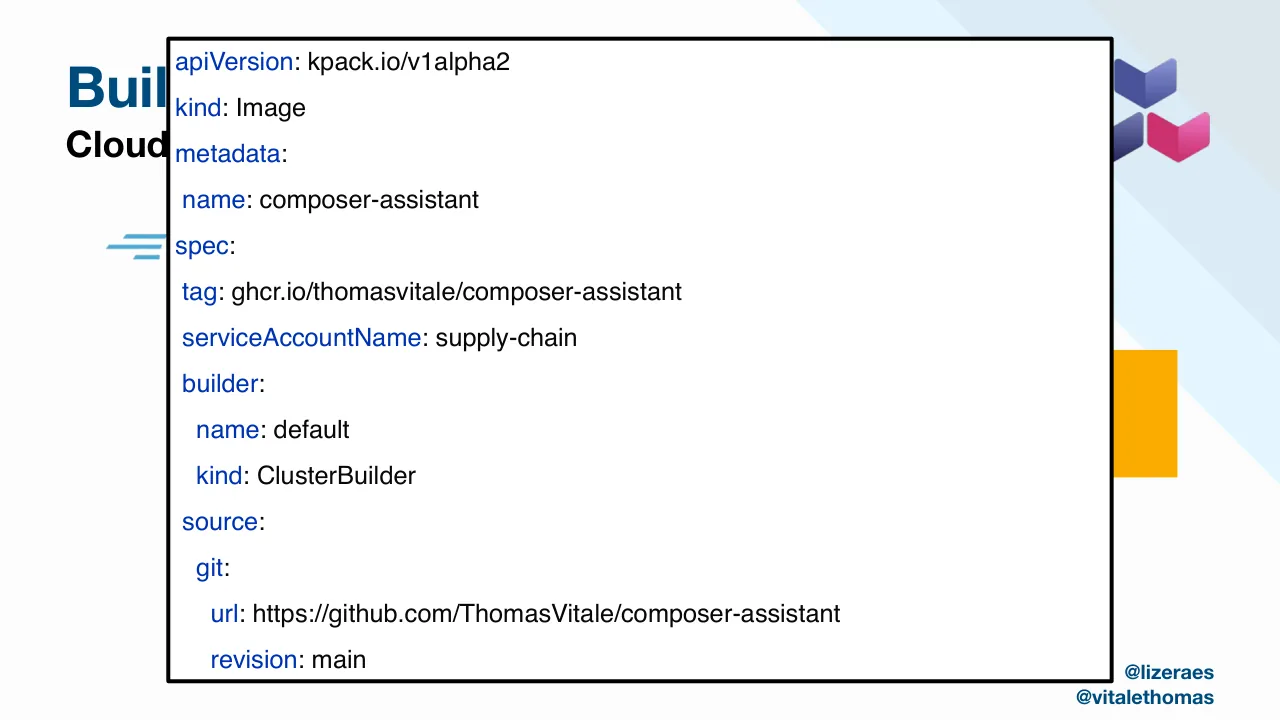
The deck has a consistent blue identity, clear one-idea-per-slide diagrams (5, 9, 12, 19, 20) and a sensible route from platform framing to concepts to a two-part golden path and a seven-step journey on slide 23. Execution flaws weaken it: slide 17 shows a code box overlapping and hiding the slide title and graphics, slide 18 shows tiny YAML, and slides 3 and 24 are scattered word clouds with no structure. Slide 21 is dense with small labels, the slide 25 cartoon is unexplained, and the closing gives no summary or takeaway, so the argument fades after slide 23. It is usable as a talk backdrop, but needs repair and tightening to stand alone.
Worth keeping: Keep the consistent title, subtitle and blue palette, and the clean flow diagrams on slides 5, 6, 19 and 20 plus the numbered journey on slide 23.
Most useful repair: Fix the overlapping code box on slide 17, enlarge and trim the YAML on slide 18, and replace the scattered words on slides 3 and 24 with a structured layout.
What would change the score: Add a closing slide that states the takeaway, simplify the labels on slide 21, and give the orchestra analogy on slides 24 and 25 a visible link to the platform argument.
Confidence medium. 26 of 26 pages inspected on contact sheets, 4 at readable size. Reviewed 2026-11-08. Model-assisted review (claude-sonnet-5-5).
Full text of the slides (26 slides)
Every slide's words and a description of its charts and images, so the deck can be searched and rebuilt. Also available as Markdown.
Slide 1
Building AI-Ready Platforms
Symphony for Developer
and Platform Engineer
Thomas Vitale and Lize Raes
KubeCon+CloudNativeCon Paris
March 20th, 2024
@lizeraes
@vitalethomas
Visuals: Decorative diagonal bands in the upper-right corner: four stripes running from upper-left to lower-right at about 45 degrees. Starting from the outermost (leftmost) band: a light sky blue #41B1F7 band, then a medium blue #0077C2 band, then a dark blue #004C7F band in the top-right corner. The bands are full-height shapes cut diagonally from about x 62% at y 0 to x 100% at about y 67% for the lightest band, with the darker bands stacked behind toward the top-right corner. A short solid dark blue #004C7F rectangle (bar) sits under the title at left, about 6.5% wide and 1.5% tall, with square corners. No photographs, logos or charts.
Slide 2
Cloud Native Platforms / Enabling product teams to deliver software better, faster, safer / End-User / PLATFORM API / PLATFORM BACKEND / Certificate Management / Continuous Deployment / Serverless Runtime / Supply Chain Choreography / Ingress and Load Balancing / ... / @lizeraes / @vitalethomas
Visuals: Diagram. Left: a dark blue (#004C7F) head-and-shoulders user silhouette icon centred above the bold label 'End-User'. A thick dark blue (#004C7F) horizontal arrow with a solid triangular head points from the icon to the purple PLATFORM API bar. Inside a dashed orange (#FFA800) rectangular frame, the purple (#724794) vertical bar labelled 'PLATFORM API' (white bold caps, rotated 90 degrees reading bottom to top) sits on the left. A maroon (#950D51) double-headed block arrow sits between the purple bar and the blue backend, pointing both ways. On the right, a blue (#0076B9) rectangle labelled 'PLATFORM BACKEND' (white bold caps, centred at top) contains six light grey (#D5D5D5) full-width bars stacked vertically, centred labels in black regular sans: Certificate Management, Continuous Deployment, Serverless Runtime, Supply Chain Choreography, Ingress and Load Balancing, and an ellipsis '...' in the last bar. Background: a full-slide image, 1920 by 1080 pixels, showing a near-white off-white field with pale light-blue diagonal bands entering from the top-right corner, faint grey-blue at the very top-right edge. Not cropped, full-bleed.
Slide 3
Vector Stores
Large Language Models
Generative AI
RAG
Embeddings
@lizeraes
@vitalethomas
Visuals: A decorative diagonal band graphic fills the top-right corner: a pale blue (#E3F3FD) diagonal wedge running from the top edge near x 62 down to the right edge near y 66, overlaid by a lighter grey-blue (#DDE6EC) wedge in the extreme top-right corner, with a thin light grey diagonal stripe between them. These are flat shapes with no gradient or shadow. No photographs, charts, logos or icons.
Slide 4
Large Language Models
Allow for a new generation of apps, solving formerly insolvable problems
Language Model
Chat Model
Embedding Model
Embedding Store
@lizeraes
@vitalethomas
Visuals: 1. Template background graphic: diagonal light-blue and pale-grey bands running from the top edge at about x 62% down to the right edge near y 70%, behind all content. 2. Circular photo/illustration of a stylised brain: an orange, yellow and red brain shape on the upper left and a dark navy and magenta lower-brain area, filled with glowing circuit-board traces, small coloured nodes and chips. A blue rectangular window/panel with lines sits at the centre, a small blue panel sits at the left edge, and a teal circular badge sits at the top centre. The background behind the brain is light grey and white. The image is cropped to a circle, not full-bleed, and has no overlay or tint. Lighting is flat and even. Dominant colours: orange, navy, magenta, light grey. 3. Four solid rectangles with white centred labels: Language Model, Chat Model, Embedding Model, Embedding Store. 4. Elbow connector line in dark navy from the bottom of the Embedding Model box down to the left edge of the Embedding Store box.
Slide 5
Retrieval Augmented Generation (RAG)
Let the model interact with your documents and data
Ingestion
Document
Text Splitter
Segments
Embedding Model
Embeddings
Embedding Store
@lizeraes
@vitalethomas
Visuals: A flow diagram titled by the word Ingestion (bold, black, placed in the empty left area of the diagram panel). Shapes and labels: a white wave-bottomed document shape labelled 'Document' at upper left; an arrow from it points right to a light-blue filled rectangle labelled 'Text Splitter'; an arrow from there points right to a stack of three white wave-bottomed document shapes labelled 'Segments' (front card with two offset cards behind it); an arrow from the Segments stack points right to a light-blue filled rectangle labelled 'Embedding Model'; a downward arrow from the Embedding Model points to a stack of three white wave-bottomed cards labelled 'Embeddings' at right. A line descends from the bottom of the Segments shape to a downward arrow pointing into a light-blue cylinder labelled 'Embedding Store' at lower centre. A line from the bottom of the Embeddings stack runs down, then left horizontally, joining the vertical line from Segments just above the cylinder, so both feed the store. Shapes have dark blue (#1F5BD6 approximately) outlines about 2 pt wide; connector arrows are a lighter blue (#4A86E8 approximately) with open arrowheads. Light blue fills #B4CCF7 approximately on the rectangles and cylinder. The whole diagram sits on a white rectangle panel with a faint edge, placed as a boxed image.
Slide 6
Retrieval Augmented Generation (RAG)
Let the model interact with your documents and data
Retrieval
Query
Query / + / Relevant / Segments
Language / Model
Embedding / Model
Query / Embedding
Embedding / Store
Relevant / Segments
@lizeraes
@vitalethomas
Visuals: Diagram (embedded image, 2048 by 619 pixels, boxed on a white rectangle at x 4.9%, y 35.2%, w 92.6%, h 49.8%). Shapes and labels: (1) Query: white rounded-corner speech-bubble shape with a downward tail at bottom-left, outlined in blue #1F5FD6 at about 2 px stroke, text 'Query' in black sans-serif; located at upper-left of the diagram. (2) Retrieval: bold black heading text above the top connector, centred around x 40%, y 43%. (3) Embedding Model: rectangle filled light blue #B4CDF5 with blue #1F5FD6 outline, text 'Embedding / Model'; bottom row, first box. (4) Query Embedding: white document shape with wavy bottom edge, blue outline, text 'Query / Embedding'. (5) Embedding Store: light blue #B4CDF5 cylinder with blue outline, text 'Embedding / Store'. (6) Relevant Segments (bottom): stack of three white document shapes with wavy bottoms and blue outlines, text 'Relevant / Segments' on the front sheet. (7) Query + Relevant Segments: tall white rounded rectangle with a downward tail at bottom-left, blue outline, text 'Query / + / Relevant / Segments'. (8) Language Model: light blue #B4CDF5 rectangle with blue outline, text 'Language / Model'. Arrows: blue #1F5FD6 straight arrowheads connect Query to the Query + Relevant Segments box along a horizontal line at the top; an elbow arrow runs from Query down to Embedding Model; arrows connect Embedding Model to Query Embedding, Query Embedding to Embedding Store, Embedding Store to Relevant Segments; a vertical line rises from Relevant Segments to join the top horizontal line, which then feeds Query + Relevant Segments; an arrow runs from Query + Relevant Segments to Language Model. Overall style: flat, no shadows, cool blue palette on white with black text.
Slide 7
Lize Raes
Open Tide
• AI Transition Specialist and
Software Engineer
• Public Face of LangChain4j
• CloudNativeHacks Program
Committee member
• OSS contributor (Java and AI)
www.epic.engineering
@lizeraes
Visuals: One illustration: a cartoon green parrot with orange-yellow-red crest, red beak, large dark eye with white highlight, perched beside a white teacup on a white saucer with amber tea visible in the cup; pale yellow-orange watercolour splashes behind the cup and bird; the parrot's feet are red and it stands on the saucer rim. Composition: boxed (not full-bleed) image with white background, placed in the right half, parrot facing left toward the viewer's left, slightly cropped by nothing, with a thin light grey border around the box. Lighting is soft and even, flat studio-like; dominant colours are green, orange, red, white and pale amber. Decorative background: at top right, a set of diagonal translucent bands running from upper-left to lower-right in pale sky blue (#E3F2FC) and light grey-blue (#DDE5EA) toward the top-right corner, fading into the background.
Slide 8
Thomas Vitale / Systematic / • Software Engineer and CNCF Ambassador. / • Author of “Cloud Native Spring in Action” (Manning). / • OSS contributor (Java, Spring, Cloud Native Technologies). / thomasvitale.com / @vitalethomas
Visuals: One photograph of a book cover, boxed (not full-bleed) and placed in the right column. Subject: the cover of 'Cloud Native Spring in Action' by Thomas Vitale, showing an illustrated figure of a ragged, barefoot man in a cream-coloured smock and pale blue trousers, holding a walking staff in his right hand, with his left arm hanging, drawn in a hand-coloured engraving style. The figure stands on a khaki-olive vertical band on the left third of the cover. Title text reads 'Cloud Native / Spring / IN ACTION' in bold black condensed sans-serif with 'IN ACTION' in grey, followed by 'With Spring Boot and Kubernetes' in small black condensed text, then 'Thomas Vitale' in small grey text, and at bottom right the grey Manning logo with the word 'MANNING'. Composition: portrait, figure occupies the full height of the cover, lit evenly with no visible light source. Dominant colours: khaki olive #9A9470, white #FFFFFF, cream #EDE3C4, black #111111, grey #8C8C8C, pale blue #A9CFD9. No overlay or tint. Decorative background element: two overlapping pale blue diagonal bands in the top-right corner, light blue #DCEFFA and pale grey-blue #DDE5EA, cut diagonally across the top-right corner and right edge.
Slide 9
LLM-Powered Applications
What new integrations should the platform support?
Model Provider
Application
Vector Store
@lizeraes
@vitalethomas
Visuals: Diagram with three filled rectangles and two arrows. (1) Application box, fill #724794, x 6.2%, y 43.7%, w 27.6%, h 30.5%, with the label 'Application' in white at its top. Inside it, from left to right: the Java logo (orange and blue coffee-cup mark), the Python logo (blue and yellow snakes), and the Go gopher mascot (light-blue gopher). (2) Model Provider box, fill #0076B9, x 59.3%, y 27.6%, w 27.6%, h 30.5%, with the label 'Model Provider' in white at its top. Inside it, from left to right: the Ollama llama icon in a white rounded square, a Mistral-style logo of orange and black pixel bars forming an 'M', and the OpenAI blossom logo in a white hexagon. (3) Vector Store box, fill #004C7F, x 59.3%, y 62.5%, w 27.6%, h 30.5%, with the label 'Vector Store' in white at its top. Inside it, from left to right: a yellow-to-green 'W'-shaped logo and a logo of overlapping blue, red and yellow circles. Arrows: a green (#3A7D22) line with a solid triangular head, from the right edge of the Application box at about (33.8%, 54.8%) to the left edge of Model Provider at about (59.2%, 46.9%); and a second identical arrow from about (33.8%, 63.7%) to the left edge of Vector Store at about (59.2%, 72.9%). Stroke about 0.6% of slide height. Logos are not cropped and sit fully within their boxes.
Slide 10
Golden Path / for / AI Applications / Part 1 / @lizeraes / @vitalethomas
Visuals: Decorative diagonal bands in the top-right corner: three stacked angled stripes running from the top edge down toward the right edge. The innermost stripe is pale sky blue (about #E3F3FD), the middle stripe is a light grey-blue (about #D9EAF5), and the outermost sliver is light grey (about #E0E6EA). The bands are flat-filled with no shadow or gradient, and they bleed off the top and right edges. No photographs, logos or icons.
Slide 11
Project Bootstrapping
Backstage Software Templates
Backstage
Search
Home
Catalog
APIs
Docs
Create...
Tech Radar
Create a new component
Create new software components using standard templates in your organization
Available Templates
Search
PERSONAL
Starred
0
KADRAS
All
1
CATEGORIES
Recommended
service
Spring Boot LangChain4j
Spring Boot using Java and Gradle with LangChain4j integration to build LLM-powered applications.
recommended
java
spring
langchain4j
ai
Hephaestus Team
CHOOSE
@lizeraes
@vitalethomas
Visuals: Two non-text visuals. (1) A Backstage logo at upper right, about 10% wide and 23% tall: a stacked isometric B-shaped block of layered slabs, with a teal-to-mint gradient from about #7CF2DA at the top to about #2BB58F at the bottom, drawn with a lighter outline on the top faces. (2) A UI screenshot of the Backstage web app, boxed with square corners and no shadow, covering x 4.9 to 72.6 and y 24.5 to 97.1. Inside it: a near-black sidebar (#111111) at the left, about 21% of the screenshot width, with the mint Backstage logo and wordmark at top, a Search item, a divider, then Home, Catalog, APIs, Docs and Create... (Create... is selected and bold white, with a thin mint marker on its left edge), a divider, and Tech Radar at the bottom, all in light grey icons and labels. The main area has a green banner (#2E6B5A to #3F8570 with faint curved lighter shapes) containing the heading 'Create a new component' in white bold sans and a subline in light grey-white. Below it on #F5F5F5, 'Available Templates' is bold dark grey (#222222), then a search field with a magnifier icon and an X, then a grey filter panel (#DCDCDC) with PERSONAL, a white Starred row with a filled star and count 0, KADRAS and a white All row with count 1, then CATEGORIES with an empty dropdown and a chevron. The right column shows 'Recommended' in bold, and a white card with a blue gradient header (#3D74A8 to #2A56A0) reading 'service' and 'Spring Boot LangChain4j' in white, with an outlined star at right. Below it on white, the description text in dark grey, a thin grey divider, grey pill tags, a blue person icon with 'Hephaestus Team' in blue, and an outlined blue CHOOSE button. The card has a soft shadow and rounded corners.
Slide 12
Continuous Development / Code, Run, Test, Debug / Development Workflow / Dev & Test Services / gradle bootRun / flask --debug run / yarn dev / @lizeraes / @vitalethomas
Visuals: Three outlined rectangles in the left column, each with a dark blue #004C7F stroke about 2 px wide and white fill, containing centred bold labels: gradle bootRun, flask --debug run, yarn dev. Three technology logos overlap the left edge of the boxes: a green Spring Boot hexagon with a white power symbol at the top, a blue and yellow Python two-snake logo in the middle, and a green Node.js hexagon with a white JS mark at the bottom. On the right, a Testcontainers banner: a white-outlined teal cube logo and white bold wordmark 'Testcontainers' on a purple-to-blue gradient rectangle, not rounded. Below it, a square white rounded-corner app icon with a black line drawing of a llama, and a yellow-green W-shaped logo with a blue lower centre. No charts, tables or photographs.
Slide 13
AI Orchestration Frameworks
LangChain4J
python
Java
.NET
LangChain
Semantic Kernel
JavaScript
Go
@lizeraes
@vitalethomas
Visuals: Diagram with logos and arrows. Shapes: three rounded rectangles with blue outline #4A86C8, about 2 px stroke and about 12% corner radius, no fill. Box 1 (LangChain4J) at x 19.4%, y 16.0%, w 25.0%, h 30.1%, containing a parrot-and-teacup illustration and the text LangChainJ. Box 2 (LangChain) at x 3.3%, y 63.9%, w 34.0%, h 15.1%, containing the LangChain parrot-and-chain-link logo. Box 3 (Semantic Kernel) at x 59.8%, y 50.6%, w 37.2%, h 17.8%, containing the Microsoft four-square logo and the text Semantic Kernel in black. Logos outside boxes: Python logo (blue and yellow snake, grey lowercase python wordmark with TM) at x 7.3%, y 31.8%; Java logo (orange flame over blue coffee-cup swooshes, blue Java wordmark with TM) at x 54.5%, y 17.4%; .NET logo (white .NET text on purple circle on white square) at x 75.1%, y 14.9%; JavaScript (yellow shield with black JS letters, black bold JavaScript label above) at x 54.8%, y 79.2%; Go logo (cyan GO wordmark with speed lines) at x 7.2%, y 85.5%. Arrows are dark grey #5F5F5F, about 3 px, with filled triangular heads: LangChain4J to Java (horizontal, from x 44.5%, y 31.4% to x 56.8%, y 32.0%); Semantic Kernel to Java (from x 72.0%, y 50.6% to x 59.5%, y 32.6%); Semantic Kernel to .NET (from x 81.0%, y 50.6% to x 84.7%, y 39.4%); Semantic Kernel to JavaScript (from x 72.3%, y 68.5% to x 64.9%, y 79.4%); LangChain to Python (from x 18.2%, y 63.9% to x 12.8%, y 45.2%); LangChain to JavaScript (from x 37.0%, y 72.5% to x 53.0%, y 87.0%); LangChain to Go (from x 18.7%, y 79.1% to x 16.4%, y 94.0%). Parrot illustration: a green, yellow and red parrot perched behind a white teacup on a saucer with tea, soft watercolour splashes in pale yellow, no crop, boxed on white. Background graphic: pale blue diagonal bands in the top-right corner.
Slide 14
AI Orchestration: LangChain4j / Easy integrations with a zoo of models and data sources / Chains / AI Services / Basics / Language Models / Image Models / Prompt Templates / Output Parsers / Memory / Tools / RAG / Document Loaders / Document Splitters / Embedding Models / Embedding Stores / @lizeraes / @vitalethomas
Visuals: A raster diagram of the LangChain4j architecture occupies about x 25.6 to 95.7 and y 27.8 to 89.2. It shows one wide rounded rectangle at the top containing two blue rounded boxes side by side, labelled Chains (left) and AI Services (right). Below it are two rounded rectangles side by side. The left one is titled Basics and holds a 3 by 2 grid of blue rounded boxes labelled Language Models, Image Models, Prompt Templates (top row) and Output Parsers, Memory, Tools (bottom row). The right one is titled RAG and holds a 2 by 2 grid of blue rounded boxes labelled Document Loaders, Document Splitters (top row) and Embedding Models, Embedding Stores (bottom row). Outer frames are white with blue #4285F4 outlines about 0.5% of slide height thick and large corner radii. Blue boxes are filled #4285F4 with white sans-serif labels; the Basics and RAG titles are black sans-serif. No arrows connect the boxes. The diagram is boxed, not cropped and not full-bleed, with a white background. A cartoon parrot illustration sits at about x 0 to 25.6 and y 34.7 to 80.3. A lime-green parrot with a red beak, orange-yellow crest and a yellow-orange splash behind it perches beside a white teacup on a saucer, with a dark amber tea surface. It is lit evenly from the front, is fully visible, is not cropped, and sits on a white background with a faint splash tint. Behind the slide, a full-bleed background image shows pale blue diagonal light stripes across the top-right and right edge.
Slide 15
Golden Path / for / AI Applications / Part 2 / @lizeraes / @vitalethomas
Visuals: Decorative diagonal bands in the top-right corner: a light blue (#E3F4FD-like) wedge band running from top edge to right edge at about 62% to 100% of width, bordered by a pale grey-blue band (#DCE9F3-like) to its upper right and a grey (#DFE5EA-like) band at the very top-right corner. No photograph, chart or logo; the bands are flat shapes with no shadow or gradient.
Slide 16
Building a Container Image
Cloud Native Buildpacks
pack build
Image
@lizeraes
@vitalethomas
Visuals: Diagram/logos: a Go logo (blue stylised GO wordmark with speed lines) at top-left; a Java logo (grey-blue Java wordmark with orange steam lines and coffee-cup rings) below it; a C# logo (purple hexagon with white C# letters) at bottom-left. A horizontal dark blue (#1F4E79) arrow with a solid triangular head points right from the language logos to a yellow box labelled 'Image'. Above the arrow sits the Cloud Native Buildpacks logo (three chevron-shaped blocks: top indigo-blue, bottom-left navy, bottom-right magenta-pink), and below the arrow the monospace caption 'pack build'. A second Buildpacks logo sits at top-right corner on the pale blue band.
Slide 17
Building a Container Image / Cloud Native Buildpacks / apiVersion: kpack.io/v1alpha2 / kind: Image / metadata: / name: composer-assistant / spec: / tag: ghcr.io/thomasvitale/composer-assistant / serviceAccountName: supply-chain / builder: / name: default / kind: ClusterBuilder / source: / git: / url: https://github.com/ThomasVitale/composer-assistant / revision: main / Image / @lizeraes / @vitalethomas
Visuals: Visible visuals: (1) a blue stripe speed-line icon at the left, about x 8 to 26 percent, y 30 to 95 percent, partly hidden behind the code panel; (2) a pale blue diagonal band graphic in the top right corner of the background; (3) a solid orange (#FBAB01) rectangle at x 72.9 to 92.0 percent, y 48.6 to 66.3 percent, partly covered by the panel so only its right part shows; (4) a logo pair in the top right at x 84.0 to 95.1 percent, y 6.9 to 23.3 percent, made of two chevron-shaped tiles, an upper indigo-violet tile (about #4B5BA8) and a lower magenta-pink tile (about #C8306A) with a dark navy tile (about #2E3366) partly hidden behind the panel, these are the Cloud Native Buildpacks mark. (5) a 1236 by 456 pixel image at x 28.1 to 66.9 percent, y 43.2 to 68.7 percent that is fully covered by the white panel and not visible. The code panel itself is a white box with a black stroke about 0.4 percent of slide width, no corner radius, no shadow, containing a monospaced-looking YAML listing in Helvetica: keys in blue #0033B3 and values in near-black #080808. None of the visible content is a chart, table or photograph.
Slide 18
Configuration: Workload API / Crossplane Composition / apiVersion: app.kadras.io/v1alpha1 / kind: Workload / metadata: / name: composer-assistant / spec: / image: ghcr.io/thomasvitale/composer-assistant / application: / framework: spring-boot / language: java / serviceClaims: / - name: open-ai / - name: weaviate / @lizeraes / @vitalethomas
Visuals: Icon: a popsicle (ice lolly) at top-right, box approximately x 89.5%, y 6.9%, w 5.5%, h 20.8%. Its stick-shaped body is divided diagonally into three colour bands: coral red #F47C7C at top, golden yellow #FFD040 in the middle, and turquoise #35D3C0 at the bottom, with a pale tan stick #F5C98A below and a darker tan shading on the stick. Background decoration: a large pale sky-blue diagonal band #E3F4FD running from top-centre down to the right edge, overlaid by two faint grey-blue diagonal bands #DCE6EC and #E6EDF1 in the top-right corner. No photographs, charts or diagrams.
Slide 19
Configuration: Implementation
Crossplane Composition
Workload API
Serverless
Deployment
Service
Binding
Application Conventions
@lizeraes
@vitalethomas
Visuals: Diagram with five filled rectangular shapes, two logo images, one arrow and one dashed frame, plus a decorative popsicle illustration at top right. (1) Dark red #800000 rectangle labelled 'Workload API' in white, at left. (2) Solid blue arrow in #004C7F, horizontal, shaft about 1.5% of slide height thick, with a filled triangular head, running from the right edge of the Workload API box into the dashed frame; it has no label. (3) Dashed orange (#FFAA00) rectangle frame, about 2.5% stroke width with a dash-dot pattern (long dash, dot, long dash), enclosing the four component blocks; it has no fill and does not overlap the popsicle image. (4) Dark blue #004C7F rectangle labelled 'Serverless / Deployment' in white, top-left inside the frame. (5) Purple #724794 rectangle labelled 'Service / Binding' in white, top-right inside the frame. (6) Knative-style logo, a blue heptagon-like hexagon with a bold white letter 'K' and a smaller lighter blue-grey octagon overlapping its upper right with a white letter 'n'; placed directly below the Serverless Deployment box, inside the frame, about 15% of slide width. (7) Service Binding logo, two interlocking angular brackets: a light blue-to-teal gradient C-shape at upper left and lower left, and a dark navy #001F6B bracket outline to the right, placed below the Service Binding box inside the frame. (8) Dark green #274E13 rectangle labelled 'Application Conventions' in white, spanning the bottom of the frame. (9) Decorative popsicle, a rounded ice lolly at top right with a coral #F47C7C top band, a yellow #FFD042 diagonal stripe in the middle and a teal #33D1BB bottom band, on a tan #F5C98A stick; the lolly overlaps the top-right corner of the dashed frame. (10) Background decoration: two diagonal bands in the top-right corner, one pale sky-blue #E1F3FC and one greyer blue-grey #D9E6EE, running from upper-left to lower-right and cropped by the slide edges.
Slide 20
Kubernetes Native Packages
Carvel: Packaging Platform Capabilities
Package API
1
Fetch
Fetch configuration
and OCI images.
2
Transform
Apply templates
and overlays.
3
Deploy
Deploy the resulting
configuration manifests.
@lizeraes
@vitalethomas
Visuals: Diagram: a dark red rectangle labelled 'Package API' (x 5.6%, y 47.1%, 19.1% by 14.7%) with a thick navy (#004C7F) right-pointing block arrow running horizontally to the left edge of the stack. Three horizontal process rows, each a solid colour block with a white label joined to a white outlined description box: row 1 navy block 'Fetch' (#004C7F) linked to box 'Fetch configuration and OCI images.'; row 2 purple block 'Transform' (#724794) linked to box 'Apply templates and overlays.'; row 3 bright blue block 'Deploy' (#00A2FF) linked to box 'Deploy the resulting configuration manifests.' Each row has a white circle with a navy outline and navy bold numeral 1, 2 or 3 overlapping the top-left corner of its coloured block. A dashed orange (#FFAA00) rectangle frames all three rows, with dash-and-dot pattern and a stroke about 0.4% of slide width. Logo: the Carvel ship's-wheel-style boat emblem (purple, navy and teal stripes inside a grey ring) at top right, unboxed, full colour.
Slide 21
App Architecture
UI
Your AI Composing Assistant
Instrument
Tone
Descriptions
Thomas’ Virtual
Instruments
Embedding Model
video
description
composer
advice
Embedding
Store
Weaviate
relevant segments
instrument
code
query
Virtual
Instrument
Retriever
Tool
tool
call
instructions + video description
+ relevant segments
instrument
code
composing advice with
available instruments
Composer Assistant
Application
LLM (OpenAI API)
@lizeraes
@vitalethomas
Visuals: Diagram with pictograms and filled shapes, all on a white ground. (1) Top left: a green bordered screenshot of a web page titled Your AI Composing Assistant, showing a faint intro paragraph and four video cards, each with a dark thumbnail, a red YouTube play icon, a short caption and a blue Select button; the card titles are legible only as Sunset, Enchanted Forest, Alien Attack and Melancholy, and the captions are too small to transcribe. (2) Left: a blue bordered square containing a black pictogram of a conductor with a baton beside a music stand and two black eighth-note symbols. (3) Centre: a black outline pictogram of a microchip with pins and a central </> code symbol, captioned Embedding Model. (4) Centre right: a light blue cylinder with a dark blue top ellipse and outline, labelled Embedding Store inside the cylinder and Weaviate beneath it. (5) Top right: three stacked purple folded-edge documents labelled Instrument Tone Descriptions, with navy outlines. (6) Top right: a black outline database pictogram with three stacked bands and three dots, captioned Thomas’ Virtual Instruments. (7) Centre bottom: a black and white outline pictogram of a brain made of circuit lines, captioned LLM (OpenAI API). (8) Lower right: a maroon rounded rectangle labelled Virtual Instrument Retriever Tool. Arrows, all grey #666666 with solid triangular heads: video description runs down from the screenshot to the conductor frame; composer advice runs up from the frame to the screenshot; a horizontal arrow runs from the frame to the chip and from the chip to Embedding Store; relevant segments returns left from Weaviate to the chip; instructions plus video description plus relevant segments runs right from the frame to the LLM; composing advice with available instruments runs left from the LLM to the frame; tool call runs right from the LLM to the Retriever; instrument code runs left from the Retriever to the LLM; query runs up from the Retriever to the database; instrument code runs down from the database to the Retriever; a down arrow runs from the purple documents to Embedding Store.
Slide 22
Observability for AI Applications
OpenTelemetry, token usage, prompts
Observability Foundation
LLM Telemetry
❖Input Tokens
❖Output Tokens
❖Prompt Content
❖Cost per Call
@lizeraes
@vitalethomas
Visuals: Logo of OpenTelemetry (left column): a telescope icon made of rounded rectangular segments, with the upper barrel and tip in yellow-orange and the middle body and lens ring in blue-violet, on a diagonal from upper-right to lower-left, above the wordmark 'OpenTelemetry' where 'Open' is yellow-orange and 'Telemetry' is blue-violet in a bold sans-serif. The logo is placed as a raster image at x 5.1%, y 50.4%, w 41.1%, h 38.3%, on a white background with no border. Right column: a bordered rectangle outline in navy containing four diamond-bulleted items (❖ glyphs) listed vertically: Input Tokens, Output Tokens, Prompt Content, Cost per Call. Background decoration: a set of diagonal light-blue and pale grey bands running from top-centre to the right edge, behind the upper right of the slide.
Slide 23
The Journey / 1 / Project / Bootstrapping / 2 / Development / Workflows / 3 / Build Pipeline / Service / Binding / 4 / Deployment / Configuration / 5 / 6 / Observability / 7 / Production / @lizeraes / @vitalethomas
Visuals: Diagram, not a chart or photograph. Seven dark-blue (#004C7F) filled circles, each with a white regular-weight numeral, arranged as a path. Circle 1 sits inside the top-left orange box above the label Project Bootstrapping. Circle 2 sits on the top edge of the lower-left orange box above the label Development Workflows. Circles 3, 4, 5, 6 and 7 are free-standing, each with its label placed above or below it: 3 with Build Pipeline above, 4 with Deployment Configuration below, 5 with Service Binding above, 6 with Observability below, and 7 with Production above. Two orange rounded-rectangle outlines (#FFAA00, stroke about 0.5% of slide width, corner radius about 1.2% of slide width, no fill) frame steps 1 and 2. Five filled dark-blue (#004C7F) block arrows connect the steps in sequence: arrow from box 1 down-right to box 2; arrow from box 2 up-right to circle 3; arrow from circle 3 down-right to circle 4; arrow from circle 4 up-right to circle 5; arrow from circle 5 down-right to circle 6; arrow from circle 6 up-right to circle 7. Each arrow is a thick straight shaft with a triangular head, no outline, no shadow. Decorative background: diagonal light-blue and grey-blue bands in the top-right corner (described under elements).
Slide 24
Container Orchestration
AI Orchestration
Music Orchestration
@lizeraes
@vitalethomas
Visuals: Decorative geometric background band in the upper-right: a diagonal stripe pattern running from top-centre (about 62% across the top edge) down to the right edge at about 70% of height. Stripes from the lower-left edge of the band outward: a pale sky-blue band (about #E3F4FD) bordered by a slightly greyer blue-grey band (about #D9EAF4) and a light grey wedge (about #DDE3E7) at the extreme top-right corner. No photographs, icons, logos or charts.
Slide 25
MUSIC
MAESTRO
@lizeraes
@vitalethomas
Visuals: One photograph, a frame from a hand-painted animated scene (cartoon animals in a cluttered room). Subject: an upright pink piano with sheet music on its music desk, a brown cello with f-holes standing on a light blue stool, a small brown bear-like character in a red bow and green vest standing in the foreground, a tan fox-like character in a red-and-green outfit seated at the piano keyboard with arms outstretched, a blue-cushioned stool in front of the piano, a grey-green figure leaning on the cello, a small brown cat or animal on top of the piano, and a seated pale character with a violin or fiddle at the far right beside a white vase on a blue cabinet. Composition: horizontal rectangle, scene shown wide, subjects spread across the frame with the piano central. Lighting: warm, low-key interior light, with darker brown and grey shadows around the edges. Dominant colours: dusty pink (#D98C9A-ish) of the piano, warm brown (#8B4A1E-ish) of the cello, muted olive and grey-green, pale blue (#6FA8D6-ish) stool, and wood-brown floor. The image is a rectangular box, not cropped at the edges, with no overlay or tint. Behind the photograph at the top right, two diagonal translucent bands of pale blue (#D9EEFA-ish) and light grey-blue (#DDE6EC-ish) run from top edge down toward the right edge, forming a corner accent with no visible outline.
Slide 26
Lize Raes
@lizeraes / [email protected] / www.epic.engineering
Thomas Vitale
@vitalethomas / thomasvitale.com
Thursday, March 21 • 11:55 - 12:30
Unlocking New Platform Experiences with Open Interfaces - Thomas Vitale, Systematic & Mauricio "Salaboy" Salatino, Diagrid
Visuals: Background: full-bleed decorative image of diagonal bands in the top-right corner, in light blue #43B3F7, mid blue #0479C2 and dark navy #004F80, fading into the grey field towards the lower right. Two short solid navy bars (accent rules) sit above each name. One QR code, 148 by 148 px, black modules on white, placed on a white square at top right, not overlapping the blue bands at its edges. No charts, tables, photographs or logos.
Download this deck
The hosted PDF of every library deck is free for readers of the SlideDeck Co newsletter. Join with your email and the viewer and download appear here.
Building a deck of your own? The SlideDeck Co Standard Deck is a slide library for business presentations: reviews, updates and plans.