The deck opens with a title slide for KubeCon + CloudNativeCon Europe 2024, then introduces the speaker, Joaquin A. Rodriguez of Microsoft, and presents an agenda covering cluster addons, why validation matters, validation strategies, secure rollouts, and a demo. It explains what Kubernetes cluster addons are and gives examples grouped by monitoring, networking, security, and storage. A slide on why addons need validation lists five concerns: compatibility, security, performance, upgrades, and configuration accuracy. The middle section walks through strategies in turn: linting manifests with KubeLinter, Kubeconform, and kube-score; validating Helm charts with helm lint and plugins; scanning container images with Grype and Trivy, with Harbor for images already deployed; and enforcing policy with Kyverno. Each strategy gets its own slide, with tool logos or code screenshots carrying much of the point. Later slides cover ring deployments across dev, preprod, and production using GitOps and progressive delivery, followed by a demo infrastructure diagram, a demo divider, a short recap, and a closing slide with contact details.
Full text of the slides (18 slides)
Every slide's words and a description of its charts and images, so the deck can be searched and rebuilt. Also available as Markdown.
Slide 1
KubeCon
CloudNativeCon
Europe 2024
Visuals: Logos: the KubeCon ship's wheel emblem in white, at upper left, followed by a thin vertical white divider line and the CloudNativeCon square-with-diagonal-stripes emblem in white and light grey. Below them, a horizontal white rule on each side of 'Europe 2024'. Illustration: a flat, paper-cut style Paris skyline across the lower right, with a green Panthéon-like dome on the left, a red Arc de Triomphe-style arch, a red Grande Arche-like square frame, a bright red Eiffel Tower in the centre-right, blue Sacré-Cœur domes, a pale peach Louvre pyramid, and a red Notre-Dame-style cathedral at the far right, all in front of a dark purple city silhouette. Four white-and-light-blue clouds with soft shadows float in the sky: one large at top right, one medium at right middle, one small at centre-left above the skyline. A large light-blue arc/circle shape fills the upper right. A darker teal-blue curved band sweeps in the lower left. A pale grey ground strip sits at the base of the skyline. The illustration is full-bleed to the bottom and right edges, with no box or frame.
Slide 2
The Art of Kubernetes Add-on Validation:
Secure Strategies for the Modern
Developer Platform
Joaquin A. Rodriguez, Microsoft
Visuals: Full-bleed abstract geometric illustration covering the whole slide. It has no photograph or figures. A light steel-blue field fills the upper-left area. A diagonal dark indigo band runs from the top edge near x 68% down to the bottom edge near x 12%, leaving the upper-left triangle blue and the lower-right area indigo. In the lower right, a large purple (#4D3875) quarter-circle arc sweeps from the bottom edge near x 56% up to the right edge near y 38%. Inside that arc, a steel-blue (#4A76A0) rectangular block starts at about x 75%, y 54% and runs to the right edge and to about y 87%, with its lower edge meeting a purple band. The shapes are flat with no gradients, shadows or overlays, and the composition is cropped at the slide edges.
Slide 3
Welcome! / KubeCon / CloudNativeCon / Europe 2024 / Joaquin A. Rodriguez / Senior Software Engineer / @joaquinrdzv / Microsoft
Visuals: 1) Photograph (landscape, boxed, not cropped, not full-bleed, no overlay or tint): the Parthenon on the Acropolis in Athens seen from the front-left three-quarter angle, with white-grey scaffolding poles wrapped around the columns and roof, pale limestone blocks and rubble in the foreground, and a few small distant tourists to the right. A smiling man with short dark hair, a light stubble beard, dark sunglasses, a black short-sleeved polo shirt, a dark backpack strap, a black wristwatch, and blue jeans stands in front of the right-hand columns, centred low in the frame, with his hands at his sides. Soft, overcast daylight with no hard shadows; dominant colours are cream/beige stone, pale grey sky, black shirt and grey-brown rock. Framing is a medium-wide shot at eye level with the building filling the frame. 2) KubeCon | CloudNativeCon Europe 2024 logo lockup at top right: a dark indigo (#3D2B6B approx.) Kubernetes wheel emblem labelled KubeCon, a thin vertical divider, and a dark indigo square emblem labelled CloudNativeCon, with a horizontal rule either side of Europe 2024 beneath the words. 3) Microsoft logo at bottom right: four squares in a 2x2 grid, red #F25022 top-left, green #7FBA00 top-right, blue #00A4EF bottom-left, yellow #FFB900 bottom-right, followed by the grey (#737373 approx.) bold wordmark Microsoft. 4) X (formerly Twitter) logo, a black stylised X glyph, placed immediately left of the handle @joaquinrdzv in the third caption line. 5) A tiny grey speck (about 0.3% of slide width) at roughly x 11.8%, y 50% on the white background, with no meaning.
Slide 4
Today’s Agenda
KubeCon
CloudNativeCon
Europe 2024
- Introduction to Cluster Addons
- Why validation is important?
- Validation Strategies
- Secure Rollouts
- Demo
Visuals: Two logos only: the KubeCon wordmark with its Kubernetes wheel icon, separated by a thin vertical divider from the CloudNativeCon wordmark with its square icon, and beneath them the text 'Europe 2024' flanked by two thin horizontal rules. All logo artwork is dark indigo-purple #2D2766 on the blue band. No charts, photographs or other graphics.
Slide 5
Cluster addons? Why do we care?
Kubernetes cluster addons are tools, applications or services that enhance the functionality of a Kubernetes cluster.
Addons provide essential capabilities that are not included in the core Kubernetes components.
Customization: Addons allow you to customize your Kubernetes clusters according to their specific requirements.
Resource Management: Addons help us manage resources to make sure your cluster is running optimally, and resources are not being wasted.
Addon Ecosystem: Addons enable integration with the broader cloud-native ecosystem, allowing clusters to work seamlessly with other tools and services.
KubeCon
CloudNativeCon
Europe 2024
Visuals: Two visual elements. (1) A Kubernetes logo, placed at x 73.9%, y 32.2%, w 20.6%, h 35.6% (600 by 583 pixels), unboxed and uncropped: a flat blue heptagon (about #326DE6) with a white ship's wheel of seven spokes centred inside it, with the hub a small hexagon. No shadow, no overlay. (2) Top-right logo lockup on the blue band: a KubeCon mark (dark navy-purple hexagon icon, about #2E2A6B, with the word KubeCon in bold below it) to the left of a thin vertical divider, then a CloudNativeCon mark (dark navy-purple square with a stylised N-shaped cutout, about #2E2A6B, with the words CloudNativeCon in bold below it), then the line 'Europe 2024' in bold dark text centred beneath both, flanked by thin horizontal rules. Approximate position of this lockup: x 83%, y 2%, w 14%, h 9%. The header band and logos appear to sit within the full-slide raster image (1601 by 901 pixels) that covers the whole slide.
Slide 6
Some Examples / KubeCon / CloudNativeCon / Europe 2024 / Prometheus / Grafana / fluentbit / Monitoring & Logging / Dashboard / Metrics Server / CoreDNS / cilium / Network & Communication / Istio / LINKERD / N+ / CERT MANAGER / Open Policy Agent / Kyverno / Security & Authorization / LONGHORN / ROOK / CubeFS / Storage / …and many more!
Visuals: Logo grid of cloud-native project logos, none charted. Monitoring & Logging box: Prometheus (orange flame mark with grey wordmark), Grafana (orange swirl with dark grey wordmark), Fluent Bit (blue-green hummingbird with wordmark 'fluentbit', 'bit' in teal), Kubernetes Dashboard (blue heptagon ship's wheel icon with label Dashboard), Kubernetes Metrics Server (blue heptagon ship's wheel icon with label Metrics Server). Network & Communication box: CoreDNS (purple chain-link mark with grey wordmark), cilium (cluster of hexagons in yellow, orange, red, green, purple, blue with dark wordmark), Istio (blue sailboat mark with black wordmark), Linkerd (teal-green hatched mark with dark grey LINKERD wordmark), NGINX Plus (green hexagon with white N+ and small registered mark). Security & Authorization box: cert-manager (blue rosette seal with white anchor and CERT MANAGER text), Open Policy Agent (grey Viking-helmet style mark with white dot, label Open Policy Agent), Kyverno (orange and blue network-tree mark with wordmark Kyverno in steel blue). Storage box: Longhorn (plum square with white bull-horn mark and dark grey LONGHORN wordmark), Rook (teal castle-tower mark with ROOK label in grey), CubeFS (blue circular FS mark with CubeFS wordmark, Cube in black and FS in blue). Header: KubeCon ship's wheel icon in dark navy on a white glyph, CloudNativeCon square icon in dark navy, thin divider line between them.
Slide 7
Why do we need to Validate Addons? / Compatible / Addons are compatible with / your Kubernetes cluster and / integrate well with other / addons / Improve Security / Identify and mitigate security / vulnerabilities / Performance / Ensures that addons do not / introduce performance / issues, maintaining the / overall efficiency and / responsiveness of your / Kubernetes cluster / Facilitates / Upgrades / Validates that addons can be / safely upgraded or modified / without impacting the existing / cluster functionality, / minimizing downtime and / service disruptions. / Guarantees / Configuration / Accuracy / Checks that addon / configurations are correctly / applied, preventing / misconfigurations that could / lead to issues / KubeCon / CloudNativeCon / Europe 2024
Visuals: Five flat line-style icons in a single blue (#5BBDEB), left to right: (1) a browser window outline with three dots in its title bar and a code symbol '</>' in the body; (2) a padlock with a keyhole, shackle at top; (3) a small network or hierarchy diagram: a rectangle at top connected by a vertical line to a horizontal bus line, with a diamond junction and three filled circles at the bottom, each linked by a short vertical line; (4) a computer processor chip: a square body with an inner square, with pins on all four sides; (5) a presentation easel board with a checklist (two check marks and three lines) on its screen and two legs. Icons are not boxed, have no shadows, and sit on white. Logos at top right in the blue band: KubeCon logo (a dark indigo ship's wheel/Kubernetes helm mark above the word 'KubeCon') separated by a thin vertical divider from the CloudNativeCon logo (a dark indigo square with a diagonal stripe mark beside the word 'CloudNativeCon'), with 'Europe 2024' centred beneath between two thin horizontal rules; all dark indigo (#2D2567) on the blue band.
Slide 8
Addon Validation Strategies
Some of the strategies we will review today:
- Static Code Analysis
- Helm Chart Validation
- Image Validation
- Validating using Policies and Rules
- Integration Testing using Secure Rollouts
Slide 9
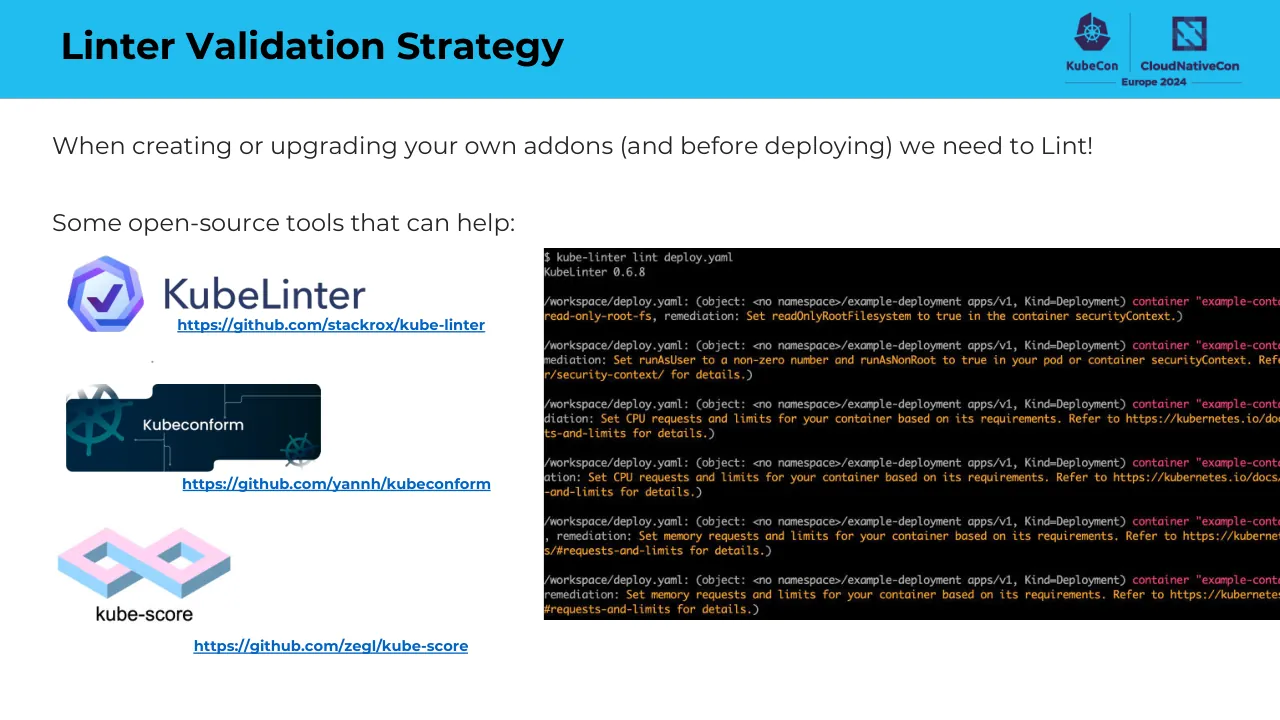
Linter Validation Strategy / When creating or upgrading your own addons (and before deploying) we need to Lint! / Some open-source tools that can help: / https://github.com/stackrox/kube-linter / https://github.com/yannh/kubeconform / https://github.com/zegl/kube-score / KubeCon / CloudNativeCon / Europe 2024 / KubeLinter / Kubeconform / kube-score
Visuals: Logos: KubeCon emblem (purple ship wheel hexagon) with 'KubeCon' wordmark and CloudNativeCon emblem (purple square icon) with 'CloudNativeCon' wordmark and 'Europe 2024' line, at top right in the header band. Tool logos at left: KubeLinter logo (blue-purple hexagon with white checkmark, dark navy 'KubeLinter' wordmark) at about x 5.2 y 35.5 w 23.3 h 11.0; Kubeconform logo (dark navy rounded block with teal Kubernetes wheel graphics and white 'Kubeconform' text) at about x 5.2 y 53.5 w 19.8 h 12.0; kube-score logo (pink and light blue isometric infinity-loop shape with dark grey 'kube-score' wordmark) at about x 4.3 y 72.7 w 14.0 h 14.4. Screenshot: a terminal window at about x 42.5 y 34.5 w 57.5 h 51.6, full black background, monospace white text showing '$ kube-linter lint deploy.yaml' then 'KubeLinter 0.6.8' then several warning lines in orange and red with paths '/workspace/deploy.yaml: (object: <no namespace>/example-deployment apps/v1, Kind=Deployment) container "example-container"' followed by remediation text such as 'read-only-root-fs, remediation: Set readOnlyRootFilesystem to true in the container securityContext.', 'Set runAsUser to a non-zero number and runAsNonRoot to true in your pod or container securityContext', and 'Set CPU requests and limits for your container based on its requirements', and 'Set memory requests and limits for your container based on its requirements'; the image is cropped at the right edge of the slide and is boxed with hard square corners, no shadow.
Slide 10
Helm Chart Validation / KubeCon / CloudNativeCon / Europe 2024 / When working with Helm Charts, it’s a good practice / to validate them / Some Options: / Use helm lint / Takes a path to a chart and runs a series of tests / to verify that the chart is well-formed. / Useful plugins: / - Helm Unit Test / Plugin that enables local unit testing of Helm / chart templates to validate their logic and / rendering with different input values, without / requiring deployment to a Kubernetes cluster / - Kubeconform plugin / Validates Helm chart-generated Kubernetes / resources against the Kubernetes API schemas to / ensure they are correctly structured and adhere to / expected configurations
Visuals: One Helm logo, a 512 by 512 pixel image placed in a box at x 57.0%, y 20.8%, w 39.7%, h 70.5%, not cropped and not full-bleed. It shows a navy ship's-wheel style emblem: an arc with spokes and rounded handles above the wordmark HELM, and a mirrored arc with handles below it. The wordmark is set in heavy geometric capitals in the same navy. Lighting is flat, with no shadow, overlay or tint on a white ground. Two conference logos sit top right on the blue band: the KubeCon logo (a dark purple hexagonal Kubernetes-wheel icon above the KubeCon wordmark) and the CloudNativeCon logo (a dark purple square with diagonal stripes above the CloudNativeCon wordmark), separated by a thin vertical rule and captioned Europe 2024 between two horizontal rules. No charts, tables or photographs.
Slide 11
Container Image Validation Strategy
Vulnerability Scanning:
Both tools excel at scanning container images and file
systems, crucial for securing cluster addons against
known vulnerabilities.
Comprehensive Databases:
Utilize extensive vulnerability databases for up-to-date
security checks
Integration-Friendly:
Easily integrate with CI/CD workflows, ensuring cluster
addons are validated for vulnerabilities pre-
deployment.
Open Source:
Free to use and community-driven ☺
What if our image has been already deployed, how
do we know about new vulnerabilities?
Harbor can help!
github.com/anchore/grype
github.com/aquasecurity/trivyv
KubeCon CloudNativeCon Europe 2024
Visuals: Three logos and one conference logo lockup. (1) Grype logo: a blue cartoon monster with two dark purple curled horns, a single large dark-navy eye with light-blue iris and white highlight, a small white tooth below a dark mouth, light-blue spots on its body, and the lowercase word grype in dark navy-purple beneath it; the monster is centred on a white background with no crop and no border. (2) Trivy logo (Aqua Security): a navy outlined hexagon containing a cyan, red, blue and yellow line pattern with a red dot at its centre, with the word aqua in small dark navy above and the word trivy in large dark navy lowercase below; white background, not cropped, not boxed. (3) Harbor logo: a thick grey ring with a green lighthouse tower inside on its left and a fan of light-blue and white beams radiating to the right, with the word HARBOR in grey capitals below; white background, not cropped. The conference logo at top-right shows a dark navy-purple Kubernetes wheel icon above the word KubeCon, a vertical divider, a dark navy-purple square icon above CloudNativeCon, and Europe 2024 in small navy text between two horizontal rules; it sits on the cyan band. No charts, tables or photographs.
Slide 12
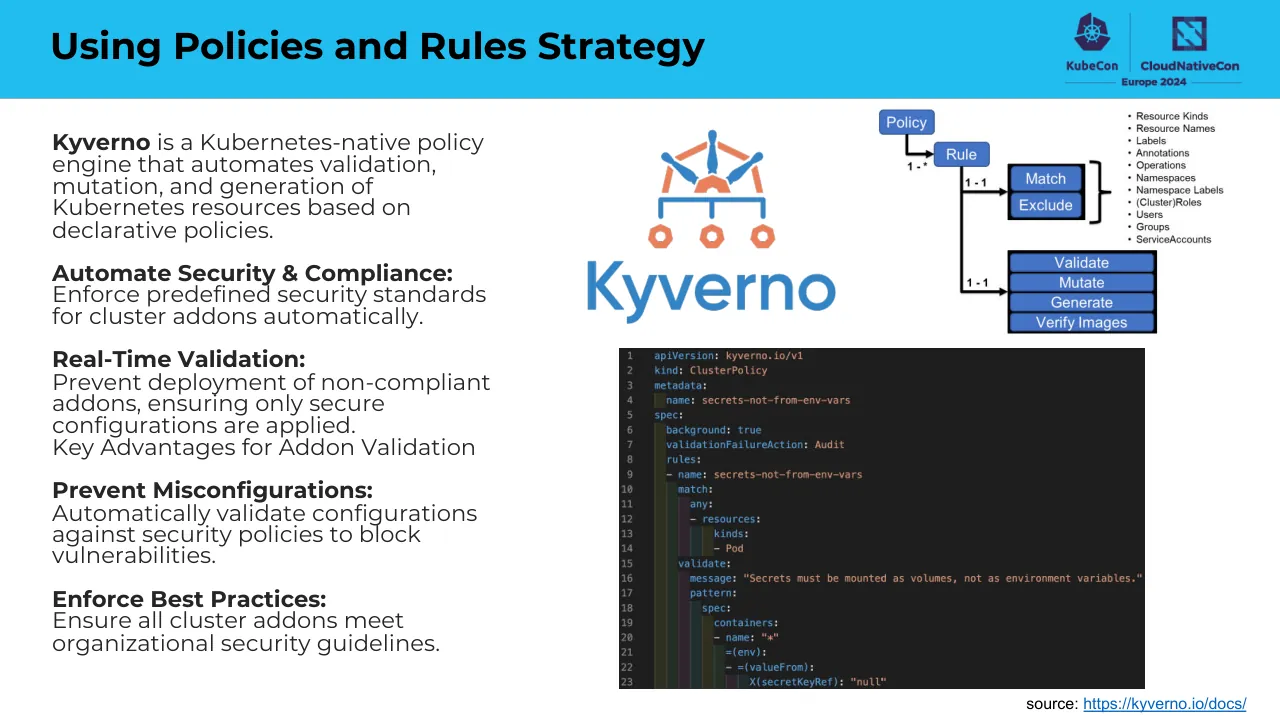
Using Policies and Rules Strategy
KubeCon
CloudNativeCon
Europe 2024
Kyverno is a Kubernetes-native policy
engine that automates validation,
mutation, and generation of
Kubernetes resources based on
declarative policies.
Automate Security & Compliance:
Enforce predefined security standards
for cluster addons automatically.
Real-Time Validation:
Prevent deployment of non-compliant
addons, ensuring only secure
configurations are applied.
Key Advantages for Addon Validation
Prevent Misconfigurations:
Automatically validate configurations
against security policies to block
vulnerabilities.
Enforce Best Practices:
Ensure all cluster addons meet
organizational security guidelines.
Kyverno
Policy
Rule
1 - *
Match
Exclude
1 - 1
Validate
Mutate
Generate
Verify Images
1 - 1
Resource Kinds
Resource Names
Labels
Annotations
Operations
Namespaces
Namespace Labels
(Cluster)Roles
Users
Groups
ServiceAccounts
source: https://kyverno.io/docs/
1 apiVersion: kyverno.io/v1
2 kind: ClusterPolicy
3 metadata:
4 name: secrets-not-from-env-vars
5 spec:
6 background: true
7 validationFailureAction: Audit
8 rules:
9 - name: secrets-not-from-env-vars
10 match:
11 any:
12 - resources:
13 kinds:
14 - Pod
15 validate:
16 message: "Secrets must be mounted as volumes, not as environment variables."
17 pattern:
18 spec:
19 containers:
20 - name: "*"
21 =(env):
22 - =(valueFrom):
23 X(secretKeyRef): "null"
Visuals: Five visuals. (1) Kyverno logo, centred in the area at x 45.8% y 17.9% w 19.5% h 27.1%: a stylised blue-and-orange emblem (orange hexagonal nodes and a helm-like arc above three orange hexagon nuts on a blue tree of lines) above the word Kyverno in blue lowercase-style sans-serif; no box, no border, on white. (2) Policy-rule diagram at x 63.8% y 13.9% w 34.8% h 34.8% (includes the bullet list): a flowchart of blue rounded-corner rectangles with dark outlines and white labels: a box labelled Policy at top left, with an arrow down and right to a box labelled Rule; an arrow labelled 1 - * from Policy to Rule. From Rule, a vertical black line runs down with a branch labelled 1 - 1 pointing right to a stacked pair of boxes Match and Exclude enclosed by a black bracket, and a lower branch labelled 1 - 1 pointing right to a stack of four boxes labelled Validate, Mutate, Generate and Verify Images, boxed by a black outline. (3) Bullet list to the right of the diagram at about x 88.0% y 15.6% w 9.5% h 18.4%: black sans-serif 10-point-equivalent text with round bullets, one item per line: Resource Kinds, Resource Names, Labels, Annotations, Operations, Namespaces, Namespace Labels, (Cluster)Roles, Users, Groups, ServiceAccounts. (4) Code screenshot at x 48.4% y 48.4% w 41.0% h 47.2%, not cropped, boxed with a sharp rectangle: a dark editor window with line numbers 1 to 23 in grey on the left and syntax-coloured YAML (keys light blue, string values orange-red, keywords such as true and Audit and Pod in blue/orange, comments none) on near-black background; the last visible line is cut off at the bottom edge of the window. (5) Source hyperlink text, not an image.
Slide 13
Validation using Rings and Secure Rollouts
KubeCon
CloudNativeCon
Europe 2024
Ring Deployments Explained:
- A phased deployment strategy that breaks down the rollout into stages
from a smaller, controlled group outwards towards the entire
infrastructure.
- This method reduces risks and allows for thorough checks at each step.
Why Ring Deployments for Kubernetes Addons?
- Safe: Allows for incremental validation and monitoring to identify and
mitigate potential issues early.
- Reduces the impact of updates or new deployments on production
workloads.
GitOps can help facilitate these deployments
- Git as a single source of truth for declarative infrastructure and cluster
addons. With GitOps, all deployment processes and their histories are
version-controlled and easily auditable.
Visuals: Two conference logos in the top-right corner of the blue header band: a purple KubeCon mark (a hexagonal emblem with a ship's wheel/helm symbol) above the word KubeCon, a thin vertical divider line, then a purple CloudNativeCon mark (a square with a stylised diagonal N-like glyph) above the words CloudNativeCon, and below both a horizontal rule either side of the text Europe 2024. The logos are dark purple (about #3D1F5C) on the blue band. No charts, photographs or other illustrations are present.
Slide 14
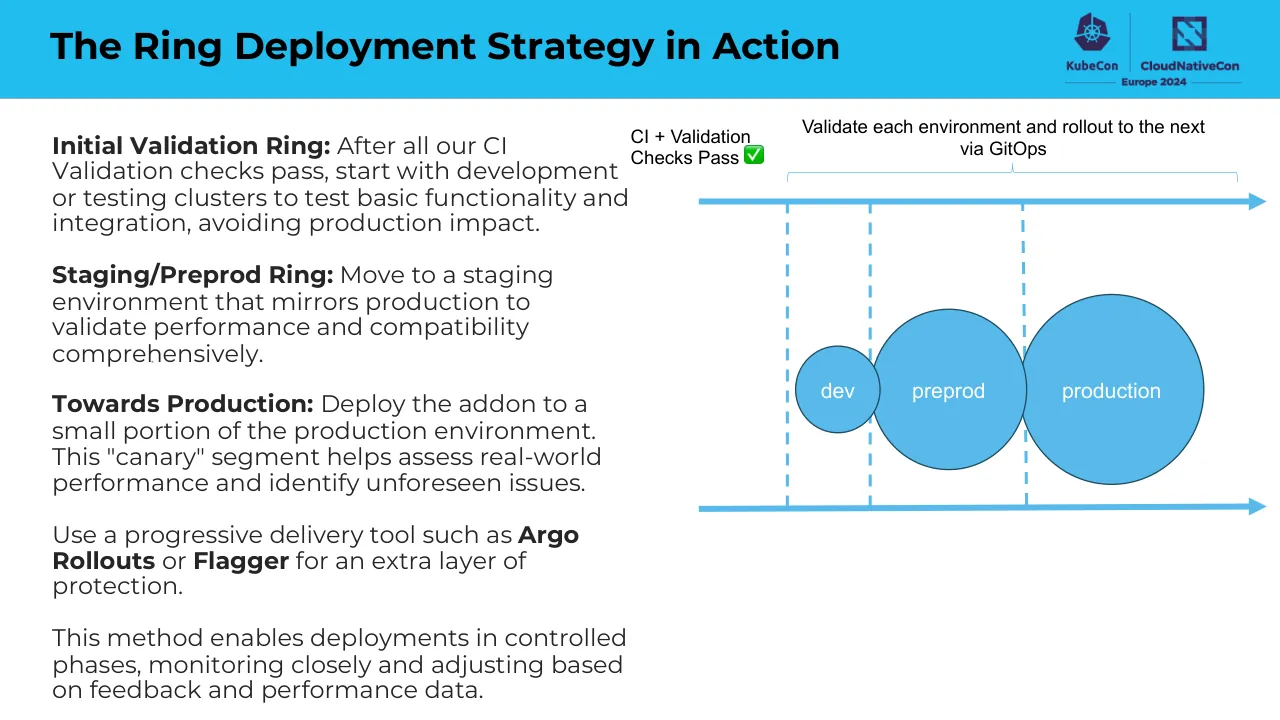
The Ring Deployment Strategy in Action / KubeCon / CloudNativeCon / Europe 2024 / Initial Validation Ring: After all our CI / Validation checks pass, start with development / or testing clusters to test basic functionality and / integration, avoiding production impact. / Staging/Preprod Ring: Move to a staging / environment that mirrors production to / validate performance and compatibility / comprehensively. / Towards Production: Deploy the addon to a / small portion of the production environment. / This "canary" segment helps assess real-world / performance and identify unforeseen issues. / Use a progressive delivery tool such as Argo / Rollouts or Flagger for an extra layer of / protection. / This method enables deployments in controlled / phases, monitoring closely and adjusting based / on feedback and performance data. / Validate each environment and rollout to the next / via GitOps / CI + Validation / Checks Pass ✅ / dev / preprod / production
Visuals: Diagram: a horizontal timeline-style flow drawn with light-blue (#59BBEA) elements. Top element: a thick horizontal arrow line (about 1.7% of slide height thick) from x 54.6% to 99%, arrowhead pointing right, at y 27.6%. Bottom element: a matching thick horizontal arrow at y 69.1% (2.0% thick), arrowhead pointing right. Three vertical dashed light-blue lines descend from the top arrow to the bottom arrow at approximately x 61.5%, x 68.0% and x 80.0%, spanning about y 28% to 70%. Three filled circles sit on the timeline, overlapping each other and each outlined in dark slate (about #1E4A5E, thin stroke): a small circle labelled 'dev' (x 62.2%, y 48.1%, w 6.6%, h 12.0%), a medium circle labelled 'preprod' (x 68.0%, y 43.0%, w 12.2%, h 22.3%) and a large circle labelled 'production' (x 79.6%, y 40.9%, w 14.4%, h 26.4%); labels are white Arial, centred. Above the top arrow is a thin light-blue curly brace spanning about x 61.5% to 96.7% at y 23.5% to 25.3%, with its centre tick pointing up to the caption 'Validate each environment and rollout to the next via GitOps' (black Arial, centred, two lines). A text label 'CI + Validation Checks Pass' with a green check-mark emoji (green square with white tick, about 1.2% of slide width) sits at top left of the diagram at x 49.3%, y 17.7%, left-aligned. Logos (in the picture, top right): a KubeCon logo consisting of a dark purple-navy ship's-wheel icon above the bold navy text 'KubeCon' (about x 83.5% to 87.2%, y 1.3% to 8.0%), a vertical thin divider line, and a CloudNativeCon logo consisting of a dark purple-navy square icon with a white diagonal stripe pattern above the text 'CloudNativeCon' (about x 91.2% to 97.0%, y 2.2% to 7.4%), with the words 'Europe 2024' in small bold navy beneath both, flanked by thin horizontal rules (about x 83.0% to 97.0%, y 11.0% to 11.8%).
Slide 15
Infrastructure Diagram for Demo
KubeCon
CloudNativeCon
Europe 2024
User
Grafana
Thanos
Prometheus
Manages the policies that
enable or disable addons
across different
environments.
argo
Management Cluster
git repo
stores the configuration
need for management
cluster
git repo
stores the configuration
for each cluster addon for
each environment fleet
Dev Fleet
dev-eastus
v1.28.5
dev-southcentralus
v1.27.9
dev-westeurope
v1.28.5
dev-westus2
v1.27.9
PreProd Fleet
preprod-eastus
v1.28.5
preprod-eastus2
v1.27.9
preprod-westeurope
v1.27.9
preprod-southcentralus
v1.27.9
Production Fleet
prod-eastus
v1.27.5
prod-eastus2
v1.27.9
prod-westeurope
v1.27.9
prod-southcentralus
v1.27.9
remote write to Thanos
Prometheus
/metrics
podinfo app
Each fleet cluster
in dev I preprod I prod
* demo purposes only*
Visuals: Diagram with icons and boxes. Management Cluster (rounded rectangle, thin dark outline, no fill) contains a grey hatched box holding Grafana logo, Thanos logo with label 'Thanos', and Prometheus logo with label 'Prometheus', and a second grey hatched box holding an NGINX green hexagon logo with a 'N' and a policy icon (orange and blue tree-like network icon above three small orange hexagons) with the caption 'Manages the policies that enable or disable addons across different environments.' beneath. Arrows: Grafana to Thanos (horizontal, pointing right); Prometheus to Thanos (horizontal, pointing left); NGINX up to Grafana box (vertical, arrowhead up); User stick figure to NGINX (horizontal, arrowhead right); Argo octopus logo to the upper box (diagonal, arrowhead up-left); Argo to lower box (horizontal, arrowhead left); Argo to the git repo box 1 (diagonal, arrowhead down-left); Argo to git repo box 2 (vertical, arrowhead down); Argo to Dev Fleet, PreProd Fleet and Production Fleet boxes (three diagonal or horizontal arrows, arrowheads at the fleet box edges). Git repo boxes: grey hatched rounded rectangles with dark outlines and small red git logos at bottom left. Fleet boxes: light blue-grey hatched fills with dashed dark outlines; each contains Azure Kubernetes-style orange icons with cluster names and version labels: Dev Fleet has dev-eastus v1.28.5, dev-southcentralus v1.27.9, dev-westeurope v1.28.5, dev-westus2 v1.27.9; PreProd Fleet has preprod-eastus v1.28.5 (orange icon), preprod-eastus2 v1.27.9 (cluster of purple cube icons, nine cubes in a hexagonal arrangement), preprod-westeurope v1.27.9 (orange icon), preprod-southcentralus v1.27.9 (purple cube cluster of six); Production Fleet has prod-eastus v1.27.5 (orange icon), prod-eastus2 v1.27.9 (purple cube cluster of nine), prod-westeurope v1.27.9 (orange icon), prod-southcentralus v1.27.9 (purple cube cluster of six). Right box: pale yellow hatched fill with dashed outline, containing a Prometheus logo, an arrow labelled '/metrics' pointing to a lavender rounded rectangle labelled 'podinfo app', a Kubernetes icon at bottom right corner, and a vertical arrow up labelled 'remote write to Thanos' from the Prometheus icon toward the Thanos box. Logos: KubeCon (dark navy Kubernetes wheel) and CloudNativeCon Europe 2024 (navy square logo) top right, separated by a thin vertical line; Management Cluster Kubernetes wheel icon in light blue at bottom left of its box; Grafana, Thanos, Prometheus, NGINX, Argo and Git logos as described.
Slide 16
DEMO
Visuals: Logo lockup, top right: a KubeCon ship-wheel icon in dark navy-purple with the KubeCon wordmark beneath it, a thin vertical divider, a CloudNativeCon square icon in the same navy-purple, the CloudNativeCon wordmark beneath it, and 'Europe 2024' centred below both with a thin horizontal rule on each side. No photographs, charts or diagrams. A tiny grey dot sits at the left edge around 12% across and 50% down.
Slide 17
Recap
- Cluster Addons are important and
need to validated to prevent issues
- There are many strategies to validating
addons and it all depends on your
requirements
- Open Source is Awesome and with the
right tools you can have a secure
cluster
Visuals: Logos (top-right of header band): KubeCon logo (purple Kubernetes-style hexagon with helm wheel emblem above the word 'KubeCon' in bold dark purple) separated by a thin vertical divider from the CloudNativeCon logo (purple square with stylised diagonal N-like mark above 'CloudNativeCon' in bold dark purple); beneath both, 'Europe 2024' in bold dark purple flanked by thin horizontal rules. No photographs, charts, or diagrams.
Slide 18
THANK YOU!
Contact me via CNCF Slack or Twitter
Joaquin Rodriguez
@joaquinrdzv
Visuals: 1) QR code: a black-and-white QR code, roughly 490 by 490 pixels, centred horizontally, occupying about x 40.5 to 59.5 and y 34.4 to 68.3 of the slide. Its three finder patterns are at the top-left, top-right and bottom-left corners. It is a flat, unshaded, unframed, sharp-edged bitmap with pure black modules on white. 2) X (formerly Twitter) logo: the black X mark in outline style, about 2.3 by 3.5 percent of the slide, placed directly left of the handle @joaquinrdzv. 3) KubeCon and CloudNativeCon Europe 2024 logo at top right: a dark purple Kubernetes helm wheel icon followed by the wordmark KubeCon, a thin vertical divider, a dark purple square icon followed by the wordmark CloudNativeCon, and the text Europe 2024 centred beneath with a thin horizontal rule on each side, all in dark purple (about #2E1A5C) on the blue band. 4) A tiny dark speck of about 0.2 percent width at about x 11.8, y 50.2, on the white background, apparently an artifact.