This KubeCon EU 2024 talk by Crossplane steering committee member Jared Watts and maintainer Philippe Scorsolini opens with a title slide and a plain definition of Crossplane as a cloud native control plane. It then covers the project's community standing ahead of CNCF graduation, followed by sections on managed resources, providers and the upjet tooling, and building a control plane with composition and functions. A further section covers developer experience tooling, composition functions, and a quick tour of the functions ecosystem, then composition environments, server side apply, and realtime compositions. A closing section focuses on community. The deck ends with links for getting involved and a call for adopters to share their stories. Many slides use one headline with a short bullet list, while managed resource and reconciliation slides pair a code sample or diagram with an annotated callout that makes the mechanics easy to follow. The composition slides show the XRD, Composition and Claim relationship as a diagram before walking through a PostgreSQL example.
Slides worth studying
Questions about this deck
What does the Crossplane deck say about its CNCF graduation status and contributors?
Slide 3 says the project is ready for CNCF Graduation, with 1,950+ contributors to the project and 690+ PR authors. It also lists 345+ companies contributing and 130+ companies with maintainers.
What does the Crossplane deck say about the upjet providers and their performance?
Slide 10 says Upbound has donated the upjet tooling and providers to the Crossplane community, and that it can generate a Crossplane provider from any Terraform provider. It reports 90+% CPU/Mem gains and a 1K objects time-to-ready change from 19.55 min to 1 sec average.
How many slides does the Crossplane deck have and how is it structured?
The Crossplane deck has 44 slides. It opens with a title slide and a definition of Crossplane, then covers community standing, managed resources, providers, composition and functions, developer experience, composition environments, server side apply, realtime compositions, community, and ends with links and a call for adopters on slides 43 and 44.
What does the Crossplane deck say about the Composition relationship between XRD, Composition and Claim?
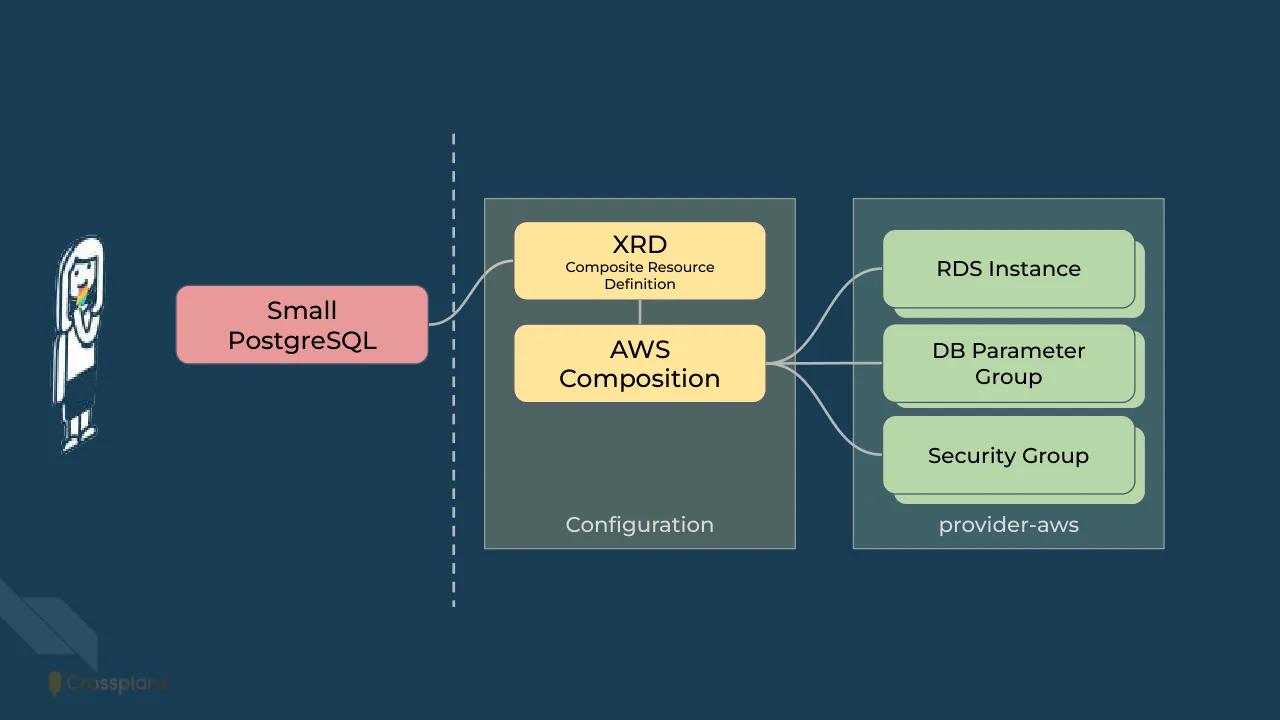
Slide 14 shows the Claim, XRD, Composite Resource, Composition, Managed Resource, Configuration and Provider relationship as a diagram. Slide 15 then walks through a Small PostgreSQL XRD example with an AWS Composition, RDS Instance, DB Parameter Group and Security Group.
Details
- Company: Crossplane
- Year: 2024
- Type: Conference talk
- Industry: Cloud infrastructure
- Pages: 44
Review score: 6 out of 10, Needs substantial work
Presentation quality, judged with the SlideDeck Co review heuristic. Ask, evidence and idea merit are not rated here.
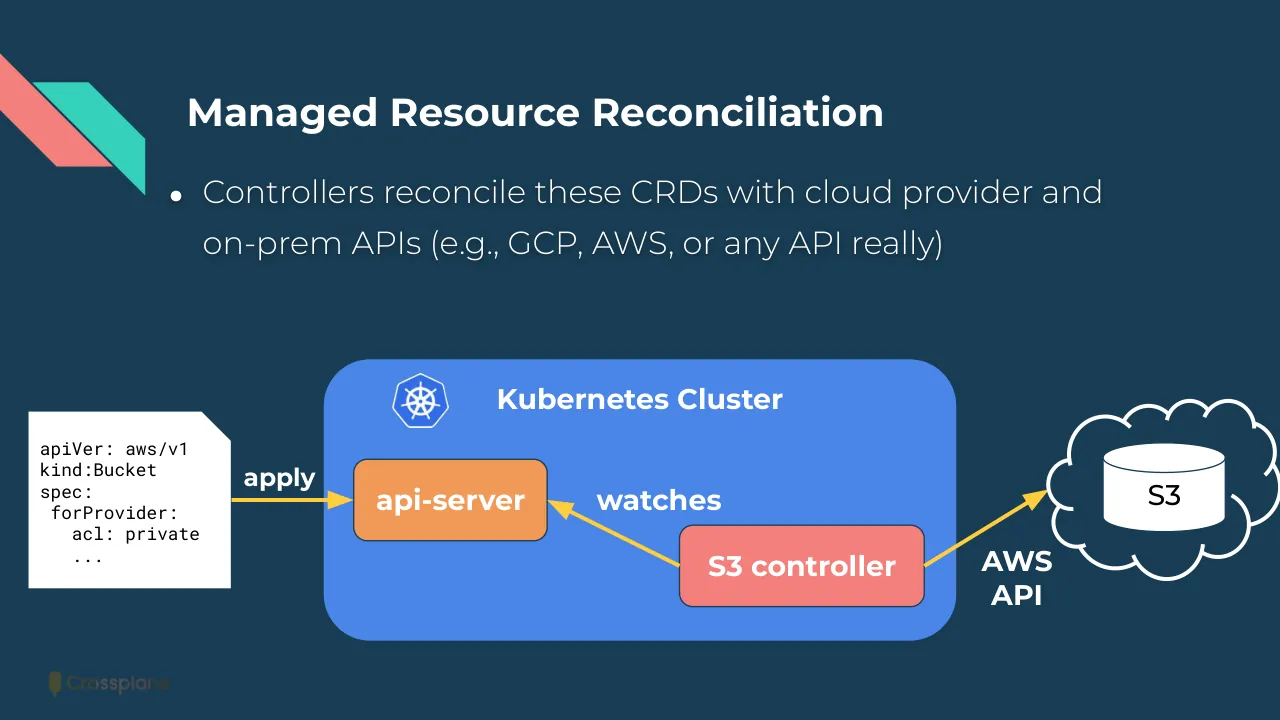
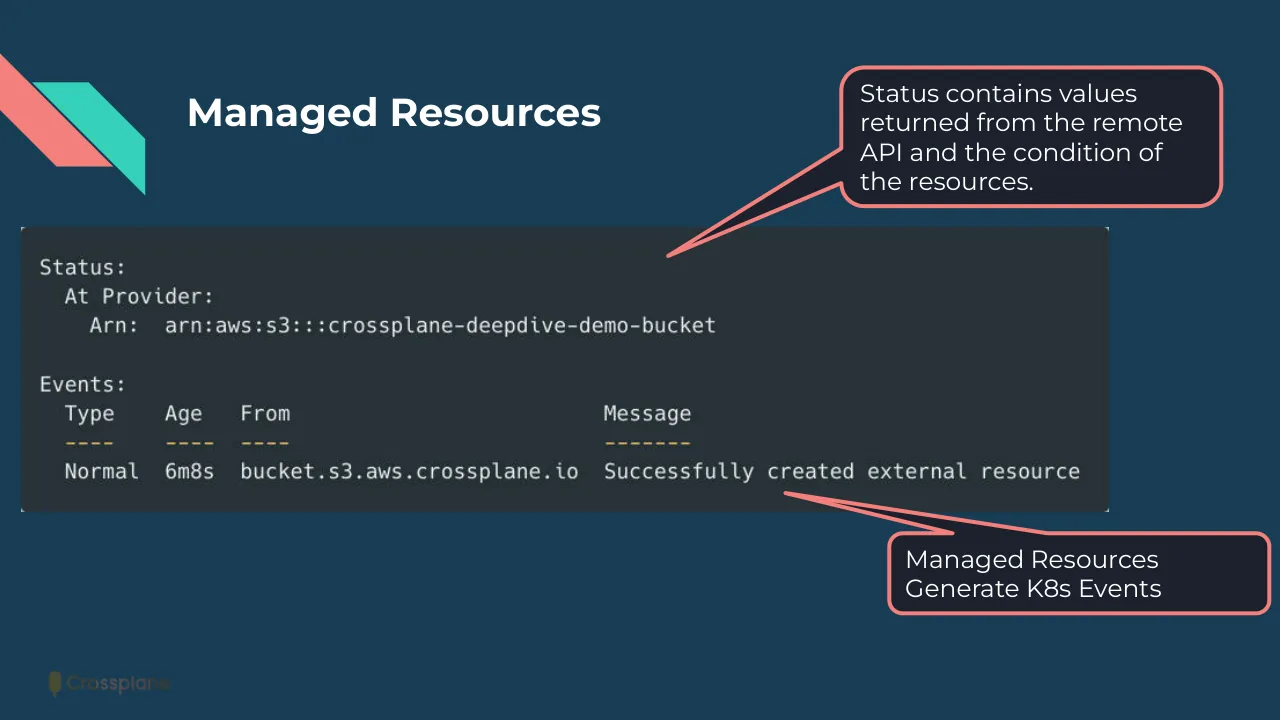
The route is easy to follow, and the best pages are very clear: the reconciliation diagram on slide 8, the Claim to XRD to Composition to resources diagram on slides 14 and 15, and the annotated code on slides 7, 16 and 17. But the second half is weakened by code screenshots that are unreadably small (slides 19 to 21 and the function tour on slides 28 to 33), and by many bare divider and 'Lightning Tour' pages that carry no content. Other weaknesses: the footer logo is nearly invisible, section dividers repeat, and several slides have one-line or leftover titles, such as the missing title on slides 14 and 15 and the typo 'witch on/off resources' on slide 32.
Worth keeping: Keep the annotated callout code slides (7, 16, 17), the reconciliation diagram on slide 8, and the consistent navy, coral, teal and yellow identity.
Most useful repair: Enlarge or crop the code on slides 19 to 21 and 28 to 33 to the few lines that matter and highlight them, and give slides 14 and 15 titles that state the point.
What would change the score: I would cut or merge the repeated section divider pages, fix the typo on slide 32, and make the footer logo legible or remove it.
Confidence medium. 44 of 44 pages inspected on contact sheets, 4 at readable size. Reviewed 2026-11-08. Model-assisted review (claude-sonnet-5-5).
Full text of the slides (44 slides)
Every slide's words and a description of its charts and images, so the deck can be searched and rebuilt. Also available as Markdown.
Slide 1
Crossplane
https://crossplane.io
Jared Watts - Steering Committee
Philippe Scorsolini - Maintainer
Visuals: Left: three overlapping parallelogram bands forming a diagonal stripe graphic, coral #F3807B (top-left band, x 0 y 0 w 25.2 h 44.6), yellow #FFCD3C (x 7.1 y 11.4 w 25.2 h 44.6) and teal #35D0BA (x 13.0 y 45.4 w 25.2 h 44.5), each with flat edges and no shadow, separated by thin navy gaps. Bottom-right: a flat isometric illustration in white outline with pastel fills of a delivery van with a coral, yellow and teal roof-mounted cargo block and an open rear door, two orange-and-white traffic cones, and a stacked block platform in coral, teal, yellow and peach. Bottom-left: the Crossplane logo, a small vertical popsicle-shaped mark in coral, yellow and teal followed by the white wordmark 'Crossplane'. Faint large diagonal translucent white shapes (opacity 0.02) run across the background at top-right and left.
Slide 2
What is Crossplane?
Your cloud native control plane
Provision/manage all of your resources
Compose those resources into high level abstractions
Give your developers self-service provisioning
Kubernetes is a great control plane for containers
Crossplane teaches it how to manage everything else
Cloud providers have used control planes for years
Now it’s your turn to build your own!
Visuals: Two flat diagonal ribbon shapes in the top-left corner. A salmon-pink strip (#F3807B) lies behind a teal strip (#35D0BA), with the teal strip offset down and right and both cut at 45 degrees. A Crossplane logo at bottom-left shows a small olive-brown emblem beside the wordmark 'Crossplane' in dark, low-contrast brown-grey. A placed image box at x 11.5%, y 22.0%, 85.7% by 68.3%, 1000 by 449 px, shows no distinguishable content on the slide and appears to be transparent behind the text. No charts, photographs or diagrams.
Slide 3
CNCF project ready for Graduation!
1,950+ contributors to the project
Top 10% of all CNCF projects for PR authors
690+ PR authors
345+ companies contributing
130+ companies with maintainers
Steering committee now has members from Apple, Nokia, and Upbound to lead and steward the project
Lots of adopters in production and at scale (ADOPTERS.md)
Nike, Autodesk, Grafana, NASA Science Cloud, Elastic, Akamai,
SAP, IBM, VMWare Tanzu, Nokia, etc.
Full proposal: cncf/toc#1254
Crossplane
Visuals: Decorative: two diagonal parallelogram bands in the upper-left corner, with the coral #F3807B band at x 0.0%, y 7.4%, w 8.8%, h 15.7% and the teal #35D0BA band at x 2.5%, y 11.4%, w 8.8%, h 15.7%. The teal band overlaps the coral band and both have 45-degree diagonal edges. A placed image (1000 by 511 px) sits at x 11.5%, y 17.6%, w 85.7%, h 77.8%; it shows no visible subject and appears transparent or blank behind the text. A Crossplane logo at x 3.4%, y 92.7%, w 10.3%, h 4.4%: a small rounded vertical capsule icon with a stem, followed by the 'Crossplane' wordmark, in dark olive tone. No charts, tables or photographs.
Slide 4
The Basics
Managed Resources
Visuals: Decorative geometric pattern in the right half: two large diagonal bands in white at 3% opacity, and about fourteen small parallelogram blocks in white at 7% opacity arranged in a staggered brick-like diagonal grid. Two accent blocks break the pattern: a coral #F3807B block at about x 75.5, y 40.2 and a yellow #FFCD3C block at about x 79.0, y 72.2. All shapes have 45-degree diagonal edges and square corners. Bottom-left: the Crossplane logo, a small olive capsule icon followed by the wordmark Crossplane, rendered low in contrast against the background.
Slide 5
Managed Resources Example: AWS
Networking
Databases
Kubernetes Clusters
IAM
VMs
Message Queues
Caches
Certificates
…and much more…
provider-aws
upbound official
Install Manifest
Providers > provider-aws
Starred
v0.33.0
Overview
Provider AWS is a Crossplane provider for Amazon Web Services (AWS) developed and supported by Upbound. If you encounter an issue please reach out on our [email protected] email address.
Package Type
Support
Source Code
Legal Notices
Provider
Upbound
github.com/upbound/provider-aws
View
Docs
CRDs (901)
Custom Resource Definitions (CRDs) define new API types in a Crossplane cluster.
Search for CRDs (e.g. Analyzer, ArchiveRule)
https://marketplace.upbound.io/providers/upbound/provider-family-aws
Visuals: Two decorative flat shapes at top-left: a coral #F3807B parallelogram band (x 0 to 8.8%, y 7.4 to 23.1%) overlapped by a turquoise #35D0BA parallelogram band (x 2.5 to 11.3%, y 11.4 to 27.1%), both cut diagonally at 45 degrees with square ends. A boxed screenshot (1024 by 606 px, no crop, no overlay, sharp corners, thin light border) of the Upbound marketplace page for provider-aws: on the left a white rounded card with a small aws logo in a rounded light-grey square, the bold dark navy name provider-aws, and a purple upbound official label; below it an outlined rounded pill button reading Install Manifest with a dark navy border. The right side shows a breadcrumb Providers > provider-aws in purple and grey, a Starred button with a gold star, a v0.33.0 dropdown, a bold Overview heading, a paragraph with purple underlined links to Amazon Web Services (AWS) and [email protected], a four-column info row (Package Type/Provider, Support/Upbound, Source Code/github.com/upbound/provider-aws, Legal Notices/View) with purple link values, a horizontal divider, tabs Docs (dark) and CRDs (901) (purple, with a purple underline), a grey description line, and a search field with grey placeholder text. Dominant colours of the screenshot are white with navy and purple text. Crossplane logo: a small olive-dark pin-shaped mark with the word Crossplane in dark olive, low contrast on navy.
Slide 6
Managed Resources / apiVersion: s3.aws.crossplane.io/v1beta1 / kind: Bucket / metadata: / name: crossplane-deepdive-demo-bucket / spec: / forProvider: / acl: private / locationConstraint: eu-west-1 / paymentConfiguration: / payer: BucketOwner / versioningConfiguration: / status: Enabled / tagging: / tagSet: / - key: Name / value: CrossplaneDeepDiveDemoBucket / Bucket overview / AWS Region / EU (Ireland) eu-west-1 / Amazon Resource Name (ARN) / arn:aws:s3:::cross plane-deepdive-demo -bucket / Creation date / April 21, 2023, 15:00:23 (UTC+01:00) / Tags (1) / Track storage cost or other criteria by tagging your bucket. Learn more / Key / Value / Name / CrossplaneDeepDiveDemoBucket / Crossplane
Visuals: Three images and one logo, plus two decorative shapes. (1) Code screenshot: a dark editor-style panel showing a YAML manifest for an AWS S3 Bucket resource in monospace type. Keys are salmon-coloured (#F3807B-like), values are off-white, and the panel is slightly rounded and boxed with no crop. Content is the manifest text listed in the text field. (2) AWS console screenshot titled Bucket overview on a near-white card (#FAFAFA) with a thin grey divider under the heading and two vertical grey dividers separating three columns: AWS Region with value EU (Ireland) eu-west-1; Amazon Resource Name (ARN) with a small copy icon followed by arn:aws:s3:::crossplane-deepdive-demo-bucket wrapped across lines; Creation date with value April 21, 2023, 15:00:23 (UTC+01:00). (3) AWS console screenshot titled Tags (1) on a near-white card (#FAFAFA) with a grey description line, a blue Learn more link (about #0972D3) with an external-link icon, and a two-column table with header row Key and Value, and one data row Name and CrossplaneDeepDiveDemoBucket, separated by thin grey rules. (4) Crossplane logo: a small tree-like icon above the lowercase wordmark Crossplane, rendered in a muted green-grey, low contrast against the navy. (5) Decorative shapes: a pink parallelogram band (#F3807B) angled 45 degrees at the top-left, with a teal band (#35D0BA) overlapping its right side in the same diagonal direction.
Slide 7
Managed Resources / Status contains values returned from the remote API and the condition of the resources. / Status: / At Provider: / Arn: arn:aws:s3:::crossplane-deepdive-demo-bucket / Events: / Type Age From Message / ---- ---- ---- ------- / Normal 6m8s bucket.s3.aws.crossplane.io Successfully created external resource / Managed Resources Generate K8s Events / Crossplane
Visuals: Three elements. (1) A screenshot of terminal output, 940 by 246 pixels, placed at x 1.7%, y 31.6%, 84.9% by 39.5%, unboxed with square corners and a thin dark frame. It shows monospace light-grey text on a charcoal panel: a Status block with At Provider and Arn lines, then an Events table with columns Type, Age, From and Message. The dashed separator row is in yellow-orange. The data row reads Normal, 6m8s, bucket.s3.aws.crossplane.io, Successfully created external resource. Lighting is flat and even, with no overlay. (2) Two speech-bubble callouts with dark #1B212C fill and coral #F3807B outlines, each with a tail pointing at the screenshot. The top callout points to the Status block. The bottom callout points to the Message cell of the data row. (3) Two decorative chevron shapes in the top-left corner, one coral #F3807B and one teal #35D0BA, overlapping diagonally.
Slide 8
Managed Resource Reconciliation
● Controllers reconcile these CRDs with cloud provider and
on-prem APIs (e.g., GCP, AWS, or any API really)
apiVer: aws/v1
kind:Bucket
spec:
forProvider:
acl: private
...
apply
Kubernetes Cluster
api-server
watches
S3 controller
AWS
API
S3
Visuals: Diagram. A white document card with a folded top-right corner holds monospace code (apiVer: aws/v1 / kind:Bucket / spec: / forProvider: / acl: private / ...). A yellow arrow labelled apply runs horizontally from the card to an orange api-server box inside a blue rounded rectangle labelled Kubernetes Cluster, with a small Kubernetes wheel logo (white outline on blue) at its top-left; the arrowhead touches api-server. A pink S3 controller box sits lower-right inside the blue box; a yellow arrow labelled watches runs diagonally from the S3 controller up-left to api-server, arrowhead at api-server. A yellow arrow labelled AWS API runs diagonally up-right from the S3 controller to a white-outlined cloud at far right, arrowhead at the cloud; inside the cloud is a white cylinder with dark navy elliptical top edge labelled S3 in black. Arrows are yellow about #FDC62F, about 0.5% of slide height thick, with solid triangular heads. The Crossplane wordmark is a small dark olive logo with a popsicle-shaped mark at bottom-left. No photographs.
Slide 9
Providers
Extend Crossplane to new environments
Crossplane
Visuals: Decorative geometric graphic, no photograph. Along the right side, a diagonal band of translucent parallelogram tiles runs from upper-left to lower-right, in a brick or stair-step pattern. Most tiles are white at about 7% opacity, forming a slightly lighter navy. Two tiles are solid accents: a coral tile at about x 75.5 y 40.2 and a yellow tile at about x 79.0 y 72.2. Two large faint diagonal bands run from top-right down to the lower-right corner, white at about 3% opacity, and they are cropped by the slide edges. Lower-left, the Crossplane logo is a small rounded-top mark with the wordmark, rendered in a dim olive tone with low contrast on navy.
Slide 10
Upjet providers for the community
Upbound has donated the upjet tooling and providers to the Crossplane community
Generate a Crossplane provider from any Terraform provider
New architecture with massive performance gains
90+% CPU/Mem and 1000x time-to-ready (TTR) improvements
1K objects: 19.55 min → 1 sec average TTR
Broad coverage, reliable, performant - ready for production
github.com/crossplane-contrib/provider-upjet-aws
github.com/crossplane-contrib/provider-upjet-azure
github.com/crossplane-contrib/provider-upjet-gcp
Crossplane
Visuals: Two overlapping parallelogram-style corner shapes in the top-left: a coral #F3807B band at the top-left and a turquoise #35D0BA band overlapping it to its right, forming a chevron-like ribbon with diagonal cut edges. Bottom-left: a small Crossplane logo (a rounded green-teal capsule mark beside the word 'Crossplane' in dark olive/grey) at about x 3.4%, y 92.7%, w 10.3%, h 4.4%. The logo is an image of 5 by 2 pixels scale, rendered in muted tones on the dark background. No photographs, charts or diagrams.
Slide 11
Marketplace for all Extensions
Discover and share Crossplane
extensions
Providers, Functions,
Configurations
Open to everyone
https://marketplace.upbound.io
Screenshot text: upbound Marketplace / Search Marketplace / Browse / Publish / Sign In / Try for Free / Crossplane [colourful icon] Providers and Configurations for your control plane / Create an Upbound Account to Publish Packages / Official Providers / Fully maintained and covered by Upbound Support / See All Providers / provider-aws / Upbound Official / provider-azure / Upbound Official / provider-gcp / Upbound Official / provider-terraform / Upbound Official / provider-azuread / Upbound Official / Featured Configurations / See All Configurations / platform-ref-aws / upbound / platform-ref-azure / upbound / platform-ref-gcp / upbound / dot-kubernetes / devops-toolkit / dot-sql / devops-toolkit
Crossplane
Visuals: One screenshot photograph of the upbound Marketplace website, boxed (not full-bleed) with square corners and no visible border, placed at about x 13.9%, y 15.9%, w 49.9%, h 71.9% (563 by 457 px). Contents: a navy top bar with the upbound Marketplace wordmark at left, a white rounded search pill in the centre, and Browse, Publish, an outlined Sign In pill and a purple Try for Free pill at right. Below it on white: a hero headline in dark navy bold sans-serif, an outlined pill button reading Create an Upbound Account followed by grey text Publish Packages, and at the right a line-drawn cloud outline containing a lilac 'up' mark, surrounded by about 12 small app tiles (Azure, AWS, Terraform, GCP, Kubernetes-style and other provider icons in blue, purple, orange, green and black). Below a thin grey rule are two card rows on very light grey #F5F5F5 cards with thin rounded corners: Official Providers (5 cards: provider-aws, provider-azure, provider-gcp, provider-terraform, provider-azuread, each with a purple check 'Upbound Official') and Featured Configurations (5 cards: platform-ref-aws, platform-ref-azure, platform-ref-gcp, dot-kubernetes, dot-sql with subtitles upbound, upbound, upbound, devops-toolkit, devops-toolkit). The screenshot is slightly blurred and low resolution. A second placed image box lies at x 63.8%, y 26.4%, w 36.2%, h 54.3% (500 by 401 px) beside the screenshot; no distinct content is visible in it on the rendered slide. Also a Crossplane logo: a small olive-green carrot-like icon with the wordmark Crossplane in dim olive-grey, low contrast against the navy, at about x 3.4%, y 92.7%, w 10.3%, h 4.4%. Decorative shapes: a coral #F3807B parallelogram-stripe and a teal #35D0BA parallelogram-stripe at the top left, both diagonal bands cut at 45 degrees.
Slide 12
Building Your Control / Plane / Composition and Functions / Crossplane
Visuals: Decorative geometric graphic on the right side, behind nothing and not overlapping the text. It is made of flat parallelogram tiles with diagonal cut edges, arranged in a stepped diagonal band running from upper-left to lower-right. Most tiles are translucent white at about 7% opacity, forming a subtle pattern. Two tiles are solid accents: one coral tile at upper right (#F3807B) and one yellow tile lower down (#FFCD3C). Two larger translucent white bands at about 3% opacity form a wide diagonal stripe behind the tiles, running from the top edge towards the lower right. The tiles are sharp-cornered with no shadows or gradients. The Crossplane logo at bottom left is a small olive-green upright capsule icon followed by the wordmark, rendered in low-contrast dark olive on the navy background. No photographs.
Slide 13
Build your own Platform API / Assemble granular resources, e.g. from multiple clouds. / Expose as higher level self-service API for your app teams / Compose GKE, NodePool, Network, Subnetwork / Offer as a single Cluster abstraction (API) with limited config / for developers to self-service / Hide infrastructure complexity and include policy guardrails / All with K8s API - compatible with kubectl, GitOps, etc. / No code required / Crossplane
Visuals: Decorative top-left graphic: a coral/salmon (#F3807B) diagonal band at x 0 to 8.8%, y 7.4 to 23.1%, and a teal (#35D0BA) diagonal band offset to the right and below it at x 2.5 to 11.3%, y 11.4 to 27.1%. Both bands are parallelograms cut at 45 degrees, running from upper left to lower right, with the teal band overlapping the coral band. Bottom-left: the Crossplane logo, a small olive-dark mark with the wordmark 'Crossplane'. A 1000 by 458 pixel image is placed over the body area at x 13.2%, y 22%, w 84%, h 68.3%; no visible picture content is apparent on the slide, so it appears to be a transparent layer behind the text.
Slide 14
Claim / XRD / Composite Resource / Definition / Composition / Managed Resource / Managed Resource / Managed Resource / Configuration / Provider / Crossplane
Visuals: Diagram with one character illustration and one logo. Shapes: a red-pink rounded rectangle labelled 'Claim' (left); a tall grey-teal rectangle labelled 'Configuration' containing two yellow rounded rectangles, 'XRD' with subtext 'Composite Resource Definition' on top and 'Composition' below; a second grey-teal rectangle labelled 'Provider' containing three green rounded cards labelled 'Managed Resource', each with an offset stacked card behind it. Connectors: a curved light-grey line runs from the right edge of Claim to the left edge of XRD; a short straight vertical line joins the bottom of XRD to the top of Composition; from the right edge of Composition three light-grey lines fan out, a curved one to the top card, a straight horizontal one to the middle card and a curved one to the bottom card, each ending at a card's left edge. A vertical dashed light-grey line at about x 35.3% separates Claim from the Configuration panel, running from about y 18.5% to y 84.2%. The character is a full-length cartoon woman in white with black outlines and long hair, standing with one hand raised near her mouth and tongue out showing a rainbow-coloured tongue; she is not cropped, has no background, and is set on the dark navy field with no tint. The logo is a small olive-green capsule icon followed by the wordmark 'Crossplane' in dark olive at low opacity (about #3E4A2C), placed over the bottom-left decorative bands. No photograph; no chart or table.
Slide 15
Small
PostgreSQL
XRD
Composite Resource
Definition
AWS
Composition
Configuration
RDS Instance
DB Parameter
Group
Security Group
provider-aws
Crossplane
Visuals: Diagram. Shapes and labels, left to right: (1) a character illustration: a cartoon woman with long straight hair, white-outlined dark navy figure, one hand raised to her chin, a small rainbow-coloured accent at the chest, standing full-length, boxed on the navy background with no border; (2) a pink rounded rectangle labelled 'Small PostgreSQL'; (3) a vertical dashed light grey line, about 2px wide, running from about 18.5% to 84% of the height at x about 35.3%, separating the pink box from the Configuration panel; (4) a grey-teal rectangle labelled 'Configuration' at the bottom centre, containing two yellow rounded rectangles stacked vertically: 'XRD' with subtitle 'Composite Resource Definition' at the top, and 'AWS Composition' below it, joined by a short vertical grey connector from the XRD bottom edge to the AWS top edge; (5) a green-tinted rectangle labelled 'provider-aws' at the bottom centre, containing three green rounded rectangles with a stacked offset card behind each: 'RDS Instance', 'DB Parameter Group', and 'Security Group'. Connectors: a curved grey line from the right edge of 'Small PostgreSQL' rising to the left edge of 'XRD'; a curved grey line from the right edge of 'AWS Composition' fanning out to the left edges of 'RDS Instance' (upward curve), 'DB Parameter Group' (straight horizontal line), and 'Security Group' (downward curve); all connectors are light grey and about 2.5px wide with no arrowheads. Bottom left: a small Crossplane logo (a green-olive stylised mark above the lowercase wordmark 'Crossplane' in dark olive with low contrast) and two overlapping translucent white diagonal parallelogram bands forming a stripe corner shape at 9% opacity. Hidden elements: three text labels 'Managed Resource' (ArialMT, 3.46% font size, black) are positioned at x 71.2%, y 37.3%, at x 71.5%, y 50.0% (Montserrat-Medium, 2.96%) and at x 71.2%, y 63.2%; they lie beneath the green boxes and are not visible on the rendered slide.
Slide 16
Composite Resources / First create Composite / Resource Definition / (XRD) to declare our / custom platform API / apiVersion: apiextensions.crossplane.io/v1 / kind: CompositeResourceDefinition / metadata: / name: nosqls.database.example.com / spec: / group: database.example.com / names: / kind: NoSQL / plural: nosqls / versions: / - name: v1alpha1 / served: true / referenceable: true / schema: / openAPIV3Schema: / type: object / properties: / Custom API Group / Standard openAPIV3 / Schema / Crossplane
Visuals: One screenshot of a YAML code listing (about 44% of slide width, 74% of height) placed at x 15, y 20 on a charcoal panel, unrounded and unbordered, showing a Crossplane CompositeResourceDefinition with keys in coral and values in white and booleans in lilac. Three speech-bubble style callouts: top callout pointing to the apiVersion line, middle callout ('Custom API Group') pointing to the group line, lower callout ('Standard openAPIV3 Schema') pointing to the openAPIV3Schema line. Decorative pink and teal parallelogram chevrons at top-left. Small Crossplane logo (dark olive pill icon with wordmark) bottom-left.
Slide 17
Compositions
apiVersion: apiextensions.crossplane.io/v1
kind: Composition
metadata:
name: nosqls.database.example.com
spec:
compositeTypeRef:
apiVersion: database.example.com/v1alpha1
kind: NoSQL
mode: Pipeline
pipeline:
- step: generate-resources
functionRef:
name: function-acme-func
input: {}
- step: filter-resources
functionRef:
name: function-filter
input: {}
Then we define a
Composition which
implements the XRD
The XRD this
Composition is for
Pipeline of functions to
execute that will generate
managed resources
Crossplane
Visuals: A screenshot of a YAML code listing in a monospace font on a dark slate panel, showing a Crossplane Composition named nosqls.database.example.com with compositeTypeRef, pipeline mode and two pipeline steps (generate-resources and filter-resources). Keys are coral, values are white, and the braces are green. Three dark rounded callout bubbles with coral outlines and wedge tails: the first points to the top-right of the code at about 55.8% x, 33.8% y; the second points to the compositeTypeRef apiVersion line at about 55.5% x, 49.1% y; the third points to the functionRef name line at about 46.1% x, 70.9% y. A Crossplane logo (olive-green pawn-like icon with wordmark) sits at the bottom-left, partly overlapping the code panel edge. Two decorative diagonal parallelogram bands sit at the top-left: a coral band and a teal band overlapping it. The code panel is a boxed image with slightly squared corners, not full-bleed.
Slide 18
What can Functions do?
Run a pipeline of simple functions to compose resources
Written in your language of choice with your unique logic
Sweet spot between “no code” ←→ building an entire controller
Focus only on your platform’s unique needs
Crossplane does the heavy lifting of CRUD-ing resources,
reconciling, finalizers, owner refs, etc
You don’t have to write any code to start using functions
Reusable functions that are generally useful
e.g., helm/go templates, CUE scripts, KCL code, etc.
Visuals: Two flat diagonal chevron-like parallelogram shapes in the top-left corner: a coral/salmon #F3807B band (back, starting at the left edge around y 7% and running down-right) and a turquoise #35D0BA band overlapping it to the right and slightly lower, both with square corners and no shadow or outline. Bottom-left, a small Crossplane logo (icon of a rounded capsule-shaped mark plus the lowercase wordmark 'Crossplane') rendered in a dark olive tone with low contrast against the navy. A placed image box of 1000 by 449 pixels sits behind the bullet list (x 10.7%, y 24.1%, w 85.7%, h 68.3%); no distinct picture content is visible in it, so it appears to be a transparent or empty raster. No photographs, charts or tables.
Slide 19
Writing Functions - Go
// RunFunction observes an example composite resource (XR). It simple adds one
// S3 bucket to the desired state.
func (f *Function) RunFunction(_ context.Context, req *fnv1beta1.RunFunctionRequest)
(*fnv1beta1.RunFunctionResponse, error) {
f.log.Info("Running Function", "tag", req.GetMeta().GetTag())
rsp := response.To(req, response.DefaultTTL)
// create a single test S3 bucket
_ = v1beta1.AddToScheme(composed.Scheme)
name := "test-bucket"
b := &v1beta1.Bucket{
ObjectMeta: metav1.ObjectMeta{
Annotations: map[string]string{
"crossplane.io/external-name": name,
},
},
Spec: v1beta1.BucketSpec{
ForProvider: v1beta1.BucketParameters{
Region: ptr.To[string]("us-east-2"),
},
},
}
...
return rsp, nil
}
Crossplane
Visuals: One photograph-style screenshot of Go source code shown as a boxed panel at x17 y14.1 w66 h83, sharp corners, no border, filling the panel with dark code text on a near-black background. The code is in a monospace font with syntax colouring: green comments (#6A9955 approx.), pink-magenta keywords such as func, return and map (#C586C0 approx.), light blue function and type names (#9CDCFE approx.), light grey identifiers and punctuation (#D4D4D4 approx.), and salmon-orange string literals (#CE9178 approx.). Lines are left-aligned starting at the panel's left inset. Two decorative diagonal bars at top left: a coral #F3807B band at x0 y7.4 w8.8 h15.7 and a teal #35D0BA band at x2.5 y11.4 w8.8 h15.7 overlapping it, both cut diagonally. A small Crossplane logo (icon of a rounded capsule plus wordmark) at bottom left, dark olive-grey, low contrast against the navy background.
Slide 20
Using Functions - for loop (templates) / apiVersion: apiextensions.crossplane.io/v1beta1 / kind: Composition / metadata: / name: example / spec: / compositeTypeRef: / apiVersion: database.example.org/v1 / kind: XPostgreSQLInstance / mode: Pipeline / pipeline: / - step: compose-xr-using-go-templates / functionRef: / name: go-templates / input: / apiVersion: example.org/v1 / kind: GoTemplate / source: Inline / inline: | / {{- range $i := until ( .desired.composite.resource.spec.count ) }} / --- / apiVersion: rds.aws.upbound.io/v1beta1 / kind: Instance / spec: / forProvider: / engine: postgres / engineVersion: "13.7" / ...etc... / {{- end }} / - step: validate-composed-resources / functionRef: / name: cel-validation / Crossplane
Visuals: Decorative top-left graphic: two parallel diagonal bands forming a stripe, a coral/pink #F3807B band behind and a turquoise #35D0BA band in front, both cut at 45 degrees and running from upper-left to lower-right, occupying roughly 0 to 11% horizontally and 7 to 27% vertically. Central code screenshot: a dark charcoal panel (#262E33) with monospace YAML syntax highlighting, showing a Crossplane Composition with a Go-template inline pipeline; keys are in coral #F47C6E, plain values in off-white #E6EBEE, template and resource lines in light green #B5E06A, and the inline pipe character in teal #35D0BA; the panel is a sharp-cornered rectangle with a faint lighter border, flat and unshadowed, not cropped. Bottom-left: the Crossplane logo, a small dark olive icon (a rounded pill-shaped glyph) followed by the wordmark, in a muted dark olive tone.
Slide 21
Using Functions - if conditionals (CUE)
apiVersion: apiextensions.crossplane.io/v1
kind: Composition
...
pipeline:
- step: conditional
functionRef:
name: function-cue
input:
apiVersion: cue.fn.crossplane.io/v1beta1
kind: CUEInput
export:
target: Resources
options:
inject:
- name: provider
path: spec.provider
value: |
#env: string @tag("provider")
name: "TestNodepool"
resource: {
if #env == "aws" {
apiVersion: "eks.crossplane.io/v1"
}
if #env == "gcp" {
apiVersion: "gke.crossplane.io/v1"
}
...
Crossplane
Visuals: One photograph-style screenshot of a code editor window, boxed (not full-bleed), placed centrally. It shows a YAML and CUE code listing on a dark charcoal-slate panel (about #263238) with a faint lighter border. Syntax colouring: YAML keys in salmon-red (about #F07A72), values and plain text in off-white (about #E6EDF0), CUE string values and the value block in pale green (about #C3E88D), the pipe character and the value indicator in teal (about #35D0BA). Monospace code font, roughly 1.9% of slide height per line, with lines left-aligned at about 30% from the left edge of the slide. Decorative graphic at top-left: two parallel diagonal slanted bars (parallelograms with 45-degree cut ends), one salmon-red (#F3807B) at about 0% to 8.8% horizontally and 7.4% to 23.1% vertically, and one teal (#35D0BA) overlapping it at about 2.5% to 11.3% horizontally and 11.4% to 27.1% vertically. Logo at bottom-left: the Crossplane wordmark with a small rounded-pin icon, in a dark olive green (about #3E4A2A) on the navy background, low contrast. Image crop: the code panel is not cropped, it is a full rectangular screenshot.
Slide 22
Developer Experience
Making Crossplane Easier
Crossplane
Visuals: Abstract geometric background pattern, no photograph. Diagonal bands run from upper-left to lower-right across the right half, built from translucent white parallelograms at about 3% to 7% opacity, with two solid accent parallelograms: one coral #F3807B in the upper-right area (about x 75.5, y 40.2) and one yellow #FFCD3C in the lower-right area (about x 79.0, y 72.2). The bands are cropped by the right and bottom slide edges. Small Crossplane logo (mark and wordmark) at bottom-left, rendered in a dark olive tone with low contrast against the navy background, with no text other than the wordmark.
Slide 23
Key DevEx Improvements
1. Crossplane is more powerful and flexible than ever
○ You can literally do things now that were impossible before
○ Your language and tools of choice
○ Functions ecosystem is growing: “There’s a function for that…”
2. Faster and easier to successfully build and deploy
Crossplane to production
○ Shift your efforts left (earlier in the cycle)
○ Rapidly iterate locally with new tooling (render, validate, etc.)
DevEx will continue to improve!
Visuals: Two decorative diagonal bars sit in the top-left corner. A coral (#F3807B) bar is at the back, and a teal (#35D0BA) bar overlaps it, offset right and down, both angled down-right with squared ends, together forming a stripe-like corner accent. A 1000 by 523 pixel raster layer covers the content area behind the text; at this size it shows no distinct picture content and appears to carry the soft shadow under the text, so it is not a photograph or illustration. A small Crossplane logo (5 by 2 px raster, olive-green wordmark with a rounded tab mark) sits at the bottom-left. Inline code words 'render' and 'validate' are set in teal monospace type.
Slide 24
Crossplane tooling
Build your control plane quickly and manage it effectively
init - scaffold a new Crossplane project
render - test your compositions and functions locally
validate - verify you’re creating healthy resources
trace - visualize complicated compositions and packages
top - observability insight into your control plane
convert - migrate older resources to new functionality
Visuals: A decorative corner graphic in the top-left: a salmon-pink (#F3807B) diagonal band starting at the left edge near y 7.4% and running down-right, overlapped by a teal (#35D0BA) diagonal band starting at about x 2.5%, y 11.4%, with both bands cut at 45-degree angles and ending at the right edge near x 11.3%. The two bands are flat fills with no gradient or shadow. A full-slide image box (1000 by 458 pixels) sits at x 13.2%, y 17.6%, w 84%, h 68.3% behind the text; it shows no discernible picture content beyond the text overlaid on it. A small Crossplane logo at bottom-left (5 by 2 pixels image) shows the Crossplane wordmark in dark olive text with a small rounded drop-shaped mark to its left, in a low-contrast dark olive (about #4A5A2A) on the navy background.
Slide 25
Demo - DevEx
Life in Crossplane is better now
github.com/jbw976/demo-devex
Visuals: Decorative geometric pattern, not a photograph: a field of translucent white parallelogram tiles (about 3 to 7% white opacity) in diagonal bands, forming a staircase of stripes running from upper-left to lower-right across the right half of the slide. Two solid accent tiles: one coral #F3807B at about x 75.5%, y 40.2%, w 8.8%, h 15.7%, and one yellow #FFCD3C at about x 79.0%, y 72.2%, w 8.8%, h 15.7%. Two large translucent diagonal bands (white at 3% opacity) run from the top edge toward the right edge. The pattern is full-bleed and cropped by the slide edges. The Crossplane logo is a small dark olive wordmark with a rounded icon at bottom-left.
Slide 26
Composition Functions
Level up your compositions
Crossplane
Visuals: Decorative geometric illustration, no photograph. Two large translucent diagonal bands run from upper-left to lower-right across the top-right area (white at 3% opacity). Beneath them is a staggered field of translucent parallelogram tiles in two rows, white at 7% opacity, arranged like a brick pattern along the same diagonal. Two solid accent parallelograms stand out: one coral #F3807B at x 75.5%, y 40.2%, and one yellow #FFCD3C at x 79.0%, y 72.2%, each 8.8% wide and 15.7% high. The coral tile is the highlighted point in the upper group and the yellow tile is the highlighted point in the lower group. The Crossplane wordmark logo is bottom-left in a dark olive tone (about #4A4A2E) with a small rounded icon mark above the word. Nothing is cropped, boxed or tinted except the translucent overlays.
Slide 27
Recent Functions Improvements
●
Python SDK - Write your function in Python!
○
github.com/crossplane/function-sdk-python
○
github.com/crossplane/function-template-python
●
Metrics:
○
Function call/response counts
○
Function execution durations
●
Request “extra” resources:
○
Functions can ask Crossplane for resources that are outside the
composition
○
Essentially very flexible cross resource references
Crossplane
Visuals: Decorative top-left mark: a pink (#F3807B) diagonal band and a teal (#35D0BA) diagonal band, overlapping, with angled cut edges, flat with no shadow. Python logo: the blue and yellow two-snake Python emblem at about x 75.4%, y 17.7%, 5.2% by 10.1%, placed beside the first bullet, with no overlay. Crossplane logo: the 'Crossplane' wordmark with a small rounded-tip vertical mark at bottom-left, rendered in a low-contrast dark olive tone on the navy background, at about x 3.4%, y 92.7%, 10.3% by 4.4%. No charts, tables or photographs.
Slide 28
Functions Ecosystem 📈 / ⚡Lightning Tour⚡
Visuals: Decorative illustration on the right half: a set of translucent white diagonal bands (opacity 0.03 and 0.07) forming a stepped pattern of parallelogram tiles that run from upper left down to lower right, plus two solid accent parallelograms, one coral #F3807B at about x 75.5%, y 40.2% and one yellow #FFCD3C at about x 79.0%, y 72.2%. Inline emoji: a chart-with-rising-red-line emoji 📈 after 'Functions Ecosystem', and two lightning-bolt emoji ⚡ flanking 'Lightning Tour'. No chart, table or photograph.
Slide 29
function-kcl / Thanks @Peefy!
Visuals: One photograph-like screenshot of a YAML and KCL code listing, boxed (not full-bleed), centred horizontally in the right-of-centre area, with a sharp rectangular frame and no shadow. Content of the listing, line by line: apiVersion: apiextensions.crossplane.io/v1 / kind: Composition / spec: / mode: Pipeline / pipeline: / - step: kcl / functionRef: / name: function-kcl / input: / apiVersion: krm.kcl.dev/v1alpha1 / kind: KCLRun / metadata: / name: basic / spec: / target: Resources / params: / name: "input-instance" / source: | / regions = ["us-east-1", "us-east-2"] / items = [{ / apiVersion: "ec2.aws.upbound.io/v1beta1" / kind: "Instance" / metadata.name = "instance-" + r / spec.forProvider: { / ami: "ami-0d9858aa3c6322f73" / instanceType: "t2.micro" / region: r / } / } for r in regions]. Keys are light blue, string values tan/orange, the pipe character after 'source:' is pink, and the text is monospaced. Dominant colours: near-black #1E1E1E panel with light blue #8CB4E0 keys and tan #D8A87A values. Lighting is flat. Also visible: a small decorative diagonal pair of bars in the top-left corner, a coral bar #F3807B and a teal bar #35D0BA, both overlapping slightly, and a small Crossplane logo mark with wordmark at bottom-left in dim olive-grey.
Slide 30
function-cue - IAM Policy with CUE
// if we have a base ARN, render a policy with that and any additional ARNs available.
if baseARN != "unknown" {
let allTuples = list.Concat([
[baseARN, baseARN + "/*"],
[
for a in additionalARNs {[a, a + "/*"]},
],
])
let allResources = list.FlattenN( allTuples, 1)
resources: iam_policy: resource: {
apiVersion: "iam.aws.upbound.io/v1beta1"
kind: "Policy"
metadata: {
name: "\(_compName)-access-policy"
}
spec: {
forProvider: {
path: "/"
policy: json.Marshal({
Version: "2012-10-17"
Statement: [
{
Sid: "S3BucketAccess"
Action: [
"s3:GetObject",
"s3:PutObject",
]
Effect: "Allow"
Resource: allResources
},
]
})
}
}
}
}
Thanks Elastic!
Crossplane
Visuals: One code screenshot, a CUE source listing with about 50 lines of monospaced code, on a near-black panel (#1E1E1E) that is a boxed rectangle with square corners and no visible border. Syntax colours: comments in muted green (#6A9955), keywords such as if, let, for, in and the 'resources' key in purple (#C586C0), identifiers and property names in light blue (#9CDCFE), function names such as Concat, FlattenN and Marshal in pale yellow (#DCDCAA), string literals in salmon-orange (#CE9178), and punctuation in light grey (#D4D4D4). Lines are left-aligned with indentation of about 2 to 4 spaces. Also present: a decorative pair of diagonal parallelogram stripes at top left, one coral-red (#F3807B) and one teal (#35D0BA) placed side by side and angled down-right, the teal stripe overlapping the lower-right edge of the coral one, and the Crossplane logo at bottom left, an ice-pop shaped mark with the wordmark 'Crossplane' in dark olive-grey (about #4A4D2E) on the navy background.
Slide 31
function-environment-configs
apiVersion: apiextensions.crossplane.io/v1
kind: Composition
spec:
mode: Pipeline
pipeline:
- step: environmentConfigs
functionRef:
name: function-environment-configs
input:
spec:
environmentConfigs:
- type: Reference
ref:
name: example-config
- step: go-templating
functionRef:
name: function-go-templating
input:
kind: GoTemplate
source: Inline
inline:
template: |
---
apiVersion: example.crossplane.io/v1
kind: XR
status:
fromEnv: {{ index .context "environment" "prod" "data" }}
Crossplane
Thanks @phisco!
Visuals: Two overlapping diagonal parallelogram bands in the top-left corner: a salmon-pink band (#F3807B) behind and a teal band (#35D0BA) in front, both angled at about 45 degrees and sharing a cut edge. One screenshot of a code editor, boxed with a thin edge and no rounded corners, showing YAML for a Crossplane Composition with a Pipeline mode and two steps (environmentConfigs and go-templating). The code panel background is dark slate (#263238) with syntax highlighting: keys in salmon-red (#E06C5F), plain values in off-white (#E6E6E6), and inline template text in pale green (#B5D98A). The pipe character after 'template:' is teal. The panel is flat with no shadow, not cropped, and shows the full code block. A small Crossplane logo (dark green-grey wordmark with a rounded vertical mark) sits bottom-left, low contrast against the background.
Slide 32
function-cel-filter - Filtering with CEL
apiVersion: apiextensions.crossplane.io/v1 / kind: Composition / metadata: / name: cel-filtering / spec: / ... / pipeline: / - step: patch-and-transform / input: / resources: / - name: table / base: / apiVersion: dynamodb.aws.upbound.io/v1beta1 / kind: Table / - name: bucket / base: / apiVersion: s3.aws.upbound.io/v1beta1 / kind: Bucket / - step: filter-composed-resources / functionRef: / name: function-cel-filter / input: / apiVersion: cel.fn.crossplane.io/v1beta1 / kind: Filters / filters: / # Only create the bucket if the XR's spec.export field is set to "S3". / - name: bucket / expression: observed.composite.resource.spec.export == "S3"
Thanks @negz &
@stevendborrelli!
Crossplane
Visuals: A code listing (screenshot of a YAML Crossplane Composition) in a dark charcoal panel #252C31 with a faint 1px border. Monospace text in light grey-white #E6EDF0 with keys in salmon-red #F3807B, string values in pale green #A6E3A1 and comments in muted grey #5C6B73. The panel shows the apiVersion, kind, metadata, spec and pipeline of a Composition, with two patch-and-transform resources (table and bucket) and a filter-composed-resources step using function-cel-filter and a CEL expression. Decorative shapes: a salmon-red #F3807B parallelogram band and a teal #35D0BA parallelogram band overlapping at the top-left corner, both diagonal strips. A small Crossplane logo (green-grey mark with wordmark) at bottom left, low contrast. No photographs or charts.
Slide 33
function-sequencer - Resource sequencing
apiVersion: apiextensions.crossplane.io/v1
kind: Composition
metadata:
name: function-sequencer
spec:
...
pipeline:
- step: patch-and-transform
input:
resources:
- name: core-resource
base:
apiVersion: infra.crossplane.io/v1
kind: core
- name: second-resource
base:
apiVersion: infra.crossplane.io/v1
kind: db
- name: third-resource
base:
apiVersion: infra.crossplane.io/v1
kind: cache
- step: sequence-creation
functionRef:
name: function-sequencer
input:
apiVersion: sequencer.fn.crossplane.io/v1beta1
kind: Input
rules:
- sequence:
- core-resource
- second-resource
- sequence:
- core-resource
- third-resource
Crossplane
Thanks @turkenh!
Visuals: Two overlapping diagonal ribbon shapes in the top-left corner: a coral/salmon #F3807B parallelogram (x 0.0%, y 7.4%, w 8.8%, h 15.7%) with its lower-right edge cut at roughly 45 degrees, and a teal #35D0BA parallelogram of the same size offset to the right and down (x 2.5%, y 11.4%) overlapping it, so the teal shape sits on top of the coral shape. Centre of the slide: a screenshot of a YAML Crossplane Composition shown as a sharp-cornered, unshadowed dark charcoal panel (about #262D33) with a thin light edge, containing monospace syntax-highlighted code in roughly 20 lines; keys and list dashes are coral/salmon, values and plain text are off-white, and comments/punctuation are muted grey. The panel is not cropped and is fully visible, with the code left-aligned and starting near its top-left inner margin. Bottom-left: the Crossplane logo, a small olive/dark green teardrop mark followed by the lowercase wordmark 'Crossplane' in dark olive-grey, low contrast against the navy background. Bottom-right: no imagery.
Slide 34
function-switcher - witch on/off resources / apiVersion: example.crossplane.io/v1 / kind: XR / metadata: / name: example-xr / annotations: / ## Annotations for enable/disable resources of Composition. / switcher.fn.kndp.io/disabled: "resourceTwo,resourceThree" / switcher.fn.kndp.io/enabled: "resourceOne" / spec: / resourceOne: / data: "value" / resourceTwo: / key: "val" / resourceThree: / foo: "baz" / ## Enable or disable resources from previous step / - step: enable-disable / functionRef: / name: function-switcher / Crossplane / Thanks kndpio!
Visuals: Two code screenshots (dark code-editor photographs, not typed text). Screenshot 1 (729 by 422 px, about 52.8% wide, 54.4% tall, boxed with square corners, placed at x 21.9%, y 13.7%): YAML in a monospace font on a charcoal #263238 background; keys in salmon-red #E06C75, string values in light green #98C379, comments in muted grey #5C6370, plain values in off-white #ABB2BF. Screenshot 2 (605 by 145 px, about 58.1% wide, 24.7% tall, placed at x 19.3%, y 70.7%, square corners): shell-style YAML fragment on the same charcoal background with the same colour scheme, comment in grey, key 'step' and 'functionRef' in salmon-red, values in off-white. Two decorative flat parallelogram stripes at top-left: a salmon #F3807B stripe and a turquoise #35D0BA stripe, diagonal, overlapping the left margin. A small Crossplane logo (about 10.3% wide, 4.4% tall, at x 3.4%, y 92.7%) in dark olive/teal tones on the dark background.
Slide 35
Next Cool Function…
Yours?
Crossplane
Visuals: Decorative geometric illustration, not a photograph. Two large translucent diagonal bands run from upper-left to lower-right across the top-right area, filled white at 3% opacity. Below them is a staggered grid of parallelogram tiles, each a rounded-corner-free sheared rectangle about 8.8% wide and 15.7% tall, with diagonal edges running parallel to the bands. Most tiles are white at 7% opacity. Three tiles are solid accent colours: one coral #F3807B at about x 75.5 y 40.2, one yellow #FFCD3C at about x 79.0 y 72.2, and the tile sitting between them is not coloured. The tiles overlap the diagonal bands and create a brick-like texture. Thin darker seams separate adjacent tiles. The Crossplane logo is a small wordmark with a popsicle-shaped icon at the left, rendered in a muted dark olive tone with low contrast against the background. No photograph, chart, table or other visual is present.
Slide 36
Composition
Environments
Crossplane
Visuals: Decorative abstract pattern, not a photograph. Diagonal bands run from upper-left to lower-right, built from stacked parallelogram blocks in translucent white (3% to 7% opacity) on the navy ground. Two accent blocks stand out: one coral parallelogram #F3807B at about x 75.5, y 40.2 and one yellow parallelogram #FFCD3C at about x 79.0, y 72.2. A small Crossplane logo (olive-coloured icon with wordmark) sits at bottom-left.
Slide 37
EnvironmentConfig
Intent: Data from environment-dependent sources
Real usage: the above, plus…
sharing across compositions
patching between resources
temporary scratch pad
etc….
Problem: Complex usage and confusing interactions
Path forward: Functions of course! 😉
Visuals: Two flat parallelogram-style bands in the top-left corner, cut diagonally: a coral/pink (#F3807B) band at the far left edge and a teal (#35D0BA) band offset to its right, with a thin dark seam where they meet. Below the title area a large transparent image box (1000 by 380 px, about 84% wide) is placed but shows no visible content on the render. A small Crossplane logo (olive-grey icon and 'Crossplane' wordmark) sits bottom-left. A winking-face emoji (about 68 by 64 px image) sits at the end of the 'Path forward' line as a colour emoji.
Slide 38
Demo / function-environment-configs / github.com/crossplane-contrib/function-environment-configs / Crossplane
Visuals: Decorative geometric illustration, not a photograph: two large diagonal translucent bands running from the top edge down toward the bottom-right corner, overlaid by sixteen small parallelogram tiles stepping down diagonally from about x 61% y 24% to x 91% y 84%, all white at 3% to 7% opacity, plus two solid accent tiles, one coral #F3807B at x 75.5% y 40.2% and one yellow #FFCD3C at x 79% y 72.2%. The tiles are cut at 45-degree sheared edges and the coral and yellow tiles are the only saturated shapes. The tiles overlap the link text and the right side of the title line. Crossplane logo at bottom-left (see elements): icon and wordmark in dark olive, low contrast against the navy. No charts, tables or photographs.
Slide 39
New Features
⚡Lightning Tour⚡
Crossplane
Visuals: Decorative geometric pattern, no photograph. Two large translucent diagonal bands run from the top edge down to the right, one at about 3% white opacity and a wider one behind it at about 3% white opacity. Over them is a field of about 15 parallelogram tiles at about 7% white opacity arranged in a staggered brick-like pattern that follows the diagonal. Two tiles are solid accents: one coral #F3807B tile at upper-right of the cluster and one yellow #FFCD3C tile at lower-right. Two Noto colour lightning-bolt emoji (yellow bolts with orange-brown outlines) flank the words 'Lightning Tour' on the second line. A small Crossplane logo (dark olive-green icon of a rounded capsule shape with the wordmark 'Crossplane' in dark olive text) sits at bottom-left at very low contrast against the navy background.
Slide 40
Server Side apply
When Crossplane wants to update a resource
Get the existing resource, mutate, and then Update
Only way in K8s to do this when Crossplane started
Problems
Only additive - can’t remove a stale field from an object
Arrays are always replaced, not merged
Server Side Apply - Let the API server figure it out!
XRs ←→ Composed resources (Functions)
claims ←→ XRs (alpha feature: --enable-ssa-claims)
docs.crossplane.io/latest/concepts/server-side-apply
Crossplane
Visuals: Two decorative diagonal parallelogram bands in the top-left corner, both cut at 45 degrees. The pink band (#F3807B) is at x 0, y 7.4%, w 8.8%, h 15.7%, lying behind the teal band. The teal band (#35D0BA) is at x 2.5%, y 11.4%, w 8.8%, h 15.7%, and overlaps the lower-right edge of the pink band. Both are flat, with no outline, shadow or gradient. The Crossplane logo is a small wordmark at x 3.4%, y 92.7%, w 10.3%, h 4.4% (raster, 5 by 2 pixels aspect). Its icon is a dark olive-green pill shape and the word Crossplane is set in dark olive-grey #3A4A36, so it has low contrast against the background. No photographs, charts or tables are present.
Slide 41
Realtime Compositions
Makes composition very fast 🏃💨
Crossplane dynamically creates watches for composition and
composed resources
API server raises an event for every change → composition
machinery runs
Changes are reflected immediately now
Alpha feature: --enable-realtime-compositions
Crossplane
Visuals: Two flat decorative parallelogram-style shapes in the top-left corner: a salmon/coral #F3807B band running diagonally from the left edge, and a teal #35D0BA band overlapping it to its right, both with angled cut ends and no outline. Two emoji icons inline in the first bullet: a running person (about 2.5% of slide width) and a dashing/wind-blown cloud emoji (about 2.5% width), both full colour. A Crossplane logo wordmark bottom left, rendered as a dark olive icon mark (a rounded pill shape) followed by the word Crossplane in a dark olive tone (about #3A4A2E), low contrast against the navy background. One image box at 13.2% x, 17.6% y, 84% w, 68.3% h (1000 by 458 pixels) sits behind the bullet list with no visible content in the render, apparently transparent.
Slide 42
Community is / everything / Crossplane
Visuals: Decorative geometric illustration, no photograph. Diagonal bands and parallelogram tiles run from upper-left to lower-right across the right half of the slide. Two large translucent bands (white at 3% opacity) form the background stripes. Sixteen tile shapes are white at 7% opacity, forming a brick-like staggered pattern. Two tiles are solid accents: one coral tile (#F3807B) in the upper right-centre and one yellow tile (#FFCD3C) in the lower right-centre. All shapes are flat, with no outlines, gradients or shadows. Logo: a small upright capsule-shaped icon followed by the wordmark Crossplane in dark olive, low contrast against the navy.
Slide 43
Get Involved
Website: https://crossplane.io/
Docs: https://crossplane.io/docs
GitHub: https://github.com/crossplane/crossplane
Slack: https://slack.crossplane.io/
Blog: https://blog.crossplane.io/
Twitter: https://twitter.com/crossplane_io
Youtube: Crossplane Youtube
Visuals: Two decorative angled bands in the top-left corner: a coral #F3807B parallelogram (about 8.8% wide, 15.7% tall, starting at 0%/7.4%) with a teal #35D0BA parallelogram overlapping its right edge (starting at 2.5%/11.4%). Both have hard, straight diagonal edges and no shadow. A 1000 by 458 pixel image box spans the list area (13.2%, 22.0%, 84.0% by 68.3%). It appears to be transparent with no visible content, so it reads as empty. A small Crossplane logo (wordmark with a rounded pill-shaped icon) sits at the bottom-left in a dim olive-grey tone with low contrast against the background.
Slides 44 to 44 continue in the full text file.
Download this deck
The hosted PDF of every library deck is free for readers of the SlideDeck Co newsletter. Join with your email and the viewer and download appear here.
Building a deck of your own? The SlideDeck Co Standard Deck is a slide library for business presentations: reviews, updates and plans.