The deck opens with a single-line title slide, then frames the problem: in 2007, storing, syncing, sharing and backing up files remains painful. It reviews current workarounds, describes the ideal experience, and includes a short demo placeholder. Next it argues that the timing is right and that this approach beats existing options, comparing competitors such as Carbonite, Mozy, box.net and Foldershare across sync, backup, sharing, versioning and OS integration. A section on technical advantages follows, covering the Python stack, use of Amazon S3 and EC2, and a performance focus. The team slide introduces the two founders and their backgrounds. Later sections cover the business model for individuals and small businesses, a platform strategy for moving content from the desktop to web apps, and customer acquisition through early adopters, free accounts and viral sharing. The deck closes with a quoted endorsement from a startup ranking. The problem and workaround slides, which build the case in short bullet lists, and the competitor capability grid are worth studying.
Full text of the slides (17 slides)
Every slide's words and a description of its charts and images, so the deck can be searched and rebuilt. Also available as Markdown.
Slide 1
http://www.getdropbox.com
Visuals: Logo lockup: the Dropbox logo as a raster image, 1048 by 435 pixels, at x 15.8%, y 26.7%, width 65.8%, height 36.4%. It contains the open-box icon made of four blue rhombus-shaped panels (light to mid blue, semi-transparent with gradient fading toward white in the centre), the bold grey gradient wordmark 'Dropbox' to its right, and the light grey sans-serif tagline 'Moving the world's files' beneath the wordmark. No photographs, charts or other graphics.
Slide 2
Storage is a mess
Bash.org
Dropbox
www.getdropbox.com
Visuals: One photograph, boxed (not full-bleed), occupying about x 12.5% to 87.5% and y 22.2% to 87.5% of the slide, roughly 4:3 landscape (800 by 521 px). It shows a cluttered home office or storage corner: wooden shelving on both sides and across the top, a beige CRT monitor on a desk showing a green-tinted window, a grey inkjet printer on the upper left shelf, a white corded telephone on the left, a grey dot-matrix or inkjet printer in the lower left, a beige desktop computer tower at the bottom left, a grey keyboard and mouse on a curved wooden desk, a stack of CDs and jewel cases on the top shelf, several brown glass bottles labelled BADS on the upper right shelf, a second grey CRT monitor on the right, a brown leather office chair in the foreground centre, a black wire mesh waste bin on the right, and loose paper, cables and clutter across the desks and floor. A white index card reading 'Bash.org' in blue handwriting is placed on the desk in the centre. Lighting is flat, even indoor light with no strong shadows; dominant colours are tan and light wood, grey and beige plastic, brown leather and white paper, with dark brown-black shadows. Framing is a wide, eye-level shot; the photo is not cropped by any frame shape and has no overlay or tint. Behind it, across the full slide, is a faded Dropbox diamond-shaped logo in pale blue-grey (about #DCE8F2 at low opacity) extending from the top-right corner to the middle right edge, and a small faded Dropbox diamond logo in the bottom-left corner with the wordmark 'Dropbox' in large bold grey letters (about #B3B3B3 at low opacity) above the URL 'www.getdropbox.com' in smaller grey sans-serif, centred at about x 16% to 42% and y 83% to 96%. A thin light-grey gradient band fades from about #E6E6E6 at the top edge to white at about 5% of slide height.
Slide 3
It’s 2007, and it’s still a pain to…
•Work on multiple computers
•Share files across a team
•Put photos, video onto the web
•Protect files from loss
Dropbox
www.getdropbox.com
Visuals: A large, pale, semi-transparent Dropbox open-box icon in light blue (about #D6E9F8 to #EAF4FC) fills the upper-right area behind the title and the first two bullets, partly cropped at the top and right edges. Bottom-left is the Dropbox logo: the blue open-box icon in light blue (about #B9DDF5 to #D9EEFB), the wordmark 'Dropbox' in bold grey (about #AFAFAF), and the URL 'www.getdropbox.com' in light grey (about #B3B3B3) beneath it. The logo is not boxed. No charts, photographs or tables.
Slide 4
What are people doing now?
Email attachments
USB drives
Browser uploads
Piecemeal solutions
Dropbox
www.getdropbox.com
Visuals: Two visual elements. (1) A faded full-bleed background illustration of an open Dropbox box mark: an outlined blue-grey open-box shape with a light blue-white interior, positioned in the upper right from about x 60 to 97 and y 2 to 47, with a soft grey-to-white gradient band across the top 6% of the slide. (2) The Dropbox logo in the bottom-left: a small light-blue diamond-lattice mark (about x 2.6 to 13, y 83.7 to 97) beside the grey wordmark 'Dropbox' and the grey line 'www.getdropbox.com'. The logo and watermark are both washed out at low opacity. No photographs or charts.
Slide 5
In a perfect world…
Your files available wherever you
are, on any device
Never worry about losing data, can
always undo
Sharing, putting media onto the
web is drag-and-drop
Dropbox
www.getdropbox.com
Visuals: A large, pale Dropbox open-box logo watermark fills the upper-right of the slide, spanning roughly x 60 to 98 and y 2 to 46. It is drawn as a thick, pale blue outlined box with faint light-blue translucent faces and sits behind the title and the first two bullets, which overlap it. A smaller full-colour Dropbox logo icon (a cluster of four blue diamonds) sits bottom-left at about x 2.6, y 83.5, w 10.5, h 13, in pale blue at reduced opacity, with the grey 'Dropbox' wordmark to its right and the grey URL 'www.getdropbox.com' beneath the wordmark. The top 6% of the slide carries a soft grey gradient band fading from about #E2E2E2 at the top edge to white.
Slide 6
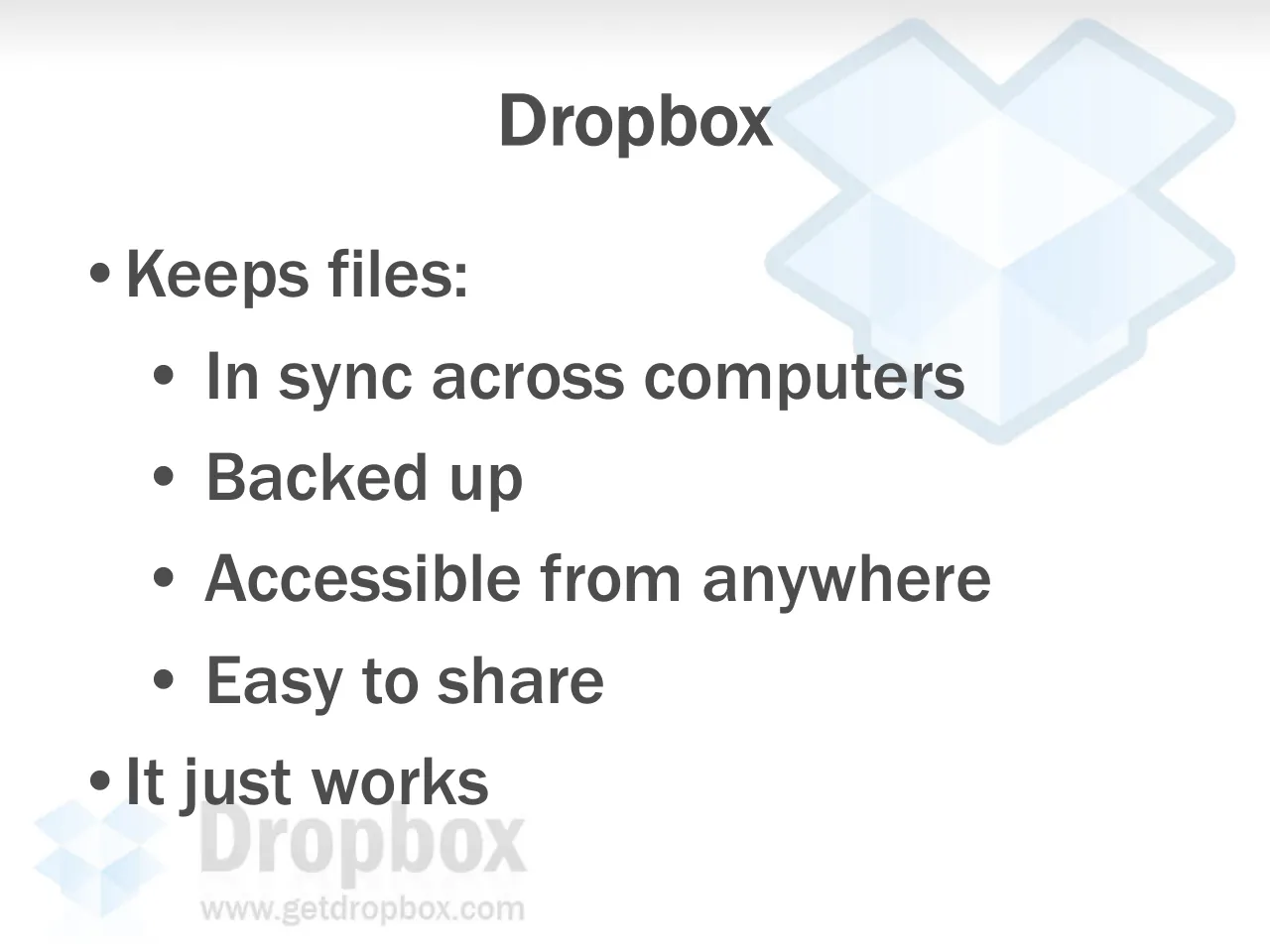
Dropbox
Keeps files:
In sync across computers
Backed up
Accessible from anywhere
Easy to share
It just works
www.getdropbox.com
Visuals: Two Dropbox brand graphics, both washed out. (1) A large open-box logo watermark in pale blue (about #DCEBF7 and #EAF4FC) with a slightly darker blue-grey outline (about #C9DCEB). It sits at the upper right, roughly x 59 to 100 and y 2 to 48, behind the title and the first bullets, and is partly cropped by the right edge. (2) A small Dropbox logo at the bottom left, roughly x 3 to 14 and y 83 to 95: a pale blue open-box icon, with the word 'Dropbox' in light grey (about #B3B3B3) beside it and 'www.getdropbox.com' in smaller light grey below. The bottom-left logo overlaps the last bullet 'It just works'. A soft grey gradient band (about #E3E3E3 fading to white) runs along the top edge over roughly the first 6% of the slide height.
Slide 7
Dropbox - Home - Secure backup, sync and sharing made easy. - Mozilla Firefox / File Edit View History Bookmarks Tools Help / https://www.getdropbox.com/home / Getting Started / Latest Headlines / Dropbox - Home - Secure backup, syn... / Dropbox - Home - Secure backup... / Dropbox / Help / Logout / Home / My Dropbox / My Workspaces / Recent Events / Account Settings / Manage Computers / My Dropbox » Home / Account type: Beta (10GB) / In use: 7.4MB of 10.0GB in use / Recent Events / Mac Mini added the file Pict... / Mac Mini deleted the file roo... / Windows XP added the file / Windows XP added the file / Windows XP deleted the file / Mac Mini added the file Pict... / Mac Mini deleted the file Co... / Mac Mini deleted the file Co... / Windows XP added the file / Windows XP added the file / Changed within the / My Dropbox / Public / A Boot Camp for the Next T... Technol...pdf / Public / C:\Documents and Settings\Test\My Documents\My Dropbox\Public / File and Folder Tasks / Rename this file / Move this file / Copy this file / GettingReal.pdf / Adobe Acrobat Document / 467 KB / hello.txt / Text Document / 1 KB / DropboxInstaller.exe / open source business models.pdf / Adobe Acrobat Document / Public / Network / Macintosh HD / DROPBOX / Desktop / drew / Applications / Documents / Movies / Music / Pictures / Dropbox / GettingReal.pdf / hello.txt / open source business models.pdf / Welcome to Webinar 11!.doc / Open / Open With / Print / Get Info / Move to Trash / Duplicate / Make Alias / Create Archive of "GettingReal.pdf" / Copy "GettingReal.pdf" / Color Label: / Dropbox / Revisions... / Copy link location / Automator / Enable Folder Actions / Demo / www.getdropbox.com / Dropbox
Visuals: Full-bleed background illustration of very faint pale-blue Dropbox open-box outline shapes on the right and top, with a light grey gradient band at the top edge. Three screenshot photographs, each boxed with a hard rectangular edge and a drop shadow: (1) Firefox 3-style browser window, Windows XP blue title bar, showing the Dropbox home page with logo, navigation list and Recent Events list, top-left; (2) Windows XP Explorer window titled Public with File and Folder Tasks pane, showing GettingReal.pdf selected (highlighted blue) with a green check sync badge, hello.txt, DropboxInstaller.exe and open source business models.pdf; (3) Mac OS X Finder window titled Public with sidebar (Network, Macintosh HD, DROPBOX, Desktop, drew, Applications, Documents, Movies, Music, Pictures, Dropbox) and a grey context menu on GettingReal.pdf with Dropbox submenu open showing Revisions... and the highlighted item Copy link location. Dropbox logo: grey-blue open-box icon bottom-left and grey wordmark Dropbox with grey www.getdropbox.com beneath it, semi-transparent. Dominant colours: white, pale blue, Windows blue #0054E3 and grey #4D4D4D.
Slide 8
Why now?
Lots of devices, bigger files, more content
Increasingly distributed/remote teams
Falling bandwidth, storage prices
Online storage is unclaimed, unmonetized territory, much like search pre-Google
Dropbox
www.getdropbox.com
Visuals: A full-bleed faded Dropbox watermark image covers the whole slide (1024 by 768 pixels). It shows a large pale-blue open-box logo mark in the upper right, drawn as a light outline with translucent light-blue facets, and a smaller blue-and-white box mark with the grey wordmark 'Dropbox' and the URL 'www.getdropbox.com' in the bottom-left corner. The large mark is at about x 61.5, y 4, w 35.8, h 42 and is very low-contrast, so the bullets remain legible over it. A soft grey gradient band runs across the top edge, fading from light grey (about #E6E6E6) at the top to white at about 6% of the height. No photographs or charts are present.
Slide 9
Why better? / Solves the entire genre of storage- / related problems with one app / Deep OS integration, visual feedback / Doesn’t make you change the way you / work / Open APIs to link desktop & web / applications / Dropbox / www.getdropbox.com
Visuals: No charts, tables or photographs. Full-slide watermark image (1024 by 768 pixels) of the Dropbox logo: a large open-box outline in pale blue-grey, offset to the upper right (about x 60 to 97%, y 4 to 90%) and drawn as a light, low-contrast tint behind the text. Bottom-left corner logo lockup: the Dropbox open-box icon (about x 5 to 26%, y 83 to 96%) in pale blue and grey, the wordmark 'Dropbox' in light grey bold sans-serif (about x 31 to 81%, y 83 to 93%) and the URL 'www.getdropbox.com' in light grey beneath it (about x 31 to 81%, y 93 to 96.5%). Dominant colours are pale blue #C9DDF0 and light grey #B3B3B3. No lighting or photographic composition; the watermark is not cropped and not boxed, and it is tinted at low opacity. A soft grey gradient band runs across the top edge (about 0 to 6% of the height).
Slide 10
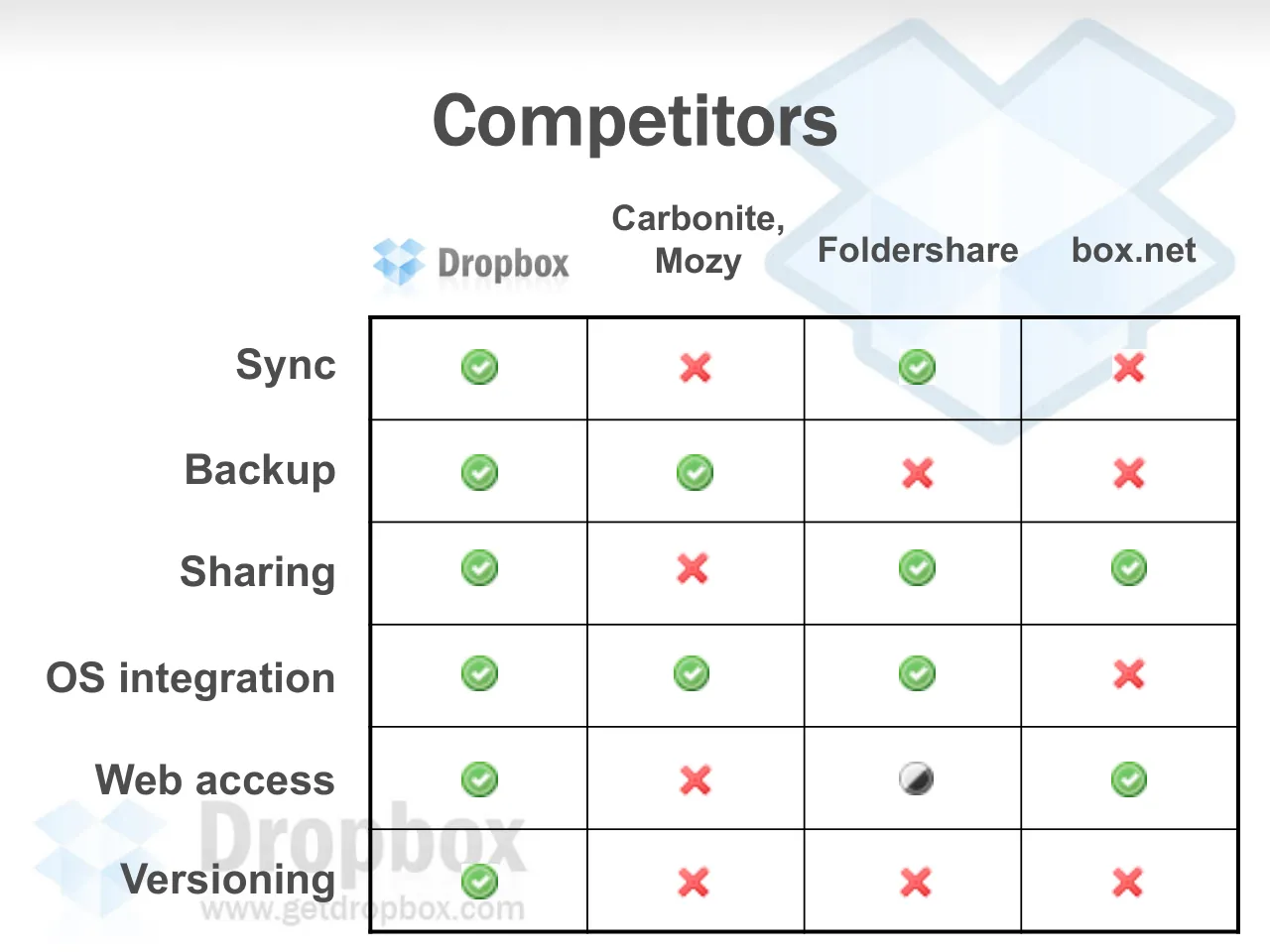
Competitors
Dropbox
Carbonite,
Mozy
Foldershare
box.net
Sync
Backup
Sharing
OS integration
Web access
Versioning
Dropbox
www.getdropbox.com
Visuals: A comparison table with 4 competitor columns (Dropbox logo, Carbonite / Mozy, Foldershare, box.net) and 6 rows (Sync, Backup, Sharing, OS integration, Web access, Versioning). Each cell holds one icon: green tick-in-circle for yes, red cross for no, and a half-filled grey and black circle for partial. Values by row: Sync: Dropbox yes, Carbonite/Mozy no, Foldershare yes, box.net no. Backup: Dropbox yes, Carbonite/Mozy yes, Foldershare no, box.net no. Sharing: Dropbox yes, Carbonite/Mozy no, Foldershare yes, box.net yes. OS integration: Dropbox yes, Carbonite/Mozy yes, Foldershare yes, box.net no. Web access: Dropbox yes, Carbonite/Mozy no, Foldershare partial, box.net yes. Versioning: Dropbox yes, Carbonite/Mozy no, Foldershare no, box.net no. Behind the table is a large faint Dropbox open-box logo in pale blue-grey outline at the top right, and a faint Dropbox logo with the word Dropbox and the URL www.getdropbox.com at the bottom left, partly overlapping the Versioning row label and the table's left edge.
Slide 11
What did they screw up? / •Only tackle small pieces of the problem / •Poor technical execution / •Clumsy, verbose & technical UIs; require configuration / •Lack of distribution, partners / Dropbox / www.getdropbox.com
Visuals: Two Dropbox brand logos, both decorative and semi-transparent. (1) A large open-box mark in the top right, roughly x 60 to 98 and y 2 to 47. It is filled with pale blue-white gradient panels (about #DCEBF8 to #F2F8FD) and outlined with a slightly darker blue-grey stroke (about #C5DCEF, roughly 2% of slide width). It is partly behind the title and the first bullet lines, with opacity around 30 to 40 percent. (2) A smaller logo in the bottom left, roughly x 3 to 42 and y 83 to 98. It has the stacked three-diamond open-box mark in pale blue (about #B9D8F2) on the left, then the word 'Dropbox' in a bold grey sans-serif (about #B5B5B5) with a faint reflection below, and the URL 'www.getdropbox.com' in a light grey regular sans-serif (about #BDBDBD) underneath. No photographs, charts or diagrams.
Slide 12
Technical advantages
Client & server written in Python: 5- / 10x faster development time
Leverage Amazon S3, EC2 to / achieve scale & reliability
Obsession with performance
Seamless compression, encryption, / binary diffing, failure recovery
Dropbox
www.getdropbox.com
Visuals: Background illustration: a faded Dropbox open-box logo watermark in pale blue (#D6E9F8) with a slightly darker blue-grey outline (#B8D4EA), occupying the upper-right quadrant behind the title and first bullets. A second, small Dropbox logo icon sits in the bottom-left corner, drawn as a blue open-box mark in light blue (#7FB2E5) and mid blue (#4A90D9), partly behind the last bullet. The Dropbox wordmark and URL are printed beside it in light grey. The top edge has a soft grey gradient band. No photographs or charts.
Slide 13
Team
• Drew Houston – CEO
S.B. MIT EECS; first line of
code at age 6; first startup
gig at 14; founded online
SAT prep co after multiple
perfect scores
• Arash Ferdowsi – CTO
S.B. MIT EECS (on leave);
director of MIT
programming competition;
prior exp at Google
Moving into our first office, 5/14/07
Visuals: One photograph: two men standing in a narrow room with a dark-stained wooden door frame at left and white wall at right. The man at left, wearing a black T-shirt printed with the multicoloured 'Google' wordmark, dark jeans and a wristwatch, is looking downward and his hand rests on a cardboard box edge at lower left. The man at right, wearing a white T-shirt with a green 'barcamp2' logo and 'Boston' text, khaki trousers and a smile, stands with one hand on a white foam panel at the right edge of the frame. Indoor, warm and slightly yellow light, with dominant colours of dark brown, white and beige. The photo is a plain rectangle, not cropped or full-bleed, with no border, overlay or tint. Faint watermark logos are also present: a light blue Dropbox open-box icon at top right, and at bottom left a light grey 'Dropbox' wordmark with a light blue Dropbox icon and the URL 'www.getdropbox.com' beneath it.
Slide 14
Business model
•Individuals: freemium
•SMB: shared folder per-seat license
(replaces backup, Windows file share,
collaboration tools, reduces IT
headcount)
•Platform: broker all UGC from the
desktop to the web
Dropbox
www.getdropbox.com
Visuals: A faded Dropbox logo watermark fills most of the slide: an open-box mark in pale blue-white, large and cropped at the top-right edge, plus a smaller open-box mark at the lower left. Beside it is the grey Dropbox wordmark with the URL www.getdropbox.com in lighter grey beneath. A grey gradient band runs along the top edge, fading from grey to white downward. The watermark is semi-transparent and sits behind the text, which is fully legible on top of it.
Slide 15
Platform
Onramp for all UGC from desktop → web
Convenient for users: drag and drop
instead of sign-in and browser upload
Beneficial for web apps: more content
uploaded, less friction & fewer failures
Bigger picture: all files in Dropbox,
delegate access to web apps
Dropbox
www.getdropbox.com
Visuals: Background illustration: a very large, faint, light-blue outlined Dropbox open-box logo (the stylised box icon) occupies the upper right, roughly from x 60 to 98 and y 2 to 45. Its fill is near-white light blue (#E8F1F8) with a slightly darker blue-grey outline (#C9DCEB). It is cropped by the right slide edge and sits behind the title and the first bullets. A pale grey gradient band runs across the top edge, from about #E3E3E3 at the top to white by about 5% down. Bottom-left corner logo: the Dropbox icon (a small blue open-box mark, about #7FB2E5 and #A9CDEB) at about x 3 to 13, y 83 to 95, next to the word 'Dropbox' in large grey bold letters (#B3B3B3 with a faint reflection) and, beneath, the URL 'www.getdropbox.com' in smaller light grey (#A6A6A6). Inline arrow: a small right-pointing arrow glyph (Wingdings 'à', rendered as →) in #4D4D4D sits between 'desktop' and 'web' in the first bullet. No photographs or charts.
Slide 16
Customer acquisition
• Loved by early adopters/beta users
(natural influencers)
• Free accounts for individuals
• Viral elements: file sharing, shared
folders, photo/media galleries
• Platform, partnerships → free
customer acquisition
Dropbox
www.getdropbox.com
Visuals: Full-bleed faded Dropbox watermark illustration: a large open-box logo in pale blue occupying the upper right (about x 60-98%, y 2-47%), a faint grey gradient along the top edge, and a bottom-left Dropbox logo lockup with the wordmark 'Dropbox' and 'www.getdropbox.com' in grey. The watermark is semi-transparent and sits behind the text. No photographs, charts, tables or diagrams.
Slide 17
•Ranked #1 among summer YC startups:
“…the simplicity and elegance of its interface,
which blends seamlessly into both Windows and
OS X, sets it apart.”
http://venturebeat.com/2007/08/16/the-y-combinator-list/
Dropbox
www.getdropbox.com
Visuals: Full-bleed faint Dropbox watermark: a large open-box diamond mark in pale blue (about #D6E9F8 with a slightly darker blue-grey outline, about #C5D9EA) occupying the top-right of the slide, partly behind the bullet and quotation text. A grey gradient band runs along the top edge, darkest at the top (about #E0E0E0) and fading to white by about 7% of the height. Bottom-left logo: the same blue diamond mark in pale blue, beside the grey wordmark 'Dropbox' in bold sans-serif (about #B3B3B3) with 'www.getdropbox.com' in small grey text beneath it (about #B3B3B3). The watermark and logo are light and do not compete with the text. The text is a single hyperlink-coloured URL, underlined.